Colorful CVN X870 Ark Frozen V14: Full Review for AM5 Builders
MotherboardsKey Specifications
Platform
AM5 Socket
X870 Chipset — ATX
Memory
DDR5 — 4 Slots
Up to 8200 MHz OC
Wireless
Wi-Fi 7
Bluetooth 5.4
Connectivity
USB 4 + TB4
8 Rear USB Ports
Storage
3× M.2 Slots
PCIe 5.0 Primary
Warranty
3 Years
Limited Warranty
Category Performance
Scores reflect our assessment of each category relative to other X870 ATX boards at this tier, based on specification analysis and feature comparison — not benchmark data.
Built for AMD's Best: The Case for Going X870
AMD's AM5 platform represents a long-term architectural commitment — a socket designed to carry multiple processor generations without forcing a board swap. At the top of that platform sits the X870 chipset, which exists to extract everything the platform can offer: maximum I/O bandwidth, PCIe 5.0 across all critical slots, native USB 4, and wireless that doesn't require a separate expansion card.
Colorful's CVN X870 Ark Frozen V14 enters this space as a full-featured ATX board from a brand better known in Asian markets than Western ones, carrying a specification sheet that competes credibly with boards from much more familiar names.
Why X870 Over Lower Tiers
- PCIe 5.0 lanes across GPU and primary M.2 — not partitioned as on B-series boards
- USB 4 support as a platform specification — not optional or absent
- Wi-Fi 7 included as standard — requires add-in card on B650/X650 boards
- Full CPU upgrade path across Ryzen 7000, 8000, and 9000 series
When X870 Is Overspecified
- Moderate gaming builds where PCIe 4.0 bandwidth is the effective ceiling anyway
- Home office machines where connectivity depth goes unused
- Budget-focused AM5 builds where chipset price premium isn't justified
Form Factor, Physical Layout, and Visual Design
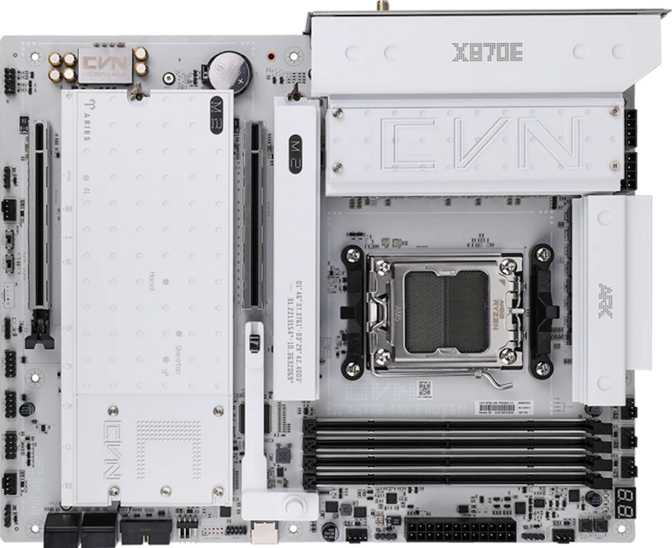
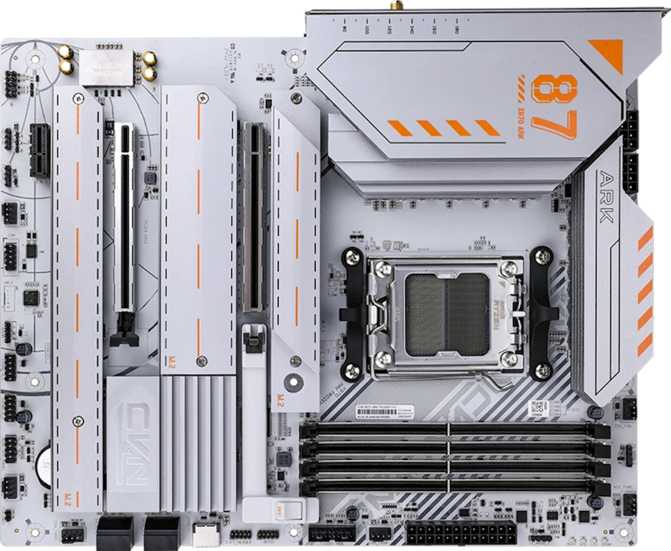
The CVN X870 Ark Frozen V14 uses a standard ATX footprint, measuring 305 mm wide by 245 mm tall. This is the most common desktop form factor and fits without difficulty into any mid-tower or full-tower case designed for ATX motherboards.
The "Frozen" branding in Colorful's CVN lineup refers to the visual design language. RGB lighting is built into the board — covering heatsink shrouds, the chipset region, and edge zones — and it is addressable through Colorful's software. The lighting can be turned off entirely for closed-case builds.
Physically, the layout follows established ATX conventions: a reinforced primary GPU slot, shielded DDR5 memory slots, heatsink coverage over the VRM array, and thermal covers over the M.2 storage slots.
Brand Context: Colorful is a legitimate, established manufacturer with a strong position in Asian markets, but its retail presence, community documentation, and warranty service infrastructure in North America and Europe are less developed than ASUS, MSI, Gigabyte, or ASRock. Buyers in Western markets should factor this in.
Physical Specifications
- Form Factor ATX
- Width 305 mm
- Height 245 mm
- RGB Lighting Included
- Warranty 3 Years
DDR5 With Serious Overclocking Range
The CVN X870 Ark Frozen V14 supports DDR5 memory exclusively — by platform design rather than a board-level choice. DDR5 is now the established standard for AM5 builds, and the performance headroom it offers is substantially higher than DDR4 could provide.
DIMM Slots
4
Dual Channel
Max Capacity
192GB
DDR5 Only
Rated Speed
5000MHz
EXPO / XMP Profiles
OC Ceiling
8200MHz
Overclocked Maximum
What These Memory Numbers Mean in Practice
32 GB
Comfortable for gaming and everyday multitasking — the standard for a gaming build.
64 GB
Covers demanding video editing, large VM setups, and heavy developer workloads.
128 GB+
Workstation-adjacent: large dataset processing, scientific simulation, professional creative software.
ECC Memory
Not supported. This is a consumer board — error-correcting RAM requires Threadripper or EPYC platforms.
Every Port on the Back Panel, Examined
USB Ports
The back panel carries eight USB connections across five different speed and form-factor standards. The standout ports are the USB 4 at 40 Gbps and Thunderbolt 4 — both operating at 40 Gbps peak bandwidth but with different compatibility footprints.
| Port Type | Speed | Count | Best Used For |
|---|---|---|---|
| USB 4 (Type-C) | 40 Gbps | 1 | External NVMe enclosures, high-res display adapters, fast docks |
| Thunderbolt 4 (Type-C) | 40 Gbps | 1 | Thunderbolt docks, eGPU enclosures, daisy-chained devices, 100W charging |
| USB 3.2 Gen 2 (Type-A) | 10 Gbps | 1 | Fast external SSDs, high-bandwidth hubs |
| USB 3.2 Gen 1 (Type-A) | 5 Gbps | 4 | External drives, most peripherals, docking stations |
| USB 2.0 (Type-A) | 480 Mbps | 2 | Keyboards, mice, wireless receivers, legacy devices |
No Mid-Speed USB-C: The only Type-C ports are the USB 4 and Thunderbolt 4 connectors. Users relying on USB-C for everyday mid-speed peripherals will use the board's fastest ports for mundane tasks — functional but not ideal without a hub.
Video and Network Outputs
Display Outputs
HDMI and DisplayPort outputs function only when the installed processor includes integrated graphics — the board carries no dedicated graphics chip of its own.
- HDMI 2.0: 4K at up to 60 fps — sufficient for secondary display and everyday desktop use
- DisplayPort: 1 output, suitable for modern monitors via iGPU
- HDMI 2.1 absent: Limits 4K high-refresh output via integrated graphics — rarely the practical bottleneck, but worth knowing
Wired Networking
A single RJ45 Ethernet port provides wired LAN connectivity. At the X870 tier, 2.5 Gbps LAN controllers have become the category standard rather than a premium add-on.
- 2.5 Gbps is a meaningful step over 1 Gbps legacy LAN for NAS transfers and large file downloads
- Confirm exact controller speed with the retailer if your use case requires it
Wi-Fi 7 and Bluetooth 5.4: What These Standards Actually Deliver
The integrated wireless module supports every Wi-Fi standard from Wi-Fi 4 through Wi-Fi 7 (802.11be) — full backward compatibility with older routers while delivering maximum performance with a Wi-Fi 7 access point.
What Wi-Fi 7 Adds Over Wi-Fi 6E
- Multi-Link Operation (MLO): Simultaneously uses 2.4 GHz, 5 GHz, and 6 GHz bands at once, rather than selecting one — improving throughput and reducing latency
- 320 MHz Channels: Double the bandwidth ceiling of Wi-Fi 6E's 160 MHz maximum for higher sustained speeds
- Congestion handling: Better performance in environments with many competing wireless devices
- Bluetooth 5.4: Most current specification — improved power efficiency, connection reliability, and throughput over the more common 5.2 or 5.3
Wireless Specifications
- Wi-Fi Generation Wi-Fi 7
- Standards Supported 802.11n / ac / ax / be
- Frequency Bands 2.4 / 5 / 6 GHz
- Bluetooth Version 5.4
Three M.2 Slots, Four SATA Ports, and Full RAID
M.2 Slot 1
Primary slot supporting the fastest current-generation NVMe drives — sequential read speeds exceeding 12 GB/s are achievable. This is the slot for your OS or primary working drive.
M.2 Slots 2 & 3
Support the majority of current high-performance NVMe drives at speeds up to ~7 GB/s. All three drives coexist without one slot being forced into a slower mode.
4× SATA 3 Ports
Traditional 2.5-inch SSDs and mechanical hard drives for large secondary volumes, archives, and backup targets where capacity matters more than raw speed.
RAID Support
Full RAID support across levels 0, 1, 5, and 10 makes this board viable for home lab setups, local file servers, or any build where storage redundancy is part of the design.
| RAID Level | Min. Drives | Primary Benefit | Protection | Supported |
|---|---|---|---|---|
| RAID 0 | 2 | Maximum speed via striping | None — one drive fails, all data lost | |
| RAID 1 | 2 | Data mirroring for redundancy | Survives single drive failure | |
| RAID 5 | 3 | Balance of speed, capacity, and fault tolerance | Survives single drive failure | |
| RAID 10 | 4 | Striped mirrors — best performance with redundancy | Survives multiple drive failures |
Internal Headers and Fan Control
Fan Headers
5
PWM & DC Control
USB 3.2 Gen 1 Headers
2
Front Panel USB-A
USB-C Gen 2 Header
1
High-Speed Front Panel
USB 2.0 Headers
4
Legacy Front Panel
120 dB SNR: Above the Category Norm
The audio solution on the CVN X870 Ark Frozen V14 is one of the board's cleaner wins. The onboard DAC achieves a signal-to-noise ratio of 120 decibels — how much cleaner the audio signal is compared to the background noise floor.
Typical Mainstream Boards (90–100 dB SNR)
CVN X870 Ark Frozen V14 (120 dB SNR)
For gamers using a quality wired headset connected via 3.5 mm, the difference compared to average onboard audio is perceptible: reduced hiss, cleaner dynamic range, and less PCB interference pickup.
For audiophiles with high-end headphone amplifiers or studio monitor setups, a dedicated external DAC remains the reference-quality option — but as an integrated solution, this one earns its specification honestly.
Audio Specifications
- DAC Signal-to-Noise Ratio 120 dB
- Surround Support 7.1 Channel
- Rear Audio Jacks 5 Connectors
- S/PDIF Optical Out Yes
PCIe Slots: Primary GPU and Beyond
The primary GPU slot runs PCIe 5.0 at full x16 electrical bandwidth — every current discrete GPU operates at its maximum potential here, and the bandwidth ceiling will not be a constraint for upcoming GPU generations.
| Slot | Generation | Width | Practical Use |
|---|---|---|---|
| PrimaryPCIe Slot 1 | PCIe 5.0 | x16 | Primary discrete GPU — full bandwidth, current and future cards |
| PCIe Slot 2 | Current Gen | x4 | NVMe controllers, 10GbE cards, capture hardware, other add-in cards |
| PCIe Slot 3 | Current Gen | x1 | Small add-in cards — sound cards, low-profile network adapters |
This is a single-GPU platform in practice. No second x16 slot is present, which reflects the current state of multi-GPU software support rather than a board shortcoming. There are no legacy PCIe 3.0 or older slots — the entire expansion ecosystem reflects current-generation standards.
Significant Headroom, Missing Safety Net
What Supports Overclocking
- 8200 MHz validated DDR5 OC ceiling — among the highest available on the AM5 platform
- AMD EXPO profiles enable rated kit speeds with a single BIOS toggle — no manual timing adjustments required
- Precision Boost Overdrive (PBO) supported for CPU performance headroom within defined power limits
- VRM array quality appropriate to the X870 tier for sustained overclocking sessions
Where the Safety Net Is Missing
No Dual BIOS
No backup firmware chip means a failed BIOS update or catastrophic OC instability requires manual recovery steps. Competing boards at this tier — particularly from Gigabyte's AORUS line — include this as standard. Its absence is a structural reliability gap.
No Physical CMOS Reset Button
Resetting BIOS settings requires opening the case to locate the CMOS jumper pins or removing the CMOS battery. This is a minor inconvenience for experienced builders, but a meaningful friction point during active overclocking sessions.
Right Fit or Wrong Match?
Strong Match For
- AM5 builders who want Wi-Fi 7, Thunderbolt 4, and USB 4 without adding separate expansion cards
- Content creators and developers who will use all three M.2 slots and benefit from high-quality integrated audio
- Enthusiasts targeting DDR5 memory performance well beyond the platform baseline
- Budget-conscious X870 buyers who want premium-tier features and are open to non-mainstream brands at a lower price point
Not the Right Fit For
- Builders who require dual BIOS protection for aggressive manual tuning or frequent firmware updates
- Workstation users needing ECC error-correcting memory — not supported on this platform
- Buyers who depend on established BIOS documentation, community overclocking guides, and Western-market support infrastructure
- Multi-GPU configurations (no second x16 slot — though this is rarely relevant given current software support)
How the CVN X870 Ark Frozen V14 Stacks Up
Comparative figures represent general category expectations across X870 product tiers — not specifications of any specific competing product.
| Feature | CVN X870 Ark Frozen V14 | Typical X870 Mid-Tier | Typical X870 Premium Tier |
|---|---|---|---|
| Wi-Fi Standard | Wi-Fi 7 | Wi-Fi 6E to Wi-Fi 7 | Wi-Fi 7 |
| USB 4 (40 Gbps) | Varies by model | ||
| Thunderbolt 4 | |||
| DDR5 OC Ceiling | 8200 MHz | 6400–7600 MHz | 7600–8600 MHz |
| M.2 Slots | 3 | 3–4 | 4–5 |
| Dual BIOS | Sometimes | ||
| Audio SNR | 120 dB | 108–115 dB | 115–120 dB |
| RAID 0/1/5/10 | Varies | ||
| Brand Ecosystem Depth | Limited in West | Established | Deep |
Questions Real Buyers Ask Before Purchasing
Final Assessment
Our Verdict
The Colorful CVN X870 Ark Frozen V14 makes a credible case for itself in the X870 ATX space. The connectivity stack — Wi-Fi 7, Bluetooth 5.4, USB 4 40 Gbps, and Thunderbolt 4 together on the rear panel — is genuinely premium-tier, not mid-range. The DDR5 memory overclocking headroom to 8200 MHz is among the most permissive available on the platform. The PCIe 5.0 primary slot, three M.2 slots, full RAID capability, and excellent onboard audio form a well-rounded foundation for a serious AM5 system.
The board asks buyers to accept two structural compromises: the absence of dual BIOS and physical CMOS reset — which matter most to active BIOS experimenters — and Colorful's thinner Western-market ecosystem compared to the major brands. These are real trade-offs, not theoretical ones.
At the right price — meaningfully below what ASUS ROG, MSI MEG, or Gigabyte AORUS charge for comparable X870 connectivity — the CVN X870 Ark Frozen V14 is a compelling option. Go in with clear expectations about the brand's ecosystem position, and this board is a capable, feature-rich foundation for a demanding AM5 build.
8.3
OUT OF 10
- Wi-Fi 7 + Thunderbolt 4 + USB 4
- 8200 MHz DDR5 OC ceiling
- 120 dB SNR onboard audio
- PCIe 5.0 primary slot + 3x M.2
- No dual BIOS or CMOS reset button
- Limited Western-market ecosystem
- HDMI 2.0 only (not 2.1)