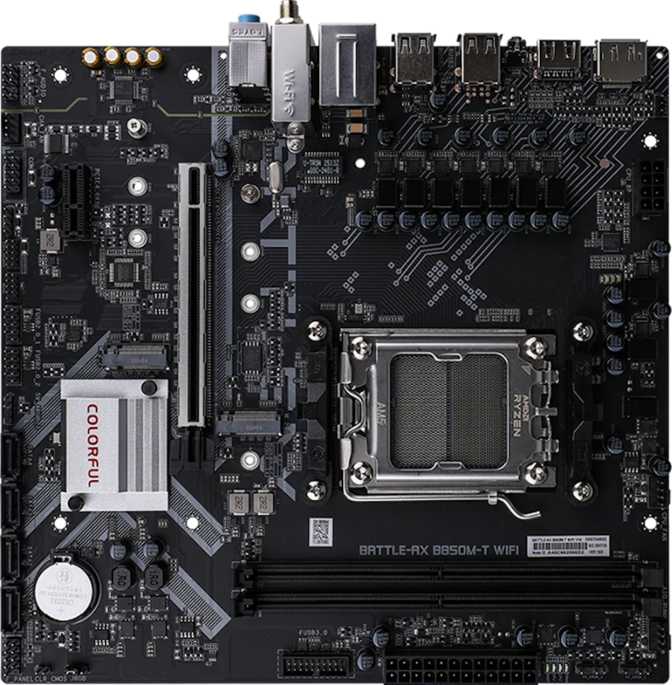
Colorful Battle-AX B850M-T Wi-Fi V14 Review: An Honest AM5 Assessment
MotherboardsBoard Specifications at a Glance
Not Just Another Budget AM5 Board
AMD's AM5 platform has reached a rare position in PC building: it offers genuine long-term value without requiring you to overpay at the point of entry. The socket is stable, the CPU lineup is mature, and the upgrade path stretches well ahead. The real question for most builders has shifted from whether to go AM5 to how little you need to spend to do it right.
The Colorful Battle-AX B850M-T Wi-Fi V14 is built to answer that question with a Micro-ATX footprint, AMD's current mid-range B850 chipset, and a feature set that punches meaningfully above what purely entry-level B650 boards deliver. Colorful has been manufacturing PC components since the mid-1990s and holds a considerably stronger market presence in Asia than in North America or Europe, but the hardware itself does not carry a loyalty tax. What this board includes — and, critically, what it omits — tells a precise story about who should buy it and who should keep looking.
Design, Build Quality, and Physical Experience
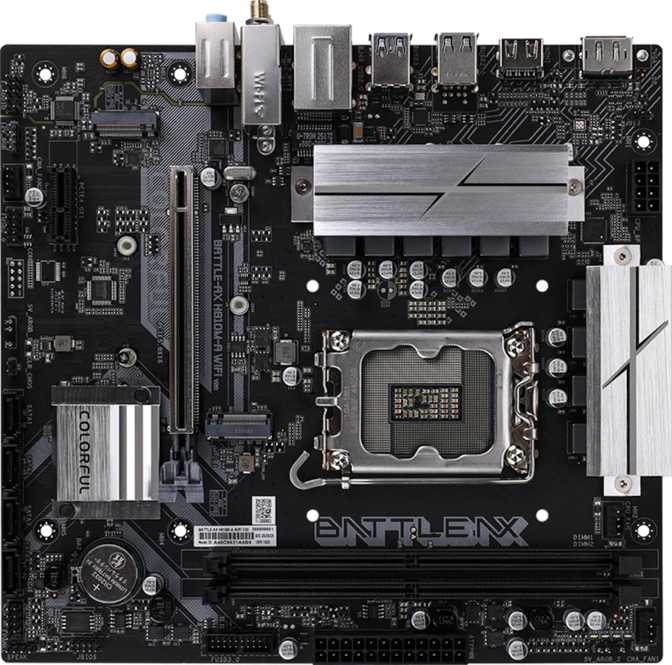
At 220 × 230 mm, the Battle-AX B850M-T fits any Micro-ATX or full-size ATX enclosure. Its natural habitat is compact cases where a full-size ATX board would waste space and cost money. Living room builds, tight desk setups, and small form-factor gaming rigs all benefit from this footprint without the cramped compromises associated with Mini-ITX. RGB lighting is present, controllable through the BIOS, and can be disabled entirely for those who prefer no visual effects — without affecting any functional behavior.
The Battle-AX carries two firmware storage chips rather than one. If a firmware update fails — interrupted by a power outage, corrupted by a bad file, or applied incorrectly — the board falls back to the secondary chip and recovers automatically. Most boards at competitive price points skip this entirely, which makes its presence here a meaningful differentiator for anyone who updates firmware or experiments with settings.
Processor and Platform Foundation
The AM5 Socket and Its Long-Term Promise
The board is built around AMD's AM5 socket, which supports the entire Ryzen 7000 and 9000 processor lineups. Beyond current-generation compatibility, AM5's platform longevity is one of its most compelling attributes: AMD's track record and platform roadmap suggest future processor releases will continue to fit the same socket. A motherboard purchased today for a mid-range Ryzen chip can accept a top-tier CPU down the line without replacing the board itself — a compounding return on the initial investment that Intel platforms have historically made more difficult.
B850: Overclocking Access Without Flagship Pricing
The B850 chipset sits in AMD's current mainstream tier, positioned meaningfully above the older B650. The practical distinction that matters most: B850 allows CPU frequency and memory overclocking across all compatible processors, not just unlocked X-suffix models. This board confirms that feature is enabled. Builders who want to push their memory speed or test processor headroom have a clear path to do so without buying a more expensive X870 or X870E board.
Memory: DDR5 Capacity, Speed, and the Two-Slot Reality
What Two Slots Actually Means
The board supports two DDR5 memory modules in a dual-channel configuration. Installing a matched pair unlocks full dual-channel bandwidth, which improves performance in memory-sensitive workloads like video editing and certain gaming scenarios where frame pacing matters. The maximum supported capacity across both slots is enough to handle demanding creative and professional workflows, and for gaming it is functionally unlimited at any practical configuration.
Speed: From Sensible to Aggressive
The board supports AMD's EXPO memory profile technology, allowing compatible DDR5 kits to run significantly faster than their baseline through a simple BIOS toggle. The upper ceiling is competitive for a B850 platform and enough to extract meaningful gains from premium high-speed kits. Stability at the top end requires DDR5 modules explicitly rated for high-speed operation — look for XMP 3.0 or EXPO-certified kits. For most builders running standard DDR5, stability is immediate and performance is strong without any tuning effort.
- Memory Type DDR5 Only
- Total Slots 2 (Dual-Channel)
- Maximum Capacity 96 GB
- Native Speed 4800 MHz
- Maximum OC Speed 7200 MHz
- ECC Memory Not Supported
Storage: Four SATA Ports, Two M.2 Slots, and Full RAID
The Physical Drive Landscape
Four SATA 3 connectors handle traditional spinning hard drives, SATA-based solid-state drives, and optical drives. This allocation supports a practical combination of OS drive, bulk storage, and backup drive — or a full RAID array across all four ports — without immediately running out of connections.
Two M.2 slots handle the faster NVMe solid-state drives that now dominate desktop storage, delivering substantially faster read and write speeds than any SATA connection can offer. Two slots mean a dedicated boot drive and a second high-speed device for games or creative projects, covering the vast majority of build requirements without compromise.
RAID: A Surprisingly Complete Implementation
RAID support on a board at this price tier is both present and comprehensive, covering every practical use case from pure speed to full redundancy. Only RAID 0+1 — a less commonly used topology distinct from RAID 10 — is absent, and its omission will not affect any typical home or small office deployment.
- SATA 3 Ports 4 Connectors
- M.2 Sockets 2 Slots
| Level | Purpose | Status |
|---|---|---|
| RAID 0 | Speed via striping | |
| RAID 1 | Redundancy via mirroring | |
| RAID 5 | Balanced parity protection | |
| RAID 10 | Speed and redundancy | |
| RAID 0+1 | Combined topology |
Expansion Slots: PCIe 5.0 Now, One Support Slot
Primary GPU Slot: PCIe 5.0 x16
The main expansion slot runs at PCIe 5.0 at full sixteen-lane bandwidth — the current top tier for data transfer between the CPU and a discrete graphics card. Most graphics cards sold today still saturate only PCIe 4.0 bandwidth, so PCIe 5.0 creates headroom for next-generation GPUs without requiring a platform change. This is a meaningful long-term advantage that less expensive boards in this category sometimes sacrifice to hit a lower price point.
Secondary Slot: PCIe x1 Only
A single narrow-format expansion slot rounds out the secondary options. This size fits compact add-in cards: dedicated audio processors, small network adapters, capture cards, and USB expansion cards. The absence of a full-length secondary slot means dual-GPU configurations or adding a second full-size card is not possible — a real limitation only in specialized scenarios that have become uncommon in modern consumer builds.
- PCIe 5.0 x16 1 Slot
- PCIe x1 1 Slot
- PCIe 4.0 / 3.0 x16 None
- Full-Length Secondary Slot
Rear I/O: Connectivity Laid Out Honestly
| Connection | Count | Speed / Standard |
|---|---|---|
| USB-A | 2 | 5 Gbps (Gen 1) |
| USB-A | 4 | USB 2.0 Speed |
| USB Type-C | 1 | Present on rear panel |
| HDMI | 1 | v2.0 — 4K at 60Hz (requires CPU iGPU) |
| DisplayPort | 1 | Requires CPU integrated graphics |
| Ethernet (RJ45) | 1 | Wired network connection |
| Audio Jacks | 3 | Analog input, output, microphone |
| Header Type | Count | Function |
|---|---|---|
| USB 3.2 Gen 1 | 2 | Front panel 5 Gbps ports |
| USB 2.0 | 4 | Front panel low-speed expansion |
| SATA 3 | 4 | Storage drive connections |
| M.2 Sockets | 2 | NVMe / SATA SSD |
| Fan / Pump Headers | 2 | Thermal control — see warning below |
The USB 3.2 Gen 2 Gap
The most notable omission is any port operating at 10 Gbps on the rear panel. External NVMe enclosures, high-performance docks, and modern portable SSDs depend on 10 Gbps throughput to deliver their rated speeds. Running one of those devices into a 5 Gbps port caps transfer speed at roughly half the theoretical maximum. This is a genuine daily-use limitation for builders who work with fast external storage — not a theoretical concern.
Video Output Consideration
The HDMI output is version 2.0, not 2.1, capping video output at 4K at 60Hz. For users driving displays through a discrete GPU, this is irrelevant. For anyone planning to use integrated graphics for a 4K display at high refresh rates, HDMI 2.0 is the ceiling.
Wireless and Wired Networking
The onboard wireless supports Wi-Fi 6E (802.11ax), the current generation of Wi-Fi technology. Full backward compatibility with older Wi-Fi standards means this board works with any existing network. Wi-Fi 6E adds access to the less-congested 6 GHz band — beneficial in dense apartment buildings or offices where the 2.4 GHz and 5 GHz frequencies carry significant interference from neighbouring networks.
In practical terms, Wi-Fi 6E delivers lower latency and better throughput consistency under load, reducing the wireless performance penalty that historically made Ethernet-only configurations mandatory for gaming. It does not replace a good cabled connection for competitive play, but it removes the need for one in more relaxed scenarios.
Bluetooth 5.3 covers the full range of modern peripheral use: wireless headphones, keyboards, mice, game controllers, and audio speakers all connect without additional dongles. The version is current enough that pairing stability and range are not concerns with any Bluetooth peripheral you are likely to own. Note that the aptX audio codec is not supported, which only matters to users specifically chasing lower wireless audio latency with aptX-certified headphones.
One RJ45 ethernet jack provides wired network connectivity for full-speed, low-latency cabled networking. This remains the benchmark connection for competitive gaming, large file transfers, and any scenario where wireless interference or latency variability is unacceptable. No amount of Wi-Fi advancement eliminates the physics advantage of a direct cable connection at this use case.
Audio: 7.1 Surround Without the Optical Port
The onboard audio engine supports up to 7.1 channel surround sound, suitable for multi-speaker desktop setups or surround-processing headphones. Three rear-panel audio jacks handle the physical connections for analog audio in and out, with the full 7.1 channel experience achievable through software virtualization for stereo headphone users.
There is no S/PDIF optical output on this board. Builders who have traditionally connected a PC to an AV receiver or home theater system via optical cable will need an alternative: a USB external DAC/amp, HDMI audio pass-through to a receiver, or a dedicated audio card in the PCIe x1 slot. For the majority of users running USB headsets or standard analog headphones, the absence of an optical port is entirely irrelevant.
- 7.1 Channel Surround Sound
- 3 Rear-Panel Analog Jacks
- No S/PDIF Optical Output
- No aptX Bluetooth Codec
Fan and Thermal Management: The Board's Most Important Limitation
Two Fan Headers
No qualifier softens this number. Most competing B850 boards at comparable price points provide four fan headers as a minimum, with many offering six or more. Two headers mean the board can directly control one cooling device attached to the CPU and one case fan — and nothing else. Every additional fan must either run at a fixed voltage with no automatic speed control, or connect to an external fan hub that itself uses one of those two available headers, adding cost and complexity.
For a minimal build with a basic tower air cooler paired with a single rear exhaust fan, two headers are technically sufficient. For any configuration that goes beyond that, the limitation becomes an active constraint rather than a passing inconvenience. This is the single specification that most directly determines whether this board fits your build. Verify your cooling configuration before committing to this motherboard.
Works Within 2 Headers
Single tower air cooler plus one case fan. Simple, quiet, and effective within the constraint.
Requires a Fan Hub
AIO liquid coolers or multi-fan builds need an external fan controller, adding cost and a dependency on third-party hardware.
Not Suited For
AIO radiator builds with separate pump and fan headers, performance cases with three or more fans, or builds optimised for silent automated cooling curves.
Who Should Buy the Colorful Battle-AX B850M-T Wi-Fi V14
- Building a compact gaming PC in a Micro-ATX case where board size is a genuine priority
- Running a simple cooling setup — one CPU cooler and one case fan — and nothing more
- Looking to access the AM5 platform without paying for X870-tier component pricing
- Needing integrated Wi-Fi 6E without purchasing or installing a separate wireless adapter
- Wanting dual BIOS firmware protection as a safety net during overclocking or BIOS updates
- Not reliant on USB 3.2 Gen 2 throughput for daily external storage or docking workflow
- Have more than two fans requiring motherboard-controlled speed adjustment — which includes virtually all AIO liquid coolers paired with multiple case fans
- Work with fast external NVMe drives, high-bandwidth USB docks, or peripherals that depend on 10 Gbps USB throughput
- Expect to use integrated graphics for 4K display output at high refresh rates via HDMI
- Iterate BIOS settings frequently and need a physical reset button for active tuning sessions
- Prioritise a brand with an established Western market service infrastructure, community forums, and documented BIOS update history
How It Compares to the Competition
Within the B850 Micro-ATX segment, the Battle-AX B850M-T competes against boards from ASUS, MSI, Gigabyte, and ASRock. Most of those alternatives tend to offer three to four fan headers as a baseline, at least one 10 Gbps port on the rear I/O, and better-established support networks for Western buyers. The Colorful board holds its position primarily on dual BIOS, PCIe 5.0 access, Wi-Fi 6E, and its three-year warranty coverage.
| Feature | Battle-AX B850M-T Wi-Fi V14 | Typical B850M Micro-ATX Rival |
|---|---|---|
| Dual BIOS | Included | Often absent at this price |
| Fan Headers | 2 Only | 4 or More Standard |
| PCIe 5.0 x16 GPU Slot | Full-speed | Full-speed |
| Wi-Fi Version | Wi-Fi 6E | Varies: Wi-Fi 6 to 6E |
| Fastest Rear USB | 5 Gbps (Gen 1) | 10 Gbps Typical |
| HDMI Version | v2.0 — 4K/60Hz | v2.0 or v2.1 |
| Warranty Period | 3 Years | 2–3 Years |
| Western Market Support | Limited | Established |
Honest Assessment: What Works and What Does Not
Where This Board Earns Its Place
The PCIe 5.0 x16 slot is useful on a board at this price: it keeps the platform relevant for next-generation GPU releases without requiring a platform change. Dual BIOS is a quiet feature that builds confidence, particularly for anyone who intends to experiment with BIOS settings. Wi-Fi 6E is the right wireless standard for a new build right now. The three-year warranty signals that Colorful stands behind the hardware.
Where Costs Were Visibly Cut
The fan header situation should not be minimised. Two headers on a modern AM5 board in a competitive price tier is a design choice that limits the audience meaningfully. The absence of any USB 3.2 Gen 2 on the rear I/O is a notable omission that will create friction for users with faster external storage devices — not a dealbreaker in every build, but a daily-use reality in many.
The brand recognition gap is real for buyers in North America and Europe. Colorful's documentation, community support, BIOS update cadence, and RMA process are less proven in Western markets than those of the major four board makers. This is not a disqualifier, but it is a real factor for anyone who values an established support ecosystem when something goes wrong.
Common Questions Before You Buy
Final Verdict
The Colorful Battle-AX B850M-T Wi-Fi V14 is a focused, technically honest AM5 board built for a specific builder: compact case, simple cooling, Wi-Fi 6E included, PCIe 5.0 ready, moderate budget. For that profile, it delivers what matters without overhead you will not use.
The purchasing decision comes down to one specification before anything else: fan headers. Two is a hard ceiling that determines every cooling configuration this board can natively support. If your build fits within that constraint — a single cooler and one case fan — the dual BIOS protection, current wireless capability, and PCIe 5.0 primary slot make this a well-equipped mid-range platform worth serious consideration.
If your build needs more fan control than two headers allow, or if 10 Gbps USB throughput is part of your daily workflow, competing B850 Micro-ATX options from more established Western-market brands offer those capabilities at comparable price points. Buy this board for the right build. Look elsewhere for the wrong one.
- Compact build, minimal cooling — one cooler and one case fan
- You want AM5 + Wi-Fi 6E + dual BIOS at a mid-range price point
- No dependency on 10 Gbps external USB storage day-to-day
- Build needs three or more controlled fans, or uses an AIO cooler
- You need 10 Gbps USB rear I/O or a major brand support network