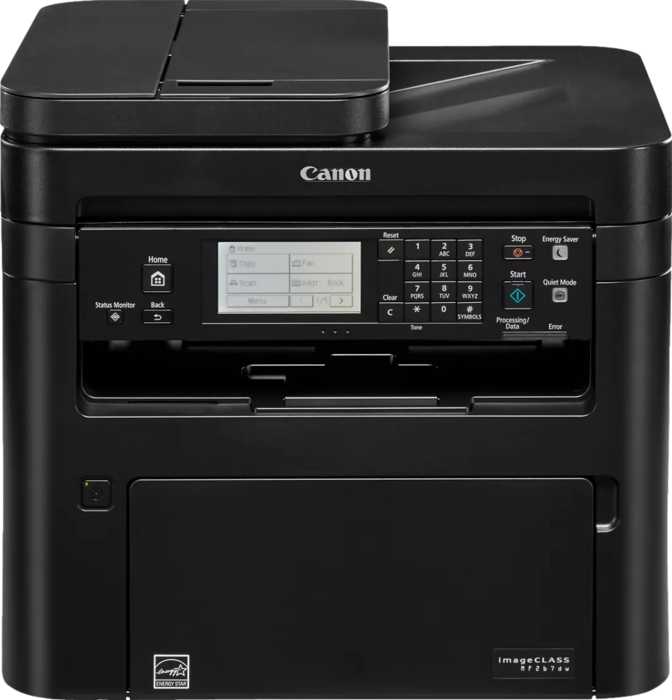
Canon imageClass MF267dw: An Honest, In-Depth Review
PrintersMost "all-in-one" printers ask you to pick a lane: fast or affordable, simple or feature-rich, built for the home or built for the office. The Canon imageClass MF267dw refuses to pick. It's a black-and-white laser workhorse that prints, copies, scans, and faxes from a single chassis, designed for the reality of a small office or busy home workspace where paperwork still runs the show. Before you decide if it earns a spot on your desk, here's what a deep read of its engineering tells us about where it shines and where it asks for compromise.
Functions
Print, Copy, Scan, Fax
Print Speed
30 ppm Black & White
Color Printing
Not Available
Recommended Volume
~2,500 Pages / Month
Design, Build Quality, and the Space It Actually Needs
This is not a printer you tuck onto a floating shelf. At roughly 15.4 inches wide, 15.9 inches deep, and 14.8 inches tall, and tipping the scale at about 27 pounds, the MF267dw has the physical presence of a small filing cabinet rather than a desk accessory. That bulk is the trade-off for everything packed inside — a full laser engine, a dedicated automatic document feeder, a flatbed scanner, and fax hardware all living under one lid.
Practically, this means you should measure your desk or printer stand before ordering. It needs a permanent home rather than a spot you shuffle between meetings, and you'll want a few inches of clearance on every side for paper trays to slide out and the output area to do its job without obstruction. The dual-tray paper system adds to the footprint but pays off in flexibility.
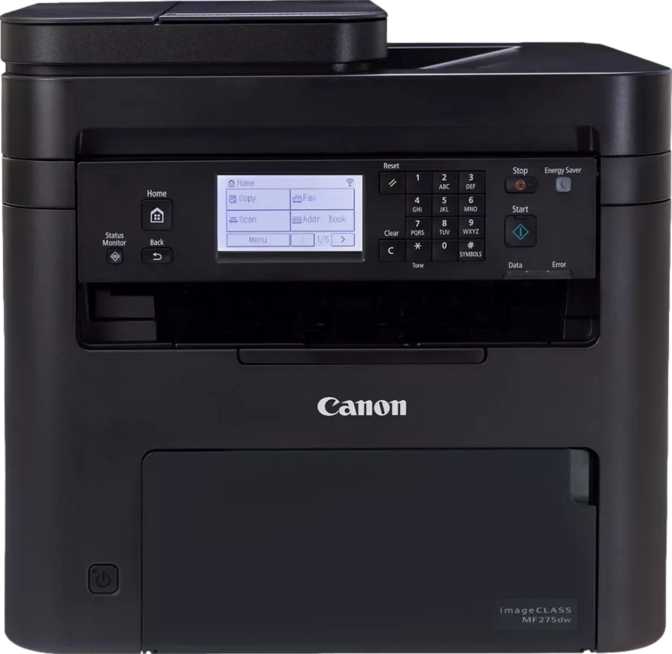
Build quality follows Canon's usual office-hardware playbook: functional, not flashy. The control panel uses a compact 1.5-inch monochrome display paired with physical buttons rather than a touchscreen. For anyone used to swiping on a tablet, this will feel like a step back at first. In practice, once you've learned where the menu options live, navigation is fast and reliable — and the simpler hardware likely keeps the price more reasonable than touchscreen-equipped siblings in Canon's lineup.
At a Glance
- Footprint15.4" x 15.9" x 14.8"
- Weight~27.3 lbs
- Display1.5" Monochrome
- Touchscreen No
- Warranty1 Year
Print Performance: Speed, Sharpness, and Paper Handling
How Fast Is It, Really?
Canon rates this engine at 30 pages per minute for standard black-and-white output, and in real-world terms that translates to roughly one page every two seconds once the job is rolling. For a typical 20-page report, that's under 90 seconds from "print" to the last sheet hitting the tray — fast enough that you generally won't be standing around waiting.
First-page speed matters just as much as sustained speed, especially for single-page jobs like a boarding pass or a signed form. Here, the MF267dw produces its first copy in about 5.1 seconds from the moment you hit the button — quick enough that one-off print jobs feel instant rather than like you're waiting on a warm-up cycle.
Resolution and Output Quality
Print resolution sits at 600 x 600 dpi (dots per inch — the density of printed detail). That's the standard sweet spot for laser printers focused on text and line graphics: sharp, clean edges on fonts and tables, crisp barcodes, and graphics that hold up well even on close inspection.
There is no color print engine inside the MF267dw at all — a detail worth stating plainly upfront because it's the single biggest factor in whether this printer fits your needs.
Automatic Duplex Printing
Automatic duplex printing — flipping and printing the back of the page without you touching the paper — is built in, running at roughly 21 pages per minute. That's an expected drop from the 30 ppm single-sided rate, because the engine has to physically reverse and re-feed each sheet. For everyday use, this is still fast enough to make duplex the default setting for internal documents, cutting paper consumption roughly in half over time.
Paper Capacity and Document Handling
| Component | Capacity | What It Means Day to Day |
|---|---|---|
| Input trays (2 trays combined) | 250 sheets | About a week of typical small-office printing before a refill is needed |
| Output tray | 50 sheets | Fine for normal jobs; collect printouts during very large runs to avoid overflow |
| Maximum paper size | Legal (8.5" x 14") | Handles contracts and legal filings, not just standard letter paper |
| Copy reduction | Down to ~24% | Shrink an oversized document to fit onto standard paper |
The two-tray input system is more useful than it sounds — it lets you keep letter paper loaded in one tray and legal-size or letterhead stock in the other, switching between them through the menu instead of physically swapping paper every time a different job comes in.
Scanning and Document Digitization
This is where the MF267dw earns its "all-in-one" label rather than just being a printer with extra buttons.
A Useful Contradiction: Color Scanning on a B&W Printer
Although the print engine is strictly black-and-white, the scanner captures full color. You can digitize a color brochure or a color ID card and get a color-accurate scan saved as a PDF or image file — you simply can't print that color back out on this machine. Optical scan resolution runs at 600 x 600 dpi, matching the print engine's sharpness.
Grayscale scans get an extra advantage: 16-bit depth capture, which preserves far more subtle shading detail than standard 8-bit grayscale. This matters most when scanning old black-and-white photos or faded carbon-copy forms, where the extra tonal range helps avoid a "muddy" look.
Scanning Speed: Two Modes for Two Jobs
| Scan Mode | Grayscale | Color |
|---|---|---|
| Single-sided, standard (flatbed) | ~27 pages/min | ~25 pages/min |
| Double-sided, standard (flatbed) | ~11 pages/min | ~9 pages/min |
| Single-sided via automatic feeder | — | Up to 45 pages/min |
| Double-sided via automatic feeder | ~20 pages/min | ~15 pages/min |
The takeaway: feed documents through the automatic document feeder (ADF) rather than the flatbed glass whenever you're scanning more than a page or two. Burst speeds climb significantly, and double-sided scanning lets you digitize a stapled contract in a fraction of the time manual flatbed scanning would take.
Built-In Reliability: Multi-Feed Detection
The automatic document feeder includes ultrasonic multi-feed detection — a sensor that listens for two pages accidentally feeding through at once. Without it, static cling or paperclip residue can cause a scanner to silently skip a page. With this sensor active, the machine pauses and flags the issue instead of plowing ahead.
Where Your Scans Actually Go
The MF267dw supports scan-to-PDF directly, Optical Character Recognition (OCR — technology that converts a scanned image of text into actual searchable, editable text), and an auto scan mode that adjusts settings based on what it detects on the page. You're also not tied to a computer to get scans off the machine: it can save directly to a USB flash drive plugged into the front port, or push scans straight to a shared folder on your network.
Copying and Fax: The Office Tools You Forget You Need
Copying
Copying gets adjustable density control, letting you darken or lighten output to compensate for faded originals or low-toner source documents — a small feature that matters a lot when copying a decades-old contract or a thermal-paper receipt.
Fax & Answering Machine
Fax runs at 33.6 kbps — the fastest standard speed used by most business fax lines — and the machine holds up to 256 pages of incoming faxes in memory, so a power blip doesn't mean lost documents. A built-in answering machine function lets a single phone line handle both voice messages and incoming faxes, a genuine cost-saver for a solo office.
Connectivity and Smart Integration
| Connection Type | Supported | Real-World Use |
|---|---|---|
| Wi-Fi | Standard wireless printing across your network | |
| Ethernet | Wired connection for offices that prioritize stability | |
| Wi-Fi Direct | Connect a phone or laptop straight to the printer's signal, no router needed | |
| AirPrint | iPhone and iPad users print with no app or driver | |
| Mopria | Android users get the same plug-and-play simplicity | |
| NFC | Tap a compatible phone against the panel to pair instantly | |
| Voice assistant support | Voice-initiated print commands through connected assistant devices | |
| USB port (x1) | Direct PC tethering or flash-drive printing/scanning | |
| Bluetooth | Not available; rely on Wi-Fi or Wi-Fi Direct instead | |
| USB-C | Only the standard USB port is present | |
| Memory card slot | Photo cards must go through a USB drive or computer |
For most households and small offices, this lineup covers every realistic scenario. The missing Bluetooth and USB-C support will only matter if you had a specific reason to want direct phone-to-printer Bluetooth pairing, which is an uncommon printing workflow to begin with.
Everyday Usability: The Small Details That Add Up
Page Preview
Check a scan or copy looks right before committing it, saving wasted paper and redo jobs.
Skip Blank Page
Automatically detects and removes blank sides during double-sided scanning.
256MB Memory
Enough to process multi-page jobs without stalling on dense text documents.
Noise, Power Draw, and What It Costs to Leave On
~50 dB Operation
Comparable to a normal conversation or a running refrigerator — noticeable but not disruptive in a shared office.
340W Active / 0.7W Standby
Standby draw is negligible enough that leaving it powered on 24/7 costs next to nothing on your electric bill.
1-Year Warranty
Standard for the category but worth weighing against an extended plan if you run near the 2,500-page monthly ceiling.
Who This Printer Is Actually Built For
A Strong Fit If You
- Print, copy, scan, and fax overwhelmingly black-and-white documents
- Run a small office or shared family workspace with moderate-to-heavy paper volume
- Need to digitize stacks of multi-page, double-sided documents quickly
- Want fax capability without a dedicated phone line
- Have a permanent, dedicated spot for a larger desktop machine
Look Elsewhere If You
- Need any color printing at all, even occasional flyers or photos
- Have limited desk space and need something compact or portable
- Want a touchscreen interface for visual menu navigation
- Specifically need Bluetooth pairing or USB-C connectivity
- Print well under a few hundred pages a month
How It Stacks Up Against Other All-in-One Types
| Factor | Monochrome Laser AIO(This Category) | Color Laser AIO | Inkjet AIO |
|---|---|---|---|
| Upfront cost | Generally lower | Higher | Often the lowest |
| Cost per page (text) | Low | Moderate-to-low | Higher at volume |
| Best suited for | B&W documents, forms, contracts | Mixed color and B&W content | Light-duty plus occasional photos |
| Maintenance | Toner lasts a long time | Color toner sets cost more | Cartridges can dry out if unused |
| Text print speed | Fast | Fast | Usually slower |
| Color output | Not available | Available | Available |
The category trade-off is straightforward: monochrome laser machines like the MF267dw sacrifice color entirely in exchange for lower running costs and dependable speed on the document types that dominate most office paperwork.
Honest Strengths and Weaknesses
What Stands Out
The strongest case for the MF267dw is consistency under real document workloads. Print speed, duplex printing, and scanning all hold up at volumes well beyond casual home use, and the combination of fax, answering-machine function, and network-based scan delivery means a small office can genuinely retire several separate devices in favor of this one box. The ultrasonic multi-feed detection prevents a real and common failure point in document scanning, and the negligible standby power draw means you never have to think twice about leaving it on and ready.
Where It Falls Short
The complete absence of color printing is a hard limit, not a minor quirk — anyone who occasionally needs a color page printed will need a second device regardless of how good everything else here is. The small non-touch display and physical button navigation feel dated next to touchscreen competitors. The one-year warranty is standard but unremarkable for a machine rated for thousands of pages a month, and the 50-sheet output tray means you'll want to keep an eye on the machine during genuinely large print runs.
Frequently Asked Questions
Final Verdict
The Canon imageClass MF267dw is a confident, no-nonsense recommendation for one specific and common buyer: a home office or small business whose daily paperwork is overwhelmingly black-and-white, who wants printing, copying, scanning, and fax handled by one reliable machine instead of several, and who values fast duplex performance over color output or a sleek touchscreen.
It is not the right purchase for anyone who needs color printing in any capacity, or for buyers prioritizing a compact footprint over raw document-handling capability. For everyone else running a paper-heavy, text-first office, the MF267dw delivers exactly what it promises, without overselling what it doesn't.