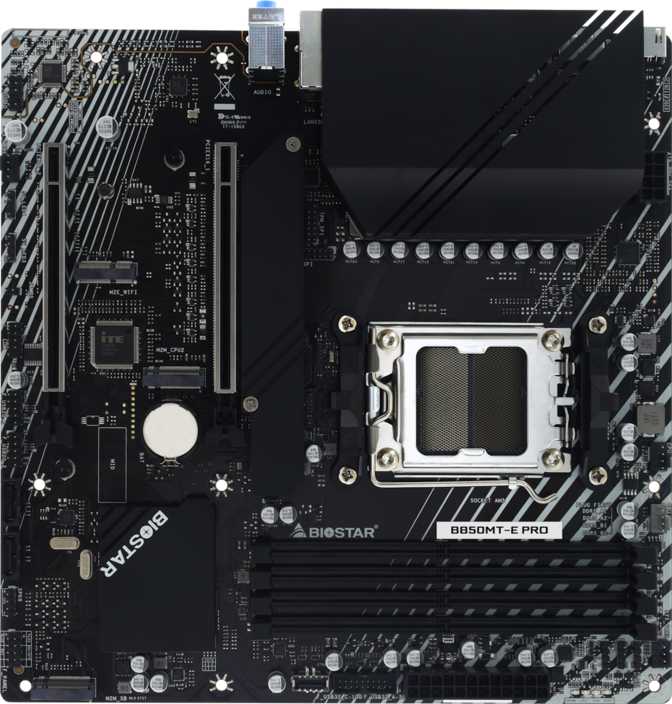
Biostar B850MT-E Pro Review: A Compact AM5 Board Built to Last
Motherboards- CPU Socket
- AM5
- Chipset
- B850
- Form Factor
- Micro-ATX
- Memory
- DDR5 / 4 Slots
- M.2 Slots
- 3 Sockets
- Warranty
- 3 Years
Compact PC builds have a reputation problem. Too often, choosing a Micro-ATX motherboard feels like accepting a list of compromises — fewer expansion slots, weaker power delivery, stripped-back I/O — in exchange for a smaller footprint. The Biostar B850MT-E Pro pushes back against that assumption with a specification set that punches well above its physical dimensions.
Built on AMD's current-generation AM5 platform with the B850 chipset, this board pairs modern CPU support with PCIe 5.0 connectivity, DDR5 memory with serious overclocking headroom, and three M.2 storage slots — all inside a 244mm square footprint. What it does not include is equally telling: no RGB lighting, no Wi-Fi, no Bluetooth. That combination of inclusions and omissions tells you exactly who Biostar built this for, and it is worth understanding both sides before spending money.
Form Factor and Build Quality
The B850MT-E Pro occupies the standard Micro-ATX footprint — 244mm on each side, perfectly square. That measurement fits into the overwhelming majority of mid-tower cases and virtually all cases marketed as Micro-ATX compatible. Unlike Mini-ITX boards, which require compromise at every turn, Micro-ATX preserves two full expansion slots and room for four memory modules, delivering a real build without the jigsaw-puzzle installation experience.
The visual design is deliberately functional. There is no RGB lighting on this board — not a single LED. For builders who prefer a clean aesthetic or who work inside closed cases where illumination would be invisible anyway, that absence is a practical benefit: no extra software overhead, no synchronization headaches, and no impact on system stability from lighting headers. For builders who architect their entire build around coordinated lighting, this board simply is not the right canvas.
The physical layout reflects Micro-ATX's honest trade-offs. The CPU socket area, memory slots, and primary expansion slot are well-positioned for most cooler and RAM combinations. Builders pairing particularly tall memory modules with a large tower CPU cooler should verify clearance specifications with their specific components — a standard precaution at this size, not a specific criticism of this board.
Platform and Chipset: Why B850 on AM5 Matters Right Now
The AM5 Socket Explained
AM5 is AMD's current CPU platform, designed for Ryzen 7000 and 9000 series processors. Unlike AMD's older AM4 platform, where the pins lived on the CPU itself, AM5 uses a contact-pad design on the processor side with the physical pins on the motherboard socket. The practical benefit: during installation, there are no fragile pins on the processor to bend or damage. For builders who have not installed a CPU in years — or who are assembling their first system — this substantially reduces the risk of a costly mistake.
AM5 is an active, current-generation platform. AMD has publicly committed to supporting it through multiple CPU generations, meaning a board purchased today has a realistic path to future processor upgrades without replacing the motherboard. That commitment does not guarantee infinite compatibility, but it does mean you are not buying into a platform at the end of its lifespan.
What Makes B850 Different from Its Predecessors
The chipset choice is where the B850MT-E Pro separates itself from the budget tier. The most impactful distinction over the older B650 chipset is the primary graphics card slot.
The B850MT-E Pro's GPU slot runs at PCIe 5.0 — the current-generation interface standard. The earlier B650 chipset ran the GPU slot at PCIe 4.0. Today's cards do not saturate PCIe 4.0's bandwidth in most scenarios, so the real-world gaming difference is minimal right now. The value of PCIe 5.0 is forward-looking: as next-generation graphics cards arrive with higher bandwidth requirements, this board will not become the system's limiting factor. It is a specification that genuinely extends the platform's useful life.
B850 also unlocks memory overclocking — both for the CPU and, critically for enthusiasts, for the RAM. The implications for real-world performance are substantial and are covered in detail in the memory section below.
Memory: DDR5 With Real Overclocking Ambition
Capacity That Never Becomes the Ceiling
Four DDR5 memory slots in a dual-channel configuration give the B850MT-E Pro a maximum supported capacity of 256 gigabytes. That number is not here to impress — it is here because it represents a deliberate design decision: this board was not built with artificial capacity limits that force an upgrade path. Most builds will ship with 32GB or 64GB. The ceiling is there as assurance rather than a feature you will actively use on day one.
Speed Overclocking: Where This Board Earns Serious Attention
The board supports DDR5 memory tuned up to 8000 MHz — a specification with measurable performance implications. AMD Ryzen 7000 and 9000 series processors use a memory architecture that benefits detectably from faster-clocked RAM, with real improvements in gaming frame rates, content export times, and application load speeds when memory is properly configured.
Reaching 8000 MHz requires a compatible high-performance DDR5 kit and BIOS configuration — typically loading the memory manufacturer's preset profile with a single toggle. The board supports it without restriction, meaning buyers who want to extract full performance from a premium memory kit will not hit an artificial wall imposed by the motherboard.
This board does not support ECC (Error-Correcting Code) memory. Professional workstation users and anyone requiring data-critical error correction at the memory level will need a platform specifically designed for ECC operation.
Rear I/O: What's on the Back Panel and What's Missing
The Available Connections
-
USB Type-A — 10 Gbps (High Speed)
One port at USB 3.2 Gen 2 speeds, suited for fast external SSDs, high-speed storage enclosures, and docking stations.
-
USB Type-A — 5 Gbps (Standard Speed, Four Ports)
Four USB 3.2 Gen 1 ports cover the everyday workload: keyboards, mice, game controllers, and standard external drives with solid speed and broad compatibility.
-
USB Type-C — 10 Gbps
One USB 3.2 Gen 2 Type-C port for modern accessories, newer smartphones, compact hubs, and USB-C peripherals.
-
USB 2.0 (Two Ports)
Two legacy ports for older peripherals where bandwidth is irrelevant — USB audio interfaces, older input devices, and similar accessories.
-
Display Outputs — HDMI 2.1 and DisplayPort
Both outputs connect to the processor's integrated graphics, not to any GPU on the board. Active only with AMD Ryzen G-series processors that include integrated Radeon graphics. Without a discrete GPU, these ports allow a fully functional display from compatible Ryzen CPUs.
-
Ethernet
A single RJ45 jack for wired network connectivity — faster and more reliable than Wi-Fi in any real-world desktop scenario.
What's Missing: No Wireless Connectivity
This is the B850MT-E Pro's most significant omission. If your build location has a network cable available, it does not matter — wired connections are objectively faster and more stable. If you need wireless, you will require a PCIe Wi-Fi card or USB adapter, adding cost and consuming either an expansion slot or a USB port. Account for this in your total budget before purchasing.
Internal Connectivity: Storage, Headers, and Expansion
Three M.2 Slots: A Genuine High Point
Three M.2 sockets are available internally — a count that stands out for a Micro-ATX board at this price level. Many competing boards offer only two. M.2 NVMe drives mount directly to the motherboard and deliver dramatically faster read and write speeds than any cable-connected drive. Three slots means a fast primary system drive, a secondary high-speed storage volume, and a spare slot held in reserve, all without needing an adapter or expansion card.
The primary M.2 slot connects to the CPU over PCIe 5.0, fully supporting the fastest NVMe drives currently available. The remaining two slots operate at PCIe 4.0 speeds — still extremely fast for any realistic storage workload.
Two SATA Ports: Where Storage Plans Meet a Hard Limit
Two SATA 3 connectors handle drives that connect via cable — traditional hard drives for bulk storage and older-format SATA solid-state drives. Two ports is a genuinely constraining number. For builds centered entirely on NVMe storage with perhaps one bulk-storage hard drive, it is workable. For storage-dense workloads with multiple spinning disks or a legacy drive collection, it is a real constraint that demands planning before purchase.
RAID: The Basics, Covered
The board supports RAID 0, which stripes data across two drives for higher throughput, and RAID 1, which mirrors data to two drives simultaneously for live redundancy against drive failure. RAID 5 and RAID 10 configurations are not supported. For home builders wanting a performance stripe or a simple data mirror, both options are present. More complex enterprise-style arrays are outside this board's scope.
Fan Headers and Internal USB
Three fan headers are present for CPU cooler and chassis fan connections. This supports a basic cooling configuration — a tower CPU cooler and one or two case fans — but falls short for ambitious multi-fan setups. Builders planning multiple independently controlled fans will need a fan hub or splitter cable to extend beyond three connections.
Internal USB headers include two USB 3.2 Gen 1 headers for front-panel USB 3.0 ports, one USB-C Gen 2 header for cases with a front-panel USB-C port, and four USB 2.0 expansion headers. A TPM connector is also present, supporting a hardware Trusted Platform Module for Windows 11 compliance and enterprise security requirements — though AMD Ryzen processors also include a firmware-based TPM solution that satisfies Windows 11 without additional hardware.
Expansion Slots: PCIe 5.0 Where It Matters
The expansion layout is clean and practical for a Micro-ATX board. Two slots provide dedicated positions for the GPU and one additional expansion card.
PCIe 5.0 x16
The primary slot runs the current-generation PCIe 5.0 interface, accommodating all current discrete graphics cards and positioned for future generations that may require significantly higher bandwidth.
PCIe 4.0 x16
The secondary slot accommodates additional expansion cards — a Wi-Fi card to compensate for missing wireless, a capture card for streamers, a sound card for audio-focused builds, or a PCIe storage controller to expand SATA capacity.
There are no PCIe x1 slots. Any expansion card beyond the GPU must occupy the second physical x16 slot, which limits the total number of add-in cards to two including the graphics card. Plan your expansion needs accordingly.
Audio Output
The onboard audio solution supports up to 7.1 surround sound through three 3.5mm analog jacks on the rear panel. For gaming headsets and desktop speakers connecting directly via 3.5mm, this covers the full range of consumer use cases without requiring a separate sound card.
There is no S/PDIF digital optical output on this board. Audiophiles routing audio through an external DAC or AV receiver that requires an optical input signal will need a USB audio interface or a discrete sound card to bridge that gap. For the majority of users connecting directly via analog 3.5mm, this omission is irrelevant.
BIOS and Overclocking: Two Features That Actually Matter
Dual BIOS: A Safety Net Worth Having
The B850MT-E Pro ships with two separate BIOS chips. If a BIOS update goes wrong — due to a power interruption mid-flash, a corrupted file, or a compatibility issue — the secondary chip automatically takes over on the next boot attempt, restoring the system to its last known working state. No user action is required. For the builder who plans to run this board for several years and update firmware regularly as new Ryzen CPU support is extended, this removes one of the more catastrophic and otherwise irreversible failure modes from the equation.
Easy Overclocking and BIOS Recovery
The B850 chipset enables both CPU and memory overclocking, and the BIOS is configured to support it accessibly. XMP and EXPO memory profiles — the standardized presets that enable RAM to run at its manufacturer-rated speed with a single toggle — are supported and straightforward to activate. This step alone delivers most of the memory performance headroom available without any manual tuning.
A dedicated CMOS reset mechanism handles recovery from failed overclocking attempts. Pushing the system beyond stable limits and watching it refuse to boot is a normal part of the process — not a sign of damage. The ability to reset quickly, without disassembling the board or locating a jumper in a tight corner, means experimentation does not become a crisis.
Who This Board Is For — and Who It Is Not
- Builders assembling a Ryzen-based system in a Micro-ATX enclosure who have wired Ethernet available and no need for built-in wireless.
- Those prioritizing long-term reliability over visual flair — no RGB means a cleaner profile and one fewer software dependency.
- Builders who want meaningful DDR5 overclocking support without paying the premium for an X-series chipset.
- Anyone who values dual BIOS for a system intended to run for several years with regular firmware updates.
- Builders planning NVMe-centric storage configurations who would be constrained by the two-slot limit common at lower price points.
- Users wanting a simple RAID 0 performance stripe or RAID 1 data mirror across their storage drives.
- Anyone who needs built-in Wi-Fi or Bluetooth — the workarounds add cost and real inconvenience, especially inside a compact case.
- Storage-heavy builds relying on more than two SATA-connected drives — the port count simply does not accommodate larger spinning-disk arrays.
- Builders planning elaborate cooling setups with multiple independently managed fans — three headers demands a hub for anything more ambitious.
- Professional workstation users requiring ECC memory for data-critical computing tasks — this is a consumer-grade platform.
- Audiophiles whose signal chain includes optical digital output devices such as high-end DACs or AV receivers requiring S/PDIF input.
How It Stacks Up Against the Competition
Against B650 Micro-ATX Boards
B650 boards occupy the price tier below B850 and remain available in quantity. The chipset generation gap is real but narrower than it sounds for most current use cases: the GPU slot difference (PCIe 5.0 vs. 4.0) is largely theoretical at current graphics card bandwidth demands, and memory overclocking ceilings on B650 boards are meaningfully lower but still sufficient for mainstream DDR5. B650 makes sense for buyers optimizing strictly for today's performance at the lowest cost. The B850MT-E Pro makes more sense for buyers thinking two to four years ahead and wanting platform longevity without paying X-series prices.
Against X870 and X670E Boards
AMD's X-series chipsets offer more PCIe lanes, typically include Wi-Fi 6E or Wi-Fi 7, provide more USB bandwidth, and carry a meaningfully higher price. For the mainstream builder who will not approach the bandwidth ceiling of a B850 board, paying the X-series premium funds features that sit idle. For the builder whose workload or connectivity needs justify it, the step up is rational — but it is a significant step in cost.
Against Competing B850 Micro-ATX Boards
Competing B850 Micro-ATX boards from major brands often include Wi-Fi 6E or Wi-Fi 7 integration, one or two additional fan headers, and BIOS ecosystems with larger user communities. If wireless is part of your build plan, those boards argue more strongly on breadth of features. The B850MT-E Pro responds with dual BIOS — not universal at this tier — and a three-year warranty matching what larger brands offer. It is a different set of priorities, not a categorically inferior product.
| Feature | B850MT-E Pro | Typical B650 mATX | Typical X870 mATX |
|---|---|---|---|
| GPU Slot Interface | PCIe 5.0 | PCIe 4.0 | PCIe 5.0 |
| DDR5 Memory Support | Yes | Yes | Yes |
| Peak Memory OC Speed | ~8000 MHz | Lower ceiling | ~8000 MHz+ |
| Built-in Wi-Fi | No | Varies | Usually Yes |
| Dual BIOS | Yes | Varies | Varies |
| M.2 Slots | 3 | 2–3 | 3–4 |
| SATA Ports | 2 | 4 (typical) | 4–6 |
| Fan Headers | 3 | 4–6 | 5–8 |
| Warranty | 3 Years | 3 Years | 3 Years |
Honest Strengths and Weaknesses
The dual BIOS implementation is the most distinctive feature — a practical safety net backed by Biostar's track record with the technology, not a marketing checkbox. The PCIe 5.0 primary GPU slot combined with B850's memory overclocking ceiling gives this board real legs as a future-facing platform foundation. Three M.2 sockets is a meaningful differentiator over boards that stop at two. The inclusion of both HDMI 2.1 and DisplayPort means it works cleanly with Ryzen G-series processors for integrated graphics scenarios without needing a separate GPU to get started. The three-year warranty signals a manufacturer prepared to stand behind the product for a full ownership cycle.
The lack of integrated wireless is the most impactful weakness in a product category where Wi-Fi 6E is increasingly standard at comparable price points. Its absence forces either a wired-only setup or additional spending on a workaround that consumes a slot or USB port. Two SATA ports is a genuinely limiting count — lower than most competing boards at this tier, and a constraint that frustrates any mixed-storage configuration. Three fan headers demands either a hub or acceptance of limited independent fan control. The absence of S/PDIF audio output is a minor concern for most but a real gap for any user whose audio chain ends at an external device requiring an optical signal.
Questions Real Buyers Ask Before Purchasing
Final Verdict
The Biostar B850MT-E Pro is a board with a clear identity and an honest feature set. It delivers the AM5 platform's present-day strengths — PCIe 5.0 for the GPU and primary NVMe slot, DDR5 with substantial overclocking headroom, and multi-generational Ryzen CPU support — in a Micro-ATX form factor with practical durability features that larger brands sometimes skip at this price tier.
The trade-offs are real and should be treated as selection criteria, not overlooked. No Wi-Fi or Bluetooth means this board belongs in a wired setup. Two SATA ports means it belongs in a build centered on NVMe storage, not a multi-drive spinning-disk configuration. Three fan headers means it belongs in a system with straightforward cooling, or one where you are prepared to add a fan hub.
For the builder in a wired home or office, working with Ryzen 7000 or 9000 series processors, who wants a clean, reliable Micro-ATX foundation at a mid-range price point, the B850MT-E Pro earns a confident recommendation. It is a capable and honest board that prioritizes substance over spectacle — which, for the right buyer, is exactly the right call.