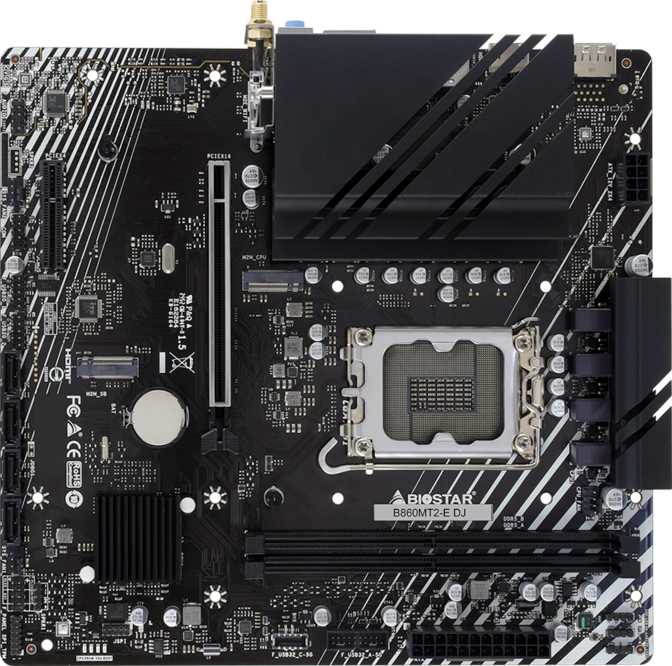
The Biostar B860MT2-E DJ occupies a specific niche that a growing number of builders are exploring: a compact, no-frills motherboard for Intel's current-generation platform that prioritizes value and physical footprint over feature excess. If you are planning a smaller desktop build around Intel's latest CPUs and have no need for wireless connectivity, lighting effects, or premium overclocking controls, this board enters the conversation early. Whether it is the right answer, however, depends almost entirely on what you are building — and what you are prepared to give up.
Biostar B860MT2-E DJ: Key Facts at a Glance
Platform
Intel Core Ultra 200 Series, LGA 1851
Chipset
B860, Mainstream Tier
Form Factor
Micro-ATX, 228 x 198 mm
Memory
DDR5, 2 Slots, Up to 128GB
Storage
2x M.2 NVMe, 4x SATA 3
Display Output
HDMI 2.1 + DisplayPort
Expansion
PCIe 4.0 x16 + PCIe x4
Warranty
3 Years
Platform Foundation: What the Chipset and Socket Mean in Practice
The LGA 1851 socket defines the processor pool this board draws from: Intel's Core Ultra 200-series desktop CPUs. Choosing a board with this socket means you are buying into Intel's current mainstream desktop architecture, with all the DDR5 memory benefits and updated PCIe connectivity that generation provides. This is not a budget shortcut to an aging platform — it is the current standard.
The B860 chipset handles the board's internal traffic management. Think of it as the coordinator between your processor, memory, storage, and ports. It sits one tier below Intel's Z890, the enthusiast-grade chipset, while offering a meaningful feature set for mainstream builders. The most relevant distinction: B860 does not allow you to manually raise your processor's clock speed above its factory-rated frequency. CPU overclocking is reserved for Z890 boards and unlocked K-series processors together.
What B860 does support is memory speed tuning. Through Intel's XMP (Extreme Memory Profile) standard, you can enable DDR5 modules to operate at their advertised rated speeds, sometimes well above the DDR5 base default, with a single BIOS setting change. The B860MT2-E DJ is marketed as straightforward to configure in this regard, and for builders who want to buy a high-speed DDR5 kit and actually run it at full potential without navigating complex BIOS menus, that matters.
For builders pairing this board with a non-K Core Ultra 200 processor, which describes the majority of mainstream builds, the chipset's overclocking ceiling is functionally irrelevant to daily performance. You get the full benefit of the platform without paying for features you cannot use.
Design and Build: Compact Without Compromise on Quality
At Micro-ATX dimensions of 228 mm by 198 mm, the B860MT2-E DJ fits comfortably into compact mid-tower cases and standard full-size towers alike. This is the practical advantage the Micro-ATX format holds over Mini-ITX: you keep meaningful expansion slot access and a reasonable connector count while still fitting into cases that take up half the desk space of a full ATX build.
The board ships with no RGB lighting: no illuminated zones, no addressable header for LED strips, no glowing logo. This is a design philosophy, not an oversight. Builders who value a clean, dark interior or plan to run an opaque case panel will find the restraint welcome. Builders assembling a glass-panel showcase system with synchronized lighting across every component will need to look at other options; this board does not participate in that ecosystem.
There is no dedicated clear CMOS button on the rear panel, and the board does not include a dual BIOS backup chip. In practical terms, this means that if a firmware update fails or an aggressive BIOS setting renders the system unbootable, recovery requires the traditional method of briefly shorting a jumper on the board itself, a simple procedure for experienced builders but one that requires opening the case and locating the correct pins. Boards with a physical clear CMOS button or a secondary BIOS chip handle this scenario more gracefully. For a first-time builder experimenting with memory overclocking settings, the absence of these safety nets is worth factoring into the decision.
- Form Factor
- Micro-ATX
- Dimensions
- 228 x 198 mm
- RGB Lighting
- Not Included
- Clear CMOS Button
- Not Included
- Dual BIOS
- Not Included
- Warranty
- 3 Years
The board carries a three-year warranty from Biostar, which is competitive for the category and covers the typical ownership window of a desktop motherboard.
Memory: Two Slots, DDR5 Speed, and the Long-Term Trade-Off
This is the most significant design decision on the B860MT2-E DJ, and it deserves direct treatment: the board provides two memory slots rather than the four slots standard on most Micro-ATX boards. This is not a minor specification footnote. It affects how you build now and how you upgrade later.
| Aspect | This Board, 2 Slots | Typical 4-Slot Board |
|---|---|---|
| Initial Build | Must buy a matched pair from day one for dual-channel | Can start with a single stick if needed |
| Upgrade Path | Existing kit must be fully replaced | Add two more sticks to empty slots |
| Practical Capacity | 32GB to 64GB pair covers most users | Same range, with an easier path upward |
What Two Slots Means for Your Initial Build
To achieve dual-channel memory operation, the configuration where both channels run simultaneously for roughly double the memory bandwidth, you must populate both slots with a matched pair. A single stick running alone operates in single-channel mode, cutting effective bandwidth significantly. Single-channel is noticeably slower in memory-bandwidth-sensitive tasks, including modern gaming, video editing, and 3D rendering. The correct approach is to buy two sticks from the start and install them together.
What Two Slots Means for Upgrades
With four memory slots, a common upgrade path is simple: add two more sticks to the empty slots. With two slots, any upgrade requires removing and replacing the existing kit entirely. If you start with a modest pair of sticks, growing your memory capacity down the road means buying a completely new pair, your initial modules become spare parts. This is the real cost of the two-slot design: not today's build, but tomorrow's flexibility.
Capacity and Performance Ceiling
Despite the limited slot count, the board supports DDR5 modules at densities that push total capacity to 128 GB, achieved by installing a pair of 64 GB high-density sticks. High-density DDR5 modules at that capacity carry a premium price, but the ceiling itself is generous for a board at this price point. For most users, the practical range will sit between a 32 GB pair and a 64 GB pair, which covers gaming through professional workloads with room to spare.
On the performance side, the board supports memory tuning well into the upper range of current consumer DDR5 speeds. Whether you are running a value-tier DDR5 kit at standard speeds or pushing a performance kit through its XMP profile, the memory subsystem has the headroom to accommodate it. Real-world speed gains are most pronounced in tasks that move large amounts of data through memory quickly: video encoding, 3D scene rendering, and heavily threaded productivity applications.
The board does not support ECC (Error-Correcting Code) memory. ECC is a specialized memory type used in professional workstations and servers to detect and silently correct single-bit data errors in real time. For gaming, home productivity, and general computing, ECC's absence is completely standard. Anyone building a system where memory data integrity is mission-critical, running financial calculations, hosting databases, or processing scientific data, should look at a platform specifically designed for ECC support.
Display Output: HDMI 2.1 and a Processor Prerequisite
The rear panel includes an HDMI 2.1 port and a DisplayPort output. These are tied to the integrated graphics capability of your processor: they produce a signal only if your CPU includes an integrated graphics unit.
Not every LGA 1851 processor ships with integrated graphics. Processors designated with an "F" suffix in their model name omit the graphics silicon entirely and are priced lower as a result. If you pair this board with an F-series CPU and intend to use the onboard display outputs, you will have no video signal at all. A discrete graphics card becomes mandatory in that scenario, not optional.
The HDMI 2.1 implementation is worth calling out specifically. Many budget boards in this price tier include HDMI 2.0, which caps out at lower resolutions and refresh rates at the high end. HDMI 2.1 supports higher bandwidth, enabling 4K at high refresh rates and 8K video output through the onboard port when paired with a compatible display. For users running integrated graphics on a modern display, this is a practical upgrade over what competitors often provide.
For gaming builds with a dedicated graphics card, the onboard outputs serve as useful secondary connections: a second monitor, a TV in another room, or a diagnostic display when your GPU needs troubleshooting.
Port Rundown: Rear I/O in Plain Terms
The back panel of the B860MT2-E DJ gives you a practical selection of connections with no premium extras.
- USB-A Ports
- Six total: three operating at USB 3.2 Gen 1 speeds and three at USB 2.0 speeds. The Gen 1 ports transfer data at up to 5 Gbps, which is fast enough for external SSDs, high-capacity thumb drives, and any peripheral where transfer speed matters. The USB 2.0 ports cap much lower but are entirely adequate for keyboards, mice, webcams, headsets, and other low-bandwidth devices. Six ports total is a reasonable count for a compact board.
- USB-C
- None. The rear I/O includes no USB-C ports at any speed. This is increasingly unusual as USB-C becomes the dominant connector on smartphones, tablets, compact laptops, modern audio interfaces, and portable monitors. If you regularly connect a phone for fast data transfer, use a USB-C audio interface, or rely on USB-C for any peripheral in your workflow, you have no native rear-panel option. A front-panel USB-C connection via a compatible case is possible through an internal header in some boards, but rear panel access does not exist here.
- Wired Networking
- One RJ45 ethernet port. Wired ethernet is faster, more stable, and lower latency than any Wi-Fi standard currently available, and most dedicated PC builders prefer it for desktop systems. The port supports standard gigabit ethernet speeds.
- Wireless Networking
- None. No Wi-Fi, no Bluetooth. Covered in detail in the next section.
- Display
- HDMI 2.1 and one DisplayPort, as discussed above.
- Audio
- Three analog audio jacks handling up to 7.1 surround sound through standard front, rear, and center and subwoofer assignments. No digital optical S/PDIF output is present.
Wi-Fi and Bluetooth: Understanding the Trade-Off
The B860MT2-E DJ ships without any wireless connectivity. No Wi-Fi module, no Bluetooth chip, no antenna connectors.
For a desktop connected to a router by ethernet cable, the setup most dedicated PC builders prefer, this is a complete non-issue. Wired connections offer better throughput, negligible latency, and eliminate the interference variables that affect wireless.
The friction appears in two scenarios. First, if your desk is far from your router and cable routing is not practical. Second, if you use Bluetooth peripherals: wireless headphones, a Bluetooth keyboard or mouse, a game controller that pairs over Bluetooth. Both scenarios are solvable with a USB dongle: a combined Wi-Fi and Bluetooth USB adapter is an inexpensive addition, but it consumes a USB port and adds an external device to manage.
One specific limitation worth noting: the board does not appear to include the M.2 Key E slot used for internal Wi-Fi combo card upgrades on some competing boards. Adding wireless through an internal card would require occupying one of the PCIe expansion slots instead. If wireless connectivity is important to you and you would prefer it handled internally, boards with integrated Wi-Fi or a Key E slot offer a tidier solution.
Internal Connectivity: Storage, Headers, and Expansion
Inside the case, the board provides a well-considered set of connections for a compact platform.
M.2 NVMe Storage
Two M.2 sockets accommodate modern NVMe solid-state drives. Given the B860 platform, these slots are expected to operate at PCIe 4.0 speeds, fast enough to run the highest-performing consumer NVMe drives available at their rated throughput. Having two M.2 slots on a budget-tier board is a genuine strength; single-M.2 configurations are not uncommon among competitors in this space, and two slots allows for a dedicated boot drive and a separate high-speed storage drive without using any SATA ports.
SATA Storage
Four SATA 3 ports handle traditional 2.5 inch SSDs, 3.5 inch hard drives, and optical drives. Four ports is a useful number, enough to run a multi-drive storage array or mix drive types while leaving room for an optical drive if needed.
Fan Headers
Three fan headers manage the board's thermal control. This is on the lean side. A typical modest cooling setup, one air cooler and two case fans, fits within three headers without issue. More complex configurations, such as a 360mm AIO liquid cooler which needs separate headers for the pump and radiator fans, will exhaust the available headers with nothing remaining for additional chassis airflow. Builders with elaborate cooling setups will need a fan hub connected to one header to manage additional fans.
Front-Panel USB Headers
Internal headers support front-panel USB connections from your case, including USB 3.0 Gen 1 ports and USB 2.0 ports for case-front connectivity. There is no USB 3.2 Gen 2 front-panel header, which means cases featuring a high-speed front-panel USB-C port at 10 Gbps will not find a matching header on this board. Standard USB 3.0 front-panel connectors will work normally.
TPM Connector
A physical TPM header is present, enabling a discrete TPM, or Trusted Platform Module, chip to be installed. Windows 11 requires TPM 2.0 at minimum, which can be satisfied by the firmware-based fTPM most modern processors provide, but the physical header accommodates a discrete chip for environments that prefer or require hardware TPM for security policy compliance.
Expansion Slots: Graphics, Add-Ins, and What's Missing
Primary Graphics Slot
One PCIe 4.0 x16 slot seats your graphics card. PCIe 4.0 is the current mainstream standard for discrete GPUs; every major graphics card from both AMD and NVIDIA operates here at full bandwidth. The slot does not step up to PCIe 5.0, which is present on higher-end Z890 boards. In practice, this makes no performance difference today: no consumer graphics card currently saturates PCIe 4.0 bandwidth in real-world applications, and that situation is not expected to change in the near term.
Secondary Expansion Slot
A PCIe x4 slot provides room for additional expansion cards. This is where you would install a dedicated network card, including a 2.5 GbE or 10 GbE upgrade, a capture card for content creation, an NVMe add-in card for additional storage, or a sound card for users who want better audio than onboard solutions provide. PCIe x1 cards, including most Wi-Fi add-in cards and basic expansion options, will fit and function in this x4 slot due to PCIe's backward size compatibility.
What's Not Here
There are no PCIe x1 slots. This is not unusual for compact Micro-ATX designs, where slot real estate is genuinely limited. Users who planned on installing a small PCIe x1 card while also using the x4 slot for something else will need to choose between them.
There are also no PCIe 5.0 x16 slots. For a B860 board at this price point, this is expected rather than surprising.
Onboard Audio: 7.1 Surround Without the Premium Extras
The audio implementation covers 7.1-channel surround sound through three rear analog jacks, handling stereo, front and rear surround, and center and subwoofer assignments in a standard HD Audio configuration. For users connecting headphones, 2.1 desktop speakers, or a basic gaming headset, onboard audio performs the job without requiring additional hardware.
The missing piece is a digital optical output. S/PDIF optical or coaxial ports are common on premium boards and allow direct connection to AV receivers, external DACs, and audio processing equipment that accepts digital audio signals. Their absence here means users with high-end external audio hardware relying on a digital connection will need a USB audio interface or an add-in sound card instead.
Storage Flexibility: RAID Support Worth Calling Out
The four SATA ports support RAID configurations across all four common modes: RAID 0, 1, 5, and 10. For a compact board at a mainstream price point, this breadth of RAID support is notable.
Stripes data across two or more drives to maximize sequential read and write speeds, trading all redundancy for performance. One drive failure destroys the entire array. Used for scratch disks, video editing cache drives, and performance-sensitive temporary storage where speed matters more than protection.
Mirrors identical data across two drives simultaneously. If one drive fails, the other retains a complete copy of everything. The practical choice for anyone who wants basic on-device protection without a separate backup solution.
Distributes data and parity information across three or more drives. One drive can fail and be replaced without data loss, while still preserving the majority of the total drive capacity as usable storage. A solid balance of redundancy and efficiency for small multi-drive arrays.
Combines both mirroring and striping across four drives, delivering redundancy against single-drive failure alongside improved read performance. The most resilient option here, at the cost of using half the total raw capacity for redundancy.
Full RAID 0/1/5/10 support is not standard across all B860 Micro-ATX boards, and its presence gives the B860MT2-E DJ real appeal for small business builds, home lab configurations, and any user managing a local multi-drive storage array.
Who This Board Is For
The B860MT2-E DJ is a strong fit for a specific type of builder. If the following describes your situation, this board deserves serious consideration.
- You are connecting your desktop to a router by ethernet cable and have no use for built-in wireless
- Your peripherals connect over USB-A, and you do not rely on USB-C for daily connectivity
- You are pairing the board with a non-K Core Ultra 200 processor and have no interest in CPU overclocking
- You are building in a compact case and need a Micro-ATX board rather than full ATX
- You want RAID capability across multiple SATA drives in an affordable package
- You are assembling a secondary machine, a home server, office workstation, or home theater PC, where cost efficiency matters more than feature breadth
- RGB lighting and aesthetic customization are not priorities
Who Should Look Elsewhere
Be clear with yourself if you fit any of the following profiles.
- Wireless users: Without built-in Wi-Fi and Bluetooth, and without an internal expansion path for a wireless combo card, wireless connectivity requires an external USB adapter. If Bluetooth peripherals or Wi-Fi access are central to how you work and play, a board with integrated wireless is a more integrated solution.
- USB-C-dependent users: Modern smartphones, compact laptops, portable monitors, and many audio interfaces increasingly rely on USB-C. With no rear-panel USB-C and no high-speed front-panel USB-C header, this board creates daily friction for USB-C-centric workflows.
- Enthusiast overclockers: Purchasing a Core Ultra 200K or 200KF chip specifically to push past stock frequencies requires a Z890 board. The B860 chipset cannot unlock CPU multiplier overclocking regardless of what the BIOS offers. Pairing an unlocked chip with this board means paying for headroom you cannot access.
- Complex cooling builds: Three fan headers create real constraints for elaborate thermal configurations. If your cooling plan includes an AIO plus multiple chassis fans, a hub becomes necessary hardware rather than optional.
- Builders who want safety net features: No dual BIOS and no clear CMOS button mean that troubleshooting a failed BIOS flash or a BIOS setting that prevents POST requires manual jumper intervention. Experienced builders handle this without stress. Beginners experimenting with settings for the first time should understand the recovery process in advance.
- RGB builders: There is no RGB header and no addressable LED controller on this board. If synchronized lighting across your build matters to the final result, this board simply does not support it.
Competitive Positioning: How It Compares to B860 Micro-ATX Alternatives
The B860 Micro-ATX segment has grown competitive, with ASUS, MSI, Gigabyte, and ASRock all fielding boards at various price points. The comparison below reflects typical differentiators across the category.
| Feature | Biostar B860MT2-E DJ | Typical B860 mATX Competitor |
|---|---|---|
| Memory Slots | 2 | 4 |
| Wi-Fi | Not included | Available on some models |
| USB-C, Rear Panel | Not included | One Gen 2 port on many models |
| M.2 Slots | 2 | 2 to 3 |
| RAID Support | 0, 1, 5, and 10 | 0, 1, 5; RAID 10 less common |
| RGB Lighting | None | Limited RGB on some models |
| Fan Headers | 3 | 4 to 5 on most |
| BIOS Recovery | Basic, jumper only | Clear CMOS button common |
| Primary PCIe Generation | 4.0 | 4.0, some 5.0 on premium models |
| HDMI Version | 2.1 | 2.0 or 2.1, varies by model |
The two-slot memory configuration is the sharpest point of competitive disadvantage. Most B860 Micro-ATX boards from other brands include four DIMM slots as standard. Four slots allow a single-stick starting configuration without the dual-channel penalty pressure, easier future upgrades, and more flexible kit selection. That advantage compounds over the ownership life of the board.
Where the B860MT2-E DJ holds its own is RAID 10 support, less universally available at this tier, the HDMI 2.1 output, and its pricing. Biostar's positioning in the market tends toward the lower end of the price range, which partly explains the feature trade-offs.
Honest Assessment: Strengths and Where It Falls Short
Strengths
The B860MT2-E DJ delivers genuine value in specific areas. The comprehensive RAID support across all four modes is meaningfully above average for a budget Micro-ATX board and alone justifies consideration for storage-oriented builds. The two M.2 slots outperform single-M.2 alternatives in the same tier. HDMI 2.1 is a legitimate step up from the HDMI 2.0 that appears on many competing boards. The lack of RGB and wireless modules keeps component cost down and translates directly into price: what you see is what you get, without features bundled in that you do not want. The three-year warranty sits comfortably at the category standard and provides practical assurance across a normal ownership window.
Where It Falls Short
The harder truths are harder to overlook. Two memory slots is the single biggest limitation on this board, and it is not a minor inconvenience: it is a foundational constraint that affects upgrade planning from day one. For a Micro-ATX board at any price, four slots is the norm, and the two-slot design here puts the B860MT2-E DJ at a structural disadvantage against most of its direct competition. The complete absence of USB-C, including no rear-panel port and no high-speed front-panel header, makes the board feel a generation behind in I/O planning. Three fan headers will serve modest builds but create planning constraints the moment cooling requirements grow. The missing BIOS recovery features, dual BIOS and a clear CMOS button, remove the kind of beginner-friendly safety net that has become standard on many competing boards in this price range.
Questions Real Buyers Are Asking
Final Verdict
The Biostar B860MT2-E DJ is an honest, focused product that does not oversell itself. It puts Intel's current-generation platform into a compact package, supports comprehensive RAID configurations, provides two M.2 slots, outputs HDMI 2.1, and comes backed by a three-year warranty, all at a price that reflects the intentional removal of features many builders simply do not use.
The recommendation comes with one firm caveat: before committing to this board, compare it side-by-side with four-slot B860 Micro-ATX alternatives in the same price range. If the price gap is small, the four-slot board is almost always the better long-term investment. The ability to start with a single DDR5 stick, run dual-channel without replacing your existing kit, and expand RAM capacity without discarding what you already own is worth more than it sounds on paper: it compounds every time your needs change.
For the buyer who checks the right boxes, wired ethernet, USB-A peripherals, a non-K processor, a compact case, and either RAID storage needs or a modest budget constraint, the B860MT2-E DJ is a capable, no-drama foundation that will handle its workload reliably across its ownership life. For anyone whose situation does not fit that profile precisely, spend the time examining alternatives before deciding this is the one.
Best For
Consider Alternatives If