Beyerdynamic DT 270 Pro Review: A Professional Monitor That Earns Its Place
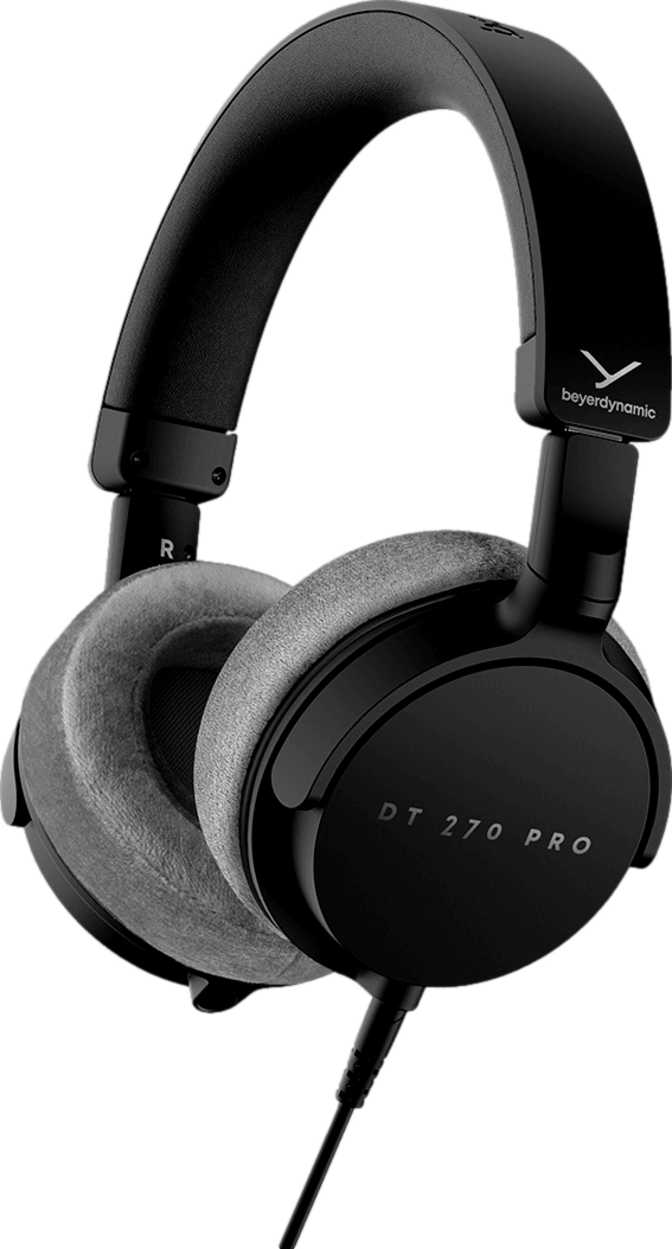
HeadphonesThere is a quiet confidence that comes with a Beyerdynamic product, and the DT 270 Pro carries that reputation into territory that genuinely matters: professional monitoring environments where sound accuracy is a requirement, not a preference. This is a closed-back, wired headphone designed for people who work with audio — broadcast engineers, studio operators, podcast producers, on-set sound technicians — and it makes no apologies for the choices that serve that mission.
At a Glance: Full Specification Breakdown
Every key specification — translated into what it means for real use.
| Fit Style | Over-Ear (Closed-Back) |
| Weight | 194 g |
| Foldable | Yes |
| Detachable Cable | Yes |
| Tangle-Free Cable | Yes |
| Water Resistance | None |
| Open-Back Design | No (Closed-Back) |
| Frequency Range | 5 Hz – 24,000 Hz |
| Impedance | 45 Ohms |
| Sensitivity | 96 dB/mW |
| Passive Noise Isolation | Yes |
| Active Noise Cancellation | No |
| Spatial Audio | Not Supported |
| Neodymium Magnet | No |
| Rechargeable Battery | Yes |
| Charging Port | USB-C |
| Battery Indicator | Yes |
| Removable Battery | No |
| Solar Charging | No |
| Connection Type | Wired Only |
| Headset (Mic) Function | Yes |
| On-Device Controls | Yes |
| In-Line Controls | No |
| Bluetooth / NFC / LDAC | None |
| Ambient Sound Mode | No |
Design and Build: Functional, Considered, and Travel-Tolerant
How the DT 270 Pro is constructed — and why each decision matters in real working conditions.
Physical Construction and Comfort
At 194 grams, the DT 270 Pro sits in the lighter half of the professional over-ear category. That matters more than most people expect. Extended sessions — a four-hour recording block, a full broadcast shift, a long editing marathon — are precisely where professional headphones live, and every gram becomes more noticeable over time. At this weight, the DT 270 Pro avoids the neck fatigue that heavier monitoring headphones quietly introduce.
The over-ear fit is full and enveloping, surrounding rather than pressing against the ear. This has a functional consequence beyond comfort: the physical depth of the ear cups contributes directly to the passive sound isolation the DT 270 Pro relies on to block external noise.
Portability and Cable Design
The DT 270 Pro folds into a compact form — an unusual decision in professional monitoring, where most headphones never leave the rack room. This one is designed to move. Engineers traveling between venues, broadcasters working on-location, and technicians who carry gear between sessions will find a headphone that doesn't demand a rigid case to survive transit.
The detachable cable is the correct call for any professional headphone. Cables fail, and in professional environments, they fail at inconvenient moments. A permanently attached cable turns a worn connector into a replacement decision for the entire unit. Here, it is a five-minute fix. The tangle-free construction reduces further friction when coiling and uncoiling on location.
Sound Performance: What the Specifications Actually Mean
Raw numbers translated into real listening implications — for both beginners and audio professionals.
Frequency Response in Plain Terms
The DT 270 Pro captures sound across an exceptionally wide range — from the very lowest bass registers that most listeners feel more than hear, all the way up to the upper limit of human hearing and slightly beyond. For context: the human ear typically perceives sound from around 20 Hz at its lowest to roughly 20,000 Hz at its ceiling. This headphone's reach extends meaningfully below that floor and above it.
For professional use, that low-end extension means engineers mixing bass-heavy content can trust what they hear rather than guessing what the headphone is hiding. The extended high-frequency reach ensures subtle harmonic information and high-frequency artifacts remain audible during critical listening passes.
Full coverage from infrasonic low end to beyond audible ceiling
Impedance and Driveability
At 45 Ohms, the DT 270 Pro occupies a practical middle ground. High-impedance headphones — such as certain other Beyerdynamic models running at 250 Ohms — require dedicated amplification to perform at their best and sound anaemic from a phone or laptop. The DT 270 Pro will perform acceptably from standard consumer-level sources while still scaling up with better amplification.
A dedicated headphone amplifier or audio interface will extract more dynamics from it, but it will not embarrass itself connected to a laptop headphone jack on location. For professionals working across varied equipment setups, this flexibility is genuinely useful.
Impedance Context
Sensitivity and Listening Levels
The 96 dB-per-milliwatt sensitivity figure describes how efficiently the headphone converts electrical signal into sound pressure. This moderate, professional-appropriate sensitivity level means the DT 270 Pro reaches healthy monitoring levels without demanding excessive amplifier output, while remaining forgiving of moderate noise floors in the driving equipment.
Very high sensitivity headphones can amplify hiss from cheaper audio interfaces — a serious problem in quiet studio monitoring contexts. This calibrated sensitivity level keeps that tendency in check.
Passive Isolation vs. Active Noise Cancellation
The DT 270 Pro uses passive noise isolation — the physical seal of the closed-back ear cup — to reduce ambient noise. There is no active noise cancellation circuitry, and this is the correct approach for a professional monitoring headphone. Active noise cancellation introduces processing that alters the phase and character of incoming sound, which is precisely the wrong thing when someone needs to hear audio accurately.
Passive isolation blocks outside noise through physical design without touching the signal itself. What passes through the drivers remains unaltered. In practical terms: this headphone will meaningfully reduce the noise of a busy studio or broadcast floor without coloring the audio being monitored.
Power, Battery, and the USB-C Connection
Understanding why a wired headphone needs a battery — and what that means for your workflow.
The DT 270 Pro includes a rechargeable, non-removable battery accessed via USB-C — an unusual feature for a wired closed-back monitoring headphone. Onboard power in a wired headphone typically supports active circuitry beyond noise cancellation: an onboard amplifier, a digital-to-analog converter, or the control panel built into the unit. Given that this headphone also functions as a headset with built-in microphone capability, the battery may support the microphone circuit or enhance its performance under consistent power conditions.
Users need to keep the DT 270 Pro charged in addition to maintaining its cable connection. The benefit is that onboard circuitry delivers consistent performance independent of the power output variability of the source device. The USB-C charging standard is modern and universally convenient — the same cable used for most current smartphones and laptops handles charging duty here.
The non-removable battery is standard practice in powered headphones today. Battery replacement after the product's useful life becomes a service or recycling decision rather than a user action — a factor worth considering if long-term serviceability is important to you.
Power Configuration Summary
-
USB-C Charging
No proprietary cables needed — standard modern connector -
Battery Level Indicator
Remaining charge is visible — no unexpected power-outs -
Non-Removable Battery
Convenient but limits long-term serviceability by end users -
Verify Operation When Depleted
Confirm with Beyerdynamic whether audio functions without charge
The Headset Function: More Than a Listening Tool
The DT 270 Pro doubles as a communication device — a practical addition for production workflows.
The DT 270 Pro includes microphone capability in addition to its playback function. For broadcast professionals, voiceover artists, producers on conference calls, or anyone who needs both hands free while monitoring audio, this is a meaningful practical addition. The on-device control panel supports volume adjustment and interaction without reaching for the source device.
No in-line control panel is present on the cable itself — controls sit on the headphone body. In a seated, studio-style workflow this works well. For walking or commuting use, reaching to the ear cup is less ergonomic, though the detachable cable design does allow for cable swaps that might accommodate different routing preferences.
Microphone Performance Note
The specification confirms headset functionality but does not detail microphone frequency response, polar pattern, or sensitivity. For standard broadcast monitoring and communication it is present and functional; for critical microphone recording, dedicated external microphones remain the professional standard.
- Built-in microphone
- On-device control panel
- No in-line cable controls
- No wireless call handling
- No ear-detection auto-pause
Who the DT 270 Pro Is Built For — and Who It Is Not
Being honest about the intended audience is more useful than pretending this headphone serves everyone.
-
Broadcast and Production Professionals
Reliable isolated monitoring in live or studio environments; foldable for location transit. -
Studio Engineers and Producers
High-quality closed-back monitoring for smaller studios or home studios without flagship pricing. -
Podcast Producers and Voiceover Artists
Headset function and passive isolation combine for effective self-monitoring during recording. -
Field Technicians
Professional grade, USB-C charged, replaceable cable, and compact enough to carry without ceremony.
-
Casual Listeners and Commuters
No wireless, no ANC, no app integration, no spatial audio. Consumer features are absent by design. -
Mobile Hands-Free Users
No Bluetooth means no wireless calling. The wired headset function requires a physical connection. -
Outdoor or Active Use
Zero weather sealing of any kind. This headphone is not built for sweat or rain exposure. -
High-Impedance Audiophiles
This is not a 250-Ohm reference headphone. It is a practical professional tool, not a reference-tier listener's headphone.
Competitive Positioning: How It Compares
Where the DT 270 Pro sits relative to the logical alternatives in its category.
| Feature | Beyerdynamic DT 270 Pro | Typical Consumer ANC Headphone | Typical 250-Ohm Studio Monitor |
|---|---|---|---|
| Cable Type | Wired, detachable | Wireless or wired | Wired, often fixed |
| Noise Reduction | Passive (signal-pure) | Active (processing) | Passive |
| Impedance | 45 Ohms | 16–32 Ohms typical | 150–250 Ohms |
| Amplifier Required | No (works on most devices) | No | Often Yes |
| Foldable for Travel | Yes | Usually yes | Rarely |
| Battery Required | Yes (active circuitry) | Yes (ANC/wireless) | No |
| Built-in Microphone | Yes | Yes | Rarely |
| Frequency Response | 5 Hz – 24,000 Hz | Typically 20–20,000 Hz | Varies (typically extended) |
| Primary Target | Professional monitoring | Consumer / commuting | Studio reference |
vs. Consumer ANC Headphones
Consumer ANC headphones compete on convenience — wireless connectivity, touch controls, transparency modes — but their processing introduces latency and signal manipulation that makes them unsuitable for professional monitoring. They are tools for enjoyment, not precision.
vs. High-Impedance Studio Monitors
High-impedance reference headphones offer exceptional detail retrieval but demand dedicated amplification and typically cannot run passably from a standard laptop or portable interface. The DT 270 Pro bridges that gap for environments where power sources vary.
Honest Strengths and Weaknesses
No product is perfect. Here is a clear-eyed assessment of where the DT 270 Pro earns praise and where it asks for compromise.
The DT 270 Pro's most significant strengths are practical rather than spectacular. The detachable cable is not a headline feature — it is the kind of decision that saves a professional from replacing an entire headphone because one connector wore out. That kind of longevity-first thinking runs through the product's design logic.
The folding mechanism, the relatively light 194g weight, the USB-C charging, and the 45-Ohm impedance are similarly unglamorous but genuinely useful across real deployment scenarios. The wide frequency response — extending well beyond the standard audible range in both directions — is legitimately impressive and appropriate for professional monitoring. Engineers can trust what they hear.
The passive noise isolation deserves specific recognition: it protects the integrity of what users hear without processing the signal at any stage. This is a principled engineering choice, not a cost-cutting measure. For professional monitoring, it is the right answer.
The absence of any warranty period in the provided specification data is a concern worth raising directly. No warranty information accompanies this product's listed specifications, and buyers should investigate current warranty terms with Beyerdynamic before purchasing. For a professional tool expected to earn its keep in demanding environments, understanding the service and replacement policy is part of the purchase decision.
The non-removable battery is standard in the category but worth noting: when the battery eventually reaches end of life, the headphone either requires a service visit or retirement. In a professional context where gear longevity is highly valued, this is a legitimate consideration alongside the genuine convenience that USB-C charging provides.
The absence of in-line cable controls means hands-on interaction is required at the ear cup — functional in seated studio work, less ideal for any mobile scenario. And the complete absence of wireless connectivity or any smart features means this product requires a deliberate change of habit for anyone arriving from a consumer-grade Bluetooth headphone background.
Questions Buyers Ask Before Purchasing
Answers to the specific concerns real buyers search for — addressed directly.
The Beyerdynamic DT 270 Pro earns its place in working production environments through a cluster of practical decisions — decisions that never make for exciting marketing copy but consistently matter in real deployments. A replaceable cable. A foldable chassis. Moderate, flexible impedance. Signal-pure passive isolation. Modern USB-C charging. These choices reflect a product that understands its audience.
This is not the right headphone for someone who wants wireless freedom, spatial audio, a transparency mode, or the smart features that consumer headphones have normalized. It makes no attempt to be those things.
It is, however, the right headphone for someone who needs audio they can trust, in environments where conditions vary, on equipment that needs to last and travel. If your work involves audio — on location, in the studio, in broadcast — and you need a closed-back professional headphone with a reliable wired connection, a replaceable cable, and a light enough profile to carry without ceremony, the DT 270 Pro merits serious consideration.
Recommend For
- Broadcast and studio professionals
- On-location field technicians
- Podcast producers and voiceover artists
- Budget-conscious professional monitoring
Skip For
- Wireless commuting and travel
- Active noise cancellation users
- Outdoor or sports use
- High-impedance audiophile listening
Before You Buy
Verify the current warranty terms directly with Beyerdynamic before purchasing. No warranty period was available in the product specifications, and for a professional tool expected to work hard over time, that information matters.