Attack Shark X87 Ultra Full Review: A Wireless TKL Built for Speed
KeyboardsThe wireless mechanical keyboard market is crowded with boards that make bold promises and deliver lukewarm results. The Attack Shark X87 Ultra does something more interesting — it bundles features that typically cost significantly more into a tenkeyless form factor, then backs it all up with a polling rate that, until recently, was reserved for flagship competition hardware. Whether you are a competitive gamer who needs every millisecond on the table, a productivity-focused professional who switches between multiple devices, or someone building their first serious desk setup, the X87 Ultra positions itself as a credible answer. The question is whether the full package holds together under scrutiny.
Design and Build Quality
Form Factor and Dimensions
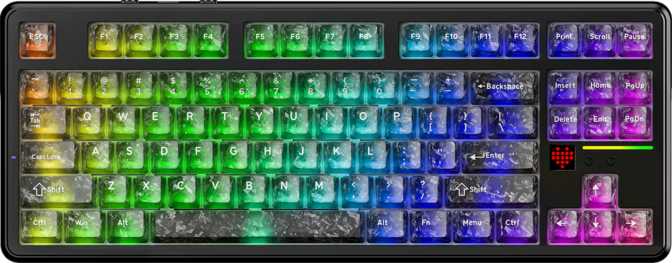
The X87 Ultra uses the tenkeyless layout, removing the numeric keypad while retaining all function keys, arrows, and the navigation cluster. For most people this is the sweet spot — you keep everything you actually use day-to-day while reclaiming a meaningful chunk of desk space and letting your mouse arm rest closer in a more natural position. Competitive gamers have made TKL the de facto standard for tournament setups, and the logic applies equally to home desks.
At 330mm wide and 137mm deep, it sits squarely in the expected TKL footprint without feeling cramped. The 760-gram weight keeps it planted during fast typing sessions without making it a burden to move — substantial enough to feel well-made, light enough to carry without complaint.
Gasket Mount and Plate Construction
The case is plastic, which deserves direct acknowledgment. On a gasket-mounted keyboard, though, the case material is largely irrelevant to the typing feel. The gasket mount system suspends the PCB and switch plate inside the case on silicone or foam gaskets rather than bolting them rigidly to the frame. This absorbs keystroke energy before it reverberates back through your fingers, producing a noticeably softer, more cushioned typing feel that rigid-mount boards at the same price simply cannot replicate.
The FR4 fiberglass plate sits between aluminum's rigidity and polycarbonate's flex — it offers a small degree of give without introducing the mushy, unfocused feel associated with fully flexible setups. For a linear switch configuration, this pairing is considered and effective.
Available in black and white without aggressive styling or accent colors, the aesthetic is desk-agnostic and understated. Adjustable rear feet let you dial in the typing angle to your preference. No wrist rest is included — a common omission at this tier, with aftermarket options widely available.
- LayoutTenkeyless (80%)
- Width330 mm
- Depth137 mm
- Thickness18.5 mm
- Weight760 g
- Mount TypeGasket
- Plate MaterialFR4 Fiberglass
- Case MaterialPlastic
- Available ColorsBlack / White
- Adjustable FeetYes
- Wrist Rest IncludedNo
Triple Connectivity: Three Ways In
The X87 Ultra supports three distinct connection modes, and the practical implications go well beyond a feature checklist. Each mode serves a different use case, and having all three on a single board removes a compromise most wireless keyboards force on their buyers.
Wired USB
Zero battery anxiety and full-speed performance. The detachable cable means you are not locked to whatever ships in the box — any compatible replacement works, and the board charges simultaneously while connected.
2.4 GHz Wireless
Recommended for GamingA dedicated, low-latency link between the keyboard and dongle. At 8,000 Hz polling, 2.4 GHz is the only wireless mode that makes competitive sense — stable, interference-resistant, and effectively indistinguishable from wired under normal conditions.
Bluetooth 5.0
Multi-device flexibility without touching a cable. Pair to a secondary laptop, tablet, or phone and switch between them silently. Writers and professionals who alternate between a desktop and a work laptop will find this the mode they use most often.
Mac Compatibility: The X87 Ultra is confirmed Mac-compatible, with full keycap support and layout accommodation for macOS — not just Windows. Multi-device Bluetooth switching makes alternating between a Mac and a Windows machine genuinely practical without any reconfiguration.
The 8,000 Hz Polling Rate: What It Actually Means
A polling rate describes how many times per second the keyboard reports its state to your computer. A standard keyboard reports 1,000 times per second. The X87 Ultra reports 8,000 times per second — eight times as frequently.
For gaming, this translates to a maximum input latency from keypress to signal of 0.125 milliseconds, compared to 1 millisecond at the standard rate. In fast-paced competitive titles where reaction windows are measured in single-digit milliseconds, this margin is meaningful at the highest levels of play.
For everyday typing, document work, or casual gaming, the practical difference between 1,000 Hz and 8,000 Hz is essentially imperceptible. The value of this specification is entirely in the competitive use case — which is precisely the audience the X87 Ultra targets with its broader feature set.
Polling Rate Context
Latency figures represent the theoretical maximum signal delay per polling interval, not total system latency.
White Jade Switch: Smooth, Light, and Considered
The White Jade Switch is a linear mechanical switch — the keypress travels straight down without a tactile bump or audible click. Each key actuates at exactly the midpoint of its travel, requiring 42 grams of force, placing it at the lighter end of the mainstream spectrum.
Lighter actuation force means your fingers do not tire as quickly during extended sessions. For gamers who rely on rapid key presses in quick succession — WASD movement, ability inputs, jump timing — the reduced resistance lowers accumulated muscular effort, which compounds noticeably over the course of an hour-long session.
The total travel distance is 3.5mm, with actuation occurring at the 2mm midpoint. This is a conventional, well-understood profile: immediate enough to feel responsive, long enough to give a satisfying sense of a full keypress. It works well for both fast gaming inputs and sustained typing.
Rapid trigger allows the actuation reset point to move dynamically as you release a key, rather than requiring travel back past the fixed actuation point. This feature requires hall-effect switches — a fundamentally different technology. If rapid trigger is a priority for your competitive play style, the X87 Ultra is not the right tool. A hall-effect keyboard is the appropriate category to evaluate.
- Switch NameWhite Jade
- Switch FeelLinear
- Actuation Force42 g
- Actuation Point2 mm
- Total Travel3.5 mm
- Hot-SwappableYes
- Rapid TriggerNo
- Adjustable ActuationNo
- Analog InputNo
Hot-Swap Switches: The Freedom to Customize
Every switch on the X87 Ultra can be removed and replaced without soldering. For buyers who have never used a hot-swap board before, this is more significant than it first appears.
Switch feel is intensely personal. Some people prefer heavier resistance; others want tactile feedback with a distinct bump; others still want the audible click of a clicky switch. With hot-swap sockets, you can purchase any MX-compatible switch set that appeals to you, pull out the White Jade switches with an inexpensive switch puller, and press the replacements straight in. The whole process for an 80% keyboard takes roughly twenty minutes and requires no specialized tools beyond the puller.
For first-time mechanical keyboard buyers, hot-swap removes the risk of committing to a switch type you may not enjoy long-term. For enthusiasts, it is an expected baseline at this tier — and the X87 Ultra delivers on it without proprietary compatibility restrictions.
Soldering Required?
No — Fully Tool-FreeCompatible with all standard MX-footprint switches from any manufacturer. No proprietary restrictions apply.
Battery Life That Changes How You Think About Wireless
The claimed battery endurance of the X87 Ultra is substantial. To put it in practical terms: even a heavy user working and gaming at their desk for ten hours daily would reach for the charging cable only a handful of times over the course of several weeks. For most people, charging the keyboard becomes something done occasionally and without urgency — not a regular part of any weekly routine.
This endurance effectively removes battery anxiety from the wireless experience. Unlike wireless mice, which often demand weekly or more frequent charging, a keyboard at this level of endurance becomes wireless in the truest practical sense — always available, never critically low at an inconvenient moment.
When the battery does eventually need attention, wired USB connection provides simultaneous full operation and charging, so there is no forced downtime.
Wireless Keyboard Battery Comparison
Comparison figures are approximate category averages for context — not specific competitor benchmarks.
Features: Display, Keycaps, and Backlighting
Built-In Display
A small onboard screen surfaces active connection mode, battery level, and current profile status at a glance — without memorizing an LED color code or opening software to check. For users who switch frequently between the three connectivity modes, this is a genuine quality-of-life feature rather than decorative hardware.
PBT Keycaps, OEM Profile
PBT plastic is the enthusiast standard: harder than ABS, resistant to the shiny worn surface that develops with months of use, and slightly more textured under the fingers. Legends hold up significantly longer. The OEM profile is a familiar, slightly taller curved-top shape that is immediately comfortable for any typing style.
The fully standard ANSI layout means aftermarket keycap sets fit without modification or compatibility research — a meaningful plus for anyone planning future upgrades.
Per-Key RGB Lighting
South-facing RGB LEDs sit beneath each switch, shining toward the bottom of the keycap legend. Per-key RGB is fully customizable through Attack Shark's software. The south-facing placement works well with the included standard OEM keycaps. Media controls are accessible via the Fn key layer — the standard trade-off for maintaining a compact TKL footprint.
Software and Customization: The Honest Picture
The X87 Ultra does not support QMK, ZMK, or VIA — the open-source firmware and configuration tools that enthusiasts use to remap keys, build complex macros, and customize behavior with full offline control. This is a meaningful limitation for power users who want deep, transparent configuration that does not depend on any proprietary software remaining active or well-maintained over time.
Customization is handled through Attack Shark's own software. The quality and long-term support of that ecosystem is a legitimate unknown — particularly for a newer brand compared to established players with years of firmware updates behind them. This is not a dealbreaker for most buyers, but it is worth factoring in if you intend to keep this board for many years.
There is no adjustable actuation point, no rapid trigger, and no dual actuation on the firmware side. These features are defined by hall-effect technology — a fundamentally different switch category. The X87 Ultra is a conventional mechanical keyboard that does not attempt to replicate what hall-effect boards offer. What it does provide is complete N-key rollover, ensuring every key pressed simultaneously registers correctly with no ghosting under any combination.
- N-Key Rollover (NKRO)
- Detachable Cable
- Mac-Compatible Layout
- Per-Key RGB Backlighting
- Onboard Status Display
- QMK / VIA / ZMK Support
- Rapid Trigger
- Adjustable Actuation Point
- USB Passthrough
- Rotary Dial / Volume Knob
Who Should Buy the Attack Shark X87 Ultra
- You are a competitive gamer who wants high-polling-rate wireless and does not need rapid trigger functionality
- You switch between multiple devices — a gaming rig, work laptop, or tablet — and want one keyboard for all of them
- You are building your first enthusiast-tier setup and want hot-swap flexibility to try different switches without buying another board
- You work across both Mac and Windows and want one keyboard that handles both platforms without friction
- You want wireless that genuinely feels untethered — with a battery that lasts weeks, not days
- Your primary competitive games benefit meaningfully from rapid trigger — a hall-effect keyboard is the appropriate category
- You require QMK, ZMK, or VIA support for open-source, offline firmware customization
- You strongly prefer tactile or clicky switches and do not plan to use the hot-swap feature to change them
- You need a full-size layout with a numpad for data entry or spreadsheet-heavy work
- You associate premium build feel exclusively with aluminum or polycarbonate construction — the plastic case will not satisfy that expectation
How It Compares: Competitive Positioning
The X87 Ultra sits against two logical alternatives — mid-range wireless TKL boards and premium hall-effect TKL keyboards. Here is how the feature set maps across each category.
| Feature | Attack Shark X87 Ultra | Mid-Range Wireless TKL | Premium Hall-Effect TKL |
|---|---|---|---|
| Polling Rate | 8,000 Hz | 1,000 Hz | 1,000–4,000 Hz |
| Mount Type | Gasket | Tray / Top | Varies |
| Hot-Swap Switches | Sometimes | ||
| Rapid Trigger | |||
| Battery Endurance | Very Long | Moderate–Long | Moderate |
| Open Firmware (QMK / VIA) | Rarely | Rarely | |
| Built-In Display | Rarely | Rarely | |
| Connectivity Modes | USB + 2.4G + BT | USB + 2.4G or BT | USB + 2.4G |
Honest Strengths and Weaknesses
Where It Earns Respect
The combination of gasket mount construction, FR4 plate, and linear switches produces a typing feel that punches well above the price class. It is soft, quiet, and satisfying in a way that rigid-mount boards at the same cost simply cannot replicate, regardless of their materials or branding.
The battery endurance is genuinely exceptional. Most wireless keyboards require charging every one to two weeks at moderate usage. The X87 Ultra extends that interval to the point where it stops being a consideration entirely — and that changes the daily experience of using a wireless board.
The 8,000 Hz polling rate and full NKRO deliver a level of input precision that most competing boards at this price point do not bother to offer. For the competitive gaming audience this keyboard targets, that specification represents meaningful and differentiated value.
Hot-swap sockets and fully standard PBT keycaps in ANSI sizing give buyers a wide-open upgrade path — different switches, different keycap sets — without replacing the board itself. For a first serious mechanical keyboard, that long-term flexibility is a significant advantage.
Where It Falls Short
The absence of VIA or QMK support will frustrate customization-minded enthusiasts who want open-source, offline firmware control. Attack Shark's proprietary software is an unknown quantity in terms of long-term support — a legitimate concern for a board you intend to use for years.
For competitive players in titles where rapid trigger provides a measurable tactical advantage, the X87 Ultra is simply not the right tool. No polling rate advantage offsets what hall-effect switches can do in that narrow but important use case.
The plastic case will disappoint buyers who associate premium feel with aluminum or polycarbonate construction. Functionally, the gasket mount compensates completely for any typing-feel implications. Perceptually, it may not meet expectations formed by more expensive-feeling boards.
No wrist rest is included, and no rotary dial or dedicated volume control is present on the board. These are common omissions at this tier, but worth noting for buyers who consider them essentials rather than extras.
Common Questions Before You Buy
Final Verdict
Attack Shark X87 Ultra — Our Recommendation
The Attack Shark X87 Ultra is a well-considered wireless mechanical keyboard that delivers where it counts for its intended audience. The gasket mount, hot-swap switches, and extended battery life form a genuinely strong foundation. The 8,000 Hz polling rate is a real differentiator — rare at this tier, and meaningful for competitive gamers who take input performance seriously.
The trade-offs are defined and deliberate. No rapid trigger, no open-source firmware, and a plastic case are choices that keep the board accessible and focused on its core strengths. Buyers who need what the X87 Ultra offers — fast wireless, exceptional endurance, quality typing feel, and a flexible multi-device experience — will find it difficult to match this combination elsewhere at a comparable price point.
For the competitive gamer, the multi-device professional, or the enthusiast building their first hot-swap setup, the Attack Shark X87 Ultra is a confident recommendation. For buyers who need rapid trigger or QMK-level customization, a different category of keyboard is the right answer — not a different version of this one.
Warranty: 1-year manufacturer warranty included with purchase.