Highly Recommended
Wireless 75% Mechanical Keyboard
Strong buy for multi-device users, keyboard enthusiasts, and gamer-typist hybrids seeking wireless freedom without sacrificing typing quality or customization depth.
Gasket Mount
Premium typing feel included standard
Tri-Mode Wireless
2.4 GHz, BT 5.1 & USB
200-Hr Battery
Best-in-class endurance
Hot-Swap Switches
Any MX switch, no soldering
QMK & VIA
Full firmware remapping
Display & Knob
Live status + remappable dial
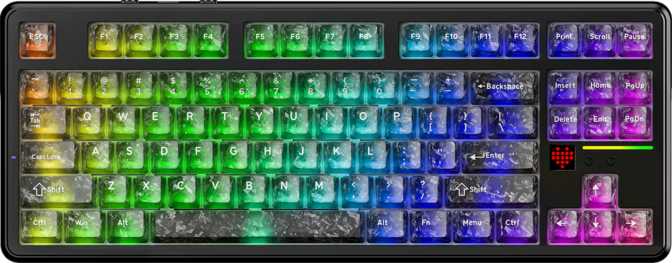
Attack Shark has been quietly building a reputation for packing enthusiast-grade features into keyboards that don't demand enthusiast-grade pricing. The X820 Ultra is where that ambition gets its most complete expression — a wireless 75% mechanical keyboard with gasket mounting, hot-swappable switches, wireless connectivity via both Bluetooth and a 2.4 GHz receiver, QMK and VIA firmware support, a small onboard display, and a rotary knob — all in a compact footprint designed to sit comfortably on any desk regardless of how much real estate you're working with.
The question isn't whether the spec sheet looks impressive — it does. The real question is whether the execution matches the promise, and whether this particular combination of features suits your specific workflow. This review answers both.
Build Quality and Physical Presence
The X820 Ultra is housed in a reinforced plastic shell, available in both black and white colorways. Plastic cases in this category tend to carry a stigma — unfairly, in many cases — and the X820 Ultra makes an argument that material choice matters less than structural execution. The gasket mounting system does more for the typing feel than aluminum casing alone, and the overall chassis feels purposefully solid rather than hollow.
The footprint is right where a 75% should be — meaningfully smaller than a tenkeyless, easily fitting on crowded desks or portable setups, without sacrificing the function row, dedicated arrow keys, or the navigation cluster. The keyboard's height sits on the taller end of the modern spectrum, which means wrist fatigue over long sessions is a genuine consideration. There's no bundled wrist rest, so budget for one or adjust your typing posture accordingly.
The weight is considerably heavier than you might expect from a plastic-bodied compact — a deliberate decision that improves desk stability and dampens vibration. It won't shift around during intense gaming sessions, and it gives the whole package a premium-adjacent feel in hand.
Three adjustable feet positions let you find the angle that suits your wrist position and desk height — a small detail that makes day-to-day comfort meaningfully customizable.
- Form Factor 75% Compact — ANSI
- Mount Type Gasket Mount
- Case Material Reinforced Plastic
- Colors Black & White
- Tilt Adjustment 3 Positions
- Cable Detachable USB
- Warranty 1-Year Coverage
No wrist rest included
For extended typing sessions at this keyboard's height, budget for a compatible wrist rest or be deliberate about typing posture from day one.
Gasket Mounting: The Feature That Changes Everything
First time hearing about gasket mounting? How a keyboard's internal PCB connects to the outer case has a dramatic effect on how typing feels and sounds. Traditional rigid mounting makes keystrokes feel hard and sharp — that impact accumulates into real fatigue. Gasket mounting suspends the internal assembly on silicone cushions around its perimeter, allowing it to flex slightly under finger pressure. The result is a softer, cushioned keystroke return, reduced bottom-out harshness, and a quieter overall sound profile — a typing experience that used to require spending significantly more.
The X820 Ultra's gasket mount makes it competitive with keyboards priced considerably higher, and it's one of the strongest arguments for this board over the sea of similarly-priced alternatives.
Each keypress bounces back against compliant silicone rather than rigid plastic, reducing the impact felt in your fingertips over long sessions.
The plate-to-case connection absorbs energy at the end of each stroke rather than transmitting it directly through to the desk.
The same flex that softens keystrokes also dampens vibration into the case, lowering overall sound output compared to rigid mounts.
The Switches: Linear Performance Out of the Box
The X820 Ultra ships with Shark Switch linears — Attack Shark's in-house linear switches. Linear switches actuate smoothly throughout the entire keystroke with no tactile bump or audible click; the motion is consistent from top to bottom.
These switches are notably light, requiring only a gentle touch to register. That translates to fast keystroke input and low finger fatigue — qualities that suit both speed-typists and gamers who need rapid repeated presses. The actuation happens early in the keystroke travel, and the total depth is short by mechanical keyboard standards, making first contact quick and responsive.
Light switches can create accidental activations for those with heavy hands or who rest their fingers on keys without intending to actuate. Transitioning from tactile or clicky switches requires an adjustment period of a week or two while muscle memory recalibrates.
Hot-Swappable PCB — The Bigger Story
Every switch is hot-swappable. The PCB accepts both 3-pin and 5-pin MX-compatible switches, covering the vast majority of aftermarket options available. Swapping requires only a switch puller and takes about twenty minutes for the full board. No soldering required. The stock switches are a starting point, not a lifetime commitment.
-
Type & Name
Linear — Shark Switch
-
Actuation Force
Light — gentle touch to register
-
Actuation Point
Early in the keystroke travel
-
Total Travel
Short — quick full stroke
-
Hot-Swap
3-pin & 5-pin MX compatible
-
Rapid Trigger
Not available
Connectivity: Wireless Done Right
Three distinct connection modes cover every scenario you're likely to encounter. Understanding when to use each one is what separates good wireless experience from frustrating wireless experience.
2.4 GHz Wireless
The gaming mode. Registers keypresses up to a thousand times per second — indistinguishable from wired for all but the most latency-sensitive competitive scenarios. Uses the included USB dongle and requires no pairing steps.
Bluetooth 5.1
The flexibility mode. Switch between a desktop, laptop, and tablet without dongles. Marginally higher latency than 2.4 GHz — imperceptible during productivity work and adequate for casual gaming.
Wired USB
The fallback mode via a detachable USB cable. Full polling rate applies here too. A detachable cable means wear never retires the keyboard — cables are far cheaper to replace than boards.
Battery Life: The Number That Makes You Read It Twice
The X820 Ultra's rated battery life is extraordinary for this category. The manufacturer's figure represents optimal conditions — backlight off, stable connection — but even factoring in real-world variables like RGB lighting and active Bluetooth use, the underlying battery capacity puts this board in a genuinely different practical tier from most competing wireless keyboards.
Where many competing wireless keyboards make charging a weekly or bi-weekly routine, the X820 Ultra has the capacity to make it a monthly or even less-frequent consideration with moderate RGB use. For perspective: competing wireless keyboards in this category typically advertise anywhere from a third to half the runtime this board claims.
RGB and Battery Life
RGB lighting is the single largest drain on wireless keyboard battery. Expect real-world runtime with full animated lighting to be substantially lower than the rated figure. Managing brightness or setting a static single-color effect rather than animated patterns extends runtime significantly. Users prioritizing endurance over aesthetics should run lighting dimmed or off entirely.
Battery Endurance at a Glance
Ratings measured with RGB off. Real-world runtime with lighting varies significantly by brightness level and usage pattern.
Onboard Display and Rotary Knob: Practical Additions, Not Gimmicks
Onboard Display
A small panel shows real-time keyboard status at a glance — active connection mode, battery level, current layer, and lock key status.
That might sound minor until you've spent time with a wireless keyboard that communicates the same information through cryptic LED blink patterns you have to look up in a manual. A glanceable display removes that friction entirely. It's a genuine quality-of-life upgrade on a keyboard where modes and layers change frequently.
Rotary Knob
The rotary knob handles volume control by default — rotate to adjust, press to mute. In practice, a dedicated physical dial becomes one of the most-used controls on your desk within days of having one.
Through QMK, the knob can be remapped to scrolling, zoom, brush size in creative software, or any other continuous input. Those settings persist in onboard memory — no background software required once configured.
QMK and VIA: The Customization Engine
QMK is open-source keyboard firmware, and its presence on the X820 Ultra means access to one of the most comprehensive key customization ecosystems available. Every key can be remapped, macro sequences recorded, RGB behaviors scripted, and layer configurations built to suit highly specific workflows.
VIA is a graphical interface for QMK configuration — remap keys, assign macros, and set lighting profiles through a browser-based or desktop app without writing a single line of code. For users who've never touched firmware before, VIA makes what would otherwise be intimidating into something approachable in under ten minutes.
-
Onboard Memory Storage
All custom configurations are saved to the keyboard itself. Key mappings, macros, and layers travel with the board and work on any computer — no software installation required.
-
Full Multi-Layer Support
Create multiple key layers for different applications — a gaming layer, a design layer, a writing layer — each stored and switchable on the fly.
-
Macro Recording
Assign multi-step key sequences to any key — from simple shortcuts to complex text expansion strings and application commands.
-
N-Key Rollover (NKRO)
Every simultaneous keypress registers accurately — no dropped inputs regardless of how many keys are held at once.
- QMK Firmware Supported
- VIA Configurator Supported
- ZMK Firmware Not Supported
- Mac OS Key Mapping Supported
- Windows Key Mapping Supported
ZMK note: ZMK is an alternative wireless firmware popular with split keyboards. Its absence won't affect most users, but open-source enthusiasts with existing ZMK-specific workflows should factor this in before purchasing.
Keycaps: Quality That Punches Above Budget
The X820 Ultra ships with PBT double-shot keycaps in OEM profile. Each of those terms carries practical weight for a buyer — and all three land in the positive column.
Shine Resistance
PBT plastic resists the wear patterns that afflict cheaper keyboards. Where ABS keycaps develop a greasy-looking sheen on frequently pressed keys within months, PBT maintains a consistent matte, textured feel for years of daily use.
Fade-Proof Legends
Double-shot construction forms the key legends as a physically separate layer of plastic inside the keycap mold — they cannot fade because they are structural rather than applied. Years of heavy use, same sharp lettering as day one.
Universal Compatibility
OEM profile is a familiar, ergonomic stepped shape most typists adapt to immediately. Standard ANSI sizing means the entire aftermarket keycap ecosystem — every profile, every colorway — fits without modification.
A Note on RGB and LED Direction
The backlighting LEDs are south-facing, positioned at the bottom edge of each switch housing. This can produce subtly uneven legend illumination with OEM-profile PBT keycaps — the top of legends catches slightly less direct light than the bottom. The RGB effect remains attractive overall, particularly visible around key edges and reflecting off the desk, but the precision of legend glow is marginally behind what north-facing LED setups achieve. For most users this is a detail noticed in photographs rather than felt in use.
The 75% Layout: What You Keep and What You Lose
The 75% form factor is a specific compromise, and it's worth being honest about both sides of it before buying.
What You Keep
- Full function row (F1–F12)
- Dedicated arrow key cluster
- Home, End, Page Up, Page Down
- Standard ANSI key sizing — full keycap ecosystem compatible
- Meaningfully reduced footprint vs. tenkeyless
- Dedicated Mac and Windows key support
What You Give Up
- The numpad — no 75% board solves this
- Dedicated media keys — handled via Fn layer, partially offset by the rotary knob
- Extra spacing between key clusters found on larger layouts
Who this layout does not suit
Accountants, data entry professionals, and heavy spreadsheet users will miss a numpad immediately and persistently. The workaround — entering numbers via the main row — exists but is not equivalent for sustained numerical input. If your workflow depends on a numpad, a 75% layout is the wrong choice regardless of how good the keyboard is otherwise.
Who Should Buy the Attack Shark X820 Ultra
- You're a gamer who also works — wireless performance and QMK support make it functional across both contexts without compromise.
- You use multiple devices — switching between a desktop and laptop or tablet via Bluetooth is smooth and practical.
- You're a keyboard enthusiast on a budget — gasket mount, QMK/VIA, hot-swap, and solid keycaps at this price tier is a compelling combination.
- You switch between Mac and Windows — dedicated Mac key support and cross-platform firmware remapping are genuinely useful.
- You're upgrading from a membrane or entry-level mechanical — the typing feel improvement will be dramatic.
- You need rapid trigger or adjustable actuation — hall-effect switch competitors offer these features; this board does not.
- You depend on a numpad for data entry — look at a tenkeyless or full-size instead.
- You demand metal construction — plastic, however well-executed, won't satisfy buyers who require a cold, heavy aluminum or brass-weighted board.
- You're committed to ZMK firmware — the QMK-only wireless firmware support closes off that ecosystem entirely.
Competitive Positioning
Framing the X820 Ultra against the right alternatives clarifies where its value lies. The most direct competitors fall into two categories: wired QMK gasket-mount 75% keyboards that trade wireless capability for metal construction, and budget wireless 75% boards that typically lack either firmware depth or premium typing feel.
| Feature | Attack Shark X820 Ultra Our Pick |
Wired QMK 75% (Aluminum builds) |
Budget Wireless 75% (Typical alternatives) |
|---|---|---|---|
| Gasket Mount | Yes | Yes (premium tiers) | Rarely |
| Hot-Swap Switches | Yes | Common | Uncommon |
| QMK / VIA Support | Yes | Common | Rare |
| Wireless (2.4 GHz + BT) | Yes | No | Often |
| Battery Endurance | Exceptional — 200 hr rated | N/A (wired) | Moderate (40–80 hr) |
| Onboard Display | Yes | Rare | Rare |
| Rotary Knob | Yes | Sometimes | Rare |
| Rapid Trigger | No | Rarely | No |
| Case Material | Plastic (solid build) | Aluminum (typical) | Plastic |
| Mac & Windows Support | Yes | Varies | Varies |
Comparison represents typical category characteristics. Individual products vary. Verify specific features with manufacturers before purchasing.
The nearest named competitors in the wired QMK/VIA gasket-mount 75% category — most notably the Keychron Q series — use aluminum construction and trade away wireless entirely. For buyers who work at a fixed desk, never need to switch devices, and want the premium feel of a machined metal case, those boards represent a meaningful alternative. Competing wireless 75% boards from brands like Epomaker and NuPhy offer solid individual features, but matching the full combination of gasket mounting, QMK/VIA, hot-swap, extended battery life, display, and rotary knob in one wireless package at this price tier is where the X820 Ultra's competitive case is strongest.
Strengths and Weaknesses, Honestly Assessed
The X820 Ultra's defining strength is coherence. It doesn't do one thing brilliantly while cutting corners everywhere else — it builds a functional feature stack where every component reinforces the others. The gasket mount improves the typing character of the linear switches. The hot-swap support maximizes the value of that mount by making switch experimentation consequence-free. QMK and VIA make the keyboard's full capability accessible without technical barriers. The battery life makes the wireless capability genuinely practical rather than a feature you manage around.
The typing experience lands well above what the price and materials suggest. Gasket mounting does real work here, and the PBT keycaps contribute a satisfying, matte keystroke feel that holds up well to extended sessions.
The weaknesses are real but contained. The plastic construction is the easiest criticism to level, but it's also the most easily contextualized — the gasket mount contributes more to the actual typing experience than material alone, and the build quality isn't compromised. The south-facing LED orientation produces subtly uneven legend illumination — a minor issue for most, but relevant to anyone building a showpiece RGB setup.
The more consequential limitation is the absence of advanced gaming input features. Rapid trigger has become genuinely relevant in competitive gaming, and keyboards with hall-effect switches now offer it as standard. Buyers for whom this matters should know the X820 Ultra doesn't have it and won't gain it via a firmware update.
The one-year warranty is shorter than the two-year coverage some competitors provide. For a keyboard intended as a daily driver, that's worth factoring into your total cost of ownership calculation.
Answers to Questions Real Buyers Search For
Final Verdict
The Attack Shark X820 Ultra earns a strong recommendation for its target audience. For the gamer who types all day, the remote worker who carries a keyboard between locations, the enthusiast buying their first truly capable board, or the multi-device user who needs a single keyboard to serve multiple machines — this board addresses each of those needs with a level of feature completeness that requires going significantly upmarket to match.
The case against is specific: buyers chasing the very latest in gaming input technology should look at rapid-trigger-equipped alternatives, and those who demand metal construction should explore wired aluminum competitors. For everyone else, the X820 Ultra makes a well-reasoned, feature-forward argument for itself.
Strong buy for multi-device users and enthusiasts entering the customization ecosystem. Pass if rapid trigger or aluminum construction are hard requirements.