Attack Shark X68 Max HE: Hall Effect 60% Gaming Keyboard Review
KeyboardsExpert Score
The competitive keyboard market is crowded with boards promising pro-level input performance while quietly cutting corners where it counts. The Attack Shark X68 Max HE takes a measurably different approach — Hall effect switches, 0.1mm rapid trigger sensitivity, an 8000 Hz polling rate, dual actuation, and an aluminum-reinforced 60% chassis arrive in a single wired package at a price that makes the feature list hard to believe at first glance. This review examines whether that combination holds up under scrutiny and precisely who it serves best.
Design, Build Quality, and Physical Experience
Form factor, materials, and structural confidence examined
60% Footprint
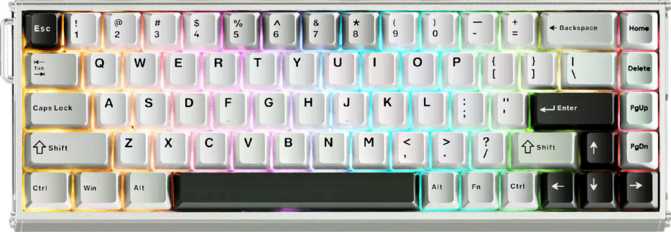
At 325mm wide and 110mm deep, the X68 Max HE is narrow enough for a laptop bag and compact enough to reclaim meaningful desk space for your mousepad. For FPS gamers, this width reduction pushes the mouse hand into a more natural, centered position without the keyboard crowding it.
The function row, navigation cluster, and numpad are absent from physical keys — all accessible via function-layer combinations instead.
Aluminum Plate Inside
The case pairs a plastic outer shell with a solid aluminum internal plate — the structural spine of any keyboard. At this price tier, that plate material is the standout choice. Aluminum delivers rigidity, a warmer sound signature, and a premium typing feel that polycarbonate and FR4 alternatives simply cannot replicate.
Close to 1.5 kg of total weight means this board stays firmly planted through the most aggressive gaming inputs.
Top-Mount Construction
The plate screws into the top half of the case — a top-mount configuration that sits above tray-mount boards in acoustic and flex quality, delivering slightly more give and a warmer, more consistent sound profile without the boutique engineering complexity of gasket-mount designs.
No case flex, no hollow clatter. Typing sounds solid and even across the entire key surface.
Color and Aesthetic
Available in black and white colorways, the X68 Max HE reads as a serious tool rather than gaming merchandise — no aggressive angles, no excessive branding. South-facing RGB LEDs illuminate each key from the bottom of the keycap opening, producing a distinct underlit glow character. The detachable cable enables custom cable swaps and protects the USB port from long-term stress damage. Both colorways carry the same understated presence that a growing portion of the enthusiast market actively prefers.
Physical Details Worth Knowing
- Adjustable tilt feet let you dial in the exact incline that suits your desk height and wrist position
- Detachable cable simplifies transport and allows custom cable upgrades without hardware modification
- Mac key compatibility is present — key mappings are available, though software and experience are Windows-optimized
- No wrist rest included. At 40mm rear height, one is worth budgeting separately for extended typing sessions
Hall Effect Switches: The Technology Behind the Performance
Why magnetic switches outperform traditional mechanical contacts — and what that means for the X68 Max HE
How Hall Effect Switches Actually Work
Standard mechanical switches register a keypress the moment two metal contacts physically touch. That contact point is fixed in hardware — one actuation depth, one reset depth, no flexibility. Over months of heavy use, those contacts wear and oxidize, causing the feel to shift and become inconsistent over time.
Hall effect switches operate on a completely different principle. A small magnet inside the switch stem moves past a magnetic field sensor on the PCB as you press the key. That sensor reads the magnet's exact position continuously throughout the entire keystroke — not just at a single binary contact point. There are no contacts to wear. Nothing degrades through use.
More importantly: because the sensor delivers positional data rather than a simple on/off signal, the keyboard's firmware can use that information any way it chooses. The actuation point, reset point, and rapid trigger behavior are entirely software-defined — configurable per key, changeable at any time. This is the foundation that makes every advanced feature on the X68 Max HE possible.
Outemu Magnetic Amber — Switch Specs
- Switch Type
- Hall Effect Linear
- Actuation Force
- 50 g — moderate-light
- Min. Actuation Distance
- 0.1 mm
- Max. Actuation Distance
- 3.4 mm
- Total Key Travel
- 3.5 mm
- Hot-Swappable
- Yes
Coming from traditional mechanicals?
The 50g actuation weight is comparable to Cherry MX Red-class linears. The texture differs: without metal contact engagement, the stroke is uniformly smooth from top to bottom of travel. Users coming from conventional linears adapt quickly and typically describe the Amber stroke as cleaner and more consistent.
Performance Features That Matter in Competitive Play
Six capabilities that separate the X68 Max HE from conventional gaming hardware
Rapid Trigger
On a conventional keyboard, a key must physically travel past a fixed reset threshold before another press can register. The X68 Max HE resets the moment a key moves upward by as little as 0.1mm — the current practical minimum available on any keyboard. The dead zone between inputs collapses to nearly nothing.
In FPS games where counter-strafing and fast directional reversals determine shot accuracy, this is a measurable mechanical advantage, not a specification exercise.
8000 Hz Polling Rate
The keyboard reports its state to the connected computer 8000 times per second — eight times faster than a standard gaming keyboard. The time between pressing a key and the computer receiving that signal shrinks to a fraction of a millisecond. This is the current practical ceiling for wired keyboards.
The perceptible gain is greatest stepping from 1000 Hz to higher rates. At 8000 Hz, the board guarantees the lowest possible input latency floor — meaningful for players who have already optimized every other variable in a competitive setup.
Per-Key Adjustable Actuation
Every key can be configured to register at a different press depth — from near-surface contact down to 3.4mm. Competitive players typically set WASD to a very shallow actuation for fastest directional response, while keeping typing keys deeper to avoid accidental presses from finger resting contact.
This level of per-key granularity was exclusive to keyboards at significantly higher price points until recently.
Dual Actuation
A single key can trigger two distinct actions at two different depths in the same keystroke — one input at a half-press, a different input at full press-through. This effectively doubles the functional density of the keyboard without adding physical keys.
Most casual users will not configure this. For optimized competitive setups it enables control bindings that keyboards without this capability simply cannot replicate — sprint on a partial press, crouch on full, for example.
Analog Input
Because the Hall effect sensor tracks exact key position continuously, a compatible game can receive that data as a proportional analog signal — similar to a thumbstick. Movement keys can communicate "pressed 30% of the way" rather than simply "pressed," enabling proportional speed control in supported titles.
Analog keyboard input support is still developing across the PC gaming ecosystem, but the hardware capability is fully present. The X68 Max HE is positioned for where this technology is heading.
N-Key Rollover
Every key on the board can be pressed and registered simultaneously, with zero ghosting and no dropped inputs regardless of how many keys are held at once. No combination of simultaneous keypresses will confuse or overflow the keyboard's input reporting.
A baseline requirement for competitive gaming keyboards that the X68 Max HE meets without qualification or asterisk.
Keycaps, Lighting, and Daily Usability
What the typing surface looks, feels, and behaves like after months of heavy use
PBT Double-Shot
A denser, harder plastic that resists the shiny worn appearance ABS caps develop after months of use. The legends are molded from a second layer of plastic inside each keycap — they physically cannot fade or wear away regardless of typing intensity.
OEM Profile
Medium-height curved caps familiar to most keyboard users. Comfortable for both touch typing and gaming, and compatible with the wide aftermarket keycap ecosystem since the board uses a fully standard ANSI US layout with standard key sizing throughout.
South-Facing RGB
Per-key RGB lighting with LEDs positioned at the bottom of each keycap opening, producing a distinctive underlit bloom that suits the understated aesthetic. Customizable through the proprietary software with profiles stored on-board for use without software running.
Rotary Dial
A physical rotary knob handles volume control, media scrubbing, and other scrolling-type functions. Having direct volume adjustment without keyboard shortcuts or software interaction is a consistent quality-of-life improvement for both gaming and general daily desk use.
Standard Layout and Aftermarket Compatibility
The X68 Max HE uses a fully standard ANSI US layout, meaning every modifier, spacebar, and shift key is a standard size. Any aftermarket keycap set labeled ANSI-compatible fits the entire board without exceptions or workarounds — you are not locked into the stock aesthetic.
Media controls and function-row equivalents are accessible via the Fn key layer, which is standard behavior for the 60% form factor. Mac users have the required key mappings available. Function layer access requires a brief adaptation period for users upgrading from larger layouts, but becomes habitual within days for those committed to the 60% format.
Who Should Buy the X68 Max HE — and Who Should Not
The right keyboard for the right person — be honest about which column describes you
Ideal For These Users
-
Competitive FPS and action game players
Rapid trigger at 0.1mm, 8000 Hz polling, adjustable actuation, and dual actuation collectively form a feature set that directly translates to measurable input advantages in fast, reflex-driven titles. This is the primary audience the board was engineered for.
-
Desk-space-conscious setups
Whether for aesthetic minimalism, limited physical space, or maximum mousepad real estate, the 60% form factor delivers. No gaming-relevant keys are sacrificed in the transition from a larger layout.
-
Enthusiasts on a budget
Hall effect technology with dual actuation, analog input, and 8000 Hz polling has historically required flagship-level spending. The X68 Max HE occupies one of the better value positions currently available in this category for these specific features.
Not the Right Fit For
-
Heavy typists and productivity-focused users
The 60% layout is a genuine impediment for workflows that depend on function keys, arrow keys, and navigation shortcuts. A 65% or 75% layout keyboard retains those physical keys while staying compact — a better fit for productivity-heavy use.
-
Open-source firmware enthusiasts
VIA, QMK, and ZMK support are absent. Configuration requires proprietary software. Complex layer programming, advanced remapping, and community-maintained keymap ecosystems are not available here.
-
Wireless-preferring users
This is wired-only. No Bluetooth, no wireless receiver. The design choice is deliberate given the competitive gaming target use case — but it is a firm limit with no workaround for cable-free desk setups.
-
Frequent travelers
At close to 1.5 kg, this is a desk keyboard. The weight is a stability advantage at home, but it makes the board noticeably heavier than compact keyboards that prioritize portability.
How It Compares to the Competition
Hall effect keyboard market positioning at comparable price tiers
| Feature | Attack Shark X68 Max HE | Budget HE Competitor | Mid-Range HE Competitor |
|---|---|---|---|
| Layout Size | 60% | 60–65% | 60–75% (varies) |
| Polling Rate | 8000 Hz | 1000–4000 Hz | 4000–8000 Hz |
| Min. Rapid Trigger | 0.1 mm | 0.1–0.2 mm | 0.1 mm |
| Dual Actuation | Yes | Rarely | Sometimes |
| Analog Input | Yes | Rarely | Sometimes |
| Hot-Swap Switches | Yes | Sometimes | Yes |
| Plate Material | Aluminum | PC or FR4 | Aluminum or PC |
| VIA / QMK Support | No | Sometimes | Sometimes |
| Wireless Option | No | Sometimes | Sometimes |
Competitor data represents category-typical offerings at comparable price tiers. Individual models vary; use this table for general market positioning context only.
Honest Assessment: Strengths and Real Limitations
The complete picture — neither hype nor dismissal
What It Gets Right
The Hall effect implementation is the X68 Max HE's headline achievement. Rapid trigger at 0.1mm sensitivity is competitive with keyboards costing considerably more, and the 8000 Hz polling rate places it at the current ceiling for wired performance. Both of these are not just marketing — they are hardware capabilities that have a direct, measurable impact in competitive gaming scenarios that other keyboards at this price tier cannot match.
Dual actuation and analog input are features that most competing keyboards at this price omit rather than include. Their presence reflects genuine feature completeness, not a checklist exercise aimed at spec sheets.
The aluminum plate is the build quality highlight. At this tier, competitors frequently use polycarbonate or FR4 fiber alternatives — the aluminum here produces a typing experience that feels genuinely premium, with a consistent sound and zero structural flex. PBT double-shot keycaps that will not age visibly under heavy daily use round out an impressively complete package for what it costs.
Where It Falls Short
The proprietary software ecosystem is the most significant limitation for enthusiast users. The board is not unusable without it — core functions work plug-and-play — but there is no path to VIA, QMK, or ZMK. Advanced remapping, complex layer programming, and community keymap access are simply not on the table. For users who value firmware-level control, this constraint is genuine and non-negotiable.
The 60% layout requires honest self-assessment. Anyone who regularly uses F-keys, arrow keys, or navigation shortcuts in their workflow will find function-layer access genuinely disruptive rather than merely inconvenient. The format is correct for the target competitive gaming audience but demands real adaptation from anyone whose habits formed on a larger keyboard.
The one-year warranty period is shorter than some competitors offering two-year coverage at comparable prices. The wired-only design, while appropriate for performance-focused gaming, has no workaround. At close to 1.5 kg, this is a desk resident — not a travel companion.
Common Questions Before You Buy
Answers to what real buyers search for before purchasing
Final Verdict
Attack Shark X68 Max HE — Our Recommendation
The Attack Shark X68 Max HE is one of the more honest value propositions in the current Hall effect keyboard market. It makes no attempt to pass for a boutique board — the plastic case elements and proprietary software make the price tier clear — but within its category it delivers features that were premium exclusives until recently.
Rapid trigger at 0.1mm, 8000 Hz polling, dual actuation, analog input, hot-swappable Hall effect switches, and an aluminum plate in a compact 60% chassis is a feature density that directly serves competitive gaming without requiring flagship-level spending. That combination is genuinely difficult to match at this price point.
The limitations are real and clearly stated: proprietary software with no open firmware path, wired-only connectivity, a layout that demands adaptation from users coming from larger keyboards, and a warranty shorter than some alternatives. Know your priorities before purchasing. If they align with what this board is built for, the X68 Max HE delivers fully and without compromise. If they do not, different hardware serves those needs better — and the X68 Max HE's clarity about what it is makes that determination straightforward.
Overall Expert Score