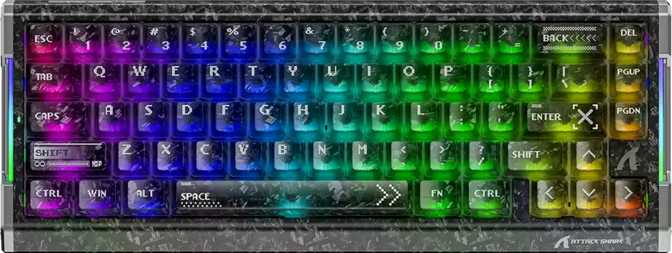
Attack Shark R68 HE Review: Hall Effect Power in a 60% Form Factor
KeyboardsVery Good
Overall Rating
Hall Effect in a 60% Package — What the R68 HE Actually Offers
The Attack Shark R68 HE sits at an interesting crossroads: it brings hall effect switch technology — a feature that was, not long ago, exclusive to premium gaming peripherals — into a compact, budget-accessible 60% form factor. For competitive players who want the precision edge of magnetic switches without committing to a full-size board or a steep price, that premise is genuinely compelling. But a keyboard lives or dies on execution, and the R68 HE has a handful of decisions that deserve a close look before you commit.
Design and Build: Compact, Confident, and Functional
Physical Footprint
325mm
Width
118mm
Depth
40mm
Thickness
780g
Weight
At 325 mm wide and 118 mm deep, the R68 HE occupies roughly two-thirds of the desk space a standard tenkeyless board would. If you run a large mousepad and need maximum horizontal room for low-sensitivity mouse movements, this layout pays dividends immediately. The 40 mm thickness sits within normal range for a gaming keyboard — not exceptionally slim, but not obtrusive either.
The weight comes in at 780 grams — notably substantial for a 60% board, which typically trends lighter due to fewer keys and a smaller chassis. The added mass is a sign of internal density — the PCB, plate, and mounting hardware together — and it translates to a keyboard that doesn't shift during intense sessions. It plants on the desk and stays there.
Materials and Colorways
The outer shell is plastic, available in both black and white. Plastic construction at this price tier is standard, and Attack Shark keeps it clean rather than trying to disguise it. The finish is practical and resists visible smudging reasonably well.
The plate beneath the keycaps is made from FR4 — the same fibreglass composite used in circuit boards. FR4 plates produce a relatively crisp, bright sound signature with a modest amount of flex. Players who like a firm, snappy keystroke will appreciate this material. Those chasing a thocky, muted typing sound may find FR4 leans too bright acoustically.
Mounting, Angle, and Lighting
Top Mount
The PCB and plate assembly is secured to the top case half, delivering a stiff, consistent feel across all key positions. Ideal for gaming, where feedback uniformity matters more than cushion.
Adjustable Feet
Two typing angle options are available via adjustable rear feet. No wrist rest is included in the box — budget for one separately if extended typing sessions are part of your workflow.
South-Facing RGB
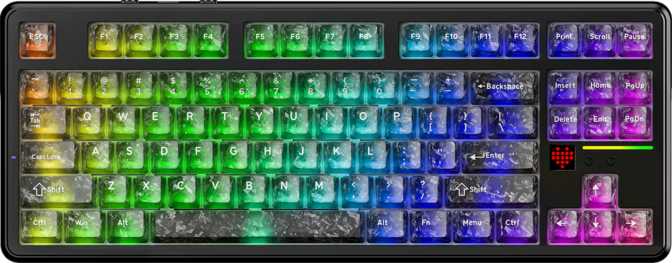
LEDs shine downward toward the desk, producing a visible glow from the front-facing angle. This creates the desk bloom effect common in gaming setups, with legends still illuminated through the keycaps.
The Switches: Why Hall Effect Changes Everything
Understanding Magnetic Switch Technology
Traditional mechanical keyboard switches use a physical contact point — a small metal leaf that gets pressed together to register a keypress. Hall effect switches, by contrast, use a magnet and a sensor. The sensor detects the position of the magnet continuously as the key travels, with no physical contact ever needed to trigger the signal. This distinction drives every advanced feature on the R68 HE.
No Contact Wear
The trigger mechanism is entirely contactless. Nothing degrades with use. The actuation behavior is identical after tens of millions of keypresses as it was when the board was first powered on — a durability advantage conventional switches simply cannot match.
Software-Defined Actuation
Because the sensor tracks key position as a continuous value, the actuation point is a variable you set in software — not a fixed physical event. This is the foundation on which rapid trigger, dual actuation, and analog input are all built.
Shark Magnetic Switch — Feel, Travel, and Specs
| Specification | Value | Real-World Meaning |
|---|---|---|
| Switch Type | Hall Effect — Linear | Smooth, silent press from top to bottom — no bump, no click |
| Actuation Range | 0.1 mm – 3.4 mm | Fully configurable trigger point across the entire key travel |
| Actuation Force | 40 g | Light spring weight — fast, effortless repeated keypresses |
| Total Travel | 3.4 mm | Full-depth stroke — enough travel to feel the press without extra resistance |
| Hot-Swap | Yes — All Positions | Pull any switch and replace it without tools or soldering |
The Shark Magnetic Switch is linear in character — no tactile bump, no audible click, just a smooth press from top to bottom. The 40-gram spring weight places it on the lighter end of the linear spectrum, making fast repeated keypresses effortless. The 3.4 mm total travel is standard for a full-depth mechanical switch — enough stroke to give fingers genuine position feedback without demanding extra force to reach the bottom.
The adjustable actuation range is where this switch earns its reputation. Set the trigger point to 0.1 mm and the key fires almost before it feels like you've pressed anything — an extreme sensitivity mode best suited to trained fingers. Set it closer to 2–3 mm for a more deliberate, typo-resistant trigger that feels closer to conventional mechanical behavior. Hot-swap support means switch replacement or experimentation never requires soldering.
Performance Features: Rapid Trigger, Dual Actuation, and 8000 Hz
Rapid Trigger
On a conventional keyboard, releasing a key doesn't re-arm the switch until it physically travels back past the actuation point — a fixed reset distance built into every keypress cycle. With rapid trigger, the switch re-arms the moment you begin releasing, regardless of position. As little as 0.1 mm of upward movement is enough. For competitive FPS players practicing precise counter-strafing, this removes a hardware bottleneck that previously couldn't be bypassed with conventional switches.
Dual Actuation
A single physical key can trigger two entirely separate inputs at different depths of travel. Press partway and it sends one command; press to the bottom and it sends another. For a 60% layout where the physical key count is already reduced by design, this effectively expands your usable input range without adding any keys. Crouch on a half-press, prone on a full press — the possibilities are practical and genuinely useful in fast-paced titles.
8000 Hz Polling
At 8000 Hz, the keyboard reports its state to the computer 8,000 times per second — eight times more than the 1000 Hz standard. The report interval drops to 0.125 milliseconds. This ensures the keyboard is never the bottleneck in any input chain. For players optimizing every millisecond of end-to-end input latency, it removes one variable from the equation entirely and represents a genuine specification advantage over nearly all competing boards at this price.
N-Key Rollover
Full N-key rollover guarantees that every single key on the board can be pressed simultaneously and all inputs register correctly. No combination of keypresses — however unusual — will produce ghost inputs or dropped signals. It is a baseline requirement for serious gaming hardware, and the R68 HE meets it fully without compromising other features to do so.
Analog Input
Because the sensor tracks key position as a continuous value rather than a binary signal, the keyboard can transmit how far a key is pressed — not just whether it is pressed. In games built to read analog input, this translates a keypress into a graduated value similar to a joystick axis. It is a niche but genuinely novel capability for a keyboard, and its practical usefulness depends entirely on software support in the titles you play.
Keycaps, Layout, and Mac Support
The keycaps on the R68 HE are made from PBT plastic — a denser, more durable material than the ABS plastic found on many keyboards at this price point. PBT resists the shine that develops on frequently used keys over time, which is a real and visible problem with ABS after months of daily use. The legends on PBT keycaps also hold up significantly better against wear, keeping the board looking clean long after ABS alternatives have started to look tired.
The keycap profile is OEM — a slightly taller, angled shape that is one of the most widely used profiles across gaming keyboards. Most users transitioning from any mainstream gaming board will find it immediately familiar. The layout is ANSI US, the standard for US-market keyboards and the most widely supported layout for custom keycap sets. Aftermarket options are plentiful and affordable for anyone who wants to personalize further.
Mac compatibility is built into the design, with certain keys labeled for macOS use and the layout accommodating Mac key mapping. Users who move between Mac and PC will appreciate not needing a separate board for each platform. Media controls — volume, playback, navigation — are all accessible through a function layer, which is standard practice on any compact 60% layout.
Keycap Quick Reference
-
Material: PBTShine-resistant, long-lasting legends — a genuine upgrade over ABS at this price
-
Profile: OEMTall and angled — familiar to the vast majority of gaming keyboard users
-
Layout: ANSI USStandard US layout with widest compatibility for aftermarket keycap sets
-
Mac CompatibleLabeled for macOS — functions across both Mac and PC platforms
-
Media: Fn Layer OnlyNo dedicated media keys — accessed via key combinations as expected on a 60%
Connectivity and Software
The R68 HE connects via wired USB only — there is no wireless option. The cable is fixed and non-detachable, which means cable damage requires more effort to address than simply swapping to a spare. For a desk-based setup where the keyboard never moves, this is a manageable inconvenience. For users who carry their board to LAN events or prefer aesthetic flexibility with custom cables, it is a more meaningful limitation that other boards in this tier do not impose.
Important: No QMK, ZMK, or VIA Support
The R68 HE uses Attack Shark's proprietary firmware exclusively. QMK and VIA are open-source platforms that allow deep key remapping, complex macros, and per-key RGB configuration through community-developed tools — and this keyboard does not support either. Customization is available through Attack Shark's own software, but within those platform's limits alone. Enthusiasts who have built workflows around open-source firmware should treat this as a hard trade-off before purchasing.
The keyboard functions as a standard input device out of the box — no software required for basic use. Software becomes necessary when you want to adjust the actuation point, configure rapid trigger sensitivity, set up dual actuation mappings, or customize RGB lighting. There is no onboard memory configuration accessible without the software companion app.
Who Should Buy the R68 HE — and Who Should Not
A Strong Match For
- Competitive FPS or action game players who want rapid trigger and adjustable actuation without paying flagship-tier prices for the privilege
- Desk-space-conscious setups that benefit from a compact 60% footprint with maximum room for wide, low-sensitivity mouse movements
- Players upgrading from a conventional mechanical keyboard who want to experience hall effect technology for the first time at a reasonable entry point
- Users who value durable PBT keycaps and hot-swap flexibility in a board at this price bracket — both of which the R68 HE delivers without compromise
- Multi-platform users who work across Mac and PC and need a single board that accommodates both without adapter hardware
A Poor Fit For
- Heavy typists or professionals who write for hours daily and prioritize ergonomic depth, included wrist rests, or a soft, cushioned typing feel
- Enthusiasts who require QMK or VIA firmware support for deep, community-driven keyboard customization workflows — this board will not accommodate them
- Users who need wireless connectivity — the R68 HE is wired only, with no Bluetooth or 2.4 GHz wireless option on offer
- Players who need constant, instant access to a numpad or function row keys without working through a function layer system
- Those seeking a gasket-mounted board or a premium, dampened acoustic sound signature — the FR4 plate and plastic case deliver function, not acoustic finesse
How the R68 HE Stacks Up Against Alternatives
The R68 HE is notably aggressive in its feature-to-price positioning. Here is how it compares to the two most logical alternatives a buyer in this space would seriously consider.
| Feature | Attack Shark R68 HE | Typical Budget 60% | Mid-Range HE Alternative |
|---|---|---|---|
| Switch Technology | Hall Effect | Standard Mechanical | Hall Effect |
| Polling Rate | 8000 Hz | 1000 Hz | 1000 – 4000 Hz |
| Rapid Trigger | |||
| Dual Actuation | Rare | ||
| Hot-Swap | Sometimes | ||
| Plate Material | FR4 | Varies | Varies |
| QMK / VIA Support | Often Yes | Sometimes | |
| Cable Type | Fixed | Often Detachable | Often Detachable |
Honest Assessment: Strengths and Weaknesses
Where It Excels
The R68 HE's strongest argument is its feature density relative to its asking price. Getting hall effect switches, rapid trigger, dual actuation, 8000 Hz polling, full NKRO, and hot-swap capability in a single compact keyboard at this price bracket is genuinely rare. For a competitive player whose primary concern is input precision, this board delivers capabilities that cost significantly more when purchased through more established brands with household names.
The PBT keycaps are a genuine quality marker at this price. Many competitors at similar or even higher prices still ship ABS, which degrades visibly with regular use. Choosing PBT here is the right call — one you will appreciate after months of daily use when competing boards start looking shiny and worn while the R68 HE still looks sharp.
Where It Falls Short
The fixed cable is the most frustrating omission on the R68 HE. Detachable cables have become standard even on budget boards, and losing this option limits both aesthetic flexibility and long-term repairability in a way that feels unnecessary at this stage of the market. The absence of QMK or VIA support closes the door on the large community of open-source keyboard customization tools — a meaningful loss for anyone who has built workflows around those platforms.
The plastic case and FR4 plate combination produce a sound profile that is functional and clean but will not satisfy buyers chasing premium acoustics. The 780-gram weight, while excellent for desk stability, is heavier than many 60% users will expect. And the one-year warranty is short by current market standards — some competitors offer two years or more — which reflects the brand's relative youth rather than confidence in the product.
Common Questions Before Buying
Buy It for Precision. Think Twice for Flexibility.
Attack Shark R68 HE
The Attack Shark R68 HE makes a compelling case as a gateway into hall effect keyboard technology for competitive players who don't want to overpay for the privilege. Rapid trigger, dual actuation, 8000 Hz polling, and hot-swappable switches in a clean 60% package with PBT keycaps — at this price, that combination is difficult to beat on paper, and it largely delivers in practice.
The caveats are worth repeating: the fixed cable is a genuine inconvenience, the lack of QMK or VIA support limits long-term customization depth, and the sound signature won't impress anyone comparing it to acoustically tuned boards at higher price points. The one-year warranty is shorter than most competitors offer.
If input precision and feature value are your top priorities
A strong competitive entry at this price bracket
If you need QMK/VIA, wireless, or a detachable cable