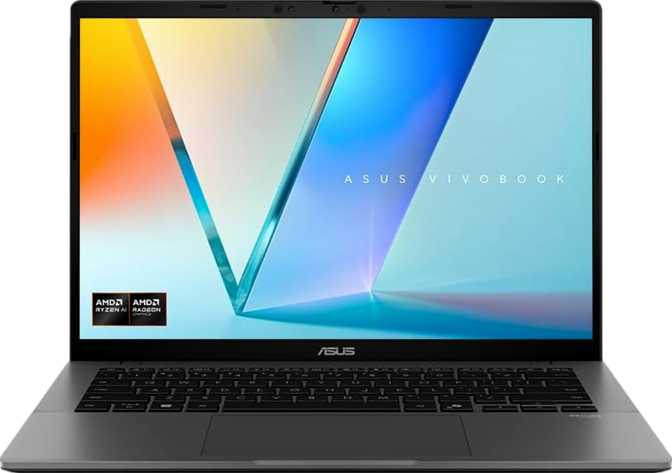
Asus VivoBook S 14 (M3407) Review: Powerful, Portable, and Honest
LaptopsA slim 14-inch productivity laptop that competes well above its price class — pairing a high-core-count AMD processor with 32 GB of fast DDR5 memory in a chassis that weighs barely over 1.3 kg. The trade-offs are real but manageable for its target audience.
Overall Rating
Performance
Portability
Display
Connectivity
Design and Build: Slim, Light, and Serious
Physical presence, keyboard, thermal design
Physical Presence
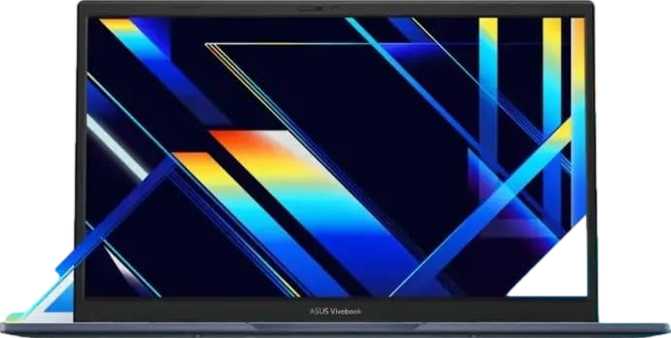
At 315 × 223 × 18 mm and 1,390 g, the VivoBook S 14 belongs to the class of laptops you pick up and immediately think: this is what a laptop should feel like. It is noticeably lighter than most 14-inch competitors in the productivity category, and the slim 18 mm profile means it slides into a bag with room to spare.
This is not a rugged field machine. There is no reinforced chassis, no splash-resistant coating, and no military-grade certification. Asus has optimized this design for the office bag and the coffee shop — not the construction site or the hiking trail. For its intended audience, that is exactly the right call.
Keyboard and Input
The backlit keyboard is a welcome inclusion at this size and price tier. Late-night work sessions, dim meeting rooms, airplane cabins — these are exactly the environments productivity laptops live in, and having key illumination turns a frustrating experience into a smooth one.
There is no fingerprint scanner on this model. Instead, Asus has included 3D facial recognition for biometric login. This works well in well-lit environments and offers Windows Hello-level convenience — you open the lid and you are already in. However, facial recognition can struggle in very low light or at unusual angles, and users who prefer a quick tap-to-unlock experience may miss a fingerprint reader.
Fan Noise and Thermal Design
This is an active-cooled machine — the processor runs at up to 45 watts of thermal design power, a serious figure for a laptop this slim. Light tasks will likely keep the system quiet. Extended workloads will engage the cooling system audibly. This is normal behavior for a high-performance thin laptop; buyers should set their expectations accordingly.
Physical Specs at a Glance
- Weight
- 1,390 g (1.39 kg)
- Thickness
- 18 mm
- Width
- 315 mm
- Depth
- 223 mm
- Backlit Keyboard
- Yes
- Fingerprint Scanner
- No
- Facial Recognition
- Yes (3D)
- Weather Sealed
- No
- Rugged Build
- No
Portability Perspective
At 1.39 kg, the VivoBook S 14 is lighter than a typical hardcover novel and a half. Carried five days a week over a year, that weight difference versus a 1.8 kg laptop adds up to real physical relief.
The Display: Almost Great, One Caveat
Resolution, refresh rate, reflections, and multi-display capability
Size, Resolution, and Sharpness
The 14-inch screen runs at 1920 × 1200 pixels — a slightly taller resolution than the standard 1920 × 1080 that dominated laptops for years. That extra vertical space adds up significantly in practice: you fit more of a document on screen, more rows in a spreadsheet, more of a webpage without scrolling.
At approximately 161 pixels per inch, text is crisp and images look clean without requiring heavy display scaling to be comfortable. This is a genuinely good resolution for a 14-inch screen.
What the Specs Don't Advertise
The display refreshes at 60 frames per second. For productivity use — writing, browsing, spreadsheets, video calls, light media consumption — this is entirely sufficient. However, anyone coming from a 90 Hz, 120 Hz, or higher-refresh display will notice the difference immediately.
The panel also lacks an anti-reflective coating, which means it can mirror its environment more than matte-panel alternatives in bright rooms or near windows. Positioning matters.
14″
Screen Size
161
Pixels Per Inch
60Hz
Refresh Rate
4
Max Displays Supported
Multi-Display Support
The GPU powering this machine can theoretically drive up to four simultaneous displays. With HDMI 2.1 output and two USB-C ports capable of video output, connecting one or two external monitors to expand a workstation setup is straightforward. HDMI 2.1 supports 4K output at high refresh rates — a meaningful detail for those who want to pair this laptop with a high-quality external monitor at a desk.
Performance: Where This Laptop Earns Its Place
Processor architecture, benchmark results, memory, and storage
Processor Architecture
The heart of the VivoBook S 14 M3407 is an 8-core, 16-thread processor built on a 4-nanometer manufacturing process. Those numbers have real meaning. The 4 nm fabrication produces a chip that runs more efficiently at a given performance level than older designs — which translates to more work done per watt, better sustained performance under load, and less wasted energy as heat.
Eight cores with 16 threads means the system handles genuinely parallel workloads without degrading. Running a video export while browsing, compiling code with background updates running, or managing a dozen open browser tabs with a spreadsheet — these multitasking scenarios are where older, fewer-core chips start to stutter. This processor does not.
The peak single-core speed reaches 5.2 GHz, while the base clock across all cores sits at 4 GHz. Single-core speed determines how fast individual applications respond. Multi-core speeds determine throughput on workloads that spread across multiple cores simultaneously. Both figures here are high-end for the productivity laptop category.
Memory: Fast, Ample, and Locked In
The 32 GB of DDR5 RAM running at speeds up to 7,500 MHz is one of the standout specifications of this machine. DDR5 at this speed tier is significantly faster than the DDR4 configurations found in many competing products. For tasks that move large amounts of data quickly — video editing, large dataset analysis, virtual machines — this matters in ways that benchmark numbers do not fully capture.
Important: The system has a single memory slot and the RAM is not upgradeable beyond 32 GB. This laptop ships with its memory ceiling already reached. For most users 32 GB is generously sufficient, but buyers planning to own this machine for five or more years should factor this in.
Storage
The 1 TB NVMe SSD using the PCIe 4.0 interface is fast and spacious. PCIe 4.0 SSDs offer roughly twice the maximum throughput of older PCIe 3.0 drives. In practical terms, this means application launches feel nearly instant, large file transfers complete quickly, and the operating system boots in seconds. One terabyte comfortably holds an operating system, a full application suite, and a substantial working file library.
Benchmark Results
Upper range for thin-and-light laptops
Strong single-thread responsiveness
Core Specs Summary
- Cores / Threads
- 8 / 16
- Base Clock
- 4.0 GHz
- Boost Clock
- 5.2 GHz
- Process Node
- 4 nm
- RAM
- 32 GB DDR5
- RAM Speed
- Up to 7,500 MHz
- Storage
- 1 TB NVMe PCIe 4.0
- L3 Cache
- 16 MB
- TDP
- 45 W
Graphics: Integrated, But Not an Afterthought
AMD Radeon 780M — what it actually does
The integrated Radeon 780M graphics are among the strongest integrated GPU solutions available in a productivity laptop. With 768 shader processors and a boost clock approaching 2,800 MHz, it handles light creative workloads — photo editing, moderate video grading, simple 3D visualization — with genuine capability.
It supports DirectX 12 and OpenCL 2.1, meaning compatibility with modern productivity software that offloads certain computations to the GPU. It does not support hardware ray tracing or AI-based upscaling features, so it is not positioned as a gaming or high-end 3D rendering solution.
The honest characterization: this is integrated graphics that will pleasantly exceed expectations for general use, light creative work, and the occasional casual game — but dedicated GPU territory, it is not.
For users who dock this laptop at a desk and want to drive one or two large external monitors, the GPU has more than enough capacity for typical productivity configurations at 4K resolution via HDMI 2.1.
Radeon 780M GPU Specs
- Shader Processors
- 768
- Texture Units (TMUs)
- 48
- Render Outputs (ROPs)
- 32
- Base Clock
- 800 MHz
- Boost Clock
- 2,800 MHz
- DirectX Support
- DirectX 12
- OpenGL
- 4.6
- Ray Tracing
- No
- GPU Type
- Integrated
Connectivity: Practical but With One Gap
Port layout, wireless standards, and what's missing
| Port Type | Count | Notes |
|---|---|---|
| USB-A (5 Gbps) | 2 | Standard connectivity for peripherals and accessories |
| USB-C (5 Gbps) | 2 | Video output capable; also supports charging |
| HDMI 2.1 | 1 | 4K-capable external display output |
| 3.5 mm Audio | 1 | Headphones or headset with microphone |
| Wired Ethernet (RJ45) | 0 | No wired network port — Wi-Fi only |
| SD Card Slot | 0 | No external memory expansion |
| Thunderbolt / USB 4 | 0 | Not present — limits high-speed docking options |
Wireless Connectivity
Wi-Fi 6 (802.11ax) is the headline wireless standard here, offering fast throughput and better performance in congested environments like offices and apartment buildings compared to older standards. Bluetooth 5.3 handles wireless peripherals and audio devices with low latency. Both are current, capable specifications.
AirPlay support is also listed — allowing wireless content streaming to compatible Apple displays and speakers. An unusual inclusion on a Windows laptop, it speaks to the increasingly cross-ecosystem nature of modern workplaces.
Wireless Standards
- Wi-Fi 6 (802.11ax)
- Wi-Fi 5 (802.11ac)
- Bluetooth 5.3
- AirPlay Support
- No GPS / No Mobile Data
No Thunderbolt
The USB-C ports top out at 5 Gbps — fast enough for most peripherals and video output, but not fast enough for Thunderbolt docks or high-speed external NVMe drives. Heavy peripheral users should plan for this.
Battery Life: The 70 Wh Question
Endurance, charging options, and real-world expectations
70 Wh
Battery Capacity
Above average for this form factor
A 70 Wh battery is a meaningful capacity figure for a laptop this slim and light. Many comparable thin-and-light productivity machines ship with smaller cells in the 50–60 Wh range, so Asus has made a deliberate choice to pack in more energy storage.
Whether that translates to a full workday of unplugged use depends heavily on workload. Light tasks — document editing, browsing, video calls — will draw relatively little power from this efficient 4 nm processor. Sustained heavy workloads will drain it faster. Based on the battery size and processor efficiency class, expecting seven to ten hours of typical mixed use is reasonable; heavy processing loads will land closer to the lower end of that range.
The USB-C ports support charging, which means this laptop can be powered from a USB-C power bank, a USB-C wall charger, or a standard laptop charger — flexibility that matters for travelers. Sleep-and-charge functionality means connected devices continue drawing power even when the lid is closed.
Who This Laptop Is For — and Who It Isn't
Matching the right buyer to the right machine
Built For
-
Remote professionals and hybrid workerswho need a capable machine to carry between home, office, and client sites without back strain.
-
Students in demanding programsEngineering, data science, architecture, or business — those who need headroom for real software without hitting limits.
-
Light-to-moderate creative professionalsPhoto editing, light video cuts, graphic design — those who need speed and storage but not Hollywood-scale rendering.
-
Power multitaskersThose keeping many applications open simultaneously — 32 GB handles aggressive multitasking gracefully.
Not the Right Fit For
-
GamersThe integrated GPU handles older or less demanding titles, but this is not a gaming laptop by any measure.
-
Users planning future RAM upgradesA single non-expandable memory slot already at its ceiling means zero upgrade headroom beyond 32 GB.
-
Heavy video producers and 3D artistsThose needing dedicated GPU acceleration for rendering, color grading, or real-time effects on large files.
-
Those requiring wired network or ThunderboltNo RJ45 port and no Thunderbolt/USB 4 mean certain professional workflows need additional hardware.
How It Compares to the Alternatives
Competitive positioning across the productivity laptop market
| Feature | VivoBook S 14 M3407 | Typical Intel Competitor | Premium Ultrabook Tier |
|---|---|---|---|
| Processor | AMD 4 nm, 8C/16T | Intel 7 nm, 6–8C | AMD/Intel 4 nm, 12–16C |
| RAM Configuration | 32 GB DDR5 | 16–32 GB LPDDR5 | 16–64 GB LPDDR5 |
| Integrated GPU | Radeon 780M (strong) | Intel Arc (competitive) | Radeon 890M or Intel Arc |
| Display Refresh | 60 Hz only | 60–120 Hz | 90–120 Hz (OLED options) |
| Thunderbolt / USB 4 | None | Common | Standard |
| Weight | ~1.39 kg | ~1.2–1.5 kg | ~1.1–1.4 kg |
| Price Tier | Mid-range | Mid-range | Premium |
The VivoBook S 14 M3407 leads its peer group on raw multi-threaded processing and RAM configuration, often shipping with 32 GB at a price point where competitors offer 16 GB. Its primary trade-offs are the 60 Hz display and the absence of Thunderbolt connectivity. Premium ultrabooks at higher price points gain OLED displays and Thunderbolt ports but give up little in actual processing power — making the performance-per-dollar equation here genuinely compelling.
Strengths and Weaknesses: The Honest Assessment
A balanced look at what this laptop does well and where it falls short
Where It Excels
The case for this laptop is strong. The processor delivers performance that many buyers will never outgrow. Thirty-two gigabytes of fast DDR5 memory is a meaningful advantage over the 16 GB configurations common among competitors. The 1 TB PCIe 4.0 SSD is fast and spacious. The machine is light enough that carrying it daily does not become a complaint, and the 70 Wh battery gives it enough range to be genuinely useful away from a power outlet.
The 4 nm processor architecture also contributes to a favorable efficiency-to-performance ratio — you get high-end processing in a chassis that does not cook itself under a sustained workload the way older, larger-node chips did in similarly slim bodies.
Where It Falls Short
The display is the most notable area where expectations need managing. A 60 Hz refresh rate and the absence of anti-reflective coating mean the screen — while sharp and well-resolved — does not match the visual experience of premium ultrabooks. For productivity work, this is rarely a problem; for anyone who values screen quality as a primary criterion, it warrants scrutiny before purchase.
The connectivity situation is serviceable but not expansive. No Thunderbolt or USB 4, no wired Ethernet, and no SD card slot limit certain professional workflows. The single non-expandable memory slot is a long-term consideration: generous at 32 GB today, but the ceiling is fixed — there is no upgrade path if needs grow significantly in the years ahead.
Questions Real Buyers Ask
Answers to what people actually search for before purchasing
Final Verdict
Our Recommendation
The Asus VivoBook S 14 (M3407) is a laptop that makes a clear and confident argument for itself: generous performance, ample memory, fast storage, and a portable form factor — all at a price that does not demand a premium for premium's sake.
It earns its recommendation for professionals who need real computing capability in a machine they can carry without complaint. The processor is fast enough to handle demanding workloads, the RAM is spacious enough to multitask freely, and the storage is large and quick enough to keep pace with both.
The display's 60 Hz refresh rate and the absence of Thunderbolt connectivity are genuine limitations — not deal-breakers for most buyers, but legitimate reasons to look elsewhere for a subset of users. If your workflow depends on high-speed docking solutions or you are sensitive to screen motion, those trade-offs need honest consideration.
For the student, the mobile professional, the developer, or the creative doing everyday work who wants a machine that performs above its weight class and fits in any bag — the VivoBook S 14 M3407 is a well-made, well-specced choice that is difficult to argue against at its price point.
Highly Recommended
Best for: Mobile professionals, developers, and demanding students who prioritize performance and portability over premium display specs.