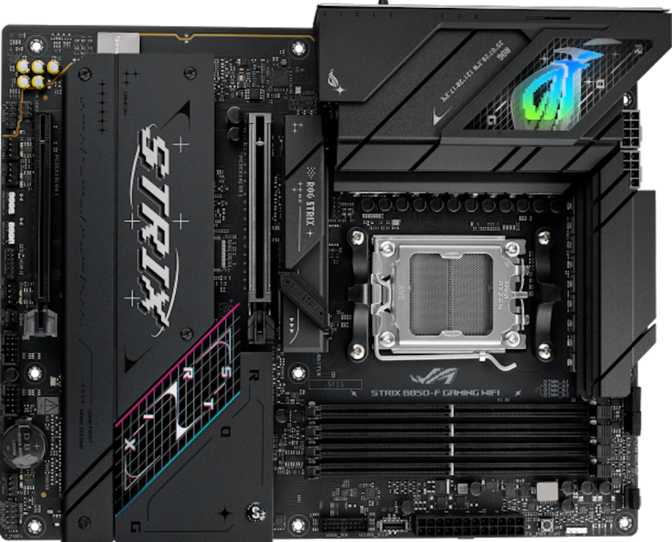
Asus ROG Strix B850-F Gaming WiFi Review: Premium B850 Done Right
MotherboardsFor years, builders who wanted PCIe 5.0 GPU support and serious wireless capability had to jump to flagship-tier chipsets and pay accordingly. AMD's B850 platform changes that calculation, and the Asus ROG Strix B850-F Gaming WiFi is one of the most fully-realized ways to build on it.
This is not a budget board dressed up in gaming aesthetics. It targets builders who want every relevant modern standard — Wi-Fi 7, four M.2 slots, a PCIe 5.0 GPU lane, and genuine overclocking support — without climbing to the very top of the price ladder. Understanding exactly what it delivers, and what it deliberately trades away, is the difference between a purchase you will be satisfied with for years and one you will quietly regret.
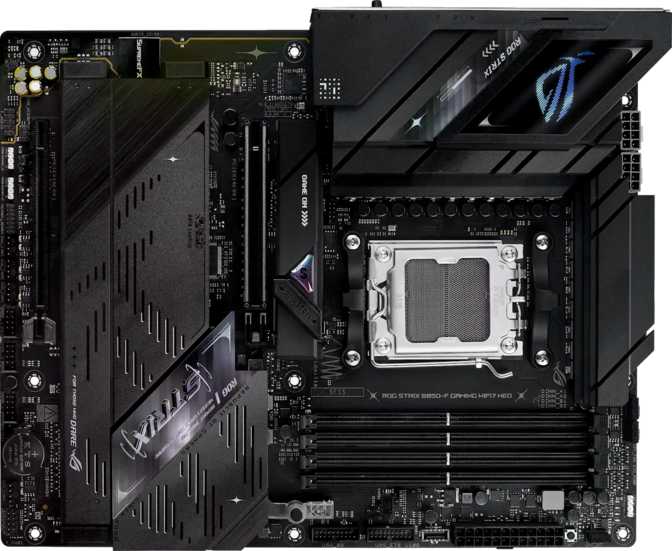
Build Quality and Physical Design
ATX Form Factor • 305 mm × 244 mm • 3-Year Warranty
The B850-F ships in the standard ATX footprint — the format that fits any full-size or mid-tower ATX case and most E-ATX enclosures without modification. This is a full-size board that uses every millimeter of its real estate rather than compressing features into a smaller form factor, so component layout has room to breathe.
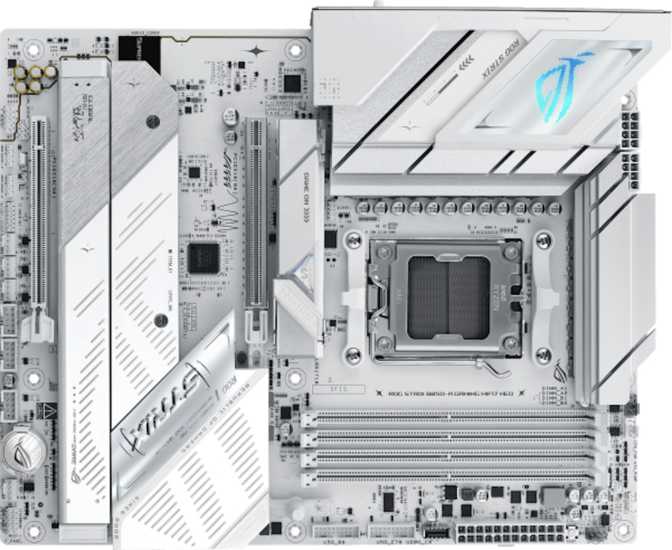
The visual identity is unmistakably ROG Strix: angular VRM and chipset heatsinks in a dark colorway, addressable RGB lighting integrated throughout the board, and an overall aesthetic designed to look deliberate rather than decorative behind a windowed side panel. The RGB covers a meaningful surface area and can be fully disabled through BIOS or Armoury Crate software if you prefer a clean look.
The VRM heatsinks are sized generously for a B-series board. Larger heatsinks keep voltage regulation temperatures in check under sustained CPU loads — relevant when running a high-end Ryzen processor through extended rendering, compilation, or encoding sessions. Most builds will never stress the VRM enough to notice, but the headroom is there.
Dual BIOS Protection
Two separate firmware chips sit on the board. If a BIOS update corrupts or fails mid-flash, the board automatically switches to the backup chip. For enthusiasts who push BIOS settings aggressively or flash beta firmware, this is a genuine safety net. For first-time builders, it means a bad update cannot permanently brick a several-hundred-dollar investment.
Physical BIOS Reset Button
Resetting to factory defaults requires pressing a physical button on the rear I/O panel — not locating a jumper and bridging it with a screwdriver inside a dark case. This sounds minor until the moment you need to recover from a bad overclock or debug a POST failure. It saves real time in exactly those scenarios.
The three-year warranty coverage extends your protection well beyond the typical first-year window — a meaningful consideration when building a system you expect to run for multiple CPU generations.
CPU Platform and AM5 Compatibility
The B850-F is built around AMD's AM5 socket, which uses a land grid array design — the pins live on the motherboard rather than the processor. A dropped CPU no longer risks bending the critical contact pins. Ryzen processors from the 7000 and 9000 series families are the correct fit, and AMD has publicly committed to an extended AM5 platform lifespan, meaning a CPU upgrade path remains open for several years beyond whatever you drop in today.
The B850 chipset occupies the mid-range position in AMD's 800-series lineup — above the B840 (which does not support CPU overclocking) and below the X870 series (which offers more PCIe lane allocation). For gaming builds and mainstream productivity workstations, B850 provides everything the platform needs. The scenarios where X870 delivers meaningfully more are fairly specific, and most buyers will never encounter them.
Discrete GPU Required for Most Ryzen Processors
Most desktop Ryzen CPUs lack an internal display engine. The HDMI 2.1 and DisplayPort outputs on this board produce no signal without a dedicated graphics card — unless you choose a Ryzen "G" series variant with integrated graphics. If you are not installing a discrete GPU, verify your CPU includes integrated graphics before purchasing.
Overclocking and Memory Performance
The B850 chipset enables CPU overclocking, which separates it from the entry-level B840 below it. In AMD's ecosystem this means access to Precision Boost Overdrive for the CPU and Expo profiles for DDR5 memory — two levers that improve real-world performance without requiring manual frequency manipulation in the BIOS.
DDR5 Memory Speed and Capacity
Four DDR5 slots run in a dual-channel configuration — install matched pairs and the processor gains access to two memory channels working simultaneously, roughly doubling bandwidth compared to a single module. The maximum supported capacity reaches 192 GB across all four slots, a ceiling no consumer workload will approach.
The overclocked memory speed ceiling reaches 8000 MHz with compatible Expo-rated DDR5 kits. Well-regarded high-performance DDR5 kits for gaming typically target 6000–7200 MHz, making 8000 MHz support the current upper boundary of consumer DDR5 availability. Getting there requires compatible RAM, a capable CPU memory controller, and some BIOS patience — but the headroom exists.
ECC memory is not supported — standard for consumer gaming boards. If your workload requires memory error-correction guarantees for long unattended renders or high-stakes calculations, this board is not the appropriate platform.
Storage: Four M.2 Slots and One Honest Trade-off
NVMe Storage Configuration
Four M.2 sockets make the headline. A typical enthusiast allocates one slot for the operating system, one for a games library, and the remaining two for future expansion or dedicated workload drives. A creative professional might assign separate drives for capture, project files, and exports. Having four slots means you are unlikely to exhaust your options within this board's usable lifespan.
The primary M.2 slot benefits from PCIe 5.0 bandwidth through the processor's direct CPU lanes, enabling the fastest-generation NVMe drives to operate at their rated performance. For most general computing tasks, PCIe 4.0 drives are already fast enough — but for workloads that push sequential throughput, PCIe 5.0 NVMe provides headroom that previous-generation platforms could not access.
Only Two Native SATA Ports — Know This Before You Buy
Two SATA ports serve two devices total. Builders migrating a system with multiple hard drives, optical drives, or legacy SATA SSDs face a real choice: migrate storage to NVMe, or consume a PCIe expansion slot with a SATA controller add-in card. This reflects how B850 allocates chipset bandwidth toward NVMe as the primary storage medium — but the constraint is real regardless of the reason.
RAID Configuration Support
For users who want redundant or high-performance storage, the following RAID modes are supported across available SATA and NVMe devices:
- RAID 0 — Data striping across drives for maximum sequential performance
- RAID 1 — Drive mirroring for automatic redundancy without a dedicated NAS device
- RAID 5 — Distributed parity across three or more drives for balanced speed and protection
- RAID 10 — Combined striping and mirroring for both performance and redundancy
Wireless Connectivity: Wi-Fi 7 and Bluetooth 5.4
The wireless module supports the full Wi-Fi 7 standard (802.11be) alongside backward compatibility with every preceding generation back to 802.11n. Wi-Fi 7's defining capability is multi-link operation — the ability to simultaneously connect across the 2.4 GHz, 5 GHz, and 6 GHz frequency bands. The result is higher sustained throughput and lower effective latency, because the connection can load-balance traffic and recover from interference without dropping to a single degraded channel.
If you are currently running a Wi-Fi 6E router, the module operates at Wi-Fi 6E capability immediately. If your router supports Wi-Fi 7, it uses the full standard. If your router is older, it falls back gracefully. For gaming: Wi-Fi 6E already delivers latency characteristics close enough to wired Ethernet that most players cannot reliably distinguish the difference. Wi-Fi 7 improves this further and adds bandwidth overhead for simultaneous high-throughput use cases.
Wi-Fi 7 Highlights
- Multi-link operation across 2.4, 5, and 6 GHz simultaneously
- Backward compatible with Wi-Fi 4, 5, 6, and 6E routers
- Higher sustained throughput for simultaneous streaming and gaming
- Future-proof wireless standard as router hardware matures
Bluetooth 5.4
The current leading Bluetooth version brings improved energy efficiency and more reliable coexistence with Wi-Fi transmissions in the 2.4 GHz band. Controllers, headsets, keyboards, and input devices supporting Bluetooth 5.x connect and operate correctly.
aptX not supported
Bluetooth headphones relying on aptX or aptX HD will fall back to SBC or AAC. If Bluetooth audio fidelity matters to your setup, verify your headphones support AAC before purchasing.
Rear I/O Ports: Planning Your Peripheral Setup
The rear panel is port-dense, but understanding the different USB specifications matters for allocating your devices correctly — plugging a keyboard into a 20 Gbps port works fine but wastes the bandwidth on a device that will never come close to needing it.
| Port Type | Count | Max Speed | Best Used For |
|---|---|---|---|
| USB 3.2 Gen 2x2 Type-C | 1 | 20 Gbps | Fastest external NVMe enclosures and high-bandwidth peripherals |
| USB 3.2 Gen 2 Type-A | 2 | 10 Gbps | Fast external SSDs, capture cards, audio interfaces |
| USB 3.2 Gen 2 Type-C | 1 | 10 Gbps | USB-C hubs, external drives, modern peripherals |
| USB 3.2 Gen 1 Type-A | 4 | 5 Gbps | General external storage, USB hubs, most standard peripherals |
| USB 2.0 Type-A | 4 | 480 Mbps | Keyboards, mice, wireless receivers, headset transmitters |
| HDMI 2.1 | 1 | Display | Monitor output — requires Ryzen G-series integrated graphics |
| DisplayPort | 1 | Display | Monitor output — requires Ryzen G-series integrated graphics |
| RJ45 Ethernet | 1 | 1 Gbps | Wired network — no 2.5G support at this tier |
| S/PDIF Optical | 1 | Digital | External DAC or AV receiver, bypasses onboard analog stage |
| 3.5mm Audio Jacks | 2 | Analog | Headphones, speakers, microphone input |
No Thunderbolt 4 or USB4 40 Gbps ports. The 20 Gbps USB-C port is the bandwidth ceiling on this board. External GPU enclosures, Thunderbolt daisy-chained devices, and 40 Gbps single-cable docking stations are not compatible.
Internal Connectors and Cooling Infrastructure
Six fan headers provide thermal management coverage that eliminates the need for a separate fan hub in most builds. A typical configuration — CPU cooler or AIO radiator plus two or three case fans — uses four to five headers at most, leaving at least one for a dedicated GPU shroud fan or supplementary exhaust.
ROG Strix boards implement per-header fan curve configuration in BIOS, meaning you can set different temperature targets and response curves for different thermal zones without any third-party software. For beginners, the default auto-tuning works well out of the box. For enthusiasts optimizing acoustic profiles, the granular per-header control is fully accessible.
Internal Expansion Headers
- 2 × USB 3.2 Gen 1 front-panel USB-A headers
- 1 × USB-C 3.2 Gen 2 front-panel header (10 Gbps)
- 4 × USB 2.0 internal expansion headers
- 6 × Fan and pump control headers
- 2 × SATA 3 connectors for legacy storage
Onboard Audio: Genuinely Above Average
The onboard audio subsystem delivers 7.1 surround channel output with a 120 dB signal-to-noise ratio on the digital-to-analog converter. To put that in context: basic motherboard audio typically measures in the 90–97 dB SNR range, mid-range boards approach 110 dB, and dedicated entry-level external DACs often start around 110–115 dB. At 120 dB, the B850-F's audio circuitry approaches the lower boundary of what discrete audio equipment delivers for casual listening.
This does not displace a proper USB audio interface for studio recording — but for gaming, music, and voice communication, the onboard audio is clean enough to use daily without audible hiss or noise floor artifacts. Most gaming headsets are not resolving enough to expose the difference anyway. Digital output through S/PDIF optical also allows the onboard analog stage to be bypassed entirely when routing audio to a receiver or external DAC.
Expansion Slots: GPU First, Everything Else Second
Two physical PCIe slots handle everything from graphics cards to network adapters. The allocation is straightforward: one slot is reserved for your GPU, one handles any additional expansion cards you need.
| Slot | PCIe Standard | Electrical Width | Primary Use Case |
|---|---|---|---|
| Primary x16 Slot | PCIe 5.0 | x16 full bandwidth | All current and future discrete graphics cards |
| Secondary x16 Slot | PCIe 4.0 | Typically x4 electrical | Capture cards, network adapters, SATA controllers, sound cards |
PCIe 5.0 at sixteen lanes provides double the bandwidth of PCIe 4.0 x16, and no current discrete graphics card can saturate it. Your current-generation GPU operates with headroom to spare, and future GPU generations have room to grow into the interface without it becoming a constraint.
There are no dedicated PCIe x1 slots. Single-width x1 expansion cards are physically compatible with x16 slots — smaller cards fit inside larger slots — but there is no dedicated small-format slot. This is standard on boards that prioritize full-length slot availability over legacy small-form-factor card support.
Who Should Buy This Board — and Who Should Not
- You are building a high-performance Ryzen gaming or creative workstation and want a platform that does not limit your GPU, NVMe storage, or wireless connectivity for multiple upgrade cycles
- Wi-Fi 7 matters to you now or within the next few years — buying it built-in avoids add-in card cost and slot consumption later
- You intend to run high-speed DDR5 memory and want the ceiling to push beyond 7000 MHz without platform limitations
- Four M.2 slots give your storage strategy the flexibility it needs, now and for future expansion
- Dual BIOS and a physical reset button matter for a build you plan to experiment with and push
- Onboard audio quality is good enough to delay or eliminate a dedicated sound card from your budget
- You have more than two SATA devices — hard drives, optical drives, or legacy SATA SSDs — and need them all connected without an expansion card
- Thunderbolt 4 or USB4 40 Gbps is part of your peripheral or display workflow — this board supports neither
- Your network infrastructure runs at 2.5 Gbps and you need wired speed to match without adding an expansion card
- Your budget requires compromising on the CPU or GPU to afford the motherboard — those components return more performance per dollar
- ECC memory is a hard requirement for your workload — this board does not support it
Competitive Positioning
The B850-F competes in a mid-range tier that also includes previous-generation B650E boards and current-generation X870 boards at a premium. Here is where it stands against each:
| Feature | ROG Strix B850-F | Typical B650E | Typical X870 |
|---|---|---|---|
| PCIe 5.0 GPU Slot | |||
| M.2 Slots | 4 | 2–3 | 4–5 |
| Max DDR5 OC Speed | 8000 MHz | 6400–7200 MHz | 8000+ MHz |
| Wi-Fi Standard | Wi-Fi 7 | Wi-Fi 6E (typically) | Wi-Fi 7 |
| Bluetooth Version | 5.4 | 5.3 | 5.4 |
| USB 3.2 Gen 2x2 (20 Gbps) | Rare at tier | Common | |
| Dual BIOS | Uncommon at tier | Common | |
| Native SATA Ports | 2 | 4–6 | 4–6 |
| Thunderbolt 4 / USB4 40G | Some models | ||
| 2.5G Wired Ethernet | Varies | Common | |
| Onboard Audio SNR | 120 dB | 108–113 dB | 113–120 dB |
An Honest Assessment
The wireless implementation is the board's clearest differentiator at its price tier. Wi-Fi 7 with Bluetooth 5.4 is not yet universal in mid-range boards, and the combination means you are not buying outdated wireless hardware that will constrain your setup as the standard matures. The dual BIOS and physical reset button reflect genuine engineering thoughtfulness — on a board positioned for overclocking and BIOS experimentation, these safeguards make the difference between a recoverable mistake and a lost afternoon. The audio subsystem at 120 dB SNR earns its own mention: it outperforms most onboard audio implementations and makes a discrete sound card optional rather than necessary.
Genuine Strengths
- Wi-Fi 7 with Bluetooth 5.4 leads the B850 category and remains relevant through multiple upgrade cycles
- Dual BIOS and physical reset button make BIOS experimentation genuinely low-risk for enthusiasts and beginners alike
- 120 dB SNR audio approaches discrete DAC territory, making a separate sound card optional for most users
- PCIe 5.0 GPU slot provides headroom for current and next-generation graphics cards without interface constraints
- Four M.2 slots accommodate even ambitious multi-drive storage architectures without any add-in cards
- 8000 MHz DDR5 ceiling supports the most aggressive Expo memory kits currently on the market
Real Weaknesses
- Only two native SATA ports — builders migrating multiple hard drives or legacy SATA SSDs face real constraints
- No Thunderbolt 4 or USB4 40 Gbps — external GPU enclosures and high-bandwidth docking stations are not possible
- Single gigabit Ethernet falls below what competing boards at this price point now offer as standard
- No aptX Bluetooth codec limits audio quality for headphones that depend on it over wireless
- No ECC memory support limits suitability for professional workloads requiring data integrity guarantees
Questions Real Buyers Ask Before Purchasing
Final Review Verdict
Asus ROG Strix B850-F Gaming WiFi
The ROG Strix B850-F occupies a clear and justified position: a premium mid-range board that delivers Wi-Fi 7, PCIe 5.0 GPU support, four M.2 slots, strong onboard audio, and dual-BIOS safety in a package that does not require paying X870 prices to access features that most builds actually need.
Its limitations are real but specific. Two SATA ports will constrain builders with established storage arrays that depend on multiple SATA devices — and if that describes your current system, the constraint warrants serious consideration before purchasing. The absence of 2.5G wired Ethernet is a genuine gap at this price tier and worth factoring in if your network infrastructure has already moved past gigabit speeds.
For the builder who is starting fresh, migrating to AM5 and NVMe-first storage, and wants a platform that remains relevant through one or two CPU upgrade cycles without revisiting the motherboard — the B850-F is the correct buy at this tier. It provides more than the majority of users will fully leverage, and the headroom it offers is in the right places: wireless connectivity, storage flexibility, and memory performance, where headroom translates into future-proofing rather than wasted spend.
PCIe 5.0, 8000 MHz DDR5 ceiling
Wi-Fi 7 strong, Ethernet lags behind
Premium features, mid-range price point
Verdict: Highly Recommended for fresh AM5 NVMe-first gaming and creative builds. Evaluate alternatives if you need Thunderbolt 4, 2.5G Ethernet, or more than two native SATA ports.