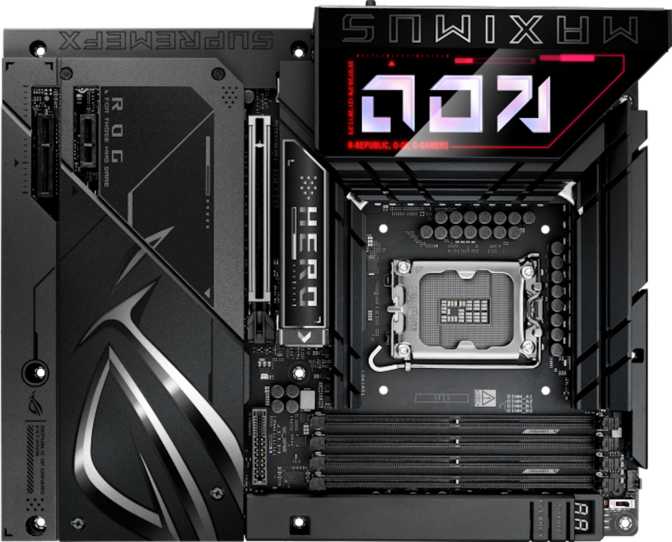
ASUS ROG Maximus Z890 Hero BTF Review: Full Platform Analysis
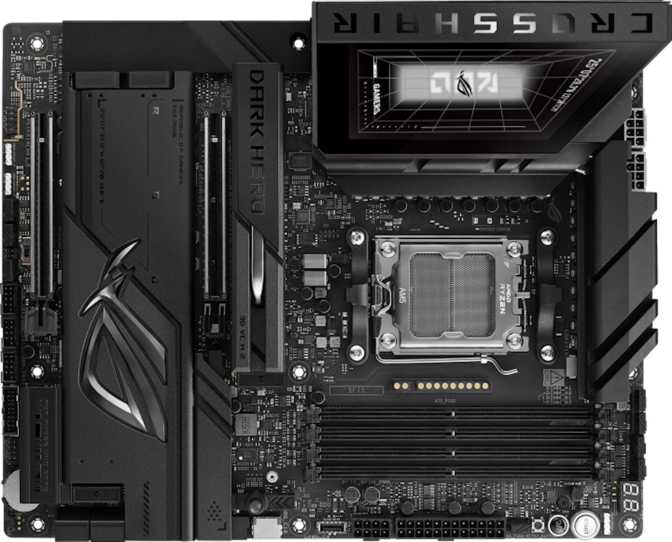
MotherboardsAt the upper reaches of the Intel enthusiast motherboard market, differentiation gets harder. Most Z890 flagships arrive fully loaded with PCIe 5.0, DDR5 support, and USB 4 — the checklist starts to look the same at a glance. The ASUS ROG Maximus Z890 Hero BTF earns its place at the top tier not by stacking more features onto an already crowded rear panel, but by rethinking the physical architecture of how a motherboard fits into a premium build. The BTF identifier is the key: it signals a completely different approach to power delivery aesthetics, one that changes the look of the entire system around it. Understanding what that means — and whether it applies to your build — is the central question this review answers.
BTF: The Cable-Clean Philosophy Explained
On any conventional high-end motherboard, the thick ATX power cables — the wide 24-pin main connector and the chunky CPU power cables — plug directly into the front-facing side of the PCB. No matter how meticulously you route them, they cross or interrupt the visual field of the board. In a glass-panel case, they are always visible.
How BTF Rethinks Power Delivery
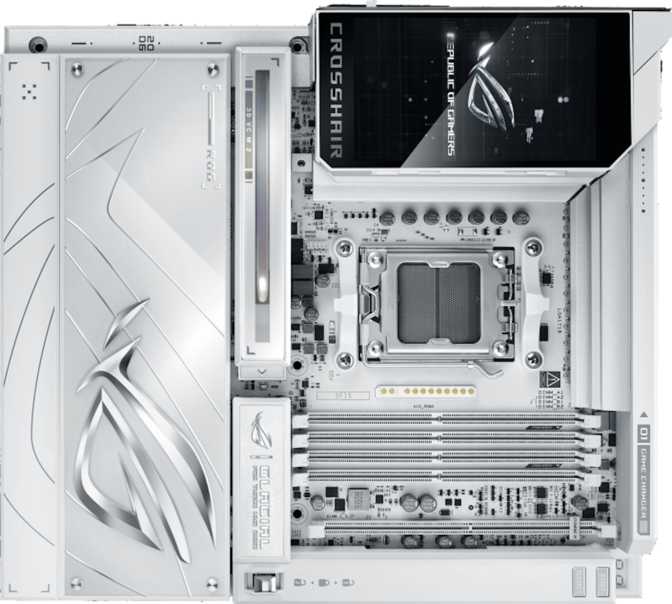
BTF (Back-to-Frame) reroutes these connections entirely. The power connectors are positioned so that cables approach from behind the motherboard tray, connecting through the PCB to contacts on the rear side rather than plugging into the front. The result is a motherboard face with no cable clutter — just components, heatsinks, and lighting. For a showcase build in a high-visibility case, the visual impact is substantial and genuinely different from anything achievable through conventional cable management.Prerequisite Check Before You Continue
The BTF standard requires both a BTF-compatible power supply and a BTF-capable chassis. A conventional ATX PSU will not connect to the BTF contact points. If your build uses an existing case and PSU, or if you have not confirmed BTF ecosystem compatibility, this board's defining feature is inaccessible. Resolve that question before committing.
Design and Build Quality
The Maximus line is ASUS ROG's flagship motherboard series, and the Z890 Hero BTF carries the physical quality expectations that history has set for it. The standard ATX format — 305 mm wide, 244 mm tall — means it slots into any full-tower or mid-tower ATX chassis without clearance complications. For a board with this feature density, ATX is the practical minimum; anything smaller would require compromises the Maximus philosophy rejects.
AURA SYNC Lighting
RGB lighting is integrated across the PCB and heatsink surfaces, synchronized through the AURA SYNC ecosystem. The coverage treats lighting as a design element contributing to a cohesive visual theme rather than isolated hotspots.
Dual BIOS Protection
Two separate firmware chips store independent BIOS copies. If aggressive overclocking or a failed update corrupts the active BIOS, the system recovers automatically from the backup — no physical flash drive or service visit required.
3-Year Warranty
The extended three-year warranty exceeds the one-to-two year standard across most competing flagship boards. This coverage signals ASUS's confidence in the board's long-term durability under sustained enthusiast-class use.
Platform Performance: What Z890 and LGA 1851 Deliver
The Foundation
The Z890 chipset paired with the LGA 1851 socket is Intel's current highest-tier desktop platform, designed for the Intel Core Ultra 200 processor family. The practical meaning: no features are artificially gated. The chipset unlocks full CPU overclocking, maximum memory speed access, full PCIe lane allocation, and every I/O capability the processor can provide.
The primary expansion slot operates at PCIe 5.0 with full x16 bandwidth — the fastest interface currently available for consumer graphics cards. Today's GPU releases do not saturate PCIe 4.0 bandwidth, let alone PCIe 5.0, so the immediate benefit is forward compatibility as GPU architectures continue to advance over the next several generations.
Expansion Slot Configuration
| Slot | Interface | Primary Use |
|---|---|---|
| x16 Slot (1) | PCIe 5.0 | Graphics Card (GPU) |
| x4 Slot (1) | PCIe | Capture / NVMe cards |
| x1 Slot (1) | PCIe | Accessory expansion |
Overclocking Architecture
The board is designed for overclocking from the ground up — the Z890 chipset enables full multiplier and base clock adjustments. ASUS provides automated overclocking profiles for less experienced tuners, while the BIOS environment exposes granular control over every voltage and timing parameter for those who want it.
The dual BIOS is directly relevant here. Aggressive overclocking carries a real failure risk that this architecture mitigates. Push too far on a manual configuration, and recovery is a power cycle away rather than a hardware intervention.
Memory: DDR5 at the Extreme Upper Limit
The Z890 Hero BTF runs DDR5 exclusively, as expected for a current Z890 board. Four DIMM slots in dual-channel configuration support a total memory ceiling that is, for practical purposes, unconstrained — high enough to cover even the most memory-intensive professional workloads like large virtual machine environments, high-resolution video editing timelines, and complex simulation workloads. Gaming builds will never approach this limit.
Configuration Guide
-
2 DIMMs for peak overclocking
One stick per channel minimizes electrical load on the memory controller, enabling the highest achievable frequencies from current DDR5 kits.
-
4 DIMMs for maximum capacity
Full 256 GB of total memory is supported with modest frequency trade-offs due to increased controller load. Right for workstation-adjacent builds.
Key Memory Facts
- DDR Version
- DDR5 only (no DDR4)
- Slots
- 4 × DIMM
- Channels
- Dual-channel
- Max Capacity
- 256 GB total
- OC Headroom
- Pushes DDR5 ceiling
- ECC Support
- Not supported
ECC Memory Note: ECC (Error-Correcting Code) memory, which automatically corrects single-bit memory errors to protect data integrity, is reserved for workstation and server platforms. Anyone building for mission-critical data integrity requirements should evaluate a workstation-class Intel alternative.
Storage: Six M.2 Slots and Why the Count Matters
Six M.2 sockets is exceptional even among high-end motherboards. Most builds — even demanding ones — use two to three NVMe drives. Six slots means the board can accommodate a complete NVMe storage array without a single expansion card, which has practical implications for professional and creative workflows running separate drives for OS, active projects, media cache, render output, backup, and long-term archive — all at full NVMe speed.
Storage Interface Summary
| Interface | Count | Typical Use |
|---|---|---|
| M.2 NVMe Sockets | 6 | Primary fast storage, project drives, cache |
| SATA 3 Connectors | 4 | Mass storage HDDs, legacy SSDs |
| RAID Support | 0 / 1 / 5 / 10 | Performance pooling or redundancy |
RAID Configuration Options
-
RAID 0 — Maximum Speed
Stripes data across drives for peak throughput. No redundancy — a single drive failure loses all data.
-
RAID 1 — Mirror Redundancy
Writes identical data to two drives. One drive can fail without data loss.
-
RAID 5 — Balanced Parity
Distributes parity across three or more drives — a balance of speed and fault tolerance.
-
RAID 10 — Mirror + Stripe
Combines redundancy and performance. Requires four drives minimum.
The Rear Panel: Connectivity Without Compromise
USB Port Breakdown
2×
40 Gbps per port
Fastest external SSDs, daisy-chaining, Thunderbolt peripherals, TB4 certified docks
4×
10 Gbps per port
Fast external drives, hubs, high-bandwidth USB peripherals
4×
5 Gbps per port
Keyboards, mice, controllers, standard USB storage devices
1×
10 Gbps
Fast-charging, USB-C peripherals, moderate data transfer
Dual LAN Ports
Two separate ethernet ports enable simultaneous wired connections — useful for running a direct NAS link for high-speed local file transfers while maintaining a separate internet connection, network bonding for increased aggregate throughput on supported routers, or separating gaming traffic from background network activity. This feature appears almost exclusively on enthusiast-tier boards.
Video Output Clarification
An HDMI 2.1 port is present on the rear panel. However, the board does not support integrated graphics output — a discrete PCIe graphics card is a hard requirement. The HDMI port's utility is limited to specific diagnostic scenarios, not standard daily operation.
No DisplayPort outputs are present on the rear panel. Display flexibility depends entirely on the discrete GPU's own output options.
Wireless and Networking: Wi-Fi 7 Ready
The integrated wireless covers the complete current standard progression. Wi-Fi 7 (802.11be) is the current peak wireless specification, delivering meaningfully higher maximum throughput and lower latency than Wi-Fi 6E on compatible routers, with improved multi-link operation that allows simultaneous use of multiple frequency bands for greater stability. As Wi-Fi 7 routers continue entering the consumer market, the board's integrated adapter will operate at full capability — this is genuine forward-looking compatibility, not a speculative claim.
Bluetooth 5.4 handles wireless peripherals — keyboards, mice, headsets, and controllers — at the current specification level, with improved low-energy performance and interference handling compared to earlier Bluetooth versions.
Wireless Standard Coverage
- Wi-Fi 7 (802.11be)Current Peak
- Wi-Fi 6E (802.11ax)
- Wi-Fi 6 (802.11ax)
- Wi-Fi 5 (802.11ac)
- Wi-Fi 4 (802.11n)
- Bluetooth 5.4
On-Board Audio: Capable Enough to Skip the Sound Card
The integrated audio achieves a signal-to-noise ratio that places it in audiophile hardware territory — background noise is essentially inaudible at this level, and the dynamic range is sufficient to reveal quality differences between audio sources. This is not a compromise audio solution.
Full 7.1 surround sound output covers the complete home theater surround format. The S/PDIF digital output allows connecting to an external receiver or standalone DAC without analog signal degradation through the cable run. Two rear audio connectors handle the physical analog connections.
For the majority of users — including most gamers, streamers, and casual music listeners — the on-board solution is strong enough to make a dedicated sound card unnecessary. The exceptions are professional audio production environments and critical listening through reference-grade, high-impedance headphones requiring a standalone headphone amplifier.
Audio Specifications
Audiophile-grade performance tier
- Surround Output
- 7.1 Channels
- Digital Output
- S/PDIF
- Rear Audio Jacks
- 2 connectors
Who Should Buy This Board — and Who Shouldn't
This Board Is For You If...
-
You are building a showcase rig in a glass-panel case and are committed to a BTF ecosystem — BTF-compatible PSU and chassis — from the ground up.
-
You plan to overclock seriously, value BIOS depth and dual-BIOS recovery, and want maximum DDR5 frequency headroom on Intel's current flagship platform.
-
Your workflow involves content creation or video production where six M.2 slots, dual LAN, USB 4, and Thunderbolt 4 provide genuine daily-use utility.
-
Platform longevity matters — PCIe 5.0, Wi-Fi 7, and Bluetooth 5.4 represent the current specification ceiling, and this board won't be a bottleneck for several upgrade cycles.
-
You value the ASUS ROG BIOS environment, AURA SYNC ecosystem, and an extended three-year warranty on a board you intend to push hard over time.
Skip It If...
-
Your existing case and power supply are standard ATX components — the BTF feature requires an ecosystem switch, not just a motherboard swap.
-
You need ECC memory support for data-integrity-critical workloads — this platform does not support it and a different Intel tier is required.
-
Your use case is primarily gaming with no intention of overclocking or using professional connectivity — a mid-tier Z890 board runs the same games for meaningfully less money.
-
You are building compact or space-constrained — this board requires a standard ATX enclosure and is not available in smaller form factors.
-
You rely on integrated graphics even temporarily — a discrete GPU is a hard requirement, with no iGPU display output available from the rear panel.
Competitive Positioning
The Z890 flagship market includes strong contenders from MSI's MEG ACE lineup and Gigabyte's AORUS Master tier. Each offers a fully capable Z890 platform, PCIe 5.0 primary expansion, DDR5, and competitive M.2 counts. At the specification level, the overlap between boards in this class is significant — the differences lie in execution details, BIOS environment quality, and distinctive features.
| Differentiator | ROG Maximus Z890 Hero BTF | ROG Maximus Z890 Hero | MSI / Gigabyte Flagships |
|---|---|---|---|
| BTF Connector Design | Exclusive Feature | Not Available | Not Available |
| Platform / Chipset | Z890 / LGA 1851 | Z890 / LGA 1851 | Z890 / LGA 1851 |
| PCIe Primary Slot | Gen 5.0 x16 | Gen 5.0 x16 | Gen 5.0 x16 |
| BIOS Environment | Maximus Tier | Maximus Tier | Competitive |
| USB 4 / TB4 | Varies by model | ||
| Dual LAN | Varies by model | ||
| Premium Over Base | BTF ecosystem cost | Lower entry cost | Competitive pricing |
BTF vs. Standard Hero: The most direct comparison is the standard ROG Maximus Z890 Hero without BTF. Both boards share the same platform capabilities, memory support, connectivity, and BIOS experience. The BTF version carries a price premium paid entirely for the connector rerouting design. If cable aesthetics in a glass-panel case matter to your build vision, that premium is rational. If they do not, the non-BTF Hero reaches the same performance ceiling at lower cost.
Honest Assessment: Strengths and Limitations
Where It Earns Its Position
The connectivity package is genuinely complete. USB 4 with Thunderbolt 4 certification, dual LAN, Wi-Fi 7, six M.2 sockets, and full RAID support address every realistic peripheral and storage scenario without expansion cards. The memory overclocking ceiling sits at the practical top of what DDR5 currently achieves, and the BIOS environment provides the depth to access it properly.
The dual BIOS and clear CMOS features lower the practical risk of aggressive overclocking, making serious tuning more accessible to a wider range of builders. The on-board audio implementation is strong enough to replace a dedicated sound card for all but the most demanding listening scenarios.
The three-year warranty, BTF aesthetic capability, and Maximus BIOS depth — which maintains a consistent benchmark reputation for Intel platform overclocking — together form an argument that requires no apologies for the board's price point, as long as that price point is justified by your specific use case.
Where to Set Realistic Expectations
The BTF requirement is a genuine build constraint, not a minor prerequisite. Building around it means committing to a BTF-compatible PSU and chassis simultaneously — it is not compatible with an existing standard-component setup. This is the most significant friction point for buyers not starting a build from scratch.
The rear panel carries two audio jacks rather than the larger multi-output array found on some competing boards, which may matter for builders with complex analog speaker configurations. No DisplayPort output means display options at the rear panel are limited to the single HDMI port, with practical display flexibility coming from the GPU.
ECC memory is unsupported — the standard for consumer Z890, but a hard boundary for anyone with professional data-integrity requirements. And the sheer breadth of features means the value calculation is highly use-case specific: you are paying for a suite that no single workflow will fully utilize simultaneously.
Questions Real Buyers Ask
Final Verdict
The ASUS ROG Maximus Z890 Hero BTF is a precisely targeted product — it is not trying to be everything to every Z890 buyer, and it does not need to be. It is the right board for a specific builder: one who wants Intel's current flagship platform at its ceiling performance, is building a showcase rig where visible cables are unacceptable, and will legitimately use Thunderbolt 4, USB 4, dual LAN, six M.2 slots, and DDR5 overclocking headroom in the same system.
For that builder, it is the most complete single-board solution available in the Z890 market. The BTF feature delivers on its promise. The connectivity is class-leading. The BIOS environment is the best available on Intel's platform. The three-year warranty and dual BIOS protections make it a board you can push hard without anxiety.
For builders who do not need the BTF ecosystem, the non-BTF ROG Maximus Z890 Hero reaches the same performance ceiling with fewer prerequisites. For anyone whose priority is CPU or GPU quality over motherboard feature depth, a mid-tier Z890 board runs the same processor without measurable performance cost.
Overall Rating
out of 10
-
Performance
9.5
-
Connectivity
9.8
-
Build Quality
9.2
-
Value
8.2
-
BTF Design
9.0