Asus ROG Falchion Ace 75 HE Full Review: Built for Competitive Gaming
KeyboardsAt a Glance
Hall effect keyboards have moved from niche curiosity to genuine must-have territory for competitive players, and the Asus ROG Falchion Ace 75 HE sits near the top of that conversation. It packs magnetic switch technology, an extreme polling rate, and a gasket-suspended typing platform into a compact layout that fits any desk without compromise. Whether you are trying to shave milliseconds off your reaction time or simply want a keyboard that will not hold you back, this one arrives with credentials worth examining closely.
Design and Build Quality
A Frame That Earns Its Price Tag
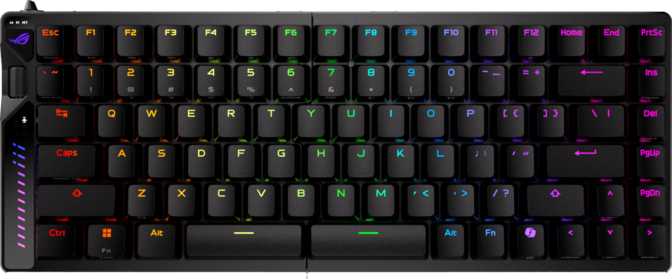
The Falchion Ace 75 HE uses a combination of plastic housing and an aluminum top plate, and that pairing does considerable work. The outer shell keeps weight manageable while the aluminum plate provides a solid, resonance-free surface above the switch layer. When you press a key, there is no flex in the deck — it feels planted in a way that budget keyboards simply cannot replicate.
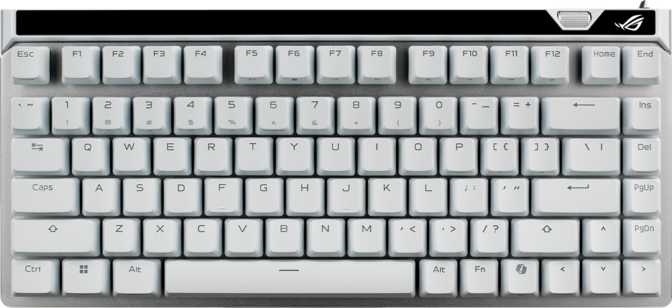
Finished in either black or white, both colorways carry a clean, purpose-built aesthetic that fits a gaming setup without demanding attention. The white version especially reads well under lighting, offering a neutral desk anchor that pairs naturally with most peripherals.
The 75% footprint occupies noticeably less desk space than a tenkeyless board while keeping the full function row intact. Total weight plants the board firmly during intense sessions, and adjustable feet let you dial in the typing angle to suit your ergonomic preference.
Detachable Cable and South-Facing LEDs
The braided cable detaches from the board, making cable management easier, transport cleaner, and cable replacement simple if it ever degrades — you replace the cable, not the keyboard. RGB lighting runs south-facing beneath each keycap, shining downward toward the user rather than straight up through the legends, producing a soft desk glow without the harsh brightness some boards produce.
Physical Specifications
- Width
- 320 mm
- Depth
- 145 mm
- Height
- 35 mm
- Weight
- 668 g
- Case Material
- Plastic + Aluminum
- Plate Material
- Aluminum
- Colors
- Black, White
- Cable
- Detachable USB
- Adjustable Feet
- Yes
- RGB Backlight
- South-Facing
The Switches: Why Hall Effect Changes Everything
What Hall Effect Actually Means
Most mechanical keyboards register a keypress through physical contact — a metal leaf or spring completing a circuit. Hall effect switches work differently: a magnet inside the stem moves past a sensor, and the keyboard reads the change in magnetic field rather than any physical contact. Because nothing ever touches, there is no wear mechanism for the actuation to degrade. The trigger point stays consistent indefinitely.
The ROG HFX V2X Magnetic Switch is Asus's implementation of this technology. It is a linear switch — smooth from top to bottom with no tactile bump or click. The 40-gram actuation force is light enough for rapid repeated inputs without being so feather-light that accidental presses become a problem.
Actuation Range: The Real Story
The actuation point is adjustable anywhere between 0.1mm and 4.0mm of travel — a span that is remarkable in the keyboard market. At the shallow end, 0.1mm means the key barely needs to move before the input registers. At the deep end, a full deliberate press is required. Total travel distance is 3.5mm.
For typing, a mid-range setting around 1.5–2.0mm tends to feel natural. For competitive gaming where re-triggering a movement key quickly is essential, pushing actuation as shallow as 0.2–0.4mm can make a meaningful difference. The switches are hot-swappable — if Asus releases a future HFX variant, swapping without soldering is an option.
ROG HFX V2X Switch at a Glance
Features That Define the Competitive Advantage
Every major feature on this board serves a specific competitive or ergonomic purpose. Here is what each one actually means for daily use.
Rapid Trigger
Standard keyboards will not register a key as released until the stem climbs back past a fixed reset point above where it triggered. Rapid trigger removes that fixed reset — the key re-arms for another input the moment it begins to rise, regardless of its current position. In a game like Counter-Strike or Valorant, you can strafe-stop faster and more precisely than any contact-based keyboard allows. For movement-heavy titles where frame-perfect positioning matters, this is a measurable mechanical advantage, not a software trick.
Dual Actuation
Two separate actions can be assigned to a single key at two different depth points. Press halfway and one action fires; press all the way and a different action fires. The most practical use case is binding crouch-walk to the halfway point of a WASD key and full crouch at the bottom — effectively doubling the function of a single key without repositioning your hands. For players who have already pushed standard keybind optimization as far as it goes, dual actuation opens up a new layer of control that simply does not exist on conventional keyboards.
8,000 Hz Polling Rate
Standard gaming keyboards report their state to the computer 1,000 times per second. This board reports 8,000 times per second — eight times as frequently — meaning each input update reaches the CPU within 0.125 milliseconds rather than 1 millisecond. Whether this difference is perceptible depends on the game, monitor refresh rate, and the player. In high-framerate competitive titles above 240fps the argument for 8,000 Hz becomes credible. For casual or single-player gaming, 1,000 Hz remains more than sufficient — but the capability is there if your setup demands it.
N-Key Rollover
Every key on the board can be pressed simultaneously and each input registers independently. In a fighting game with complex input sequences, or any scenario where five or six keys need to be held at once, nothing drops. For competitive gaming and fast typing, this is expected at this price level — it is included here without restriction or compromise across any usage scenario.
Rotary Dial
A rotary dial sits on the top-right corner of the board. Out of the box it handles volume control well — a quick spin adjusts output without breaking concentration to open software. Some users remap it to control application volume, scroll speed, or zoom in creative tools. Each notch produces a tactile click that gives useful feedback without adding noise to the desk environment.
What Is Missing — And Why It Matters
The Falchion Ace 75 HE does not support QMK, ZMK, or VIA — the open-source firmware ecosystems that enthusiasts use for deep custom programming. All configuration happens through Asus Armoury Crate. For the gaming-focused buyer this keyboard targets, Armoury Crate covers every relevant use case — but those who value firmware freedom will notice the absence immediately.
There is no USB passthrough port, no display panel, and no wireless option. This is a focused, wired competitive tool, and every feature decision reflects that priority.
Keycaps and Layout
PBT Double-Shot Keycaps
The keycaps are made from PBT plastic rather than the more common ABS. PBT is denser, more resistant to developing a shine from finger oils over time, and produces a slightly textured surface that most typists prefer for long sessions. The legends are produced using a double-shot molding process — two layers of plastic, one for the body and one for the legend — so the characters cannot fade regardless of use. After years of heavy typing, the letters will look exactly as they do on day one.
The keycap profile is OEM — the standard stepped-row curvature found on most office and gaming keyboards. It is familiar, universally compatible with aftermarket sets, and unlikely to require any adjustment period for most users.
Standard ANSI Layout — Full Aftermarket Compatibility
The keyboard uses ANSI (US) layout with fully standard key sizing across every row. Virtually any aftermarket keycap set will fit without modification — something that sounds trivial until you have owned a board with a non-standard bottom row that locks you into the factory caps indefinitely. Media controls live on the function layer rather than dedicated keys, which is the expected trade-off in a compact 75% design.
- Keycap MaterialPBT
- Legend ProcessDouble-Shot
- Keycap ProfileOEM
- LayoutANSI US
- Standard Key SizingYes
- Media ControlsFn Layer
- Rotary DialYes
Who This Keyboard Is For — And Who Should Look Elsewhere
It Makes Sense For
- Competitive FPS and battle royale players who want every available input advantage — particularly rapid trigger and extreme polling rate.
- Players upgrading from standard mechanical switches who want the durability and consistency of hall effect technology without learning a new ecosystem.
- Desk space-conscious setups where a tenkeyless is still too wide but a 60% layout feels too stripped — the 75% is the sweet spot.
- Anyone prioritizing switch longevity — hall effect mechanisms do not degrade the way contact-based switches do, meaning no need to rebuy switches every few years.
It Doesn't Make Sense For
- Wireless-only desk setups — there is no Bluetooth or 2.4GHz option. This keyboard is wired, full stop.
- Open-source firmware hobbyists who need QMK or VIA compatibility for deep custom programming beyond what Armoury Crate provides.
- Office or shared environments where the gaming aesthetic and ROG branding feel out of place.
- Budget buyers — the hall effect technology, 8,000 Hz polling, and aluminum construction command a premium that reflects their genuine value.
- Mac users — no Mac-specific key legends or dedicated remapping profiles are included.
How It Compares to the Alternatives
Logical competitors in the compact hall effect and analog switch keyboard segment.
| Feature | ROG Falchion Ace 75 HE | Wooting 60HE+ | Razer Huntsman V3 Pro TKL | SteelSeries Apex Pro TKL |
|---|---|---|---|---|
| Layout | 75% | 60% | TKL (80%) | TKL (80%) |
| Switch Type | Hall Effect | Hall Effect | Analog Optical | Analog Magnetic |
| Rapid Trigger | Yes | Yes | Yes | Yes |
| Polling Rate | 8,000 Hz | 1,000 Hz | 8,000 Hz | 8,000 Hz |
| Hot-Swap | Yes | Yes | No | No |
| QMK / VIA | No | Yes | No | No |
| Wireless | No | No | No | No |
| Dual Actuation | Yes | No | No | Limited |
Strengths and Honest Weaknesses
Where It Excels
The combination of 8,000 Hz polling, sub-millimeter actuation sensitivity, dual actuation, rapid trigger, and hot-swap capability in a 75% chassis is not something many competitors offer simultaneously. The aluminum plate provides a typing feel that justifies the weight, and the PBT double-shot keycaps communicate quality immediately upon first touch.
The gasket mount deserves close attention. Unlike keyboards where the plate screws directly to the case, gasket mounting suspends the internal assembly using silicone or foam pads at the edges. The result is a slight, controlled flex when typing — not looseness, but a cushioning quality that reduces the harshness of bottoming out. Over long sessions, this makes a genuine ergonomic difference that direct-mount boards rarely deliver.
Hall effect switch technology carries an essentially unlimited mechanical lifespan advantage over contact switches. The trigger point will not drift or degrade with use — these switches will outlast the keyboard chassis they sit in.
Genuine Limitations
The absence of wireless connectivity is a meaningful exclusion. Competing products at this price point increasingly offer 2.4 GHz modes alongside wired operation, and there is no technical reason hall effect keyboards must be wired-only — this is an Asus design decision that reflects competitive-gaming focus but will disappoint anyone who values a cable-free desk.
The reliance on Armoury Crate for configuration deserves scrutiny. It is functional, but is known for installing alongside other ROG system utilities that some users find intrusive. For buyers coming from keyboards with VIA or open-source firmware, it feels like a step backward in depth. Basic configuration is straightforward — advanced macro programming is where the ecosystem shows its limits.
The one-year warranty period is standard for the category but conservative given the underlying switch technology. The hall effect mechanism will far outlast that window — the warranty offers no special reassurance about the surrounding hardware components.
Common Questions Answered Before You Buy
Final Verdict
The Asus ROG Falchion Ace 75 HE is a purpose-built competitive keyboard that does not ask you to choose between performance and build quality. The hall effect switches deliver a genuinely different experience from contact-based mechanicals — more consistent, more adjustable, and designed to stay that way indefinitely. The 75% layout fits most gaming desks without compromise, the gasket mount makes extended sessions more comfortable, and the 8,000 Hz polling rate places it at the top tier of input devices for high-refresh-rate competitive play.
Buy It If You Are
- A competitive FPS player at 240fps or above
- Upgrading from contact-based mechanicals and want long-term switch consistency
- Looking for a 75% hall effect board with hot-swap and function row intact
- Ready to invest in a technically complete, wired competitive tool
Skip It If You Want
- Wireless connectivity — it is simply not an option here
- QMK or VIA open-source firmware support
- A budget-friendly entry point into hall effect keyboard technology
- A Mac-optimized layout with native key legends
Within its intended lane — wired, competitive, and technically complete — the Falchion Ace 75 HE is one of the most fully-featured keyboards available in the 75% category. It earns a strong recommendation for competitive gamers upgrading from standard mechanical switches, and for anyone who wants hall effect technology without sacrificing a function row or hot-swap support.