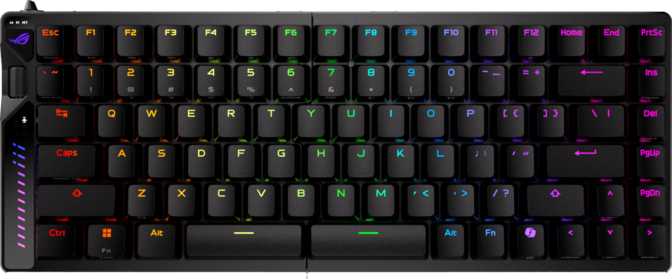
Asus ROG Falcata Full Review: Wireless 75% Hall Effect Gaming Keyboard
KeyboardsDesign and Build Quality
Construction and Materials
The Falcata is built from a combination of plastic and aluminum, with an aluminum plate internally supporting the switches. The top case incorporates aluminum elements that deliver real structural rigidity, while the base uses plastic to manage weight distribution and cost. The result sits clearly above purely plastic boards without crossing into the unyielding territory of all-metal constructions.
The finish comes in black, keeping the aesthetic desk-neutral and understated. Visual identity comes almost entirely from the per-key RGB lighting rather than from the chassis shape itself — a sensible design choice for a board meant to fit both gaming rigs and cleaner workspace setups.
Gasket Mount: What It Means for Typing Feel
The internal structure uses a gasket mount design — the plate holding the switches is suspended inside the case by soft gasket material rather than screwed directly to the case walls. This produces a slight, controlled flex with each keystroke. Compared to a tray-mounted or top-mounted keyboard, gasket mounting delivers a softer, less fatiguing feel during long sessions. For gaming, the result is reduced finger fatigue. For typists, a more forgiving stroke that absorbs some of the impact.
Physical Dimensions
At 327mm wide the Falcata saves meaningful horizontal space compared to a tenkeyless board while retaining dedicated arrow keys and a short navigation column to the right of the main cluster. The weight of 968 grams is on the heavier end for a wireless 75% keyboard — partly explained by the aluminum plate and the included wrist rest. Stability is what you trade for portability here.
Accessories and Connectivity
Most keyboards bundle nothing alongside the board. The included wrist rest signals extended-session intent and removes a purchase most buyers otherwise add separately.
The USB cable disconnects at the keyboard end for clean transport and eliminates the permanent damage risk of a permanently attached cable that gets yanked.
Adjustable feet let you match keyboard angle to desk height and personal posture preference, reducing wrist strain across long sessions.
The ROG HFX V2 Magnetic Switches
Hall Effect Technology Explained
Traditional mechanical switches use a physical metal contact point that closes a circuit when the key travels far enough. Two problems follow from this: contact metal wears out over time, and the actuation point is permanently fixed by the physical construction — no amount of software or user adjustment can change it.
Hall effect switches work on an entirely different principle. Instead of a metal contact, they use a small magnet and a magnetic sensor. The sensor reads the magnet's position continuously as the key travels — there is no physical contact closing a circuit at all. Three direct consequences flow from this architecture:
- Longevity without degradation. With no contact wear, these switches are rated for dramatically longer operational lifespans than conventional mechanicals.
- Fully adjustable actuation. Because the sensor reads position continuously, the registration point can be set anywhere within the travel range in software — per key if desired.
- Rapid trigger capability. The switch detects both press and release at extremely fine resolution — something binary contact switches fundamentally cannot replicate.
Adjustable Actuation Range
Set the registration point anywhere from a near-zero 0.1mm touch to a deliberate full 3.5mm press — adjustable per key in Armoury Crate software.
Setting actuation near the top of travel (around 0.2mm) means keys register almost the instant they move — ideal for rapid directional changes in competitive games. A deeper setting suits users who prefer a more deliberate press to avoid accidental inputs during typing.
Rapid Trigger
On a standard keyboard a key must travel back past a fixed reset point before it can register again — creating a small but real delay during fast direction changes. With rapid trigger active, a new press registers the moment the key begins moving downward again, at fractions-of-a-millimeter resolution. In competitive shooters this translates directly to sharper strafing responsiveness.
Dual Actuation
A single physical key can trigger two separate actions at different depths of press. A shallow touch might crouch a character while a full press triggers sprint. This opens input configurations unavailable on traditional switches — particularly useful in titles built to support multi-state key input.
Analog Input
The switch reports its actual physical position as a variable value rather than a simple on/off signal — similar to how a gamepad analog stick reports degrees of tilt. For compatible games and applications, this enables variable-speed movement and gradient actions that binary contact switches simply cannot produce.
Hot-Swappable Switch Sockets
Switches pull out and press in without soldering — a basic switch puller is all you need. Given the growing number of competing hall effect switches entering the market, this future-proofs your hardware investment. You can drop in different compatible magnetic switches without replacing the entire board.
Performance Features
8000Hz Polling Rate
Standard gaming keyboards report their position to a computer 1,000 times per second. The Falcata reports at 8,000 times per second at its maximum mode. The perceptual difference from 1000Hz is genuinely subtle for most players, and some systems show increased CPU overhead at higher polling rates — this is worth acknowledging honestly.
Where 8000Hz earns its relevance is in combination with the 0.1mm actuation and rapid trigger: extremely fast inputs are captured and transmitted without interpolation artifacts. For most users 1000Hz is sufficient. For players who have already optimized every other variable, 8000Hz is the current performance ceiling.
Full N-Key Rollover
Every key on the board can be pressed simultaneously and each input registers independently. No input is ever dropped regardless of how many keys are held at once — this is a full NKRO implementation, not a 6-key rollover approximation. For players who bind many simultaneous actions across movement, abilities, and utility inputs, this eliminates one more potential failure point from their setup.
Battery Life and Wireless Performance
With RGB lighting off or minimized, this translates to months of daily use. Most users will charge this keyboard considerably less often than they charge their phone.
Understanding the Real-World Battery Range
The 610-hour rated figure applies with RGB lighting minimized. Illumination is the largest single power draw on any wireless keyboard, and running full RGB will shorten endurance considerably — expect days or weeks rather than months depending on lighting intensity and patterns. For typical gaming sessions with moderate lighting, charging once every one to two weeks is the realistic expectation for most users.
Three Connection Modes
Keycaps, Layout, and Daily Usability
PBT Double-Shot Keycaps
The keycaps are made from PBT plastic with double-shot construction. PBT is a harder, denser material than the ABS plastic found on most keyboards at or below this price tier. It resists the development of a shiny, worn appearance on frequently used keys — the texture should hold up for years of regular use without the greasy sheen ABS develops over time.
Double-shot construction means the legends are formed from two layers of molded plastic rather than printed on. Under no normal use condition can the legends wear off — the character is physically part of the cap, not applied to its surface.
The keycap profile is OEM — a widely used, slightly sculpted shape familiar to anyone who has used a standard desktop keyboard. It offers a gentler learning curve than specialized profiles like SA or DSA, and works well for both gaming and productivity typing.
Layout and Key Access
The ANSI US layout follows the standard American key arrangement. The 75% format retains all alphanumeric keys, a full function row, dedicated arrow keys, and a short navigation column. Every key uses a standard size — any third-party keycap set works without searching for non-standard replacements.
Media controls are accessed through the function key layer rather than dedicated physical keys, which is the standard 75% trade-off. The rotary dial adds a more tactile way to adjust volume or other assigned functions — reaching for a physical knob is faster and more natural than pressing any key combination.
The board includes full per-key RGB backlighting. PBT plastic and double-shot legends are a noticeably better match for RGB effects than ABS keycaps — colors appear more consistent and character clarity holds at high brightness levels.
Software and Customization
The Fal cata operates within Asus Armoury Crate for all configuration. Actuation points, rapid trigger sensitivity, dual actuation profiles, RGB lighting, and key remapping all live inside this software. Understanding its scope — and its ceiling — is essential before buying.
What Armoury Crate Controls
- Per-key actuation point adjustment (0.1mm – 3.5mm)
- Rapid trigger sensitivity and reset distance settings
- Dual actuation depth configuration
- Full RGB lighting profiles and effects
- Key remapping and macro programming
Firmware Limitations to Know
- No QMK support — open-source firmware not available
- No ZMK or VIA compatibility
- No USB passthrough port on the board
- All configuration requires Armoury Crate on a Windows PC
Why no QMK or VIA? Hall effect switches require firmware capable of processing analog positional data — a fundamentally different software architecture than the binary on/off input that QMK and VIA were designed for. ROG routes all configuration through Armoury Crate instead. Users who have invested in QMK-based workflows should treat this as a structural limitation, not a future firmware update.
Who Should Buy the ROG Falcata
This keyboard is a strong fit for:
- Competitive FPS and battle royale players who want rapid trigger and adjustable actuation in a wireless package — addressing the two most common objections to wireless in serious play simultaneously.
- Players optimizing desk real estate who want a smaller footprint without giving up arrow keys or any gaming performance features.
- Enthusiasts investing long-term who want switches where contact wear is simply not a factor in the lifespan equation.
- Users alternating between gaming and clean workspace setups — the detachable cable and triple wireless modes make context-switching easy.
This keyboard is not right for:
- Open-source firmware users who rely on QMK or VIA for deep, layer-based customization — this limitation is architectural, not resolvable by updates.
- Typists and productivity-first users — nothing prevents typing well on this board, but the light actuation, gaming feature orientation, and price all signal a different primary use case.
- Mac users — no Mac-optimized key labeling or macOS-specific layout accommodations are present.
- Frequent travelers prioritizing portability — approaching one kilogram is substantial for a 75% board, and this is not the keyboard you want to carry daily in a bag.
How It Compares to Alternatives
The Falcata competes directly against other compact wireless gaming keyboards — particularly the growing field of hall effect competitors.
| Feature | ROG Falcata | Typical Hall Effect Competitor | Standard Optical / Mechanical Wireless |
|---|---|---|---|
| Switch Technology | Hall Effect (Magnetic) | Hall Effect (Magnetic) | Optical or Contact |
| Actuation Range | 0.1mm – 3.5mm | 0.2mm – 4.0mm typical | Fixed point only |
| Rapid Trigger | Increasingly common | ||
| Polling Rate | 8000Hz | 1000 – 4000Hz | 1000Hz standard |
| Wireless Modes | USB + 2.4GHz + BT 5.0 | Varies | Varies |
| Battery (lights off) | Exceptional (months) | Varies significantly | Typically 1–3 weeks |
| Wrist Rest Included | |||
| QMK / VIA Support | Occasionally | ||
| Keycap Material | PBT Double-Shot | ABS common at tier | ABS common at tier |
| Hot-Swappable | Varies | Varies |
Common Questions From Buyers
Honest Assessment
What Makes It Worth Considering
The Falcata's case is built on a genuinely differentiated technology foundation. Hall effect switches with 0.1mm minimum actuation, full rapid trigger, dual actuation, and analog input capability represent the current ceiling of what gaming keyboard input technology offers. Delivering all of that in a wireless 75% package — with exceptional battery endurance to match — reflects real product engineering.
The 8000Hz polling rate future-proofs the hardware even if its real-world perceptual impact today remains subtle. The hot-swap sockets ensure the board has hardware longevity beyond any single switch generation — you can swap in new magnetic switches as the market evolves without replacing the board.
PBT double-shot keycaps at this tier are a material upgrade over the ABS plastic competitors typically ship. The gasket mount delivers a noticeably more comfortable typing experience than plate-mounted alternatives in the same price bracket. The included wrist rest removes a common additional purchase from the total cost of ownership.
Limitations You Should Know Before Buying
The Armoury Crate dependency is a structural reality — not a preference. Users who have invested in QMK-based workflows, or who want the transparency and community support of open-source firmware, should accept this as a non-negotiable constraint before committing to the purchase.
Armoury Crate itself carries a historically mixed reputation among PC enthusiasts for software stability and background resource usage. The situation has improved in recent iterations, but users running lean system configurations may find the software footprint heavier than they prefer.
The weight approaching one kilogram is real. For a keyboard that will never move from a desk, this is actually a stability advantage. For anyone who packs up their setup regularly, it becomes a meaningful daily inconvenience.
The absence of USB passthrough is a minor but genuine omission — plugging a mouse or USB dongle into the keyboard itself is not possible. The Falcata is also priced as a premium product: every specification in this review comes at a price, and buyers who don't need or use the performance ceiling should consider whether a less capable board at a lower price serves them better.
Asus ROG Falcata: Clear Recommendation With Clear Conditions
The ROG Falcata does something genuinely difficult: it assembles the most technically advanced switch features currently available in the gaming keyboard space into a compact, wireless form factor without stripping out build quality to hit a price point.
Buy if:
Wireless competitive gaming performance is your primary metric and you are working within an Armoury Crate-compatible Windows setup. The hall effect switch system, adjustable actuation, and rapid trigger capability work together as a cohesive performance package rather than a checklist of disconnected features. Players who have hit the ceiling of what conventional wireless keyboards can offer will find the Falcata represents a genuine next step.
Skip if:
Open-source firmware flexibility, lighter weight for travel, or Mac compatibility are requirements you cannot work around. These limitations are not correctable through software updates — they are design and architecture decisions. Buyers for whom any of these factors is essential should look at competing keyboards before committing.