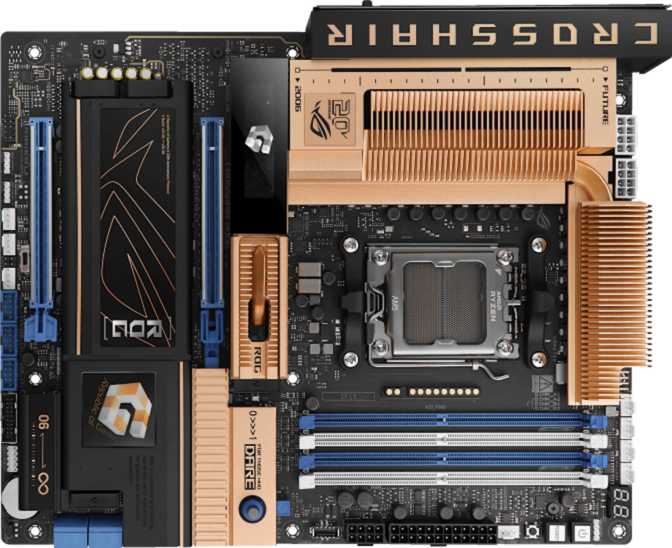
Asus ROG Crosshair 2006 Review: A Full-Featured X870 Flagship for AM5
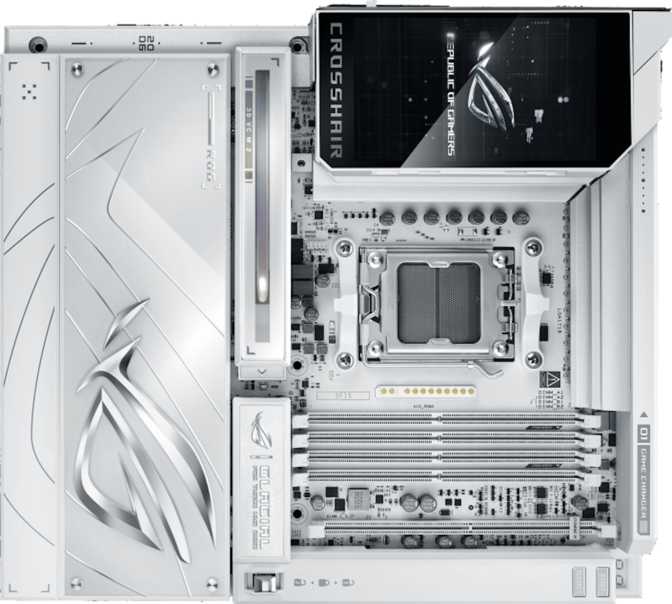
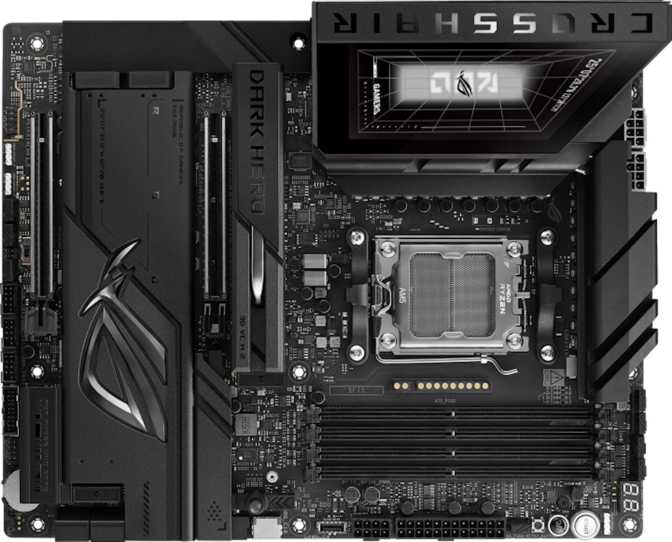
MotherboardsThe ROG Crosshair 2006 is Asus's flagship AM5 answer for builders who treat their motherboard as a long-term platform investment — not just a component to connect other parts. Dual Thunderbolt 4, Wi-Fi 7, five M.2 slots, and twin PCIe 5.0 x16 slots make a comprehensive argument. This review breaks down exactly what that means for real builds.
4.5 / 5
Expert Rating
Design and Build Quality
Physical experience, layout, and what you actually hold in your hands
Physical Presence and Layout
The Crosshair 2006 follows the standard ATX footprint at 305 mm wide by 244 mm tall — the industry-standard full ATX size that fits comfortably in the vast majority of mid-tower and full-tower cases. No measuring tape required; if your case supports ATX, this board fits.
ROG's aesthetic delivers exactly what the Republic of Gamers brand has trained buyers to expect: aggressive angular styling, premium-finish heatsinks over the VRM and chipset areas, and addressable RGB lighting integrated directly into the board. The lighting integrates with Asus's Aura Sync ecosystem for synchronization across compatible peripherals. It can be fully disabled for a dark minimal build or configured for a full light show.
The component layout reflects careful engineering for real-world cable management. M.2 slots are distributed across the board to prevent thermal stacking, and PCIe slot placement accommodates multi-slot GPU coolers without blocking the primary airflow lane.
Build Quality Indicators
Reinforced PCIe slots and hardened M.2 retention mechanisms are meaningful additions when you are installing a heavy triple-fan GPU or performing repeated SSD swaps over years of ownership.
The BIOS flashback and clear CMOS button are both accessible from the rear I/O panel — meaning you can recover a failed overclock or flash a BIOS update without a CPU or RAM installed. At this tier, button-accessible BIOS recovery is a basic operational necessity, not a luxury.
Board Dimensions
- Form Factor: ATX (305 × 244 mm)
- RGB: Addressable, Aura Sync compatible
- Clear CMOS: Rear I/O panel button
- Warranty: 3 years
Platform Foundation: AM5 and X870
Why the chipset and socket choice matter beyond the spec sheet
The Crosshair 2006 uses AMD's AM5 socket — AMD's current-generation LGA platform supporting their latest Ryzen processors. AMD has historically honored socket compatibility across multiple CPU generations, making AM5 a reasonable long-term investment platform for several years of processor upgrades.
The X870 chipset is AMD's enthusiast-tier offering, sitting above the mainstream B650 and B850 chipsets. X870 mandates USB4 support, higher-bandwidth connectivity options, and greater PCIe lane availability. In a build with a flagship GPU, multiple NVMe drives, a USB4 external SSD, and a high-resolution display running simultaneously, the bandwidth headroom of X870 versus a cheaper chipset is the difference between a system that breathes freely and one that quietly throttles.
| Socket | AM5 |
| Chipset | X870 |
| Form Factor | ATX |
| Integrated GPU | Not included |
| Easy Overclock | Yes |
| Dual BIOS | No |
| Warranty | 3 Years |
Memory Performance: DDR5 at Its Ceiling
Capacity, overclocking headroom, and what 256 GB support actually means
Capacity and Configuration
Four DDR5 memory slots in dual-channel configuration support up to 256 GB of total memory. Most gaming builds currently use 32 GB; 64 GB is becoming standard for professional workstations; 128 GB covers video editors working with 8K RAW footage or engineers running large simulation datasets. The 256 GB ceiling is aspirational for most users today — but ensures this board never becomes your memory bottleneck as workloads grow.
Overclocking Headroom
The overclocked memory speed ceiling reaches 9600 MHz. The gap between DDR5 baseline speeds and 9600 MHz is substantial in memory-sensitive workloads — video encoding, compression, large dataset processing, and latency-sensitive gaming titles all benefit. The easy overclock feature and EXPO/DOCP memory profile support allow one-click memory speed improvements without manual timing calculations.
Note: the board does not support ECC (Error-Correcting Code) memory. ECC is standard in professional server and workstation environments for data integrity. Its absence is expected for a consumer enthusiast platform but worth flagging for mission-critical data processing work.
256 GB
Maximum Capacity
9600 MHz
OC Speed Support
4 Slots
DDR5 DIMM
Dual
Channel Configuration
Connectivity: Where the Crosshair 2006 Separates Itself
Rear I/O breakdown, USB tiers explained, and wireless capabilities
Rear I/O Panel Ports
USB Type-A — 6 Ports (All 10 Gbps)
Every USB-A port on the rear panel operates at the highest-tier standard for Type-A connections. There are zero legacy slow-speed USB-A ports — every connection is fast enough for external SSDs, high-speed storage arrays, and any current USB peripheral.
USB Type-C — 3 Ports (10 Gbps)
Three USB-C ports round out standard USB-C connectivity — useful for modern smartphones, tablets, external displays, and the growing ecosystem of USB-C peripherals.
USB4 40 Gbps — 2 Ports
Four times faster than a standard 10 Gbps USB port. The appropriate interface for high-speed NVMe enclosures, professional video capture cards, and demanding docking station setups where a single cable handles monitors, storage, and peripherals simultaneously.
Thunderbolt 4 — 2 Ports
The headline differentiator at this tier. Each port supports output to two 4K monitors or one 8K monitor, daisy-chaining up to six devices, and full backward compatibility with USB4, USB 3.x, and Thunderbolt 3 devices. Many X870 boards skip Thunderbolt entirely.
Dual Gigabit Ethernet — 2 RJ45 Ports
Supports dedicated gaming and streaming lanes on separate cables, a bonded connection for doubled throughput to a NAS, or a failover setup. A single-NIC board cannot replicate this without additional hardware.
HDMI 2.1 Output
Present for connecting displays directly from the board when using a processor with integrated graphics. Currently inactive with GPU-only processors but future-proofs the board for AMD APU-class AM5 configurations.
Wireless Connectivity
Wi-Fi 7 (802.11be) is the highest-tier wireless standard currently available, offering theoretical throughput that surpasses even wired gigabit connections with significantly reduced latency over congested networks. The board maintains backward compatibility with Wi-Fi 6E, Wi-Fi 6, Wi-Fi 5, and Wi-Fi 4.
Bluetooth 5.4 handles peripherals, audio devices, and input devices at the current standard. One note: the board does not support aptX audio encoding — relevant for audiophiles using Bluetooth headphones that specifically benefit from that codec. For most Bluetooth use cases — keyboards, mice, controllers, earbuds — this is not a practical concern.
Wireless Standards
- Wi-Fi 7 (802.11be)
- Wi-Fi 6E (802.11ax)
- Wi-Fi 6 (802.11ax)
- Wi-Fi 5 (802.11ac)
- Wi-Fi 4 (802.11n)
- Bluetooth 5.4
Storage: Five M.2 Slots and Full RAID Support
NVMe expansion, SATA options, and RAID configurations explained
NVMe Expansion
Five M.2 slots is a specification that commands attention. Most mid-range and even upper-mid boards offer two or three. Five slots means a primary boot drive, a secondary fast working drive for active projects, a game library drive, and remaining slots for future additions — all without touching a single SATA cable.
SATA Storage
Four SATA 3 connectors remain available for traditional SSDs and hard drives — sufficient for a secondary storage array alongside the NVMe primary setup. Users managing large media libraries that do not demand NVMe speeds, such as uncompressed video archives, music libraries, or cold backup storage, will find four SATA ports adequate.
RAID Configurations Explained
RAID 0Maximum Speed
Stripes data across drives for peak performance. No redundancy — one drive failure means total data loss. Best for scratch disks or render caches where speed matters more than safety.
RAID 1Full Mirror
Identical copy on two drives. A single drive failure loses nothing. Ideal for important working files where continuity is critical.
RAID 5Speed + Redundancy
Distributes data and parity across three or more drives. Tolerates a single drive failure with better storage efficiency than RAID 1.
RAID 10Mirror + Stripe
Combines mirroring and striping for both speed and redundancy. Requires four drives. The practical choice for local business storage that cannot afford downtime.
5
M.2 NVMe Slots
4
SATA 3 Connectors
4
RAID Modes
6
Fan / Pump Headers
Expansion Slots: Built for Next-Generation GPU Configurations
PCIe 5.0 bandwidth explained and what dual x16 slots actually enable
PCIe 5.0 x16 — Both Slots
The Crosshair 2006 features two PCIe 5.0 x16 slots. PCIe 5.0 doubles the bandwidth of PCIe 4.0, which itself doubled PCIe 3.0. A full x16 PCIe 5.0 connection delivers enough headroom that even the most demanding GPU released in the coming years will not be limited by the interface itself.
The second full x16 slot means dual-GPU configurations are physically supported — whether for a computational workload that benefits from a second accelerator, an AMD mGPU setup, or simply a dedicated capture card with guaranteed full bandwidth. Both slots are the same premium generation; there are no legacy PCIe x1, x4, or older-generation slots that add clutter or consume lanes inefficiently.
Compatibility Note
There are no legacy PCIe x1, x4, or older-generation slots on this board. Users with older PCIe expansion cards should verify compatibility before purchasing.
| Slot Type | Count | Bandwidth |
|---|---|---|
| PCIe 5.0 x16 | 2 | 128 GB/s |
| PCIe 4.0 x16 | 0 | — |
| PCIe x1 | 0 | — |
Internal Headers
- 6 Fan / Pump Headers
- USB 3.2 Gen 1 (×4 via expansion)
- USB 3.2 Gen 2×2 (×1 via expansion)
- USB 2.0 (×6 via expansion)
Audio: Onboard Sound Worth Using
Signal quality, channel support, and when an external DAC still makes sense
The onboard audio delivers a signal-to-noise ratio of 120 dB — a measurement describing how cleanly the audio signal is separated from electronic interference within the board. Consumer-grade motherboards typically offer 97–108 dB; dedicated mid-tier sound cards target 110–115 dB. At 120 dB, this implementation approaches the performance ceiling of what analog headphones and speakers can resolve.
For a gaming headset, stereo speakers, or even most audiophile headphones, the onboard audio will be the last thing in the chain limiting sound quality. The system supports 7.1 surround sound, covers both analog and digital S/PDIF output (connecting to receivers and external DACs), and provides two audio jacks on the rear I/O for simultaneous microphone and headphone use without a USB audio interface.
Audiophile grade (97–108 dB is typical onboard)
- 7.1 Surround Channels
- S/PDIF Digital Output
- 2 Rear Audio Jacks
- No aptX Bluetooth codec
Overclocking and BIOS Experience
What "easy to overclock" means in practice and where the limits are
The BIOS provides AI-assisted overclocking that allows a one-click approach to pushing both processor and memory beyond stock speeds using EXPO/DOCP memory profile support. Expert users can bypass the automation entirely and tune voltage, frequency, and timing parameters manually.
The clear CMOS button is accessible from the rear panel — the correct placement for a serious overclocking board. A failed overclock or botched BIOS experiment should not require opening the case to locate a small jumper. Button-accessible reset means recovery from an aggressive tuning session takes seconds.
The board does not include dual BIOS. Some competing boards carry a backup BIOS chip as a failsafe if the primary chip is corrupted — a rare but non-zero risk during manual BIOS flashing or a power interruption mid-update. The Crosshair 2006 mitigates this through FlashBack capability (BIOS updates without a CPU installed) but does not provide the hardware-level redundancy of a second physical BIOS chip.
Dual BIOS: Notable Absence
At this price tier, a backup BIOS chip is a reasonable expectation. Its absence is the single most pointed engineering trade-off on this board — FlashBack helps, but it is not the same safety net.
Real-World Usage: Who This Board Is Built For
Matching the hardware to the builder — including who should look elsewhere
Ideal Users
High-End Gaming Builds
Pairing this board with a flagship AM5 processor and PCIe 5.0 GPU eliminates every platform-level bottleneck. Wi-Fi 7 handles a gaming router's fastest network without a separate card. Dual LAN allows dedicated game-traffic isolation.
Content Creators and Video Editors
Five M.2 slots allow a dedicated project drive, render cache, and boot drive to coexist with room to grow. Thunderbolt 4 supports professional external storage arrays at speeds that matter during active editing sessions.
Streamers Running Simultaneous Workloads
Dual LAN, top-tier wireless, and a second PCIe 5.0 slot for a dedicated capture card make this a production-grade streaming platform rather than a compromised gaming-first board.
Enthusiast Overclockers
DDR5 support up to 9600 MHz, accessible BIOS tooling with AI assistance, and a capable VRM implied by the X870 tier and ROG platform make this a serious AM5 overclocking board.
Who Should Look Elsewhere
Mainstream Gamers on a Budget
A B650 or B850 board at a fraction of the price delivers equivalent everyday gaming performance. The premium here returns value only if you actively use the additional connectivity, memory headroom, or overclocking capabilities.
Builders Who Require Dual BIOS
If BIOS-level hardware redundancy is non-negotiable — such as an always-on workstation where a manual BIOS recovery is unacceptable — competing boards at similar tiers do include it.
ECC Memory Users
Scientific computing, financial modeling, or any application where memory data integrity is non-negotiable requires ECC support. This board does not provide it. Those workloads belong on AMD's EPYC or Threadripper platforms.
How the Crosshair 2006 Compares to Its Closest Competitors
Representative X870 competitive landscape — verify specific model specs before purchasing
| Feature | ROG Crosshair 2006 | X870 Competitor A | X870 Competitor B |
|---|---|---|---|
| PCIe 5.0 x16 Slots | 2 | 1 | 2 |
| M.2 Slots | 5 | 4 | 5 |
| USB4 40 Gbps Ports | 2 | 2 | 1 |
| Thunderbolt 4 Ports | 2 | 0 | 2 |
| Dual LAN (2× RJ45) | |||
| Wi-Fi Generation | Wi-Fi 7 | Wi-Fi 7 | Wi-Fi 6E |
| Dual BIOS | |||
| Max DDR5 Speed (OC) | 9600 MHz | 8800 MHz | 9200 MHz |
| Onboard Audio SNR | 120 dB | 115 dB | 120 dB |
| Warranty | 3 Years | 3 Years | 3 Years |
Honest Strengths and Weaknesses
An unvarnished look at where this board excels and where it falls short
The connectivity suite is genuinely exceptional and not matched by most boards at this tier without paying a separate premium for Thunderbolt add-in cards. Dual Thunderbolt 4 ports land as a primary purchase driver for creative professionals — many X870 competitors simply skip the standard.
The five M.2 slots, dual full-bandwidth PCIe 5.0 expansion, 120 dB audio, and dual LAN all deliver real-world utility rather than specification padding. The three-year warranty is appropriate for a premium investment, and the ROG BIOS development history suggests firmware will continue improving long after purchase.
The DDR5 memory overclocking ceiling at 9600 MHz is among the highest in its class, giving enthusiasts genuine runway for future performance tuning.
The absence of dual BIOS is the most pointed omission for a flagship board. It is exactly the kind of hardware-level safety net that makes sense at this price point, and competing products at similar tiers include it. FlashBack capability partially addresses the risk but is not equivalent to a second physical BIOS chip.
The lack of aptX Bluetooth audio encoding affects a narrow audience but is worth noting for users with high-quality wireless headphones that benefit specifically from the codec.
The absence of any legacy USB-A ports is a clean modern decision — but it requires USB-A to USB-C adapters for users with older peripherals. Not a flaw, but a genuine adjustment in a busy workspace.
Questions Buyers Ask Before Purchasing
Answers to the real searches people run before spending money on a flagship board
Final Verdict
The Asus ROG Crosshair 2006 is a flagship AM5 motherboard built without meaningful corners cut in the areas that define the premium tier: connectivity, memory performance headroom, expansion capability, and audio quality. The dual Thunderbolt 4 ports, five M.2 slots, Wi-Fi 7, dual LAN, and twin PCIe 5.0 x16 slots collectively form a platform that will not need replacing because it ran out of ports or bandwidth.
The board is not a universal recommendation. If your build does not need Thunderbolt, will not use more than two M.2 drives, and does not demand the outer reaches of DDR5 overclocking, the premium over a well-specified B850 or mid-tier X870 board is difficult to justify. The missing dual BIOS is a genuine oversight at this price point.
For enthusiast builders, content creation professionals, streamers, and overclockers who want a platform to grow into progressively: this is a clear, confident choice.
4.5
out of 5
- Best for: Enthusiast builders and creators
- Skip if: Budget build or no Thunderbolt need
- Warranty: 3 Years
- Wireless: Wi-Fi 7 + Bluetooth 5.4