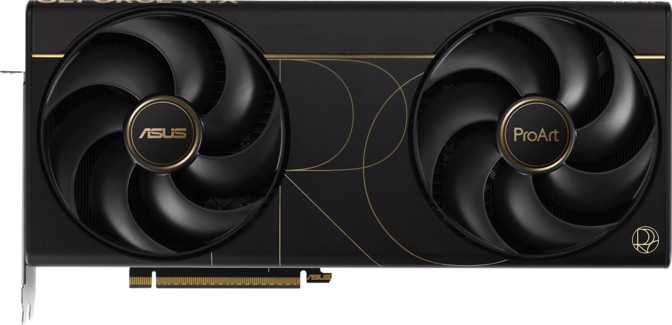
Asus ProArt GeForce RTX 5090 OC Edition: Tested and Reviewed
Graphics CardsWhat the ProArt RTX 5090 OC Edition Actually Is — And Who Should Care
The RTX 5090 is the fastest consumer GPU ever built, and Asus could have dressed it in any clothing they chose. They chose the ProArt line — their creator-focused brand — rather than the gaming-centric ROG Strix or the enthusiast-tuned TUF Gaming labels. That choice tells you something important before you even look at the specs: this card is engineered for the person who uses their workstation to make things, not just play them.
That does not mean gamers should look away. With the raw compute muscle packed into the Blackwell architecture, the ProArt RTX 5090 OC Edition delivers exceptional gaming performance as a byproduct of its professional ambitions. The target buyer is a 3D artist, video editor, machine learning practitioner, or visualization engineer who also wants the best gaming experience money can buy.
If you want the best discrete GPU available with no compromises for creative work or gaming, read on. If cost-efficiency is your primary concern, this review will tell you exactly where to look instead.
Design and Build Quality
Professional restraint at a massive scale
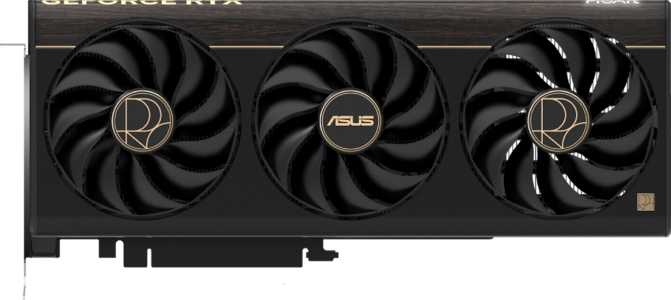
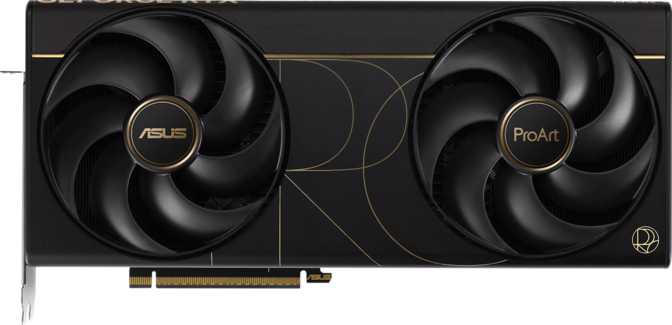
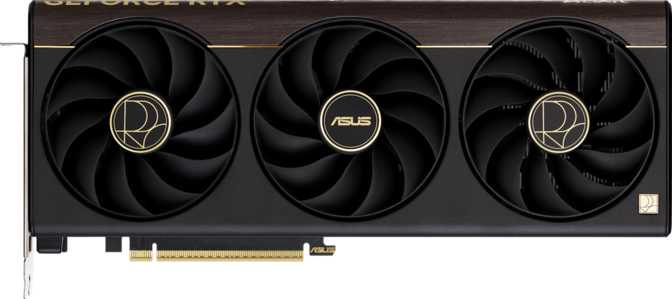
Asus’s ProArt aesthetic is deliberately understated. Where the ROG Strix lineup leans into aggressive angular shrouds and heavy RGB illumination, the ProArt line communicates through cleaner lines, muted tones, and a sense of purposeful engineering. The cooler shroud uses tighter, more refined paneling — the kind of industrial design that looks appropriate in a content creation tower sitting next to a reference monitor, not clashing with it.
The card spans 304mm in length and 140mm in height — roughly the length of a standard school ruler. It occupies three expansion slots in any modern full-tower or mid-tower chassis, and that slot footprint is non-negotiable given the cooling demands of the hardware inside.
RGB lighting is present but functions as an accent rather than a spectacle. The illumination is addressable through Asus’s Aura Sync ecosystem, meaning those who prefer zero glow can disable it entirely through software. Build quality across Asus’s ProArt GPU line features premium capacitor selections, reinforced connectors, and cooler frames that resist flex under the card’s own substantial weight.
- Length304 mm
- Height140 mm
- Slot Occupancy3 Slots
- Cooling TypeAir Cooled
- RGB LightingAura Sync
- PCIe InterfacePCIe 5.0
- Warranty3 Years
- Process Node5 nm
The Blackwell Architecture: What 92 Billion Transistors Actually Mean
Core performance analysis grounded in real-world implications
The GPU powering this card is built on NVIDIA’s Blackwell architecture, manufactured at a 5-nanometer process node. The transistor count — over 92 billion — requires context to appreciate. Each transistor is a microscopic switch; packing 92 billion of them into the die means an extraordinary density of compute resources, enabling capabilities that simply were not possible in previous GPU generations.
Nearly 500 MHz of headroom above base, sustained automatically under load by Asus’s cooling solution
109 trillion single-precision operations per second — workstation-class compute on a consumer desktop card
Over 442 billion pixels rendered per second — the direct hardware driver of frame rate output
Clock Speed and Sustained Boost
The card operates at a base clock of just over 2 GHz, boosting under load to approximately 2.5 GHz. The OC Edition designation means Asus has pushed the factory boost clock slightly beyond NVIDIA’s reference specification, extracting additional performance without requiring user intervention. This sustained boost is not theoretical — the cooling solution is engineered to maintain these clocks under prolonged workloads, not just brief spikes.
Double-Precision and Professional Compute
Double-precision floating-point (DPFP) compute is supported, which matters for scientific computation, simulation workloads, and certain professional applications. Many gaming-focused GPUs artificially limit double-precision performance. Its inclusion here, alongside a texture processing throughput exceeding 1,700 billion texels per second across 680 dedicated texture mapping units, reinforces the ProArt’s professional positioning beyond the gaming market.
32 GB of GDDR7 on a 512-Bit Bus
The memory subsystem that changes what is possible
The card carries 32 gigabytes of GDDR7 video memory — the latest generation of graphics memory, delivering substantially higher data rates per pin than the GDDR6X found in previous flagship GPUs. The memory bus is 512 bits wide. Think of memory bandwidth like lanes on a highway: more lanes mean more data can travel simultaneously. At 512 bits wide, this highway is extraordinarily broad, and the GDDR7 memory traveling across it achieves total bandwidth approaching 1,790 gigabytes per second — nearly 1.8 terabytes of data moving between GPU and memory every single second.
32GB of VRAM is far beyond what any current game requires, even at 8K resolution with every texture quality setting maximized.
- Complete future-proofing against texture streaming limitations
- No VRAM-related stuttering even in heavily modded titles
- Substantial headroom for the next generation of game development
32GB changes what is possible in a single session, without offloading to system RAM or cloud resources.
- 3D artists load multi-gigabyte texture sets without compromise
- Video editors maintain multiple ProRes or RAW streams simultaneously
- ML practitioners run larger models and larger batch sizes locally
Ray Tracing, DLSS, and the Software Ecosystem
Where the hardware meets the real-world experience
Ray Tracing
Hardware-accelerated ray tracing simulates the physical behavior of light — reflections, refractions, shadows, and ambient occlusion — in a way rasterization cannot match without approximation. On a GPU with this level of performance headroom, ray tracing at 4K with complex lighting scenarios is viable at playable frame rates. The generational improvement in RT core throughput over previous architectures is substantial.
DLSS
DLSS uses AI-based upscaling to render games at a lower native resolution and reconstruct a higher-quality image in real time, with minimal perceptible quality loss. The practical result is dramatically higher frame rates or the ability to push demanding quality settings without sacrificing smoothness. At 4K, DLSS creates performance headroom previously associated only with professional rendering hardware.
API Support
DirectX 12 Ultimate compliance covers the complete set of advanced rendering features: ray tracing, mesh shaders, variable rate shading, and DirectX Raytracing (DXR).
OpenGL 4.6 and OpenCL 3 ensure broad compatibility with professional creative applications that rely on GPU-accelerated compute for rendering, compositing, and simulation workflows.
Display Output and Connectivity
Four simultaneous displays across three modern port types
| Port Type | Count | Specification | Status |
|---|---|---|---|
| HDMI | 1 | HDMI 2.1b | |
| DisplayPort | 2 | Current Generation | |
| USB-C (Display Out) | 1 | Display Output Capable | |
| DVI | 0 | Discontinued | |
| Mini DisplayPort | 0 | Not Included |
Port Notes
HDMI 2.1b is the most current HDMI revision, supporting 4K at high refresh rates, 8K output, and Variable Refresh Rate for compatible televisions — covering every modern consumer display scenario.
Dual DisplayPort outputs cover the standard professional and enthusiast monitor connection used in virtually every high-end display released today, enabling multi-monitor desktop productivity setups.
USB-C adds flexibility for certain monitors and docking solutions — particularly useful in workstation contexts where display variety is common. The absence of DVI is a non-issue in any modern setup; the port has been effectively obsolete for years.
Power and Thermal Considerations
What 575 watts means for your entire system
The PCIe 5.0 connector standard is used for power delivery, and Asus includes the appropriate cabling. However, confirming your PSU supports PCIe 5.0 power delivery or provides a compatible adapter is a pre-purchase step that cannot be skipped. Attempting to run the card with an underpowered or incompatible supply risks both performance and hardware reliability.
The PCIe 5.0 slot interface for data means a compatible motherboard delivers the full potential bandwidth between CPU and GPU. PCIe 4.0 boards remain electrically compatible, and the real-world performance difference between PCIe generations in most workloads is smaller than the version number gap suggests.
Thermal output at 575 watts demands genuine attention to case airflow. A chassis with strong intake and exhaust ventilation allows the card to boost consistently and operate quietly. Cramped mid-tower cases with minimal airflow will result in elevated fan speeds and potential thermal throttling under sustained load — reducing both performance and longevity.
- Below 850W — Insufficient
- 1,000W — Minimum recommended
- 1,200W – 1,400W — Preferred
- PCIe 5.0 connector required
Who This Card Is For — and Who Should Look Elsewhere
Real-world usage scenarios and honest buyer guidance
- Professional content creators — 3D rendering, visual effects, architectural visualization, or motion graphics professionals who need maximum VRAM, ECC reliability, and compute throughput in a workstation-class card
- AI and ML practitioners — running local inference or fine-tuning workflows who have exhausted the memory limits of lower-tier cards and need ECC reliability alongside raw compute throughput
- Enthusiast gamers — demanding the absolute best at 4K or 8K, with no budget constraints and a preference for a card that will not require replacement for years
- Multi-display power users — running complex, GPU-accelerated workflows across four simultaneous monitors in a professional production environment
- Budget-conscious gamers at 1080p or 1440p — the performance is wildly disproportionate to the display resolution, and a mid-range card delivers near-identical gaming results for a fraction of the cost
- Casual home users — power requirements, physical size, and price tier make this a poor fit for any non-intensive use case; the value proposition simply does not translate
- Those with small or poorly ventilated cases — the cooling and power delivery demands make chassis compatibility a genuine concern, not a footnote to worry about after purchase
Competitive Positioning
How the ProArt RTX 5090 OC Edition compares to logical alternatives
| Card | Architecture | VRAM | Tier | TDP | Best For |
|---|---|---|---|---|---|
| THISProArt RTX 5090 OC | Blackwell | 32GB GDDR7 | Flagship | 575W | Creator & Enthusiast |
| Reference RTX 5090 | Blackwell | 32GB GDDR7 | Flagship | ~575W | Enthusiast Gaming |
| RTX 5080 | Blackwell | 16GB GDDR7 | High-End | ~360W | Mainstream Enthusiast |
| RTX 4090 (Prev. Gen) | Ada Lovelace | 24GB GDDR6X | Prior Flagship | 450W | Enthusiast Gaming |
Strengths and Honest Weaknesses
A balanced assessment, because credibility comes from honesty
The Blackwell architecture’s compute density, paired with the memory subsystem Asus has chosen and tuned, produces a card with no genuine performance rival on the market. The combination of 32GB ECC-capable GDDR7, extraordinary compute throughput, and the ProArt brand’s professional software alignment creates a package that holds its own against workstation-class alternatives costing significantly more.
The 3-year warranty reflects genuine confidence in build quality and provides meaningful coverage for a product at this price tier. The ProArt aesthetic, factory overclock, and Aura Sync integration add polish without compromising the professional identity of the card. For its intended buyer, there is simply nothing better available.
The 575-watt power draw is a system-level commitment. It raises electricity costs in daily operation, demands a substantial PSU investment, and generates significant heat that the rest of your build must manage. This is not a card for any existing system built without substantial headroom in mind.
The physical size demands compatibility verification before purchase, and the ProArt branding commands a premium over a reference RTX 5090. Buyers who have no use for creator-focused software integration or the ProArt aesthetic may find an alternative variant offers equivalent raw performance for less.
There is no factory water cooling option. For users running sustained professional workloads in thermally constrained environments, aftermarket cooling solutions may be worth investigating post-purchase.
Common Questions Buyers Ask Before Purchasing
Honest answers to the questions that matter most
Final Recommendation
The Asus ProArt GeForce RTX 5090 OC Edition is the right card for a specific, well-defined buyer: someone who creates professionally, computes intensively, or games at the highest level — and who has the system infrastructure and budget to match the hardware’s demands.
If that describes you, there is no more capable consumer GPU available. The combination of Blackwell’s generational leap in compute, the 32GB GDDR7 memory subsystem with ECC support, and Asus’s ProArt build quality produces a card that will remain at or near the performance ceiling for years. The factory overclock, 3-year warranty, and professional software positioning make the ProArt variant a justified premium over reference alternatives for the target audience.
If it does not describe you — if your workflow is light, your games run at 1440p or below, or your system cannot support 575 watts of GPU draw — this card represents one of the most expensive mismatches in consumer hardware. Direct your budget toward a card that matches your actual needs, and let the RTX 5090 be what it genuinely is: a professional-class tool wearing a consumer GPU label.