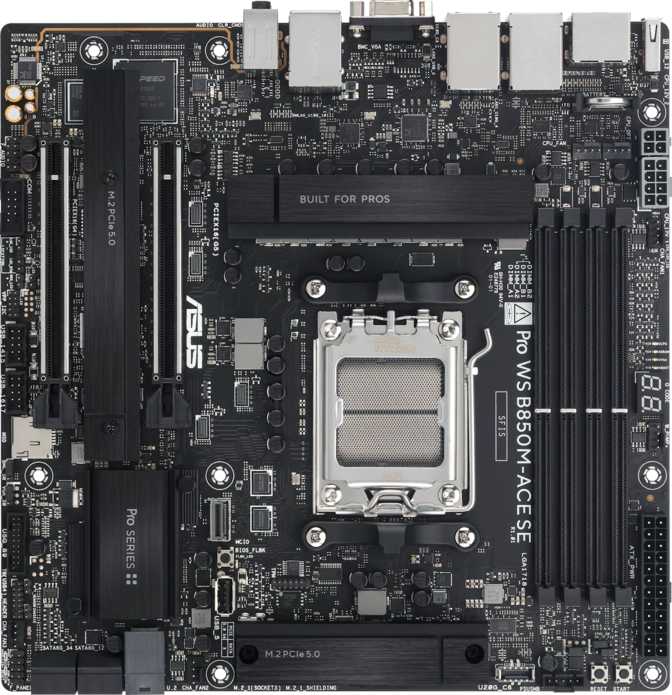
Most B850 motherboards aim squarely at PC gamers. The Asus Pro WS B850M-Ace SE targets a different buyer entirely — the small business operator, the developer running local virtualization, or the professional who needs a reliable, dense workstation that earns its keep daily. Three separate Ethernet ports, full RAID 5 support, PCIe 5.0, and DDR5 memory headroom approaching 8000MHz all coexist inside a Micro-ATX footprint at pricing well below dedicated workstation platforms. Whether those features align with your actual needs is exactly what this review resolves.
Performance Scores at a Glance
Editorial scores based on full specification analysis and workstation use-case evaluation
Outstanding workstation connectivity and features in a compact, wired-first design
Design, Build Quality, and Physical Experience
Physical Footprint and Layout
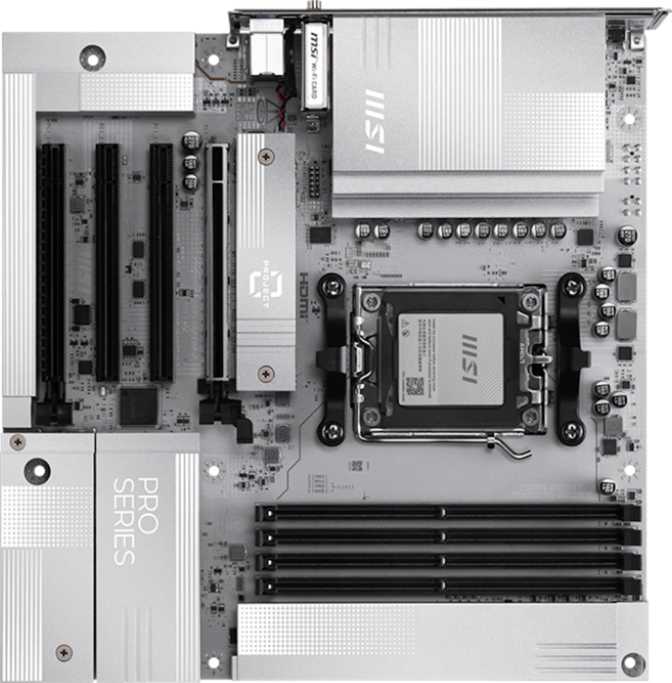
At 244 x 244mm, this is a standard Micro-ATX board — meaningfully smaller than a full ATX board, which matters when building inside a compact workstation chassis where space is at a premium and airflow paths get constrained with larger boards. Asus has used the available real estate efficiently, placing expansion slots, storage headers, and rear I/O in logical positions that simplify cable routing without crowding.
The board carries Asus's Pro WS visual identity: restrained and purposeful rather than aggressively styled. RGB lighting is present but controlled, providing optional personality for glass-panel cases without committing the board to an overtly gaming aesthetic. Asus's Aura Sync software delivers full customization — including the option to shut the lighting off entirely for a clean, professional environment.
Build Quality Signals and Confidence Indicators
A dedicated Clear CMOS button on the rear I/O panel simplifies BIOS recovery after a failed memory overclock or a botched firmware update. There is no need to open the case or locate a jumper header — one button press from outside the chassis resets the configuration. For a machine expected to serve daily production duty, that accessibility reduces downtime meaningfully.
The board requires a discrete Ryzen processor. No integrated CPU or onboard graphics processor is present — display output depends on a processor with integrated graphics or a dedicated GPU. This is standard for performance-class boards in this category and carries no practical penalty for the target buyer.
- Form FactorMicro-ATX
- Board Dimensions244 x 244 mm
- CPU SocketAM5
- ChipsetB850
- RGB LightingYes (Aura Sync)
- Clear CMOS ButtonRear Panel
- Dual BIOSNo
- CPU Sockets1
- Warranty Period3 Years
Core Platform: AM5 Socket and B850 Chipset
What AM5 Means for Your Build
AM5 is AMD's current-generation processor socket designed for Ryzen 7000 and 9000 series desktop CPUs. If you are upgrading from an older Ryzen system built around AM4, your existing processor will not transfer — AM5 represents a clean platform break that also requires DDR5 memory. For new builds this is a non-issue; for upgrades from AM4, plan accordingly for both board and memory costs.
AMD has publicly committed to extending the AM5 platform's lifespan, making today's purchase a reasonable long-term investment. Future Ryzen CPU generations are expected to remain AM5-compatible, meaning your next processor upgrade may not require replacing this motherboard — a significant consideration for production machines expected to evolve over several years.
B850 Chipset: What You Keep, What You Save
B850 sits one tier below AMD's flagship X870E chipset. The practical gap is narrower than the naming suggests. This board retains the features that matter most: PCIe 5.0 on the primary slot, full DDR5 support up to 8000MHz via XMP and EXPO profiles, USB 3.2 Gen 2 throughput, and comprehensive storage connectivity. Overclocking is explicitly supported throughout.
The main X670E advantage over B850 is additional PCIe lanes for running multiple high-speed NVMe drives simultaneously. For the workstation buyer this board targets — typically running one or two fast NVMe drives alongside conventional SATA storage — that difference rarely surfaces. The chipset cost savings translate directly into budget available for a better processor or more RAM.
Memory: DDR5 Headroom That Grows With Your Workload
Capacity and Upgrade Path
Four DIMM slots in dual-channel configuration support DDR5 exclusively and can address up to 256GB of total system memory. For context, even the most memory-intensive professional workloads — large-scale video editing with proxy files, running multiple virtual machines simultaneously, or compiling massive codebases — rarely push a single-user workstation past 64GB. The 256GB ceiling exists for environments running multiple demanding processes in parallel, not for typical single-application use.
Four slots provide a practical, phased upgrade path. Start with two modules today and expand with two more later without disturbing the existing configuration. In a professional environment where machines evolve with workload demands over time, that scalability has real dollar value.
Speed Ceiling and Overclocking
The board supports memory overclocking up to 8000MHz through XMP and EXPO profiles. Standard DDR5 operates at 4800MHz; mainstream performance kits typically run at 6000–6400MHz. Reaching nearly 8000MHz places this board well above what typical workstation configurations require and positions it to extract maximum performance from the fastest DDR5 kits available — where higher memory throughput translates to measurable gains in rendering, data analysis, and large dataset operations.
Error-Correcting Code memory — which detects and self-corrects single-bit data errors — is absent here. For genuinely mission-critical financial, scientific, or server workloads where data integrity is non-negotiable, this is a hard limitation. The Pro WS targets professional-grade workloads, not enterprise-grade ones. That distinction matters.
- Memory StandardDDR5 Only
- DIMM Slots4
- Maximum Capacity256 GB
- Memory ChannelsDual Channel
- Max XMP / EXPO Speed8000 MHz
- ECC SupportNo
DDR5 Speed in Context
Storage Connectivity and RAID Support
Physical Storage Options
Two M.2 slots accommodate modern NVMe solid-state drives — the compact, high-performance drives that mount directly onto the motherboard. The primary M.2 slot operates at PCIe 5.0 speeds, capable of feeding the fastest NVMe drives currently available. The secondary slot runs at PCIe 4.0 — still substantially faster than any conventional hard drive or SATA SSD option.
Four SATA 3 connectors extend storage capacity with 2.5" SSDs and 3.5" mechanical hard drives, which remain the most cost-effective option for bulk data storage and large media archives. A fully configured system can simultaneously run six storage devices — two fast NVMe drives and up to four conventional drives — without additional controller cards.
- M.2 NVMe Slots2
- Primary M.2 InterfacePCIe 5.0
- SATA 3 Ports4
- U.2 SocketsNone
- Supported RAID Modes0, 1, 5, 10
RAID Support: A Genuine Differentiator at B850 Pricing
Full RAID support — including RAID 5 — is uncommon at the B850 chipset tier and represents one of the strongest reasons this board carries the Pro WS designation. At comparable pricing, RAID 5 would otherwise require a dedicated add-in RAID controller card consuming one of only two expansion slots.
| RAID Level | Min. Drives | Fault Tolerance | Best Use Case |
|---|---|---|---|
| RAID 0 | 2 | None | Scratch storage and temporary project files only |
| RAID 1 | 2 | 1 drive failure | Important personal or business file mirroring |
| RAID 5 | 3 | 1 drive failure | SMB file servers and content archives |
| RAID 10 | 4 | 1 per mirrored pair | Business-critical data with throughput requirements |
RAID 0+1 is not supported. All four listed modes are hardware-confirmed from specification data.
Connectivity: Rear I/O, USB, and the Triple Ethernet Story
Three Ethernet Ports: The Board's Defining Feature
Three separate RJ45 Ethernet ports on a single consumer-segment desktop motherboard is genuinely uncommon. This specification alone separates the Pro WS B850M-Ace SE from virtually every other B850 board on the market and directly explains what the Pro WS designation means in practice.
Rear Panel USB Connectivity
The rear I/O delivers five high-speed USB ports — all running at 10Gbps — fast enough to saturate most external SSDs and professional peripherals simultaneously without contention.
- 3 × USB-A at 10GbpsUSB 3.2 Gen 2 full-size ports for drives, hubs, and accessories
- 2 × USB-C at 10GbpsUSB 3.2 Gen 2 for modern peripherals, docks, and portable storage
- 2 × USB-A at USB 2.0Keyboards, mice, dongles, and low-bandwidth accessories
Internal Headers for Front Panel Expansion
Case front-panel USB headers extend high-speed connectivity to the chassis front, where it is most accessible during daily use.
- USB 3.2 Gen 1 Headers25Gbps front-panel ports for standard case connectors
- USB 3.2 Gen 2x2 Header120Gbps front-panel USB-C — fastest available in modern cases
- USB 2.0 Expansion Headers4 portsAdditional low-bandwidth front-panel port capacity
Display Outputs and Audio
Display Connectivity: Modern and Legacy Together
HDMI 2.1 and DisplayPort cover modern display requirements. HDMI 2.1 supports output up to 4K at 120Hz or 8K resolution — directly relevant for professionals using high-resolution monitors or delivering content to large displays. DisplayPort accompanies it for dual-monitor setups or compatibility with professional display hardware that prefers that interface.
A VGA output is also present — an analog video standard rare on modern motherboards. Its inclusion is deliberate: professional and industrial environments still operate legacy monitors, KVM switches, and projectors over VGA connections. For a home office or gaming build it is entirely irrelevant. For a small business deploying machines into mixed-age display infrastructure, it eliminates a compatibility problem without requiring an adapter.
Rear Display Outputs
Onboard Audio
The onboard audio implementation supports 7.1 surround sound — the full configuration for a multi-speaker home theater or surround gaming setup. Two physical rear audio connectors handle direct connections, with the 7.1 channels accessed through software remapping or the front-panel audio header exposed through most modern cases.
There is no optical S/PDIF output. Anyone connecting to an AV receiver via optical cable or routing audio through an external DAC using that interface will need a USB audio adapter or a dedicated PCIe sound card. For the majority of professional workstation use cases this has no practical impact — but it is worth knowing before purchase if audio routing is part of your workflow.
Audio Specification Summary
Expansion Slots and Thermal Management
PCIe Expansion Configuration
Two PCIe expansion slots are available. The primary slot runs at PCIe 5.0 x16 — delivering double the bandwidth of PCIe 4.0. While current graphics cards don't saturate PCIe 4.0 during typical workloads, the PCIe 5.0 slot provides immediate benefit for today's PCIe 5.0 NVMe add-in cards and future-proofs the platform for next-generation GPU upgrades.
The secondary slot operates at PCIe 4.0 x16, supporting a second GPU for compute workloads, a dedicated network card, a capture card, or a hardware RAID controller — without competing with the primary slot for bandwidth.
| Slot | Standard | Est. Bandwidth | Primary Use |
|---|---|---|---|
| Primary | PCIe 5.0 x16 | ~128 GB/s | GPU / PCIe 5.0 NVMe card |
| Secondary | PCIe 4.0 x16 | ~64 GB/s | GPU / Capture / NIC |
Fan Headers and Sustained Cooling
Five fan headers provide independent control over the CPU cooler, case airflow fans, and optionally a pump header for liquid cooling loops. Five headers on a Micro-ATX board is a generous count — sufficient for a complete airflow configuration in a standard mid-tower without requiring a separate fan hub or external controller.
For the Pro WS's workstation audience — machines running under consistent sustained load from rendering, compilation, or continuous file transfer — sustained thermal management matters more than on a gaming board handling bursty workloads. The header count here supports proper independent fan curve configuration across the system.
System Headers and Connectors
Who Should Buy This Board — and Who Should Not
- Small Business Workstation BuildersMulti-port networking, RAID redundancy, and AM5 longevity in a compact chassis — backed by a 3-year warranty for production machines that need to stay running.
- Developers and SysadminsRunning multiple VMs, isolated network environments, or self-hosted services benefits directly from triple Ethernet and substantial expandable memory capacity.
- Content Professionals with Large File VolumesRAID 1 or RAID 5 for local data protection without a separate controller card suits photographers, video editors, and media archivists managing valuable assets.
- Power Users Wanting Workstation ReliabilityInfrastructure-class networking and storage features at B850 pricing, without requiring ECC memory or Threadripper-class core counts.
- Wireless-First BuildersNo Wi-Fi, no Bluetooth, no internal headers for either. Without Ethernet cabled to your desk, this board creates an immediate connectivity problem that requires a workaround from day one.
- Gaming-Focused BuildsCompeting B850 gaming boards offer Wi-Fi 7, Bluetooth, and gaming-tuned features at comparable prices. The Pro WS profile means paying for workstation capabilities a gaming build will never use.
- ECC Memory RequirementsApplications demanding absolute bit-level data integrity require ECC support. AMD's Ryzen Pro or EPYC platforms are the appropriate choice for those workloads.
- Ultra-Compact SFF BuildsMicro-ATX is smaller than ATX but larger than Mini-ITX. This board will not fit inside the smallest available small form factor cases.
Competitive Positioning: How It Stacks Up
The Pro WS B850M-Ace SE occupies a distinct and narrow niche. Here is how its feature set maps against the alternatives most likely under consideration at a similar price point.
| Feature | Asus Pro WS B850M-Ace SE | Typical Gaming B850 mATX | Typical X670E mATX |
|---|---|---|---|
| Ethernet Ports | 3 | 1–2 | 1–2 |
| RAID 5 Support | Yes | Rarely | Sometimes |
| Wi-Fi | No | Wi-Fi 6E / 7 | Wi-Fi 6E / 7 |
| Bluetooth | No | Yes | Yes |
| Max DDR5 Memory | 256 GB | 192–256 GB | 256 GB |
| PCIe 5.0 x16 Slot | Yes | Yes | Yes |
| Warranty Period | 3 Years | 1–3 Years | 3 Years |
| VGA Legacy Output | Yes | No | No |
| USB-C Rear (Gen 2) | 2 Ports | 1–2 Ports | 1–2 Ports |
| Primary Use Case | Workstation / SMB | Gaming / Enthusiast | Gaming / Enthusiast |
Comparison reflects typical category characteristics. Individual board specifications vary by model and manufacturer.
Honest Assessment: Where It Excels and Where It Falls Short
The Pro WS B850M-Ace SE does something genuinely uncommon: it takes a consumer-tier chipset and loads it with infrastructure-grade connectivity at pricing well below dedicated workstation platforms. Three Ethernet ports and RAID 5 on a single board at B850 cost is a specific combination with no close rivals at this chipset tier.
The DDR5 memory ceiling approaching 8000MHz significantly exceeds what competing B850 gaming boards typically prioritize. For memory-sensitive professional workloads — rendering, data analysis, large dataset processing — this overhead translates into extractable real-world throughput with premium DDR5 kits, without stepping up to X670E platform costs.
The three-year warranty provides confidence appropriate for production-duty machines. The Clear CMOS button and explicit overclocking support reduce friction for users who want performance headroom without requiring deep BIOS expertise. The AM5 platform's stated longevity further supports this as a durable multi-year workstation foundation.
The complete absence of wireless connectivity is the most immediate limitation. No Wi-Fi, no Bluetooth, and no internal headers to add either without consuming an expansion slot or adding a USB adapter. In a wired professional environment this is a non-issue. Anywhere else, it demands a workaround from day one.
The lack of ECC memory support is the principled concern for this board's target audience. The Pro WS designation creates an expectation of mission-critical suitability — ECC's absence is a reminder that this product sits firmly below the enterprise tier where ECC is treated as mandatory infrastructure.
No Thunderbolt or USB4 limits compatibility with high-speed docking stations and professional storage enclosures increasingly requiring those interfaces. The absence of dual BIOS recovery — standard on many competing boards — means a failed firmware update requires the Clear CMOS process rather than automatic failover to a backup chip.
Common Questions Before You Buy
Final Verdict
A compelling workstation board that earns a direct recommendation for the right professional builder — and a clear pass for everyone else. That is not a criticism.
The Asus Pro WS B850M-Ace SE does something genuinely uncommon: it takes a consumer-tier chipset and loads it with infrastructure-grade connectivity features at pricing well below what dedicated workstation platforms demand. Three Ethernet ports, RAID 5 capability, and a Micro-ATX footprint is a specific, unusual combination that has a clearly defined audience — and for that audience, it is difficult to match at B850 pricing.
For those building a compact, wired workstation for professional use, small business deployment, local virtualization, or data-sensitive work requiring RAID redundancy, this board delivers a feature set that would cost substantially more on a workstation-branded platform. Triple Ethernet alone separates it from the B850 field, and RAID 5 support eliminates the need for a dedicated controller card consuming one of only two expansion slots.
For gaming PCs, wireless home office machines, or content creation rigs without specific multi-networking or RAID requirements, better-matched boards exist at this price. The absence of Wi-Fi and Bluetooth is a deliberate design choice reflecting a specific purpose — not a manufacturing oversight. Whether that purpose aligns with your build goals is the only real question this board asks you to answer.
For the right builder, the Pro WS B850M-Ace SE is a well-considered, high-value platform with a three-year safety net and upgrade longevity built into the AM5 foundation. That is a compelling package.