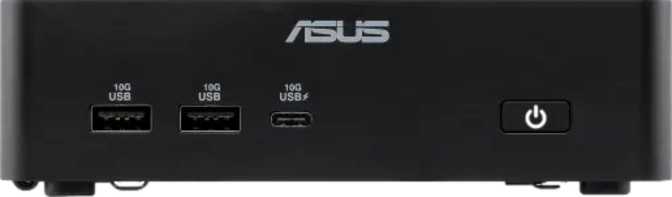
Asus NUC 16 Pro Review: Full-Size Features in a Sub-Liter Machine
Mini PCsMini PCs have come a long way from being glorified media streamers. The Asus NUC 16 Pro represents what happens when that form factor finally grows up: a machine small enough to mount behind a monitor yet capable of handling workloads that would have required a full tower just a few years ago. With a dedicated Intel Arc B390 GPU, a hybrid processor architecture, Wi-Fi 7, Bluetooth 6, and a port selection that shames many full-sized desktops, this machine is designed for buyers who are tired of choosing between space efficiency and actual capability. The question is whether it delivers on that promise in practice — and who specifically should be writing the check.
At a Glance
The specifications that define this machine, and the metrics that contextualize them.
Processor
16-Thread Hybrid
5.1 GHz Peak Boost
Dedicated GPU
Intel Arc B390
PCIe 5.0 · 3 nm Node
System RAM
Up to 96 GB
DDR5 · Dual-Channel
Storage
2 TB NVMe SSD
High-Speed Flash
Wireless
Wi-Fi 7 + BT 6
Latest Generation
Chassis Volume
Sub-Liter
707 cm³ · VESA-Ready
Multi-Core PassMark
37,904
Single-Core PassMark
4,451
Total USB Ports
8 Ports
Max Display Outputs
4 Screens
Design and Build Quality
Small by intent, not by compromise.
The NUC 16 Pro occupies a footprint roughly the size of a thick paperback novel. At 144mm wide, 117mm deep, and just 42mm tall, it displaces less than three-quarters of a liter of space on your desk. For context, a standard 1.5-liter water bottle takes up more room. This is not a machine that tolerates a large desk — it thrives on a small one.
Despite its compact footprint, nothing about the chassis feels sacrificed. The Micro-ATX classification situates it in the more capable tier of mini PC designs, distinct from ultra-miniature NUC variants historically limited to integrated graphics only. The extra millimeters of height compared to the smallest NUC units matter here: they are what allows Asus to fit discrete-class graphics and the thermal solution needed to keep things stable under sustained load.
Build material and finish are consistent with Asus's professional product lines — no flex, no creaking, and surfaces that do not attract fingerprints under normal handling. The port layout is intentional and dense; every face of the chassis is put to work.
One practical note: the 42mm height means this machine fits comfortably in VESA mounting brackets designed for slim mini PCs, making behind-monitor installation genuinely clean and unobtrusive.
Physical Specifications
- Width144 mm
- Depth117 mm
- Height42 mm
- Volume707.6 cm³
- Form FactorMicro-ATX Mini PC
VESA compatible: The 42mm chassis height fits standard slim mini PC VESA mount brackets, enabling a clean, cable-managed behind-monitor installation.
The Processor: Efficient by Design, Capable When Needed
A hybrid architecture that manages power intelligently and sprints hard when required.
Architecture That Manages Power Intelligently
The CPU inside the NUC 16 Pro uses a hybrid core design — specifically a three-tier arrangement with performance cores, efficiency cores, and low-power efficiency cores running at different base speeds. This is Intel's big.LITTLE-inspired approach to balancing responsiveness against power draw. The result is a 16-thread processor that can sprint hard when the task demands it, touching 5.1 GHz at peak, and coast quietly when it does not.
The 25-watt thermal envelope is borrowed from the laptop world. That TDP is not a weakness — it is a deliberate engineering choice that allows the NUC 16 Pro to remain near-silent under light loads and produce manageable heat under sustained workloads, all within a chassis this size. The trade-off is that a desktop chip of equivalent thread count running at 65W or more will edge it out in prolonged all-core scenarios such as extended video encoding or large compilation jobs.
The processor's 18 MB of L3 cache is generous for a mobile-class chip and meaningfully benefits tasks that involve large datasets being repeatedly accessed — think data analysis, software compilation, or large spreadsheet operations.
PassMark in Context
The multi-core benchmark result of approximately 37,900 places this machine firmly in competitive mid-to-upper mid-range desktop territory. Single-core performance at around 4,450 is strong enough that everyday application responsiveness — launching programs, switching tasks, and browser-heavy workflows — feels snappy rather than constrained. This puts the NUC 16 Pro ahead of many budget desktop towers and competitive with systems using previous-generation full desktop CPUs.
Benchmark Performance
Mid-to-upper mid-range desktop tier
Strong everyday app responsiveness
CPU Highlights
- 16 threads via hybrid big.LITTLE architecture
- 5.1 GHz peak boost for burst workloads
- 18 MB L3 cache benefits data-heavy tasks
- 25W TDP keeps noise and heat manageable
- Sustained all-core loads approach thermal ceiling faster than full desktop chips
Graphics: The Arc B390 Changes the Calculation
This is where the NUC 16 Pro separates itself from the vast majority of mini PCs.
Most compact desktop systems at this size rely entirely on the processor's built-in graphics — functional for basic display output, but not suited for anything visually demanding. The Asus NUC 16 Pro ships with a dedicated Intel Arc B390 GPU, and that distinction matters significantly.
What the Arc B390 Actually Offers
The B390 is part of Intel's second-generation Arc "Battlemage" lineup, built on a 3-nanometer fabrication process — among the most advanced currently used in GPU production. This places the B390 in hardware that runs cool and efficiently for its performance level.
The GPU boosts up to 2,500 MHz. Combined with the modern architecture, this enables real-time hardware ray tracing, DirectX 12 Ultimate support, and OpenCL 3.0 compute acceleration. DirectX 12 Ultimate means the GPU supports every current-generation graphics feature, including mesh shading and variable-rate shading used by modern games and professional visualization software. OpenCL 3.0 support opens the door to GPU-accelerated tasks in creative and scientific software.
PCIe 5.0 connectivity between the GPU and the rest of the system ensures the graphics card has full, unthrottled bandwidth — important for data-intensive rendering workloads.
Four-Display Support
The NUC 16 Pro can drive four independent displays simultaneously — combining its two HDMI outputs, two DisplayPort outputs, and the USB4 and Thunderbolt ports. This is genuinely rare at this physical size and makes the machine viable as a command center for traders, developers running multi-monitor setups, or content creators who work across a wide desktop canvas.
Arc B390 Specifications
- Fabrication Node3 nm
- Peak GPU Clock2,500 MHz
- PCIe InterfacePCIe 5.0
- DirectX Version12 Ultimate
- OpenGL Version4.6
- OpenCL Version3.0
- Max Displays4 Simultaneous
Why 4 displays matter
Four simultaneous outputs from a sub-liter chassis positions the NUC 16 Pro as a rare option for multi-monitor professionals who cannot justify a full tower footprint.
Memory and Storage: Built for Demanding Workflows
High-speed RAM and fast storage that match the caliber of every other component.
DDR5 at Serious Speeds
The NUC 16 Pro supports DDR5 memory at speeds up to 9,600 MHz — considerably faster than the DDR5 speeds found in mainstream desktop systems, which typically cap around 5,600–6,400 MHz in stock configurations. Running across two memory channels, this high-bandwidth configuration benefits exactly the workloads this machine targets: AI inference tasks, large dataset manipulation, creative software with heavy RAM dependencies, and scenarios where graphics share system memory.
The platform supports up to 96 GB of RAM, an exceptional ceiling for a machine this size. The majority of professional desktop workflows — software development, video editing, virtual machine hosting, and data science — operate comfortably within that headroom with room to spare.
96 GB
Maximum Capacity
9,600
MHz Max RAM Speed
2 TB NVMe Storage
The included 2 TB NVMe SSD provides both speed and capacity. NVMe storage accesses data dramatically faster than traditional SATA-based SSDs, meaning large file operations — opening project files, exporting video, loading virtual machines — happen without the lag that older storage solutions introduce.
Two terabytes is sufficient for most primary storage needs: it can hold several large game libraries, a substantial media archive, or years of project files without requiring an immediate external drive.
No Internal Expansion
The NUC 16 Pro has no additional drive bays or PCIe slots. Storage growth happens externally — via Thunderbolt docks or USB-attached NAS — which the port selection handles well.
Connectivity: The Strongest Port Selection in Its Class
A port layout that shames many full-sized desktops — from a chassis smaller than a thick paperback.
USB and High-Speed Data Ports
| Port Type | Count | Notes |
|---|---|---|
| USB4 40 Gbps | 2 | Fastest USB standard; supports displays and data simultaneously |
| Thunderbolt 4 | 2 | Intel certified; eGPU, daisy-chain, and docking hub compatible |
| USB 3.2 Gen 2 (USB-A) | 2 | 10 Gbps each; for external drives and peripherals |
| USB 3.2 Gen 2 (USB-C) | 2 | 10 Gbps; flexible modern connector form |
| USB 3.2 Gen 1 (USB-C) | 1 | 5 Gbps; general peripheral connectivity |
Video Outputs
| Output Type | Count | Details |
|---|---|---|
| HDMI | 2 | Standard display connections for monitors and TVs |
| DisplayPort | 2 | For professional monitors and high-refresh displays |
| Via USB4 / Thunderbolt 4 | + | Additional display output possible through high-speed ports |
Network and Audio
| Connection Type | Count | Details |
|---|---|---|
| Wired Ethernet (RJ45) | 2 | Dual physical network ports — unusual at this size |
| Wi-Fi | Wi-Fi 7 | 802.11be with backward compatibility to Wi-Fi 4, 5, 6, and 6E |
| Bluetooth | v6.0 | Newest standard; improved stability and energy efficiency |
| 3.5 mm Audio Jack | 1 | Headset and speaker connection |
No USB 2.0 — By Design
The complete absence of USB 2.0 ports is a meaningful signal about who this machine is designed for. Every connection point is high-speed. Legacy slow ports are simply gone.
Dual Ethernet Explained
Two physical RJ45 ports suits network administrators, developers running local server environments, home lab enthusiasts, or anyone needing simultaneous links to two network segments without USB adapters.
Thunderbolt 4 Unlocks Real Expansion
Two Thunderbolt 4 ports allow connection to docking stations (one-cable desktop setup), external GPU enclosures, and high-bandwidth storage arrays — making the NUC 16 Pro a legitimate docking station target.
Real-World Fit: Who Should Buy This and Who Should Not
The NUC 16 Pro is genuinely excellent — for the right buyer. Here is a direct assessment.
Well-matched for
Multi-monitor professionals
Developers, designers, financial analysts, or content creators who need three or four displays from a single compact system.
Home lab and network enthusiasts
The dual Ethernet and substantial RAM ceiling make it viable as a capable server, router endpoint, or virtualization host.
Space-constrained power users
Studio apartments, small offices, or clean desk environments where computing capability cannot be sacrificed for compactness.
Creative professionals
Video editors, motion graphics artists, and 3D modelers working at resolutions up to 4K will find the Arc B390 genuinely useful.
AI and ML hobbyists
DDR5 bandwidth at this speed tier and OpenCL 3.0 GPU compute support enable local AI inference and model experimentation that pure integrated-graphics systems cannot match.
Not the right choice for
Hardcore gamers expecting AAA performance
The Arc B390 handles moderate gaming but does not compete with discrete mid-range desktop GPUs in a traditional tower configuration at high settings.
Heavy sustained workloads
Extended video transcoding, large scientific simulations, or multi-hour compilation jobs will hit the 25W CPU thermal ceiling faster than a full desktop processor would.
Budget shoppers
The NUC 16 Pro is a premium mini PC. Its component quality and connectivity come at a corresponding price — there is no budget version of this feature set.
Users who need proprietary expansion
There are no PCIe slots, no option to add a full-length GPU internally, and no additional drive bays. This is a fixed-configuration purchase.
How It Positions Against the Competition
The mini PC market has three tiers. The NUC 16 Pro operates at the top — here is what that means.
The most direct competition comes from compact systems using AMD's integrated RDNA graphics within Ryzen-based mini PCs, or other Intel NUC configurations using lesser GPU solutions. The dedicated Arc B390 is the clearest differentiator — for users who need more than a single display, more than light creative work, or any GPU compute capability, it changes the calculus entirely.
| Feature | NUC 16 Pro | Typical Intel-IGP Mini PC | Typical AMD RDNA Mini PC |
|---|---|---|---|
| Dedicated GPU | Arc B390 | None | Integrated Only |
| 4-Display Support | Often 2–3 | Often 2–3 | |
| Wi-Fi Generation | Wi-Fi 7 | Wi-Fi 6E typical | Wi-Fi 6E typical |
| Dual Ethernet | Rarely | Rarely | |
| Thunderbolt 4 | 2 Ports | Varies | Rarely |
| RAM Ceiling | 96 GB DDR5 | 64 GB typical | 64 GB typical |
| PassMark (approx.) | ~37,900 | ~20,000–28,000 | ~25,000–35,000 |
Comparison figures for competing categories represent typical configurations in the same size class, not specific models.
Strengths and Honest Weaknesses
Every product has both. Here is a direct assessment of where the NUC 16 Pro earns its premium and where it falls short.
Where It Excels
The NUC 16 Pro's greatest strengths accumulate in a way that makes the package genuinely unusual. The connectivity alone — dual Thunderbolt 4, dual USB4 at 40 Gbps, dual Ethernet, Wi-Fi 7, Bluetooth 6, and four display outputs — would be impressive in a full desktop. Getting it in a chassis under one liter is the kind of engineering that takes a product from impressive spec sheet to practical daily tool.
The Arc B390 GPU is a legitimate differentiator. Whether it handles the demands of a specific user's workload is the right question to ask — not whether it belongs in a machine this size. It belongs.
The DDR5 platform at speeds well above mainstream desktop norms, the generous RAM ceiling, and the 2 TB NVMe SSD mean the machine is not just capable today — it is positioned to remain capable as software demands grow.
Where It Falls Short
The 25W CPU platform, while efficient and capable for its thermal category, will throttle under sustained all-core loads in ways a desktop processor does not. If your workflow includes hours of continuous video encoding, large batch rendering, or parallel scientific computation, the thermal ceiling is a real constraint — not a dealbreaker for most users, but a ceiling nonetheless.
The one-year warranty is brief for a premium product. Buyers who rely on this machine professionally should factor in extended coverage from the outset.
The lack of any internal expansion — no additional drive bays, no PCIe slot — means this is a fixed-configuration purchase. External expansion through Thunderbolt docks and USB4 enclosures handles this reasonably well, but it adds cost and cables.
Real Buyer Questions Answered
The specific questions people search for before making this kind of purchase — answered directly.
Final Verdict
A direct recommendation — who should buy the Asus NUC 16 Pro and who should not.
The Asus NUC 16 Pro is the answer to a specific and legitimate question: can a computer that fits on a small desk, draws modest power, and makes no noise at idle actually handle real professional and creative work? The answer is yes — with the appropriate understanding of where its limits are.
The combination of a dedicated Arc B390 GPU, a dual-channel DDR5 platform capable of supporting up to 96 GB of RAM, a 2 TB NVMe drive, Wi-Fi 7, Bluetooth 6, dual Thunderbolt 4, dual USB4, dual Ethernet, and four-display output support is not something you assemble easily in this form factor. Asus has done that work, and the result is a machine that earns its place in professional environments, home offices, and anywhere space is limited but capability cannot be. For the buyer who fits the profile, this is not a compromise — it is the right tool.
Purchase Verdict
Buy it if:
You need multi-display support, Thunderbolt flexibility, serious memory capacity, or capable dedicated graphics in the smallest possible package — and you understand the sustained CPU thermal ceiling.
Skip it if:
Your primary workload is extended high-CPU-load processing, AAA gaming at maximum settings, or if budget is a hard constraint that makes the premium price difficult to justify for your actual needs.