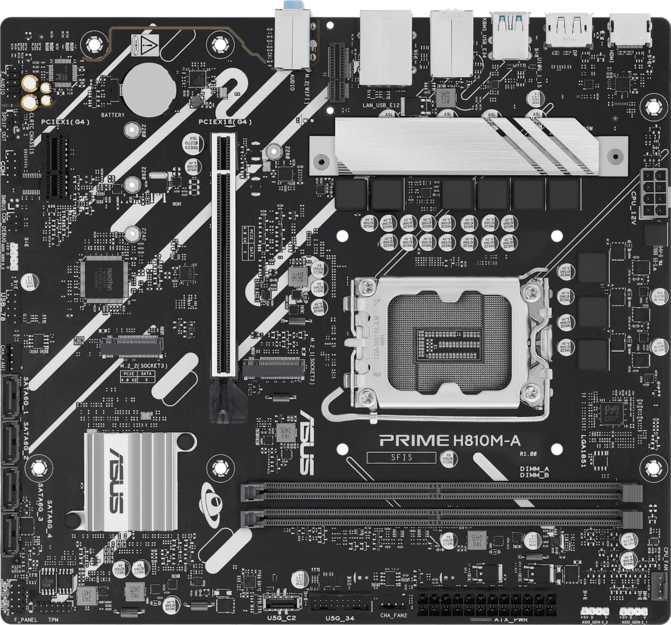
Asus Prime H810M-A Review: Intel's Most Affordable Arrow Lake Entry
MotherboardsPlatform Entry Point: What This Board Sets Out to Do
There's a particular kind of build decision that rarely gets enough attention — the one made by someone who needs a capable, modern machine without spending money on features they will never use. The Asus Prime H810M-A is designed squarely for that decision. Built on Intel's entry-level H810 chipset and the current LGA 1851 processor socket, it puts the latest generation of Intel processors within reach of the tightest budgets, in a compact Micro-ATX package that fits neatly into most standard cases.
That accessibility, however, comes attached to a specific set of compromises. Some are invisible in everyday use. Others will matter the moment you realize you needed the feature that isn't there. This review maps every trade-off against real-world scenarios so you know exactly what you're buying before the transaction clears.
Build Quality and Physical Design
Physically, the Prime H810M-A carries Asus's familiar black PCB with subtle onboard RGB lighting that adds visual personality without demanding attention. The lighting is tasteful — not the aggressive multi-zone spectacle you'd find on higher-tier boards, but enough to give a lit build a cohesive, clean look.
The board's construction reflects its price tier. Heatsinks are minimal, which is appropriate for the H810 chipset since the platform is not designed for the thermal demands of heavy overclocking. Power delivery components don't need elaborate cooling at stock operating conditions, and Asus keeps the board uncluttered as a result.
Component clearance is handled sensibly — memory slots and the primary M.2 socket are positioned away from the GPU slot, so installing a large graphics card won't block critical connectors. Cable routing is workable even for builders doing this for the first time.
One physical detail worth flagging: the board retains a PS/2 port on the rear panel. This is a legacy connector for older keyboards and mice, and most modern peripherals don't use it. It won't matter to the vast majority of buyers, but those migrating from a very old system can continue using PS/2 peripherals during the transition.
Clear CMOS Convenience
A dedicated BIOS reset mechanism lets you restore factory defaults without opening the case or locating internal jumpers — a practical safety net for anyone adjusting settings for the first time.
Aesthetic Highlights
- Onboard RGB lighting included
- Black PCB with clean layout
- Fits standard Micro-ATX and ATX cases
The H810 Chipset and LGA 1851 Platform: What This Generation Means
The LGA 1851 socket is Intel's current desktop processor format, supporting the Core Ultra 200 series — Intel's most recent architecture. Choosing a board with this socket means your processor platform is as current as Intel makes it, which matters for software optimization, driver support, and how long before the CPU ecosystem moves past your hardware.
The H810 chipset is the most affordable entry point into this platform. Intel designed it explicitly for straightforward, unmodified operation: stable, reliable everyday performance without the overhead of advanced tuning features. What this means practically is that the processor runs at the speeds Intel specifies and no higher. There is no mechanism to push clock speeds beyond the rated turbo frequencies — the ceiling is set at the chipset level, and nothing in BIOS configuration changes that.
For everyday use — productivity software, web browsing, video streaming, light gaming, home office applications — this is no practical limitation. Modern Arrow Lake processors deliver genuinely capable performance at their rated specifications, and most users never approach the scenarios where additional frequency headroom would be detectable.
The limit surfaces more concretely in the primary expansion slot for a discrete graphics card, which runs on an older PCIe generation than mid-tier and high-end boards in this socket family. A GPU installed here operates at that interface's performance ceiling — which, for current-generation cards, produces no real-world gaming bottleneck in the overwhelming majority of scenarios, but does leave future PCIe bandwidth on the table.
No CPU Overclocking
Clock speed adjustment is locked at the chipset level. This is a firm hardware boundary, not a BIOS restriction. Enthusiasts requiring multiplier control must step up to a B860 or Z890 board.
Platform Snapshot
- Chipset Tier
- H810 (Entry)
- GPU Slot
- PCIe 4.0 x16
- Expansion (additional)
- 1x PCIe x1
- CPU OC Support
- None
DDR5 Memory: Speed, Capacity, and a Two-Slot Reality Check
The board uses DDR5 memory exclusively — the current standard that replaced DDR4 and brings substantially wider bandwidth and higher speed potential to the platform. Arrow Lake processors respond particularly well to high-speed DDR5, and this board supports memory running at the top of the speed range that Intel's current platform is optimized for. The performance difference versus slower DDR5 is most noticeable in bandwidth-sensitive workloads: compiling code, working with large datasets, running virtual machines, or multitasking across many applications simultaneously.
Total supported memory reaches a ceiling high enough that no consumer user will approach it — the kind of capacity where the spec is irrelevant rather than meaningful. What is practically meaningful is the slot count: two slots. Micro-ATX boards in this price tier commonly reduce the slot count from the four you'd find on larger ATX boards, and this board follows that pattern.
Two slots means you install your full RAM kit at once. There is no "start with two sticks and add two more later" path. If you buy a smaller kit now and want more in two years, you'll swap the existing sticks out, not supplement them. For most users installing reasonable capacities for home or office use, this is a non-issue. For users planning significant memory growth, it's worth factoring into the total upgrade cost.
Dual-channel memory operation is supported, meaning two matched sticks working in parallel to effectively double available memory throughput versus a single stick. Always install memory in matched pairs to take full advantage of this.
Memory Quick Facts
- Standard
- DDR5 Only
- Slots
- 2
- Max Capacity
- 128 GB
- Channels
- Dual-Channel
- ECC Support
- None
Upgrade Path Note
With only two slots, future RAM upgrades require replacing your existing kit — not adding to it. Plan your initial capacity carefully.
Storage: Flexible and Well-Provisioned for a Budget Board
For a board at this price tier, storage connectivity is a genuine strength. Two M.2 sockets support the fast solid-state drives that have become the standard for operating systems and primary working storage. These drives connect directly to the motherboard and deliver transfer speeds that make conventional hard drives look measurably slow — the kind of speed where Windows loads in seconds and large files move in moments. One socket for your primary system drive and a second for games, a project archive, or general working storage gives you a complete, fast storage foundation without needing external enclosures.
Beyond the M.2 connections, four SATA ports handle conventional storage devices: older SSDs, spinning hard drives for large-capacity media storage, or any combination. Four SATA connections at this board tier is a solid count — enough to build a multi-drive configuration without running short on connections.
One notable absence: drive mirroring and striping through RAID configuration is not available. Users who rely on RAID arrays for data redundancy or performance — typically in small business server contexts — should factor this in. Consumer home builders running separate drives independently won't notice or miss it.
Graphics Support and Display Output
The board provides both an HDMI output and a DisplayPort output on the rear panel. These connections drive monitors and displays when paired with Arrow Lake processor SKUs that include Intel's Arc integrated graphics alongside the processor cores — specific models within the Core Ultra 200 lineup that don't require a separate graphics card to produce display output.
The HDMI connection here is Intel's current-generation HDMI standard, which handles resolutions up to 4K at high refresh rates. Paired with a capable display, the integrated graphics in supported Arrow Lake processors can cover productivity work, content consumption, and light use on a large monitor or television with quality output. The DisplayPort output adds a second independent display connection, enabling dual-monitor productivity setups without a discrete card.
For gaming, video editing, 3D rendering, or any GPU-intensive task, a dedicated graphics card installed in the PCIe x16 slot will perform significantly beyond what integrated graphics offers. In that configuration, the card's own outputs handle all display connections, and the rear panel video outputs typically become inactive.
-
HDMI 2.1 — 4K at high refresh rates
-
DisplayPort — Second independent display
-
Requires iGPU-equipped CPU for rear panel output
Rear Panel and Internal I/O: What's There, What Isn't
What the Rear Panel Delivers
-
2x High-Speed USB Type-A (10 Gbps)
Transfers large files at multi-gigabit speeds — for modern external SSDs and high-speed peripherals. -
4x USB Type-A (USB 2.0)
Mice, keyboards, USB hubs, and everyday peripherals that don't transfer large files. -
Gigabit Ethernet (RJ45)
Wired connections are faster and more stable than Wi-Fi for the same network. -
3x Audio Jacks (7.1 Surround)
Covers stereo headphones, 2.1 desktop speakers, or a complete multi-channel configuration. -
HDMI 2.1 + DisplayPort outputs
Dual-display support for iGPU-equipped processors.
Three Gaps That Matter
No Wi-Fi or Bluetooth
No wireless radio of any kind is present. Adding Wi-Fi via the PCIe x1 slot solves the problem but consumes the only remaining expansion option beyond the GPU.
No USB Type-C Anywhere
Neither the rear panel nor the internal headers offer a USB-C connection. A case's front-panel USB-C port will go completely unused with this board — check your case selection carefully.
No High-Bandwidth Connections
USB4, Thunderbolt, and similar single-cable solutions for docking stations and fast external drives are absent. Expected at this chipset tier, but a ceiling worth knowing.
Audio, BIOS, and Thermal Management
Onboard Audio
Seven-channel surround audio is available through three analog jacks. The hardware handles headphone listening and standard desktop speaker setups without issue — covering the needs of the vast majority of users who don't use external audio interfaces.
No S/PDIF output. If your speaker system or AV receiver accepts a dedicated digital audio feed, you'll need to route audio through HDMI instead.
BIOS and Tuning
Asus's BIOS on the Prime series is among the more approachable in the market. An Easy Mode gives first-time builders a simplified view of commonly adjusted settings, while Advanced Mode exposes the complete range of options. The interface is clean, well-labeled, and navigable without specialized knowledge.
Memory can run at high speeds through the supported DDR5 profile system, which brings meaningful performance improvements over base-speed memory. CPU clock speeds, however, cannot be pushed beyond Intel's rated specifications.
No dual BIOS chip. If the primary BIOS becomes corrupted during a failed update, there is no secondary backup to fall back on automatically.
Thermal and Fan Control
Three fan headers govern system cooling. A simple build — CPU cooler, single case exhaust, optional front intake — fits within three headers without additional hardware. Headers support PWM speed control, automatically adjusting fan speeds based on sensor-reported temperatures: quieter under light load, faster when thermal demands rise.
Builders planning multiple intake fans, dual-radiator AIOs, or separate exhaust zones may find three headers limiting and need a fan hub or splitter.
Who This Board Is Right For — and Who Should Look Elsewhere
Buy If You Are...
-
A budget-focused builderwanting Intel's current processor generation without paying for platform features you won't use.
-
A home or office desktop userrunning productivity software, web applications, video streaming, and light multitasking.
-
A light to moderate gamerpairing a budget to mid-range GPU with an Arrow Lake processor, where PCIe generation bandwidth is not a practical bottleneck.
-
A first-time PC builderwho benefits from Asus's accessible BIOS, Clear CMOS recovery, and stock-settings reliability.
-
Building in a Micro-ATX casewhere smaller footprint matters and the reduced feature set is an acceptable trade.
-
Near a router with Ethernet accesswhere wireless connectivity genuinely isn't needed and wired LAN covers everything.
Look Elsewhere If You Need...
-
CPU overclocking capabilityEven casual tuning requires a B860 board at minimum; full control needs a Z890 platform.
-
Built-in wireless or BluetoothAdding a PCIe Wi-Fi card uses the only remaining expansion slot beyond the GPU.
-
USB-C front panel supportModern cases with front USB-C ports will have no header to connect to on this board.
-
Professional or creative workloadsFour memory slots, PCIe 5.0 storage bandwidth, or ECC memory reliability require a higher chipset tier.
-
Home theater digital audioNo S/PDIF output for external DACs or AV receivers requiring a dedicated digital feed.
-
PCIe 5.0 future-proofingThe GPU slot tops out at PCIe 4.0. Maximum bandwidth for next-generation cards requires a B860 or Z890 board.
How It Compares: Intel LGA 1851 Chipset Tier Breakdown
The most useful comparison for this board isn't against other specific H810 models — it's against the chipset tiers above it that share the same LGA 1851 socket. Understanding where H810 ends and the alternatives begin clarifies whether the upgrade cost is worth it for a given use case.
| Feature | H810 Tier (This Board) |
B860 Tier (Mid-Range) |
Z890 Tier (Enthusiast) |
|---|---|---|---|
| CPU Overclocking | Not Supported | Not Supported | Supported (K-series) |
| Primary GPU Slot | PCIe 4.0 x16 | PCIe 5.0 x16 | PCIe 5.0 x16 |
| Memory Slots (typical) | 2 | 2–4 | 4 |
| Memory Profile Support | Supported profiles to platform optimum | Broader XMP / EXPO support | Full overclocking support |
| Built-in Wi-Fi (typical) | Not Included | Commonly Included | Commonly Included |
| USB-C Rear Panel (typical) | Not Included | Often Included | Often Included |
| Additional Expansion | 1x PCIe x1 beyond GPU | More varied | Most varied |
| Price Position | Lowest | Mid-Range Premium | Highest |
Features marked "typical" represent common characteristics for boards in each chipset tier and may vary by specific model.
Honest Assessment: Where This Board Earns Credit and Where It Falls Short
Genuine Strengths
-
Current-generation platform access at lowest costLGA 1851 socket support puts Intel's most recent architecture within budget reach and remains relevant for the full lifespan of the Core Ultra 200 series.
-
High-speed DDR5 memory profiles not sacrificedMemory speed support aligns with what Arrow Lake processors perform best at — this isn't diluted at the H810 tier.
-
Strong storage flexibility for the priceTwo M.2 sockets and four SATA ports provide genuine multi-drive capability — many competing entry-level boards compromise further here.
-
Asus BIOS quality holds at entry-levelApproachable layout, Easy Mode for beginners, and full Advanced Mode access — these aren't afterthoughts retrofitted onto a budget product.
-
Clear CMOS and three-year warrantyPractical recovery convenience and above-average warranty coverage for the price bracket.
Real Limitations
-
No USB-C anywhere — rear panel or internal headerA tangible gap on a current-gen platform. Modern monitors, peripherals, and cases have largely standardized around USB-C, and this board has zero provision for it.
-
Wireless absence compounds expansion limitsNo radios, and adding them via a PCIe card consumes the board's only remaining expansion slot — leaving nothing for anything else.
-
PCIe 4.0 GPU slot, not PCIe 5.0Current-gen GPUs won't be bottlenecked, but future-generation cards and users wanting maximum theoretical bandwidth will find the ceiling lower than B860 or Z890 boards.
-
Two memory slots limits upgrade pathGrowing RAM requires replacing sticks, not adding them. A planning consideration for long-term ownership.
-
No dual BIOS and no S/PDIF audio outputMissing a backup firmware chip for BIOS corruption recovery, and no dedicated digital audio path for external DACs or home theater receivers.
Questions Buyers Ask Before Purchasing
Final Verdict
Asus Prime H810M-A
The Asus Prime H810M-A is a competent, honest entry point into Intel's current processor generation — nothing more, and nothing less. It delivers what a budget-minded builder actually needs: a stable, well-constructed platform with solid DDR5 memory speed support, practical storage connectivity, and Asus's reliably approachable BIOS experience, all in a Micro-ATX footprint that fits most cases.
The limits are real and should be read clearly. No USB-C anywhere, no wireless radios, a PCIe 4.0 rather than PCIe 5.0 GPU slot, and only two memory slots are the price of entry at this tier. None of these are deal-breakers in a system where the priority is reliable everyday performance at minimum spend. But if any one of them matters to your specific use case, the right answer is to spend a bit more and step up to a B860-based board instead.
Buy this board if your build is a focused, no-frills machine for home computing, light gaming, or office productivity, and your budget leaves no room for extras you don't actually need. It will serve that purpose reliably for years. If you're building anything with more ambition — wireless needs, a front USB-C port, or thoughts of a PCIe 5.0 GPU — spend the premium and get a board that won't create friction down the road.
The Right Choice When:
- Budget is the top priority
- Wired Ethernet is accessible
- No overclocking planned
- Standard case, no USB-C front panel
Consider B860 or Higher When:
- USB-C connectivity is needed
- Wireless is required
- Overclocking is on the agenda
- PCIe 5.0 headroom matters