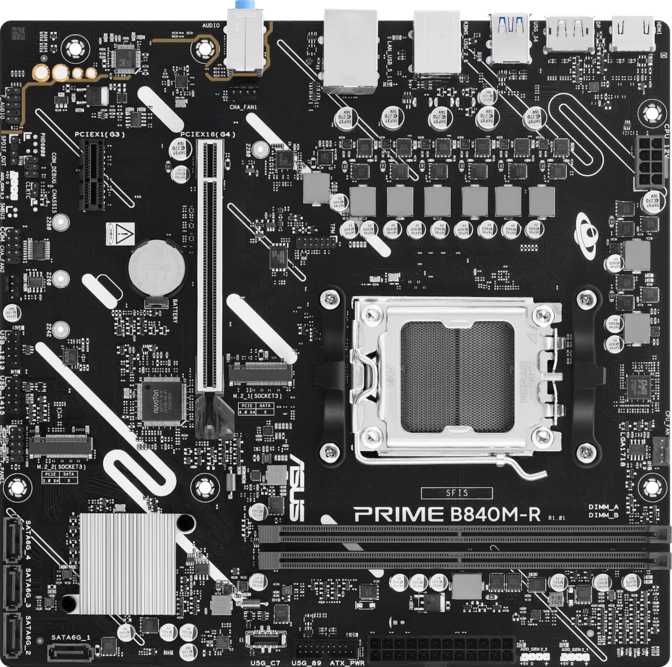
Asus Prime B840M-R Review: A Focused AM5 Budget Motherboard
MotherboardsThe budget end of the AM5 motherboard market has become genuinely competitive, and the Asus Prime B840M-R is one of the more interesting arrivals. It sits on AMD's B840 chipset — a platform designed specifically for builders who want modern Ryzen performance without paying for features they will never use. For a certain kind of builder, that is exactly the right trade-off. For others, the omissions will be deal-breakers from the first glance. This review tells you which camp you fall into.
Socket & Chipset
AM5 · B840
Form Factor
Micro-ATX
Max Memory
128 GB DDR5
Warranty
3 Years
Design and Build Quality
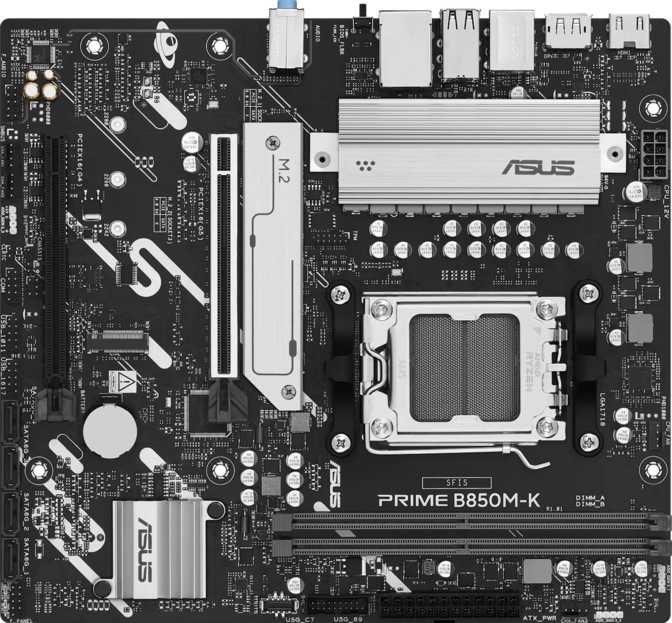
The Prime B840M-R uses the Micro-ATX form factor, measuring 229 mm tall and 236 mm wide. That compact footprint makes it a natural fit for mid-tower cases that accept mATX boards, as well as the growing number of smaller cases designed around this size. Builders working with limited desk space or going for a tidier build will appreciate not having unused PCB real estate sitting in the case.
Asus includes RGB lighting on the board, which lets you tie it into a coordinated system lighting theme if your case and peripherals support that. It is not the most elaborate implementation you will find on a budget platform, but it is present and functional, with controls available through BIOS and Asus Armoury Crate software.
One notable absence at this level: there is no dedicated clear-CMOS button accessible from the rear panel, and there is no dual-BIOS chip. If a BIOS update causes instability, recovery requires the more manual process of using the onboard header. Enthusiasts who frequently flash experimental firmware will want to keep that in mind. For most users who update the BIOS once and leave it alone, it is a non-issue.
Compact Footprint
At 229×236 mm, the mATX layout fits efficiently in mid-tower and compact cases without wasting space or obstructing airflow paths.
RGB Lighting
Onboard RGB allows integration with case and peripheral lighting setups for a coordinated look, fully manageable and disableable from BIOS.
3-Year Warranty
Asus backs the board with a competitive three-year warranty for this price tier, reflecting confidence in the manufacturing quality.
Platform and Chipset: What B840 Means for Your Build
The B840M-R uses AMD's B840 chipset with the AM5 socket, accepting current-generation Ryzen 7000 and 9000 series processors. AMD's commitment to the AM5 platform means the socket is expected to remain relevant through several future processor generations — a build on this board today is not heading toward a dead-end upgrade path.
The B840 chipset sits at the entry level of AMD's current lineup, and that distinction carries practical implications worth understanding clearly before you commit to a purchase.
Manual CPU overclocking — raising clock multipliers or adjusting voltage curves — is not available on the B840 chipset. Builders aiming for peak performance from an unlocked Ryzen processor need a B650 or X870 board. The B840M-R simply is not that platform, and understanding this distinction before buying is essential.
Memory tuning tells a very different story. The board supports AMD's EXPO profiles — essentially one-click DDR5 tuning — and carries this capability to an impressive speed ceiling. For most users, enabling an EXPO profile in the BIOS is all the performance tuning they will ever need, and the B840M-R handles it confidently.
Memory Configuration: Two Slots, Generous Headroom
The board ships with two DDR5 memory slots running in dual-channel configuration. Two slots instead of four is a common cost reduction on Micro-ATX budget boards, and it creates one practical constraint: adding RAM in the future means replacing what you have, not supplementing it. Choose your initial kit capacity with future needs in mind.
The ceiling is generous, however. Both slots support high-speed DDR5 modules, and with EXPO profiles enabled, memory can be pushed to very high transfer rates — a benefit that directly and measurably improves gaming performance on Ryzen platforms where memory throughput matters. The maximum supported capacity far exceeds any consumer workload that exists. ECC memory, the error-correcting type used in workstations and servers, is not supported — which is expected and inconsequential for consumer use.
2
DDR5 Slots
(Dual-Channel)
128GB
Max Capacity
7600MHz
EXPO OC Ceiling
DDR5
Standard
No ECC Support
Storage: Capable Enough for Most Builds
M.2, SATA, and RAID Support
Two M.2 slots handle NVMe solid-state drives — one for your operating system and applications, a second for games or large project files. That covers almost every home and office use case without requiring an add-in card or any compromises in storage speed.
Four SATA ports extend the pool with support for 2.5-inch SSDs and traditional hard drives, bringing total simultaneous device support to six. For a compact mATX board, that is meaningful flexibility for users with large media libraries or archiving needs who do not want to leave files spread across external drives.
The RAID support across all four primary configurations is a notable inclusion at this price point. Builders who want to mirror two drives for local data redundancy will find this option available without stepping up to a more expensive board — an uncommon value at the budget tier.
Cooling and Thermal Headers
Three fan headers handle cooling duty: CPU cooler plus one or two case fans is the practical limit. Builders with more aggressive airflow layouts using four or more fans will need a separate fan hub, adding cost and cable management complexity. A TPM connector is included for platform security requirements.
- M.2 NVMe Slots2
- SATA Ports4
- Total Devices Supported6
- Fan Headers3
- TPM Connector
- RAID 0 — Striping for maximum read/write speed
- RAID 1 — Mirroring for data redundancy
- RAID 5 — Distributed parity for balanced protection
- RAID 10 — Combined striping and mirroring
Rear I/O: Practical but Limited
The rear panel connectivity reflects the B840M-R's value-oriented positioning. It covers the essentials for a wired desktop build — but several omissions, most critically the complete absence of USB-C and any form of wireless, will matter to a growing number of potential buyers.
| Port Type | Count | Practical Use |
|---|---|---|
| USB-A 3.2 Gen 1 | 4 | External drives, fast peripherals, USB hubs |
| USB 2.0 | 2 | Keyboards, mice, and other low-bandwidth input devices |
| HDMI 2.1 | 1 | APU / integrated graphics display; supports high-refresh 4K output |
| DisplayPort | 1 | Secondary display via integrated graphics |
| RJ45 Gigabit Ethernet | 1 | Wired network connectivity |
| PS/2 | 1 | Legacy input devices and KVM switches |
| USB-C (any speed) | 0 | Not present — neither rear panel nor front-panel header |
| Wi-Fi / Bluetooth | None | No antennas fitted; cannot be added through the board itself |
Internal Headers Extend USB Availability
Beyond the rear panel, two USB 3.2 Gen 1 headers and four USB 2.0 headers are available on the board for case front-panel connections and expansion brackets — partially offsetting the rear port count for builders with well-equipped cases.
Expansion Slots: A Focused Layout
The expansion layout is deliberately simple: one PCIe 4.0 x16 slot for a dedicated graphics card, and one PCIe x1 slot for smaller add-in cards. No consumer GPU currently on the market saturates PCIe 4.0 bandwidth, so the absence of PCIe 5.0 has zero real-world impact on gaming or rendering performance for any build you can put together today.
PCIe 4.0 x16
Primary GPU Slot
Supports all current discrete graphics cards without bandwidth restrictions. PCIe 4.0 is not a bottleneck for any GPU available today, making this slot fully capable for demanding gaming, 3D rendering, and GPU compute workloads.
PCIe x1
Expansion Cards
One x1 slot is available for sound cards, Wi-Fi cards, or capture cards. Adding a Wi-Fi card here consumes this slot entirely — no further expansion space remains beyond the primary GPU. Plan your build around this constraint if wireless connectivity is needed.
Onboard Audio
Onboard audio covers 7.1 surround channel output through three rear analog jacks — the standard configuration for this class of board. Gaming headsets, desktop speaker sets, and direct headphone connections are all handled competently. The audio quality is appropriate for casual gaming and everyday media consumption.
There is no optical S/PDIF output on the rear panel. Users with external DACs or surround sound receivers that require an optical connection will need a separate USB audio interface or a PCIe sound card — factoring the additional cost and PCIe slot usage into the build plan if this applies to you.
7.1
Surround Channel Support
Who Should Buy the Asus Prime B840M-R?
- You are building your first PC and want a modern AM5 platform without an overwhelming feature list or inflated price tag
- Your machine stays in one fixed location and connects to the internet via Ethernet — wireless is never needed
- You are building in a Micro-ATX case and want to keep the build compact, clean, and efficiently laid out
- Storage flexibility and RAID redundancy matter more to you than wireless connectivity or USB-C
- You are using an AMD APU with integrated graphics and need the onboard display outputs to run a monitor
- You need Wi-Fi and are not willing to give up your only spare PCIe slot for a wireless add-in card
- You want to manually overclock your Ryzen CPU for maximum performance gains beyond stock speeds
- Your build needs more than two M.2 slots or more than three fan headers without sourcing extra hardware
- You rely on USB-C for monitors, docking stations, or newer peripherals — the port is absent entirely
- You want PCIe 5.0 GPU slot compatibility as a hedge against next-generation graphics card requirements
How It Compares to the Alternatives
The primary choice facing buyers in this price tier is between B840 and B650M. B650 sits at the mid-range of AMD's chipset stack and brings meaningful additional capabilities at a higher cost. Here is where the trade-offs actually land in practice:
| Feature | Asus Prime B840M-R | Typical B650M Board |
|---|---|---|
| Chipset Tier | Entry — B840 | Mid — B650 |
| CPU Overclocking | EXPO memory only | Full CPU OC support |
| Wi-Fi Included | None | Often included |
| M.2 NVMe Slots | 2 | 2–3 typical |
| USB-C Rear Port | None | Usually 1 |
| PCIe GPU Slot | Gen 4 | Gen 4 or Gen 5 |
| RAID Support | Full (0/1/5/10) | Varies by model |
| Price Position | Lower | Higher |
Stepping from B650 down to B840 costs you manual CPU overclocking flexibility and often wireless connectivity. If neither matters to your specific build, you gain meaningful budget headroom without losing any day-to-day performance you would actually notice.
Honest Assessment: Strengths and Weaknesses
The EXPO memory overclocking support pushes DDR5 speeds to levels that deliver tangible gaming performance gains — something that directly benefits Ryzen platforms where memory throughput has a measurable impact. No manual tuning expertise is required; enabling a preset EXPO profile in BIOS takes only a few menu selections.
RAID support across all major configurations is uncommon at this price segment and adds real value for anyone storing important data locally who wants redundancy without investing in dedicated NAS hardware or a more expensive board. It is the kind of feature that would otherwise cost extra.
Asus's established BIOS ecosystem and three-year warranty give this board credibility that no-name budget alternatives cannot match. The UEFI interface is approachable for first-time builders while still being functional for experienced ones — a balance that matters when setting up memory profiles for the first time.
No USB-C anywhere on the board — front panel header or rear — is a meaningful shortcoming as that port becomes the standard across monitors, docking stations, and peripheral accessories. This is not a minor inconvenience for affected users; it is a daily friction point that should be a genuine deciding factor in your purchase decision.
Three fan headers is a tight ceiling for anything beyond a basic setup. Builders with four-fan configurations or water cooling loops with multiple pump and sensor headers will need a hub, adding cost and cable management complexity to a build that was supposed to be simple.
The complete absence of wireless hardware means any Wi-Fi need either consumes the only spare PCIe slot or forces a USB adapter workaround. No dedicated clear-CMOS button means BIOS recovery is more involved than it should be. Neither surfaces daily — but both surface at the least convenient moments possible.
Questions Real Buyers Ask Before Purchasing
Final Verdict
Recommended for Wired, Compact AM5 Builds
Asus Prime B840M-R — AM5 Socket · B840 Chipset · Micro-ATX
The Asus Prime B840M-R is a focused, no-frills AM5 motherboard that delivers what it promises without pretending to be something it is not. It is the right foundation for a budget-to-midrange Ryzen build in a compact case where wired connectivity is the norm and manual CPU overclocking is not on the agenda.
The lack of USB-C and wireless connectivity are genuine limitations — real omissions that will push some buyers toward a B650M alternative. But for builders who know their requirements and are honest about what they will actually use, this board cuts costs in the right places and retains value in the ones that matter: meaningful RAID support, an impressive EXPO memory ceiling, a three-year warranty, and Asus's reliable BIOS ecosystem.
If your build is wired, compact, and centred around a modern Ryzen processor without the need for manual CPU tuning, the Prime B840M-R earns a confident recommendation. Step up to a B650M board only if you specifically need Wi-Fi, full CPU overclocking, or USB-C connectivity — otherwise, you are paying for features that will sit completely unused.
Buy: Wired Desktop Builds
Buy: Compact mATX Cases
Skip: Wi-Fi or USB-C Needed