Asus Prime B850M-K Review: A Compact B850 Board for the Right Builder
MotherboardsThe AMD AM5 platform has matured into a genuinely compelling foundation for PC building, and choosing the right motherboard can define how far your build can grow. The Asus Prime B850M-K targets a specific kind of builder: someone who wants access to the latest AMD infrastructure — including support for cutting-edge graphics connections and fast memory — without the financial commitment of a premium flagship board. Whether it earns that position depends on some deliberate trade-offs that deserve a close look.
Key Specifications at a Glance
Size, Build, and Physical Presence
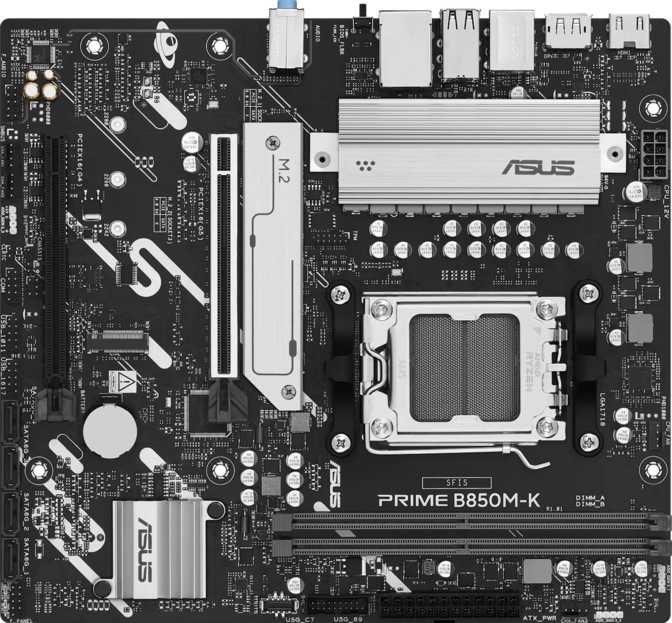
At 244 by 221 millimetres, the Prime B850M-K uses the Micro-ATX form factor — a format that fits comfortably in standard mid-tower and compact mid-tower cases while freeing up physical space in chassis that can technically accommodate larger boards. It is meaningfully smaller than a full ATX board without the extreme constraints of Mini-ITX, sitting in a pragmatic middle ground that suits most home and office builds.
Asus’s Prime line occupies the reliable core of their consumer lineup — not the enthusiast-grade ROG tier and not the entry-level budget tier, but a segment defined by genuine engineering discipline and consistent quality control. The three-year warranty reflects that positioning clearly. At a price point where some competitors offer one or two years of coverage, three years signals confidence in component longevity that matters if you’re building a machine you intend to keep.
RGB lighting is present on the board. For builders who care about aesthetics, it integrates with Asus’s lighting control software for synchronisation with other compatible components. For those who find it irrelevant, it can be disabled through the BIOS or software without affecting anything else.
BIOS Reset Limitation
This board has no dedicated rear-panel button for resetting the BIOS to factory defaults. Resetting requires using an internal jumper header — manageable for experienced builders but a genuine friction point for first-timers after a failed overclock. The dual BIOS feature covered in the next section does soften this limitation in practice.
What the B850 Chipset Actually Means for Your Build
The B850 is AMD’s current mainstream platform chipset — the generation that follows B650 and sits below the premium X870 tier. This distinction defines the GPU slot bandwidth, memory support, and overclocking capabilities available to you.
AM5 Platform & Upgrade Path
The AM5 socket supports AMD’s current and recent Ryzen desktop processors. AMD has publicly committed to AM5 as a multi-generation foundation, meaning a processor upgrade doesn’t automatically require a new motherboard. Your investment in this board doesn’t expire when a new processor generation launches — a meaningful financial advantage over platforms with shorter socket lifespans.
Full Overclocking Without the Premium Tax
The B850 chipset fully enables both CPU and memory overclocking. If you purchase an unlocked Ryzen processor, you can push performance beyond stock specifications directly through the BIOS. Asus’s firmware provides structured overclocking tools that work for systematic tuning without deep technical knowledge, while keeping manual controls fully accessible for experienced builders.
Dual BIOS: A Safety Net Worth Having
The board carries two BIOS chips. If the primary BIOS becomes corrupted — through a failed firmware update, a power cut mid-flash, or an aggressive manual edit — the system recovers automatically from the backup chip without manual intervention. For overclockers who push settings hard, this is genuine insurance. Combined with the three-year warranty, reliability outpaces the price.
Memory Configuration: DDR5, Speed, and the Two-Slot Reality
DDR5 Is the Only Option Here
The Prime B850M-K is built exclusively for DDR5 memory — the current generation of RAM technology offering higher bandwidth and greater capacity per module than its predecessor. If you’re building fresh, this is straightforwardly the right choice. If you’re upgrading from an older system and carrying DDR4 sticks, those are not compatible. The physical connector position differs, DDR4 modules cannot be inserted, and a new DDR5 kit is a required purchase.
The Performance Ceiling Is Genuinely High
At standard operating speeds, DDR5 on the B850 platform already outperforms what the previous generation could achieve. When pushed beyond defaults through memory overclocking profiles — something this board explicitly supports — the upper frequency ceiling reaches territory that was purely enthusiast-grade just two generations ago. Memory-intensive workloads like video rendering, 3D animation, and simulation software see meaningful gains from higher bandwidth. The total capacity ceiling of 128 gigabytes exceeds any consumer workload currently imaginable.
Dual-channel operation — where both slots work together for combined bandwidth — activates automatically when both are populated. ECC memory, used in servers and workstations where data integrity errors carry serious consequences, is not supported. For gaming, content creation, and general computing, this is irrelevant. For scientific or financial workloads where memory errors cannot be tolerated, this board is the wrong choice.
Only Two Memory Slots
Most Micro-ATX boards at this tier provide four slots. With only two, future capacity upgrades require replacing both existing sticks entirely — not adding to them. Plan your kit purchase with your target capacity in mind from day one.
Two-Slot Impact Summary
- Cannot add more sticks later — replacing both is the only upgrade path
- No option to run four smaller sticks if that configuration is preferred
- Kit compatibility critical — select a tested, qualified dual-stick DDR5 pair
- Dual-channel bandwidth activates automatically when both slots are populated
PCIe 5.0 and Future GPU Readiness
PCIe 5.0 x16 — The Current Leading Standard
The main slot for a discrete graphics card operates at PCIe 5.0 x16 — the most significant feature separating B850 boards from the B650 generation that preceded them. PCIe 5.0 doubles the data transfer bandwidth of PCIe 4.0.
To be clear about the immediate practical impact: current graphics cards do not saturate a PCIe 4.0 connection in typical gaming scenarios, let alone the doubled bandwidth of PCIe 5.0. You will not install a current GPU and notice a performance difference attributable to the slot generation. What you are buying is ceiling — as future GPU architectures push toward higher bandwidth requirements, this board is positioned to accommodate those cards without becoming a bottleneck. Choosing this over a B650 board is a deliberate forward-compatibility argument that costs relatively little extra.
PCIe 4.0 x16 for Expansion Cards
A second expansion slot runs at PCIe 4.0. When occupied — for a capture card, sound card, or PCIe wireless adapter — it operates at a reduced lane count while the primary GPU slot remains unaffected. This is standard behaviour for chipset-connected secondary slots. There are no PCIe x1 slots present, meaning any expansion card uses this single secondary slot regardless of physical size. A Wi-Fi card here permanently consumes your only remaining slot.
Expansion Slot Summary
| Primary GPU Slot | PCIe 5.0 x16 |
| Secondary Slot | PCIe 4.0 x16 |
| PCIe x1 Slots | None |
| Legacy PCI Slots | None |
| Thunderbolt | Not Supported |
Storage: NVMe Speed, SATA Depth, and RAID Capability
NVMe and SATA Storage Options
Two M.2 sockets accommodate NVMe solid-state drives — the format that has replaced traditional 2.5-inch SSDs as the default for system drives and fast secondary storage. M.2 NVMe drives connect directly to the motherboard without cables, operate significantly faster than SATA-connected drives, and run cooler and more efficiently. Two sockets covers the typical use case cleanly: one for the operating system and applications, a second for additional fast storage.
Four SATA 3 connectors handle conventional storage — SATA SSDs, standard hard drives, or optical drives. This accommodates configurations where large-capacity hard drives serve as cost-effective bulk storage alongside faster NVMe system drives.
| Storage Interface | Count |
|---|---|
| M.2 NVMe Sockets | 2 |
| SATA 3 Connectors | 4 |
| eSATA Ports | None |
| mSATA | None |
Full RAID Support — Broader Than Expected
All four major RAID configurations are supported — a feature not guaranteed on B850 boards, where some manufacturers reserve certain RAID levels for premium chipsets. This broadens the board’s practical scope to include home server builds and any setup where drive redundancy or performance striping has real value.
| RAID Level | Function | Supported |
|---|---|---|
| RAID 0 | Striping — maximised sequential speed | |
| RAID 1 | Mirroring — full data redundancy | |
| RAID 5 | Parity — balanced speed and protection | |
| RAID 10 | Mirror + Stripe — speed with fault tolerance |
Connectivity: Ports, Headers, and What’s Missing
There are no USB-C ports on the rear I/O panel and no USB-C front-panel header for chassis connections. Users who rely on USB-C for external drives, cameras, docking stations, or USB-C monitors will encounter permanent friction. An external hub or a PCIe USB-C expansion card is required as a workaround, and the latter consumes your only remaining expansion slot.
Rear I/O Ports
| Port | Speed | Count |
|---|---|---|
| USB-A (3.2 Gen 2) | 10 Gbps | 2 |
| USB-A (3.2 Gen 1) | 5 Gbps | 2 |
| USB 2.0 (USB-A) | 480 Mbps | 4 |
| USB-C (any speed) | — | 0 |
| Ethernet (RJ45) | 1 Gbps | 1 |
| HDMI Output | 2.1 Standard | 1 |
| DisplayPort Output | — | 1 |
A USB wireless adapter or PCIe wireless card is required. Using a PCIe card leaves no remaining free expansion slots for other devices.
Internal Connectors & Headers
| Connector | Count |
|---|---|
| M.2 NVMe Sockets | 2 |
| SATA 3 Ports | 4 |
| Fan Headers (4-pin) | 4 |
| USB 3.2 Gen 1 Header | 2 |
| USB 2.0 Header | 4 |
| USB-C Front Panel Header | 0 |
| TPM Header |
Four fan headers provide adequate control for typical Micro-ATX builds using standard air cooling or a single-radiator AIO. Cases with a USB-C front port cannot activate it with this board — no front-panel USB-C header is present.
Display Output and Onboard Audio
Display Output Via Processor
The HDMI 2.1 port and DisplayPort on the rear panel are functional when paired with a Ryzen processor that includes integrated graphics — a feature present on most current Ryzen desktop processors. HDMI 2.1 supports 4K resolution at high refresh rates, making it genuinely useful for a home office setup or a compact media machine connected directly to a high-resolution display without a discrete GPU. Confirm your specific processor includes integrated display capability before assuming you can build without a separate graphics card.
7.1 Channel Onboard Audio
The audio subsystem supports up to 7.1 surround sound through three analogue connectors on the rear panel — covering stereo headphones, a front microphone, and multi-channel speaker setups. This covers the needs of gaming headsets and desktop speaker systems without requiring a separate audio interface for most users.
Who Should Build with the Prime B850M-K
The Right Fit
This board suits a specific builder well: compact AMD Ryzen systems with wired ethernet, a single discrete GPU, and a preference for long-term upgrade path over broad out-of-box connectivity.
- Home office and productivity builds where wired ethernet is available and performance-per-price matters more than wireless
- Budget gaming rigs centred on a single GPU, where the PCIe 5.0 slot provides long-term graphics card compatibility
- Compact secondary PCs or home server-adjacent builds where full RAID storage management adds genuine utility
- Builders who want a no-frills foundational feature set and don’t want to pay for connectivity they’ll never use
Where It Falls Short
Be honest about your actual workflow before committing. The following use cases represent a genuine mismatch with this board’s feature set.
- Wireless connectivity is non-negotiable — a USB dongle or PCIe card is required, and the PCIe option consumes your only remaining expansion slot
- USB-C is part of your daily workflow — no rear USB-C and no front-panel header makes adapters or an external hub a permanent requirement
- Four memory slots matter to you — this board’s two-slot configuration removes the option for incremental RAM expansion
- ECC memory is required — scientific computing or financial workloads needing error-corrected RAM need a different platform entirely
How It Compares to the Logical Alternatives
The Prime B850M-K sits between the previous-generation B650M boards and premium B850M options with integrated wireless. Each category makes a different case, and the right choice depends entirely on which trade-offs align with your build priorities.
| Feature | Asus Prime B850M-K | B650M Boards | B850M with Wi-Fi |
|---|---|---|---|
| GPU Slot Generation | PCIe 5.0 x16 | PCIe 4.0 x16 | PCIe 5.0 x16 |
| Wi-Fi / Bluetooth | No | Often No | Yes |
| Memory Slots | 2 Slots | Typically 4 | 2–4 (Varies) |
| Rear USB-C | No | Varies by Model | Often Yes |
| Dual BIOS | Yes | Varies | Varies |
| Full RAID (0/1/5/10) | Yes | Varies | Varies |
| CPU Overclocking | Full | Partial on Some | Full |
| Warranty Period | 3 Years | Typically 3 Years | Typically 3 Years |
B650M boards with four memory slots remain a legitimate consideration at lower prices — their PCIe 4.0 GPU slot is the meaningful long-term trade-off. For a build intended to last through the next GPU generation, the B850M-K’s PCIe 5.0 slot makes a rational, low-incremental-cost argument for the upgrade.
Honest Assessment: Where It Stands
Where It Stands Out
-
PCIe 5.0 x16 GPU SlotA meaningful differentiator at this price tier. Boards that cap the GPU slot at PCIe 4.0 are a generation behind the current standard, and the bandwidth gap will only become more relevant as GPU architectures advance.
-
Dual BIOS RecoveryPractically valuable for anyone experimenting with overclocking or BIOS modifications. Recovery from a failed firmware flash requires no manual intervention and keeps the board bootable without case disassembly.
-
Three-Year WarrantyBeats the one-year coverage some budget competitors offer. A longer warranty signals confidence in component longevity that shorter coverage simply cannot communicate.
-
Full RAID 0/1/5/10 SupportBroadens this board’s utility into home server and redundant storage territory — not guaranteed on competing B850 boards that reserve certain RAID levels for premium chipsets.
-
Full CPU and Memory OverclockingUnlocked Ryzen processors can be pushed beyond stock specifications without restriction. Memory overclocking extends to very high frequencies, meaningful for bandwidth-sensitive workloads.
Where It Comes Up Short
-
No USB-C — Rear or InternalThe complete absence of USB-C — not one rear port and not one front-panel header — is a significant connectivity gap for a current-generation platform. This cannot be resolved without additional hardware cost.
-
Only Two Memory SlotsRemoves incremental upgrade flexibility. Four-slot boards allow adding more RAM later; this board requires replacing both sticks entirely when more capacity is needed.
-
No Wi-Fi or BluetoothNot a flaw for ethernet-connected builds, but a real additional cost if wireless is needed — and a PCIe wireless card means giving up your only remaining expansion slot.
-
No Hardware CMOS Reset ButtonResetting the BIOS requires an internal jumper rather than a rear-panel button — minor friction day-to-day, more frustrating during troubleshooting under pressure.
-
No Optical Audio OutputHome theatre receivers requiring S/PDIF optical input need a separate USB audio device or PCIe sound card — which further reduces the already limited expansion slot availability.
Questions Buyers Ask Before Purchasing
Final Verdict
Asus Prime B850M-K
The Asus Prime B850M-K is a deliberate board for a deliberate builder. It identifies the features most important to a value-focused AMD platform build — a current-generation GPU slot, full overclocking support, dual BIOS reliability, genuine RAID capability, and a three-year warranty — and delivers them without padding the price with features a particular segment of buyers will never use. Its trade-offs are honest and predictable, which is what you want from a board at this tier.
Buy It If
- You’re building a compact AMD Ryzen system in a Micro-ATX or mid-tower case
- Wired ethernet covers your networking and wireless is not a priority
- You want a PCIe 5.0 GPU slot for long-term graphics card compatibility
- Dual BIOS safety and a three-year warranty matter to your build confidence
Look Elsewhere If
- Wireless connectivity or Bluetooth is non-negotiable for your setup
- USB-C is a regular part of how you connect devices and peripherals
- Four memory slots matter for incremental future RAM expansion
- You need more than one expansion card alongside your discrete GPU
For its intended buyer, the Prime B850M-K is a confident recommendation without reservation. For the buyer it is not designed for, the compromises are clear and equally straightforward to address by moving one tier up in the B850 family.