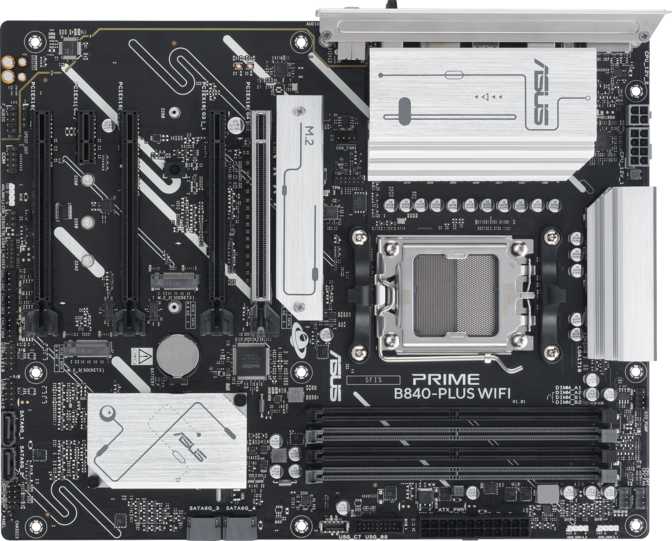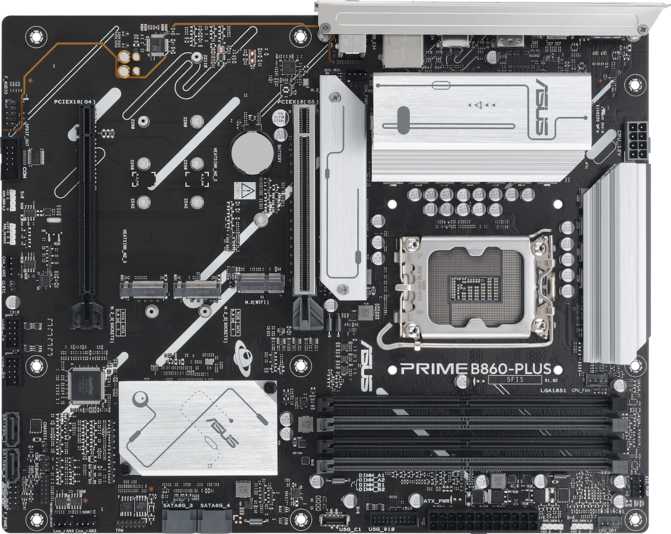
Asus Prime B860-Plus Motherboard Review: Worth Your Money?
MotherboardsThe Case for Building on Intel's B860 Platform
The Asus Prime B860-Plus occupies a sharp position in the current Intel motherboard market: it targets builders who want full access to Intel's latest processor architecture without paying for overclocking capabilities they will never use. The B860 chipset sits one tier below the enthusiast Z890 platform, and that distinction matters — but less than many spec-sheet comparisons suggest. For the majority of builders, the performance gap between the two is invisible in daily use. What is not invisible is the price difference, and that is the real argument this board makes.
What elevates the Prime B860-Plus beyond a routine mid-range choice is what Asus has packed into a B860 product: three M.2 storage slots, dual BIOS protection, PCIe 5.0 GPU support, and memory headroom that reaches the upper edge of what current DDR5 kits can achieve. These are features associated with higher-tier boards. Whether that combination justifies the choice — and which buyers should still look elsewhere — is exactly what this review addresses.
Board at a Glance
Editor's Score
Best for wired, storage-intensive Intel builds
Feature Ratings
Platform Foundation: LGA 1851 & B860 Chipset
Intel Arrow Lake ecosystem — Core Ultra 200 series desktop processors
The LGA 1851 socket is Intel's current platform for its Arrow Lake processor generation. This architecture brings native DDR5 memory support, PCIe 5.0 GPU connectivity, and substantially improved power efficiency compared to previous generations. The B860 chipset positions this board in the mid-range of that ecosystem — and the practical consequences of that position are specific and worth understanding before purchasing.
What B860 Delivers
- Full Intel Arrow Lake architecture access at stock processor speeds
- Native DDR5 with XMP memory profile compatibility, including very high-frequency kits
- PCIe 5.0 x16 primary GPU slot — Intel's latest and fastest graphics interface
- Identical per-clock performance to Z890 for every task running at stock speeds
The One Hard Limitation
CPU overclocking is not available. Intel reserves that capability for Z890-series motherboards. If you are planning to buy an unlocked Intel processor — identifiable by a "K" suffix in the model name — specifically to push its clock frequency beyond factory specifications, this board will not allow that. No BIOS option exists to change this; it is a chipset-level restriction. For every other builder running processors at stock speeds, this limitation is entirely invisible in real-world use.
Memory Overclocking: B860's Meaningful Exception
While B860 restricts CPU frequency tuning, memory overclocking remains fully supported through Intel's XMP (Extreme Memory Profile) system. High-speed DDR5 kits carry XMP profiles that tell the motherboard how to run them at their rated speeds, and the Prime B860-Plus honours those profiles up to frequencies that reach the current outer edge of consumer DDR5 capability.
The DDR5 standard launched at around 4,800 MHz, and today's popular mainstream kits run at 6,000–6,400 MHz. The ceiling this board supports pushes well beyond that — into territory occupied only by the most extreme enthusiast kits. In practical terms, whatever DDR5 memory you install will run at its full rated speed without needing a Z-series platform to unlock it.
Design, Build Quality & Physical Experience
Form Factor & Board Layout
The Prime B860-Plus uses the standard ATX form factor, measuring 244 mm × 305 mm. This is the most common motherboard size and fits the overwhelming majority of mid-tower and full-tower cases. Compact case builders working with Micro-ATX or Mini-ITX chassis are outside the scope of this board entirely — the ATX dimensions are non-negotiable.
Asus's Prime series sits in the middle ground between bare-bones budget boards and the flashier ROG and TUF lines. The aesthetic leans toward restrained professionalism: RGB lighting is present for those who want visual flair, but it does not define the board's identity. The PCB layout follows conventions that experienced builders navigate without consulting a manual.
Six fan and pump headers are distributed across the PCB — a count generous enough that even complex thermal configurations with a 360 mm all-in-one cooler, dedicated pump header, and additional case fans can be managed entirely from the BIOS without needing a separate fan controller hub.
Physical Specs
- Form Factor
- Standard ATX
- Dimensions
- 244 × 305 mm
- Fan Headers
- 6 Total (Fan + Pump)
- RGB Lighting
- Included
- Warranty
- 3 Years
Dual BIOS: The Feature That Earns Its Keep
Two BIOS chips provide real-world insurance that most builders undervalue until they need it. If a firmware update corrupts mid-process, or an unstable BIOS setting causes a persistent boot failure, the board automatically falls back to the secondary chip — recovering without tools, replacement parts, or shipping anything. For a system meant to run stably for years, this is genuine protection against a frustrating scenario.
Clear CMOS Button
Recovering from a failed memory overclocking profile or aggressive BIOS setting is a single button press rather than hunting for a jumper pin with a screwdriver inside the case. This reduces the friction of experimentation and eliminates a common source of frustration when first dialing in a high-speed DDR5 kit or testing new firmware.
DDR5 Memory: Speed, Capacity & Real-World Headroom
The DDR5 standard launched at around 4,800 MHz, and today's popular mainstream kits run at 6,000–6,400 MHz. The ceiling this board supports pushes well into territory occupied only by the most extreme enthusiast kits currently available. In practical terms, whatever DDR5 memory you install will run at its full XMP-rated speed without needing a Z-series platform to unlock it — a genuine differentiator versus boards on the previous generation's platform.
Most builds will use 32 GB or 64 GB, but the 256 GB ceiling means this board can serve memory-intensive professional workloads — large video editing timelines, 3D rendering, multiple simultaneous virtual machines — without hitting any artificial limits.
Error-Correcting Code memory — which automatically detects and corrects single-bit memory errors — is not available on this platform. This is expected at this tier. If you are building a server or clinical workstation where memory error correction is a hard requirement, you are looking at an entirely different product category.
Memory Summary
- DDR5 only — no DDR4 compatibility
- 4 slots in dual-channel pairs
- 256 GB maximum supported capacity
- XMP memory profiles fully supported
- Extreme high-frequency XMP kits validated
- ECC error-correcting memory not supported
Storage: Three M.2 Slots Is the Headline
NVMe M.2 Slots: Cable-Free High-Speed Storage
Three M.2 slots give this board serious storage flexibility for a B860 product. M.2 is the interface format used by modern NVMe solid-state drives — fast, compact drives that plug directly into the motherboard rather than connecting via cables. Three slots means a primary system drive, a high-capacity secondary drive for games or project files, and a third for additional capacity or backup, all without a single SATA cable.
SATA Ports & RAID Support
Four SATA 3 ports handle traditional 2.5-inch SSDs and mechanical hard drives — relevant for builders migrating storage from an older system or adding high-capacity archival drives where cost-per-gigabyte matters more than peak speed.
RAID Configurations Supported
Full RAID support across all four major configurations is meaningful for NAS-adjacent setups, creative workstations with redundant project storage, or any scenario where a drive failure should not mean data loss.
Expansion Slots & GPU Connectivity
PCIe 5.0 for Your Graphics Card
The primary expansion slot operates at PCIe 5.0 x16 — Intel's latest GPU interface, doubling the theoretical bandwidth available compared to PCIe 4.0. Current graphics cards do not fully saturate PCIe 4.0 bandwidth in most scenarios, so the practical gaming or creative performance difference today is minimal. The real value is forward compatibility: as future GPUs emerge that benefit from higher transfer rates, this board's primary slot is already ready for them.
| Slot | Interface | Physical Size | Best Use |
|---|---|---|---|
| Primary | PCIe 5.0 x16 | x16 Physical | Discrete GPU |
| Secondary | PCIe 4.0 x16 | x16 Physical | Capture Card / Secondary |
No PCIe x1 Slots — Worth Noting
There are no compact PCIe x1 slots on this board. The x1 format is the natural home for smaller utility add-in cards — wireless adapters, discrete sound cards, basic capture devices. With only two physical slots, both in the large x16 format, adding a small utility card means occupying a slot that could hold a more capable device.
This matters especially because the board has no onboard Wi-Fi. A builder who needs both wireless internet and a capture card faces a direct slot conflict with no clean solution. Plan this carefully before purchasing if both are required.
Rear I/O Panel: Fast & Functional
USB Connectivity
Display Outputs
Network Connectivity
This board carries no onboard wireless radio of any kind. For desktop builders who run Ethernet directly — the recommended configuration for stationary PCs — this is entirely sufficient. For users who rely on Wi-Fi by necessity, the absence creates genuine friction. Adding wireless requires either a USB adapter or a PCIe card, the latter of which consumes one of the board's only two expansion slots.
Competing B860 boards at similar prices frequently include Wi-Fi 6E or Wi-Fi 7 with Bluetooth as standard. This is a direct and relevant comparison for wireless-dependent buyers.
Also Absent from Rear I/O
- Thunderbolt ports (no generation supported)
- S/PDIF optical digital audio output
- Legacy VGA or DVI video connectors
Internal Headers & Connectors
6 Fan & Pump Headers
A 360 mm all-in-one liquid cooler uses three fan connections and one pump header — leaving two additional headers for case fans. Air-cooled builds with multiple case fans have the same flexibility. All controllable from BIOS without any external fan controller required.
USB Expansion Headers
Internal headers bring USB 3.2 Gen 1, USB 3.0, and USB 2.0 connections to the case front panel. A case with a well-equipped front I/O panel can match what the rear provides — the board's internal headers are not a limiting factor for most mid-tower and full-tower cases.
TPM Module Connector
A dedicated TPM (Trusted Platform Module) header allows installation of a discrete hardware module for builds requiring hardware-isolated cryptographic functions. The platform's firmware TPM handles Windows 11's TPM 2.0 requirement without any additional hardware, but the header is available for compliance-sensitive environments.
Integrated Audio
The integrated audio supports 7.1-channel surround output through three 3.5 mm connectors on the rear panel. For the majority of users running stereo headphones, a headset, or a 2.0 or 2.1 speaker setup, this provides fully functional audio with no additional hardware.
Enthusiast audio setups are a different story. Integrated motherboard audio remains a practical compromise for listeners with high-quality headphones or studio monitors, and for any professional audio production workflow. An external USB DAC/amplifier or dedicated audio interface will outperform integrated audio regardless of chipset tier — the Prime B860-Plus is no exception to that reality.
Users with AV receivers, DACs, or audio processors that accept a digital optical signal will need to route audio differently — through HDMI to a display that passes audio through, or via a USB audio device. This is a notable omission for home theatre and audiophile setups that depend on optical connectivity.
Audio at a Glance
- 7.1 surround channel support
- 3× 3.5 mm rear panel connectors
- Suitable for stereo, 2.1, 5.1, and 7.1 setups
- No S/PDIF optical digital output
Who Should Buy the Asus Prime B860-Plus
Good Fit
-
Wired-network builders prioritizing stability
Building a gaming rig, content creation workstation, or productivity system that will run at stock CPU speeds and connect via Ethernet. The platform delivers the full Arrow Lake experience without the Z890 price premium.
-
Storage-intensive creative workflows
Videographers, photographers, and data professionals who need multiple fast drives benefit directly from three M.2 slots and comprehensive RAID support across all four major configurations.
-
Long-term reliability seekers
Dual BIOS protection, a three-year warranty, a 256 GB memory ceiling, and a PCIe 5.0 GPU slot signal a board designed to serve a build for its full lifecycle without becoming a bottleneck.
-
DDR5 speed enthusiasts
Memory frequency support keeps pace with the fastest consumer DDR5 kits currently available — no Z-series upgrade required to run them at full rated speed.
Not the Right Choice
-
CPU overclockers
The B860 chipset does not permit unlocked processor frequency tuning. If you plan to buy an Intel Core Ultra 200K processor specifically to push it beyond stock speeds, you need a Z890 board — there is no workaround.
-
Wireless-first users
No Wi-Fi, no Bluetooth, and limited expansion slots for adding them. If Ethernet is not an option in your build location, factor in the additional cost and slot trade-off of adding wireless separately.
-
Thunderbolt users
No Thunderbolt ports of any generation. Thunderbolt-certified docks, high-bandwidth external storage, and Thunderbolt-dependent peripherals are incompatible with this board's rear I/O.
-
Small form factor builders
The standard ATX footprint will not fit Micro-ATX or Mini-ITX cases. The form factor is fixed and there is no smaller variant of this board.
Competitive Positioning
The Prime B860-Plus sits between budget entry-level B860 boards and the full-featured Z890 tier. Where it wins and where it concedes is straightforward when the features sit side by side.
| Feature | Asus Prime B860-Plus | Entry B860 Board | Z890 Mid-Range |
|---|---|---|---|
| CPU Overclocking | Not Supported | Not Supported | Supported |
| Primary GPU Interface | PCIe 5.0 x16 | PCIe 4.0 or 5.0 | PCIe 5.0 x16 |
| M.2 NVMe Slots | 3 Slots | Typically 2 | 3 or more |
| Dual BIOS Protection | Included | Typically absent | Varies |
| Integrated Wi-Fi | Not Included | Often Included | Often Included |
| Rear USB-C Speed | 20 Gbps | 10 Gbps typical | 20 Gbps+ |
| Price Tier | Mid-Range | Lower | Higher |
The Prime B860-Plus wins on storage depth and reliability infrastructure at its price point. It concedes to entry-level boards on wireless inclusion and to Z890 on CPU overclocking. For builders who need neither of those things, this board offers the strongest overall feature package in the B860 category.
Honest Assessment
Genuine Strengths
- Three M.2 slots on a mid-range chipset board is genuinely uncommon. For storage-intensive builders this single advantage can justify the choice over competing B860 products with only two slots.
- Dual BIOS protection raises the floor of system resilience in a way that matters over a multi-year installation. It is a feature borrowed from premium-tier boards and genuinely earns its presence here.
- PCIe 5.0 primary GPU slot ensures the board will not become a connectivity bottleneck as future graphics generations emerge and begin to leverage higher transfer bandwidth.
- 20 Gbps USB-C rear port is an uncommon inclusion at B860 pricing — meaningfully faster than the 10 Gbps standard on most competing designs for users who move large files via external drives.
- Full RAID support across all four major configurations covers NAS-adjacent, backup-focused, and performance-RAID use cases without needing additional hardware or software.
Genuine Weaknesses
- No Wi-Fi or Bluetooth, and the absence is compounded by the lack of PCIe x1 slots — where a wireless card would normally sit without consuming a primary expansion slot. This is the board's most impactful limitation for a specific buyer type.
- No Thunderbolt of any generation limits high-bandwidth peripheral compatibility for professional workflows — audio interfaces, fast docks, and certified storage — that depend on it.
- Only two expansion slots in x16 physical format with no x1 alternative. Small utility add-in cards are expensive in terms of slot usage — each one displaces a device that could occupy a more capable interface.
- No S/PDIF optical audio output limits digital audio routing for home theatre receivers and external DACs that prefer or require a digital optical signal over analog or HDMI.
None of these weaknesses reflect poor engineering of what is present — they are product definition choices that serve wired, storage-focused builders well and leave a specific set of other users looking for a different board. The distinction matters: this board does not fail at anything it attempts. It simply does not attempt several things that some buyers need.
Questions Buyers Ask Before Purchasing
Final Recommendation
Recommended for wired builders prioritizing storage depth and platform reliability
The Asus Prime B860-Plus makes a strong case for mid-range Intel platform builds that prioritize storage density, reliability features, and modern connectivity over CPU overclocking or wireless convenience. Its three M.2 slots, dual BIOS protection, PCIe 5.0 GPU connectivity, and extreme DDR5 support deliver a feature set that punches meaningfully above what the B860 label typically implies. The 20 Gbps USB-C rear port and comprehensive RAID support round out a package that would comfortably justify its presence on a more expensive board.
None of the board's weaknesses are failures in engineering — they are clear product definition choices. The wireless omission is the most visible and the most impactful for affected users. Buyers who need Wi-Fi, CPU overclocking, or Thunderbolt should look at alternative boards. Everyone inside those constraints gets an excellent mid-range platform foundation built to last.
Buy If You...
Run Ethernet, operate your CPU at stock speeds, and want multiple fast M.2 drives with long-term reliability built in
Skip If You...
Need built-in Wi-Fi, plan to overclock your CPU, depend on Thunderbolt peripherals, or are building in a compact case