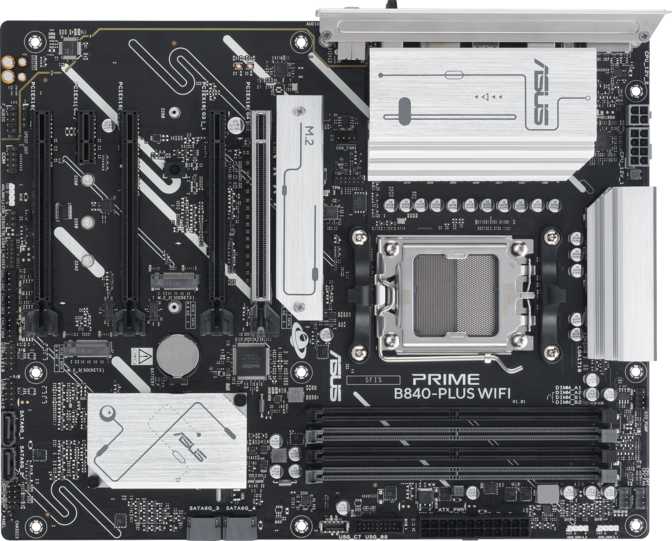
Asus Prime B840-Plus WiFi Review: A Confident Mid-Range AM5 Pick
MotherboardsThe AM5 platform is where AMD's current and near-future Ryzen processors live, and the motherboard you choose for it will define your build's ceiling for years. The Asus Prime B840-Plus WiFi enters this space with a deliberately positioned feature set: not the stripped-down minimum of a budget board, and not the overbuilt complexity of a flagship. What it offers is a carefully assembled mid-range foundation with some genuinely useful extras that boards at this tier often skip. Whether you are building your first Ryzen system, upgrading from an older platform, or simply trying to get the most value from your build budget, what follows covers everything you need to reach a confident decision.
Build Quality and Physical Design
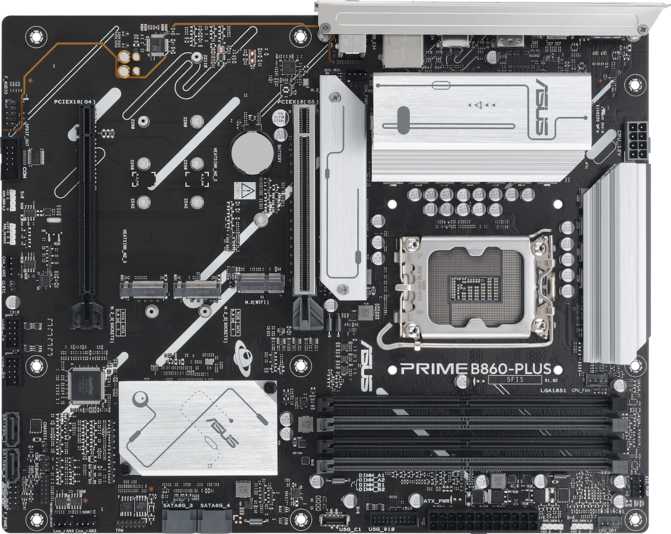
The Prime B840-Plus WiFi is a full-size ATX board, which means it fits comfortably inside any mid-tower or full-tower case without compatibility guesswork. Full ATX sizing gives Asus room to space components sensibly rather than cramming headers, slots, and heatsinks into uncomfortable proximity. The result is a board that is noticeably easier to work with during assembly and cable management.
Asus has included onboard RGB lighting, which feeds into their Aura Sync ecosystem. If you are building inside a case with a windowed panel and want coordinated lighting across your components, this board participates without requiring a separate controller or hub. If lighting is irrelevant to you, it is equally easy to disable through the BIOS or software.
A hardware CMOS reset mechanism is integrated, allowing you to wipe BIOS settings to factory defaults without opening the case, removing the battery, or shorting any pins. When an overclocking attempt leaves the system unable to complete startup, pressing this button resolves the situation without disassembly.
Dual BIOS Advantage
Most motherboards at this price carry a single firmware chip. If a BIOS update is interrupted or corrupted, the board can be rendered non-functional and require professional recovery.
This board ships with two BIOS chips. If the primary encounters a problem, the secondary takes over automatically — no intervention required. For first-time builders, this is a meaningful safety net.
Three-Year Warranty
Above average for the consumer motherboard category, where one to two years is the common standard. That extended coverage reflects component confidence and provides meaningful protection across a realistic build lifespan.
The AM5 Platform and B840 Chipset
AMD's AM5 is the current home of Ryzen 7000, 8000, and 9000 series processors. Critically, AMD has committed publicly to this socket's continued relevance across future processor generations — meaning buying into AM5 now positions you for CPU upgrades without a mandatory board replacement. That platform longevity argument is a genuine part of the value proposition here.
The B840 chipset occupies a deliberate middle position in AMD's current lineup. Above it sit B850 and X870, which cost more and add features most mainstream builders never use. Below it is the A620, which trims features to reach a lower price but removes flexibility in the process. B840 lands at a point where the everyday feature list is essentially complete.
EXPO profiles deserve a specific mention because they matter more than the term implies. DDR5 memory kits are typically sold with a rated speed significantly higher than the default frequency at which they operate without configuration. Without activating an EXPO profile in the BIOS, your fast DDR5 kit runs at its conservative base speed — meaning you have paid for performance you are not receiving. B840 boards support EXPO activation with a single BIOS toggle, ensuring your memory runs at what you actually paid for from day one.
PCIe 4.0 vs. 5.0: Know the Trade-off
The B840's primary GPU slot operates at PCIe 4.0 speeds. B850 and X870 boards offer PCIe 5.0 — double the theoretical bandwidth. In practice, no current consumer GPU saturates PCIe 4.0 bandwidth. The real-world gaming and creative performance difference today is zero. For a build planned around today's hardware, this is not a meaningful limitation.
DDR5 Memory: Performance, Capacity, and Configuration
Populate in matched pairs for full dual-channel bandwidth
Future-proof headroom far beyond any realistic current workload
Accommodates demanding EXPO kits at their full rated specification
Four DDR5 memory slots are available, and the total capacity ceiling is extraordinarily high for a mid-range board — enough to accommodate configurations that would satisfy demanding content creation and light workstation workloads many times over. Reaching that ceiling requires using today's highest-density DDR5 modules, which most builders won't purchase, but knowing the headroom exists means this board will never become a memory capacity bottleneck within any realistic upgrade timeline.
Most builders will populate two matched DDR5 modules in the dual-channel pairing slots — the positions the board recommends for maximum performance. Dual-channel configuration runs both sticks simultaneously to double available memory bandwidth. In gaming, this makes a measurable difference; in video editing, 3D rendering, and other bandwidth-intensive creative work, the gap is wider.
The overclocking ceiling for memory on this board is notably high for its tier — capable of validating fast EXPO kits well above what most users will ever need. For enthusiasts purchasing high-frequency DDR5 to push Ryzen performance through tighter memory timings and higher frequencies, this board provides the headroom to run those kits at full specification.
ECC Memory: Not Supported
ECC (Error-Correcting Code) memory automatically detects and corrects single-bit memory faults, making it essential for servers and data-critical workstations. Consumer AM5 motherboards — including this one — do not support ECC. This is a platform-wide characteristic, not a board-specific shortcoming. Professional environments requiring ECC should look at workstation-class hardware in a different product category.
Storage: Three NVMe Slots, SATA Ports, and Full RAID
Three M.2 slots eliminate the storage planning headaches associated with budget boards. On a board with one or two slots, you face trade-offs: operating system drive versus games drive, fast storage versus capacity. With three dedicated NVMe slots, you can build a logical, separated storage configuration — fast system drive, large games or media drive, overflow or backup drive — entirely in the NVMe format without touching a single SATA port.
Four SATA 3 ports remain available for builders carrying forward existing mechanical drives, older SATA SSDs from a previous build, or large-capacity drives used for archival storage. Keeping those ports available means you do not have to abandon perfectly functional storage hardware when upgrading.
Storage Overview
- 3 M.2 NVMe Slots
- 4 SATA 3 Ports
- RAID 0, 1, 5, and 10 Supported
- No mSATA or U.2 Connectors
RAID Support: Four Configurations Covered
Stripes data across multiple drives simultaneously for maximum throughput. No redundancy — a single drive failure loses all data. Best for scratch disks and temporary storage.
Mirrors data identically to two drives. One drive can fail without any data loss. Ideal for protecting original photos, project archives, and irreplaceable files.
Uses parity data spread across three or more drives to balance speed and fault tolerance. One drive can fail and data remains fully intact and accessible.
Combines mirroring and striping across four or more drives. Delivers both strong performance and data redundancy in a single array configuration.
Connectivity: Wireless, Wired, USB, and Video
Wi-Fi 6E and Bluetooth 5.3
The wireless adapter built into this board is one of its clearest differentiators at this price. Wi-Fi 6E extends wireless networking into the 6GHz frequency band — a band that older devices cannot use, which means it is essentially congestion-free in environments where 2.4GHz and 5GHz are crowded with neighboring networks and smart home devices. In apartments, offices, or homes with many connected devices, moving to 6GHz produces a perceptible improvement in latency consistency and real-world throughput, particularly for gaming and video conferencing where interruptions matter. Full backward compatibility with older Wi-Fi standards means this adapter connects to any router you currently own, with 6GHz benefits unlocking when your router supports it.
Bluetooth 5.3 covers modern wireless peripherals — headphones, gamepads, keyboards, and mice — with current range characteristics and connection stability improvements over earlier Bluetooth generations.
No aptX Audio Codec
aptX provides higher-quality audio transmission over Bluetooth at lower latency than standard codecs. For casual listening, gaming, or video calls, the absence is unlikely to matter. For audiophiles who specifically rely on Bluetooth audio over aptX for critical listening, this is worth confirming before purchase.
Wired Network
One Gigabit Ethernet port handles wired connectivity. For standard broadband internet connections, even fast residential speeds rarely challenge Gigabit's practical limits. For local network transfers — moving large video project files to a NAS or copying game libraries between machines — Gigabit's practical ceiling of around 110 megabytes per second can occasionally become the bottleneck. Users who regularly shift multi-gigabyte files across a local network will notice this ceiling. The board does not offer 2.5 Gigabit Ethernet, which is increasingly common on competitor boards at this tier.
Rear I/O USB Ports
The rear panel provides eight USB connections total, split across four generations. Internal headers also add front-panel USB 3.0 and USB 2.0 connections through your case, supplementing the rear total. With four ports being USB 2.0 and only two offering 10Gbps throughput, frequent users of high-speed external devices may reach for a hub sooner than they would on a more performance-skewed board.
| Port Type | Connector | Speed | Count | Best For |
|---|---|---|---|---|
| USB 3.2 Gen 2 | Type-A | 10 Gbps | 1 | High-speed external NVMe enclosures |
| USB 3.2 Gen 2 | Type-C | 10 Gbps | 1 | Modern devices and accessories |
| USB 3.2 Gen 1 | Type-A | 5 Gbps | 2 | External drives, high-speed hubs |
| USB 2.0 | Type-A | 480 Mbps | 4 | Keyboards, mice, low-bandwidth devices |
No USB 4 or Thunderbolt
Neither USB 4 (40Gbps) nor Thunderbolt 3 or 4 is present on this board. For typical gaming and productivity use, this is a non-issue. For video production workflows involving Thunderbolt docks, 40Gbps external RAID arrays, or Thunderbolt-only audio and video capture interfaces, this board cannot accommodate those devices. Verify your peripheral list before committing.
Video Output
One HDMI 2.1 port and one DisplayPort output are provided on the rear I/O. HDMI 2.1 is a meaningfully capable video standard — it supports 4K at 144Hz and higher resolutions at lower refresh rates, making it future-compatible with current and next-generation displays.
Expansion Slots: GPU and Add-in Cards
The primary PCIe slot — reinforced with a metal retention bracket to prevent GPU sag and protect against the mechanical stress of heavy graphics cards — runs at full PCIe 4.0 x16 bandwidth directly from the CPU. Every current-generation discrete GPU performs identically on PCIe 4.0 versus PCIe 5.0; the additional bandwidth headroom has no measurable effect on gaming or creative workloads with today's cards.
Beyond the primary GPU slot, three additional PCIe x16-sized slots are present on the board. These run through the chipset at PCIe 3.0 speeds and at reduced electrical lane counts rather than the physical x16 their connector size implies. They are appropriate for add-in cards with modest bandwidth requirements: capture cards for streaming, network adapters, dedicated audio hardware, or additional storage controllers.
Running a second high-end GPU in these slots is not a supported configuration for modern discrete GPUs — current GPU architectures and driver stacks do not meaningfully benefit from multi-GPU setups in gaming. No dedicated PCIe x1 slots and no legacy PCI slots exist, both expected on any current AM5 board.
Slot Configuration
- PCIe 4.0 x16 (GPU) 1 Slot
- PCIe 3.0 x16 (Add-in) 3 Slots
- PCIe 5.0 Not Present
- Dedicated PCIe x1 Not Present
- Legacy PCI Not Present
Audio: 7.1 Surround Without a Digital Output
The onboard audio handles 7.1 surround sound through three analog connectors on the rear I/O — the standard arrangement of front, rear, and combined center/subwoofer outputs. This configuration covers stereo headphones, gaming headsets, and speaker systems up to 5.1 or 7.1 without additional hardware, and performs at a level appropriate for mid-range PC audio.
Three rear audio jacks handle the full 7.1 channel configuration in the conventional color-coded layout, compatible with the vast majority of gaming headsets and desktop speaker systems on the market today.
No S/PDIF Digital Output
Users who connect PC audio to a home theater receiver via optical cable, or who use an external DAC with a digital input, will find no native digital audio output on this board. A USB audio interface or PCIe sound card can supply this functionality. This omission is common at this tier but not universal — confirm your audio chain's requirements before purchasing.
Thermal Management: Six Fan Headers
Six fan control headers is more than this board strictly needs for baseline operation, and that surplus is genuinely useful. A standard system — one CPU cooler plus two or three case fans — occupies roughly half those headers. The remaining connections accommodate expanded cooling configurations without adding external hardware: a 360mm all-in-one liquid cooler's three radiator fans plus its pump, a push-pull radiator fan arrangement, or additional case fans for high-airflow builds.
Keeping all fan connections managed directly from the motherboard centralizes control in the BIOS, which allows precise temperature-responsive fan curves without a separate controller hub adding complexity or cost.
Enough for a 360mm AIO plus full case ventilation without a separate hub
Who Should Buy This Board — and Who Should Not
This Board Suits You If...
-
You are assembling a mainstream Ryzen AM5 system
Wi-Fi 6E, three M.2 slots, four DDR5 slots, comprehensive RAID support, and dual BIOS deliver consistent value for home builders, productivity workstations, and gaming systems at this tier.
-
You want built-in Wi-Fi without a separate adapter
Wi-Fi 6E as a native inclusion at this price represents genuine value — equivalent standalone PCIe wireless adapters carry a real cost and consume an expansion slot.
-
You are upgrading from an older platform to DDR5
AM5's forward compatibility commitment and this board's high memory headroom mean the upgrade has substantial runway well into the future.
-
You are a first-time builder wanting safety margins
Dual BIOS protects against firmware update accidents, the accessible CMOS reset recovers from overclocking missteps, and a three-year warranty covers the unexpected.
Look Elsewhere If...
-
You depend on Thunderbolt or USB 4 connectivity
Thunderbolt docks, 40Gbps external storage enclosures, and Thunderbolt-only professional audio or video gear cannot be used with this board. Verify your peripheral list before committing.
-
You are specifically targeting PCIe 5.0 GPU bandwidth
If your upgrade plan includes a future GPU that explicitly benefits from PCIe 5.0, start with a B850 or X870 board now rather than replacing the motherboard later.
-
You need optical digital audio output
Budget for a USB audio interface or PCIe sound card if your audio chain depends on S/PDIF digital output — it is absent on this board.
-
You require ECC memory for data-critical workloads
ECC support is absent — a platform-wide consumer AM5 limitation that cannot be addressed through board selection alone.
How the Prime B840-Plus WiFi Compares
The B840-Plus WiFi captures most of a B850 board's everyday capability at a reduced price. The concrete trade-off moving from B850 to B840 is the PCIe 5.0 GPU slot — a specification difference with no practical impact on current gaming or creative workloads. Against A620 boards, this board is the clear choice across nearly every meaningful category: better wireless, more storage slots, broader RAID support, and the dual BIOS that budget boards omit.
| Feature | ASUS Prime B840-Plus WiFi | Typical B850 Board | Typical A620 Board |
|---|---|---|---|
| CPU Socket | AM5 | AM5 | AM5 |
| Primary GPU Slot | PCIe 4.0 x16 | PCIe 5.0 x16 | PCIe 4.0 x16 |
| Wireless | Wi-Fi 6E | Wi-Fi 6E (most) | Wi-Fi 6 or absent |
| M.2 NVMe Slots | 3 | 3–4 | 1–2 |
| Dual BIOS | Yes | Varies by brand | Rarely present |
| Full RAID Suite | Yes | Yes | Partial |
| USB 4 / Thunderbolt | No | Select models | No |
| Rear USB 3.2 Gen 2 | 2 (1A + 1C) | 2–4 typically | 1–2 |
| Warranty | 3 years | 3 years typical | 1–2 years typical |
| Pricing Tier | Mid-range | Mid-high | Budget |
Common Questions Before You Buy
Final Verdict
The Asus Prime B840-Plus WiFi is a mid-range AM5 motherboard that earns its position through concrete feature strength rather than specification padding. Wi-Fi 6E at this price tier is a genuine differentiator — a fully capable wireless standard that will remain relevant well past the point where the rest of the system ages out. Three M.2 slots offer real storage planning flexibility. And the combination of dual BIOS, accessible CMOS reset controls, and a three-year warranty gives this board an unusually forgiving character for builders who value reliability and peace of mind.
Clear Strengths
- Wi-Fi 6E — a genuine upgrade, not a checkbox
- Three M.2 NVMe slots eliminate storage compromises
- Dual BIOS provides meaningful protection for first builders
- High DDR5 capacity ceiling and overclocking headroom
- Full RAID suite for home storage flexibility
- Three-year warranty above the category average
Honest Limitations
- No PCIe 5.0 GPU slot (no real-world impact today)
- No USB 4 or Thunderbolt connectivity
- No S/PDIF optical audio output
- Rear USB count skewed toward legacy 2.0 ports
- Gigabit only — no 2.5GbE wired networking
The trade-offs are honest and expected. For builders targeting a Ryzen 7000, 8000, or 9000 series processor build on a realistic budget, the Prime B840-Plus WiFi is a confident choice. It gives you a durable, capable foundation that will not become an obstacle to the rest of your build or a liability as your system matures. Confirm your CPU choice, audio setup, and peripheral requirements align with the board's capabilities before purchasing — and if they do, this board earns its place without reservation.