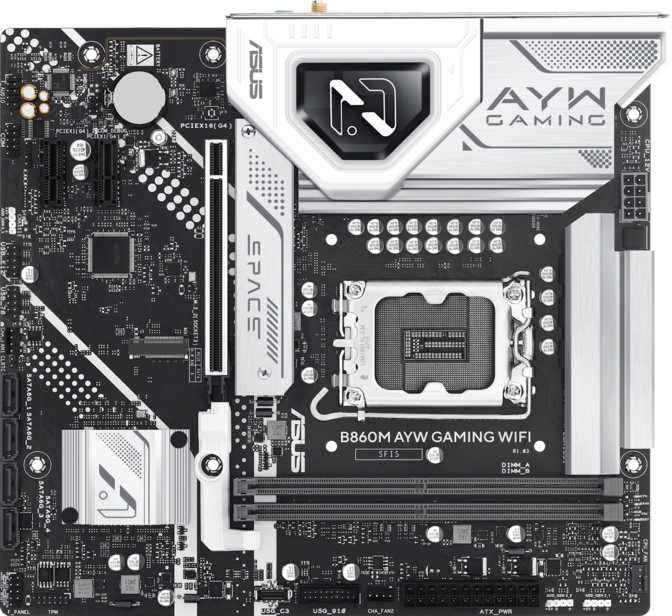
Asus B860M AYW Gaming WiFi: An Honest, In-Depth Review
MotherboardsChoosing a motherboard rarely feels exciting until something goes wrong — a BIOS that won't boot, a Wi-Fi card you have to buy separately, or a case that simply won't fit the board you picked. The Asus B860M AYW Gaming WiFi is built to remove those worries from the equation. It's a Micro-ATX board designed around Intel's current LGA 1851 socket, paired with the B860 chipset, and aimed squarely at builders who want a stable, well-equipped platform without paying for features they'll never touch.
This is not a flagship board chasing benchmark records. It's a sensibly specified foundation for a gaming or general-purpose PC, and that's exactly the niche where it needs to be judged. Below, we break down what every major spec actually means for your build, where this board genuinely shines, and where it asks you to compromise.
Design, Build Quality, and Physical Layout
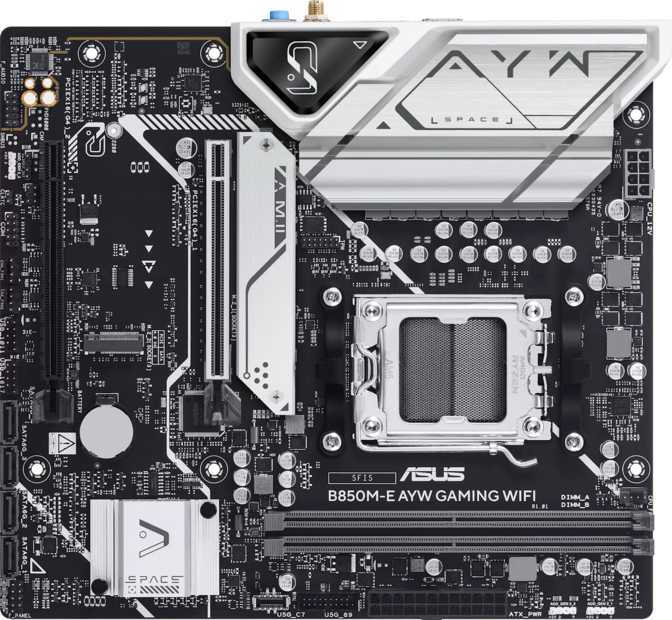
At 244mm wide and 222mm tall, the B860M AYW Gaming WiFi follows the standard Micro-ATX footprint, which means it will slot into the overwhelming majority of mid-tower and compact ATX cases without any compatibility guesswork. If you're building inside a smaller enclosure to save desk space without going all the way down to a Mini-ITX system, this is the form factor that gives you that balance.
Asus has included onboard RGB lighting elements on the board itself, which is a small but appreciated touch for anyone building behind tempered glass. It won't replace a full RGB fan and strip setup, but it adds a baseline of visual polish without forcing you to buy aftermarket lighting just to avoid a bare, all-black board.
Dual BIOS
A backup BIOS chip means a failed firmware update or a bad overclock that bricks your primary BIOS doesn't end your motherboard. You can recover and try again.
Easy Clear CMOS
Resetting BIOS settings to factory defaults is a straightforward built-in function, not something that requires opening the case to hunt for a jumper.
Platform and Core Performance
The LGA 1851 socket places this board on Intel's current desktop platform generation, meaning it's built to support the latest wave of Intel processors rather than older, soon-to-be-retired silicon. If you're planning a new build rather than reusing an old CPU, this is the platform you want to be on.
The B860 chipset is the more telling detail. Chipsets in Intel's lineup are tiered, and the B-series sits in the middle — below the enthusiast-grade Z-series boards, above entry-level options. In practical terms, that positioning usually means:
- Full feature set for everyday use — storage, USB, and connectivity options that feel complete rather than stripped down.
- Limited CPU multiplier overclocking — B-series boards traditionally don't unlock full core-and-multiplier overclocking the way Z-series boards do.
- Memory overclocking headroom is still on the table — confirmed by this board's rated speeds, covered next.
For the vast majority of buyers — people assembling a gaming PC, a productivity workstation, or a general daily driver — this is the right tier. You're not paying for VRM headroom and overclocking features you'll never use, but you're also not getting a barebones board that cuts corners.
Memory: Capacity, Speed, and Overclocking
The board uses DDR5 memory exclusively, the current generation of RAM offering higher bandwidth and better efficiency than the previous DDR4 standard. With two memory slots arranged in dual-channel configuration, you install one stick per channel for the best performance — the same setup used on the vast majority of mainstream gaming boards.
Maximum supported capacity sits at 128GB. For context, even demanding workloads like video editing, large creative suites, or running multiple virtual machines rarely push past 32-64GB in a home setup, so this ceiling leaves enormous headroom — you're very unlikely to ever max this board out.
The overclocked memory speed ceiling represents the upper limit of what the board's memory controller and trace design can handle with a fast XMP/EXPO-rated kit. A few honest caveats:
- Actual achievable speed depends heavily on the specific CPU's integrated memory controller — not every chip will reach the board's ceiling.
- Higher-speed kits cost significantly more, so treat this number as "what's possible," not "what you'll get out of the box."
- With only two DIMM slots rather than four, signal integrity tends to be cleaner, which often allows higher stable memory speeds than four-slot boards.
Storage and RAID: Built for Speed and Redundancy
Two M.2 sockets are available for solid-state drives, the compact, stick-shaped SSD format that's become the standard for boot drives thanks to far faster transfer speeds than traditional 2.5-inch drives. Having two means you can dedicate one to your operating system and keep a second purely for games or active project files.
Beyond the M.2 sockets, four SATA III connectors are available for traditional 2.5-inch SSDs or 3.5-inch hard drives — ideal for bulk storage, media libraries, or backup drives that don't need the absolute fastest speeds.
| RAID Type | What It Does | Best For |
|---|---|---|
| RAID 0 | Combines drives for maximum speed, no redundancy | Pure performance, scratch disks |
| RAID 1 | Mirrors data across two drives | Protecting against drive failure |
| RAID 5 | Distributes data with parity across 3+ drives | Balance of capacity, speed, protection |
| RAID 10 | Combines mirroring and striping | High performance with redundancy |
Motherboard-level RAID on mainstream chipsets is typically managed through firmware rather than a dedicated hardware controller. That's standard for this board's class and works well for home and small-office use, but isn't a substitute for enterprise-grade hardware RAID.
Connectivity: Wireless, Bluetooth, and Wired Networking
The "WiFi" in this board's name isn't just branding — wireless networking is built directly onto the board, meaning you don't need to buy and install a separate Wi-Fi card or USB adapter. The included module supports the full progression from older 802.11n through the modern Wi-Fi 6 (802.11ax) standard, which means two things in practice:
- Backward compatibility — it connects happily to older routers without issue.
- Forward-looking performance — on a Wi-Fi 6 router, you get meaningfully better performance in congested environments and generally lower latency, which matters for online gaming.
Bluetooth 5.3
Handles wireless keyboards, mice, controllers, and audio devices with improved range and stability over older Bluetooth generations. Note: aptX, the higher-fidelity audio codec, is not supported — a minor omission for audio-focused users.
Wired LAN
A single RJ45 Ethernet port handles your wired connection — the more reliable choice for competitive gaming or any task where you can't risk a wireless dropout.
Ports and Expansion
Display Output
A single HDMI 2.1 output matters specifically if you're running a CPU with built-in graphics and want to use that instead of, or before installing, a dedicated graphics card. HDMI 2.1 supports high refresh rates and resolutions well beyond what integrated graphics will typically push.
There's no DisplayPort, DVI, or VGA output here — a clean, modern-only video setup. Like virtually any standard motherboard, video output through this port only works if your installed CPU includes integrated graphics.
Audio
Onboard audio supports 7.1 channel surround sound through three audio jacks — enough to drive a full surround setup or, more commonly, a quality stereo headset or 2.0/2.1 speakers with headroom to spare.
There's no S/PDIF optical output, so if your setup includes an AV receiver that specifically wants an optical digital connection, you'll need to route audio through HDMI or USB instead.
Who This Motherboard Is Built For
- A budget-conscious gaming build on Intel's current platform
- A compact Micro-ATX footprint without sacrificing function
- Built-in Wi-Fi 6 without shopping for a separate card
- Real headroom for fast DDR5 memory tuning
- Dual M.2 storage plus full RAID support
- Unrestricted CPU multiplier overclocking
- USB-C ports for peripherals, phones, or drives
- PCIe 5.0 bandwidth for next-gen storage or GPUs
- Optical digital audio output for an AV receiver
How It Compares to the Alternatives
| Consideration | Asus B860M AYW Gaming WiFi | Entry-Level B-Series | Z-Series Flagship |
|---|---|---|---|
| CPU Overclocking | Limited | Limited or none | Full unlock |
| Memory OC Headroom | High (up to 8800 MHz rated) | Often lower-rated | High |
| Built-In Wi-Fi | Yes, Wi-Fi 6 | Often absent | Usually yes |
| USB-C Availability | None | Sometimes one port | Multiple ports |
| M.2 Slots | 2 | Often just 1 | 3-4 typical |
| Form Factor | Micro-ATX | Micro-ATX or smaller | Usually full ATX |
| Price Positioning | Mid-range | Lower | Premium |
The honest takeaway: this board sits comfortably above true entry-level boards thanks to its memory headroom, dual M.2 storage, and built-in Wi-Fi 6, while deliberately staying out of flagship Z-series territory to keep the price reasonable.
Strengths and Weaknesses: An Honest Assessment
This board feels complete for its price tier — built-in Wi-Fi 6 and Bluetooth 5.3 remove a shopping step competitors leave to the buyer, while dual BIOS and easy CMOS reset show real attention to the moments that actually frustrate builders. At the same time, a few omissions are hard to ignore for an otherwise well-rounded spec sheet.
Strengths
- Built-in Wi-Fi 6 and Bluetooth 5.3 eliminate a shopping step
- Dual BIOS and one-touch Clear CMOS solve real builder pain points
- Dual M.2, four SATA ports, and a full RAID suite for the price tier
- 8800 MHz memory OC ceiling signals real engineering effort
- Above-average 3-year warranty for peace of mind
Weaknesses
- Zero USB-C ports anywhere on the board, front or rear
- No PCIe 5.0 slot for next-generation GPUs or storage
- Only three fan headers, modest for elaborate cooling setups
- No optical S/PDIF audio output
- No aptX Bluetooth codec for higher-fidelity wireless audio
Frequently Asked Questions
Final Verdict
The Asus B860M AYW Gaming WiFi earns its place as a smart, sensible choice for anyone building a current-generation Intel gaming PC who doesn't need flagship overclocking headroom. It nails the fundamentals that matter most day to day — built-in Wi-Fi 6, solid storage flexibility with RAID support, genuinely useful reliability features like dual BIOS, and real headroom for fast DDR5 memory — all in a compact, case-friendly Micro-ATX footprint backed by an above-average three-year warranty.
Where it asks for compromise is clear and specific: no USB-C anywhere on the board, no PCIe 5.0 slot, and limited CPU overclocking as expected from its chipset tier. None of these will matter to the average gaming or productivity builder, but they're worth weighing if USB-C peripherals or future-proofed PCIe bandwidth are non-negotiable for you.
Recommended For
Budget-to-midrange gaming builds, compact Micro-ATX setups, and anyone who wants a complete, no-shopping-list-required platform on Intel's current socket.
Consider Alternatives If
You need USB-C connectivity, want unrestricted CPU overclocking, or are chasing PCIe 5.0 bandwidth for next-generation storage or GPUs.