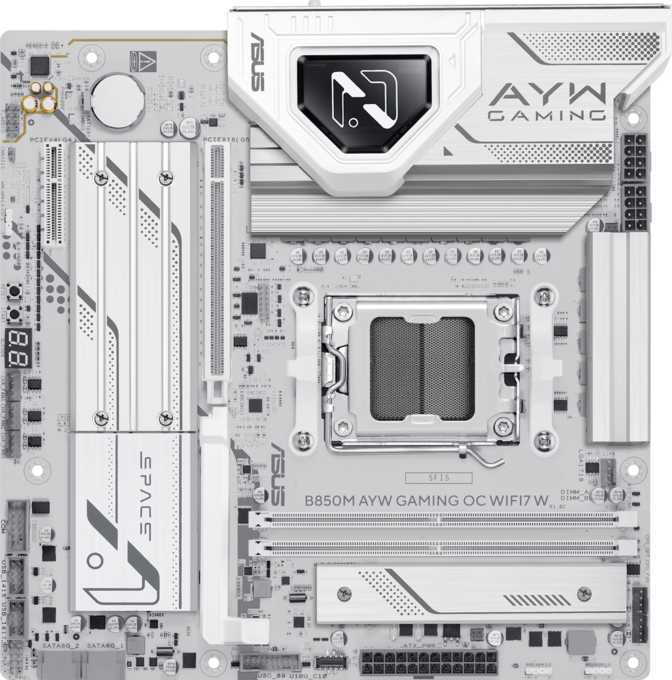
Asus B850M AYW Gaming OC Wi-Fi 7: A Full Review for AM5 Builders
MotherboardsThe compact gaming motherboard market has always demanded compromise: shrink the board, lose features. The Asus B850M AYW Gaming OC Wi-Fi 7 challenges that assumption directly. Built on AMD's current-generation AM5 platform with a B850 chipset, it packs Wi-Fi 7, PCIe 5.0, and meaningful overclocking headroom into a Micro-ATX footprint that fits cases most full-sized boards cannot touch. Whether you are building a space-efficient gaming rig or a capable small-form workstation, this board demands a serious look — and a few honest caveats too.
Design and Build Quality
Physical experience · Micro-ATX form factor · White aesthetic with RGB
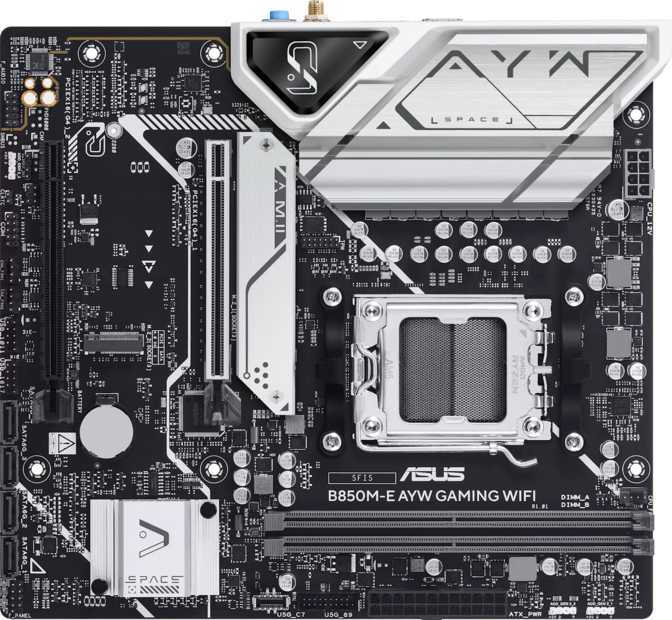
At 244 mm × 244 mm, the B850M AYW Gaming OC sits squarely in Micro-ATX territory — noticeably smaller than a standard ATX board, but with significantly more room than Mini-ITX alternatives. That size matters in practice: you still get two full memory slots, multiple expansion options, and a rear I/O panel that does not feel like a compromise.
The "W" suffix signals a white colorway, and combined with onboard RGB lighting, this board is clearly designed for builders who care about aesthetics as much as performance. The lighting integrates with Asus's Aura Sync ecosystem, letting you coordinate illumination across compatible components in a single software interface.
The Gaming OC branding includes a physical Clear CMOS button — a genuinely appreciated detail that lets you reset the BIOS without dismantling any hardware if an overclocking session goes sideways. No dual BIOS protection is available here, which is the one safety net absent at this tier, but the dedicated reset button partially compensates in everyday use.
Build quality on Asus B-series boards at this level reflects VRM design appropriate for the chipset's power delivery requirements. The B850 is positioned directly below AMD's X870 flagship, handling the full Ryzen AM5 lineup capably while skipping some of the premium redundancies found on costlier platforms.
Physical Specifications
- Form Factor
- Micro-ATX
- Dimensions
- 244 × 244 mm
- Socket
- AM5
- Chipset
- B850
- RGB Lighting
- Yes — Aura Sync
- Clear CMOS
- Dedicated button
- Dual BIOS
- Not available
- Warranty
- 3 years
Platform and Chipset: Why B850 Makes Sense
AM5 socket · B850 chipset · CPU and memory overclocking unlocked
The AM5 socket is AMD's current and committed platform, designed with long-term processor support in mind. Choosing AM5 today means your motherboard investment carries a credible upgrade path — future Ryzen generations are expected to remain compatible with existing AM5 boards.
The B850 chipset occupies a strategic middle position: it delivers more capability than the entry-level A620, including overclocking support that A620 withholds entirely, while sitting below the X870 and X870E boards designed for enthusiasts who need every available lane. For the majority of gaming builds and mainstream workstations, B850 hits the practical ceiling of what most users will actually use.
Overclocking is explicitly supported here — for both the processor and memory. That is not guaranteed on AMD's lower chipsets, and it meaningfully extends the useful life of the platform by letting you extract more performance from existing hardware as your needs grow over time.
| Feature | A620 | B850 | X870 |
|---|---|---|---|
| CPU OC | |||
| Memory OC | |||
| PCIe 5.0 | |||
| Price Tier | Budget | Mid-range | Premium |
Memory: DDR5 With an Enthusiast-Level Ceiling
DDR5 exclusively · 2 DIMM slots · 128 GB maximum · 9600 MHz OC
This board supports DDR5 exclusively — there is no DDR4 compatibility, which reflects the AM5 platform's requirements. DDR5 is the present and future standard for this socket, and the trade-offs in kit pricing are increasingly offset by improved availability and falling costs at mainstream speeds.
Two memory slots are standard for Micro-ATX boards of this class. While that limits future upgrade flexibility compared to four-slot designs, it simplifies installation and improves signal integrity at high frequencies. Two-DIMM configurations often reach better overclocking results than four-slot alternatives for precisely this reason.
The maximum supported capacity of 128 GB across both slots far exceeds any gaming workload. A 32 GB kit (2 × 16 GB) covers virtually every gaming and content creation scenario with room to spare. A 64 GB kit serves serious video editors or users running virtualization environments comfortably.
The overclocking ceiling is where this board earns its "OC" designation. Certified DDR5 support extends to 9600 MHz under XMP/EXPO profiles — a speed substantially above what most B-series boards certify. At those frequencies, memory bandwidth becomes competitive with setups built on more expensive platforms, which matters in CPU-limited gaming scenarios where Ryzen processors depend heavily on fast memory access.
- StandardDDR5 only
- Slots2 DIMM
- Max Capacity128 GB
- OC Ceiling9600 MHz
- ChannelsDual-channel
- ECC SupportNo
Storage: Three M.2 Slots and the Limits of Two SATA Ports
3× M.2 NVMe · 2× SATA 3 · RAID 0, 1, 5, and 10 supported
Storage flexibility is one of the strongest arguments for this board within its category. Three M.2 sockets accommodate NVMe SSDs directly, and given the PCIe 5.0 x16 slot on this board, the primary M.2 slot is expected to support PCIe 5.0 NVMe drives — the fastest consumer storage currently available. PCIe 5.0 SSDs deliver sequential read speeds that eclipse even top PCIe 4.0 drives, though real-world gains in everyday tasks are more measured than synthetic benchmarks suggest. For large file transfers, code compilation, or heavy dataset work, the headroom is genuinely useful.
The remaining M.2 slots provide room to expand storage without touching any drive bays, enabling clean, cable-free builds that keep the interior uncluttered.
Traditional SATA storage is limited to two ports — the one area where the Micro-ATX form factor shows its constraints. Two SATA connections cover a pair of hard drives or SATA SSDs adequately for most builds, but require planning for anyone migrating from a system with multiple existing drives or optical storage. Builders with large media libraries or NAS-adjacent storage needs should account for this early.
RAID configurations across all four major modes — 0, 1, 5, and 10 — are fully supported. This enables data redundancy and striped performance without an external storage solution, a feature that often appears only on productivity-focused boards and adds genuine versatility here.
- M.2 Slots3× NVMe
- SATA 3 Ports2×
- mSATANone
- U.2None
RAID Support
Connectivity: Wi-Fi 7 as a Genuine Differentiator
Wi-Fi 7 (802.11be) · Bluetooth 5.4 · Full backward compatibility · 1× RJ45
The wireless specification on this board is legitimately impressive for its price tier. Full Wi-Fi 7 (802.11be) support means compatibility with the newest router generation, delivering theoretical throughput and reduced latency well beyond what Wi-Fi 6E offered. Wi-Fi 7's multi-link operation — using multiple frequency bands simultaneously — reduces congestion on busy networks and noticeably lowers latency for gaming connections where consistency matters.
The wireless module maintains backward compatibility through every generation down to Wi-Fi 4, so it works with any existing router immediately and grows into Wi-Fi 7 infrastructure when you are ready. No router upgrade is required to use this adapter on day one.
Bluetooth 5.4 is included alongside wireless networking. This version brings improvements in range, power efficiency, and connection stability over earlier iterations — meaningful for wireless peripherals like headsets, controllers, and keyboards where reliability matters more than raw speed.
A single Ethernet port handles wired networking, which is standard for this form factor. For gaming specifically, a wired connection remains the most consistent choice, and the single port covers every typical wired use case without limitation.
- Wi-Fi 7 — 802.11be (current generation)
- Wi-Fi 6E — 802.11ax with 6 GHz band
- Wi-Fi 6 — 802.11ax
- Wi-Fi 5 — 802.11ac
- Wi-Fi 4 — 802.11n (backward compatible)
- Bluetooth 5.4 — peripherals and audio
- 1× RJ45 Ethernet — wired network port
Rear I/O and Front-Panel Ports: Generous for a Compact Board
10 rear USB ports · HDMI 2.1 · DisplayPort · Front-panel expansion headers
Rear Panel Ports
- 3× USB 3.2 Gen 2 Type-A — 10 Gbps each; fast enough for external SSDs at near full rated speed
- 4× USB 3.2 Gen 1 Type-A — 5 Gbps workhorse ports for peripherals and hubs
- 1× USB 3.2 Gen 2×2 Type-C — 20 Gbps; reaches the ceiling of most consumer external storage
- 2× USB 2.0 Type-A — appropriate for keyboards, mice, and low-demand devices
- 1× HDMI 2.1 output — active only with AMD APU (integrated graphics) processors
- 1× DisplayPort output — active only with AMD APU (integrated graphics) processors
- 1× RJ45 Ethernet — wired gigabit network connection
- 3× Audio Jacks — 7.1 surround via rear panel analog connectors
Front-Panel Expansion Headers
- 2× USB 3.2 Gen 1 headers — front-panel case expansion, 5 Gbps each
- 4× USB 2.0 headers — front-panel case expansion
- 1× USB-C 3.2 Gen 2 header — front-panel Type-C at 10 Gbps
Expansion Slots: PCIe 5.0 GPU Support and One Additional Slot
1× PCIe 5.0 x16 for GPU · 1× PCIe x4 for add-in cards · No PCIe x1
The primary PCIe 5.0 x16 slot is the critical specification for GPU compatibility. Every current and recent discrete graphics card operates at PCIe 4.0 x16 or below in real-world usage — PCIe 5.0 x16 is forward-compatible and provides meaningful headroom for next-generation GPU architectures, ensuring this board will not become a bandwidth bottleneck for any foreseeable graphics hardware.
A secondary PCIe x4 slot provides space for add-in cards — capture cards, additional NVMe adapters, networking cards, or other expansion hardware. It prevents the GPU from consuming all available expansion options, which is a practical benefit in builds with specific workflow demands.
No PCIe x1 slots are present. This is a consequence of the Micro-ATX form factor rather than a targeted omission — the reduced board area does not leave room for the narrower slots that full ATX boards sometimes include for legacy devices.
- PCIe 5.0 x161× GPU
- PCIe x41× add-in
- PCIe x1None
- PCIe 4.0 x16None
- Legacy PCINone
Audio: 7.1 Surround on a Budget Board
Onboard 7.1 channel · 3 analog jacks · No optical output
Onboard audio supports 7.1 channel surround sound, suitable for headset virtualization and traditional speaker configurations. Three audio jacks on the rear panel handle standard analog connections for most setups.
S/PDIF optical output is absent, which matters only to users with older audio equipment that accepts optical input. USB audio via a dedicated DAC or HDMI/DisplayPort audio passthrough to a soundbar or monitor both remain fully functional alternatives in any configuration.
For gaming with a quality USB headset or display-connected audio, the onboard implementation covers the use case without limitation. Only users with premium analog rigs or legacy optical setups will find the audio section insufficient.
Fan Headers and Thermal Management
5 fan headers · Per-header temperature curves · TPM connector
Five fan headers allow meaningful airflow management across a compact chassis. This count comfortably covers a standard small build: CPU cooler plus four case fans in various intake and exhaust positions. Per-header temperature curves are accessible through the BIOS, enabling precise noise-versus-cooling tuning without requiring third-party software.
A TPM header is present for users who require hardware-based encryption, satisfying Windows 11's platform requirements without relying on firmware TPM alone and providing an additional security layer for work-adjacent use cases.
- Fan Headers5 total
- Fan ControlPer-header temp curves
- TPM HeaderPresent
Who This Board Is For — And Who Should Look Elsewhere
Matching the right builder to the right board before you spend money
- You are building a compact AMD Ryzen system without sacrificing modern connectivity
- Wi-Fi 7 matters now or as near-term future-proofing ahead of a router upgrade
- You want DDR5 overclocking headroom beyond what entry-level B-series boards allow
- Three M.2 slots cover all your NVMe storage needs without requiring SATA expansion
- A white-themed, Aura Sync-compatible build with RGB is part of your design plan
- You need more than two SATA ports for a drive-heavy or legacy storage setup
- Thunderbolt 4 or USB4 is required for docking stations or professional storage
- You want dual BIOS protection as a safety net for aggressive overclocking
- A full ATX board with four memory slots is worth the larger case to you
- You expect to use the onboard HDMI/DisplayPort with a standard non-APU Ryzen CPU
How It Compares in the B850 Micro-ATX Market
Asus B850M AYW Gaming OC Wi-Fi 7 versus the typical B850 Micro-ATX competition
| Feature | Asus B850M AYW Gaming OC Wi-Fi 7 | Typical B850 Micro-ATX Rival |
|---|---|---|
| Wi-Fi Generation | Wi-Fi 7 | Often Wi-Fi 6 or 6E |
| Memory OC Ceiling | 9600 MHz DDR5 | 6400–7200 MHz DDR5 typical |
| M.2 Slots | 3 | 2–3 |
| Primary PCIe Slot | PCIe 5.0 x16 | PCIe 5.0 x16 (standard) |
| USB 3.2 Gen 2×2 | Yes — 1 port | Often absent at this tier |
| SATA Ports | 2 | 2–4 |
| Dual BIOS | No | Varies by brand |
| Bluetooth | 5.4 | 5.2–5.3 typical |
| Warranty Period | 3 years | 2–3 years |
Honest Assessment: Strengths and Weaknesses
An unvarnished look at what this board gets right and where it falls short
The B850M AYW Gaming OC's strongest qualities come from what it delivers within a constrained form factor without the typical concessions.
- Wi-Fi 7 is rare at B850 pricing and adds long-term network relevance that most rivals cannot match
- 9600 MHz DDR5 OC ceiling is substantially higher than what most competing B-series boards certify
- Three M.2 slots in a 244 mm square footprint represent excellent storage planning for a cable-free build
- PCIe 5.0 x16 primary slot future-proofs the GPU lane across at least one hardware generation
- Three-year warranty exceeds the two-year standard most competitors offer at this price tier
- 20 Gbps USB-C rear port is a genuine bonus that most boards in this class do not include
The limitations are real and should factor into your decision. They do not undermine the board for its intended audience, but they disqualify it for specific use cases.
- Only two SATA ports constrains anyone migrating from a multi-drive system or planning traditional drive-heavy storage
- No dual BIOS means a failed firmware update or severe misconfiguration requires manual recovery without an automatic fallback
- HDMI/DisplayPort are inactive with standard Ryzen desktop CPUs — functional only with integrated-graphics APU processors
- No Thunderbolt 4 or USB4 — a disqualifying gap for anyone dependent on Thunderbolt docking or high-speed professional storage
Answers to Questions Buyers Search For Before Purchasing
Real buyer concerns addressed directly
Final Verdict
Asus B850M AYW Gaming OC Wi-Fi 7
The Asus B850M AYW Gaming OC Wi-Fi 7 earns a clear recommendation for compact AMD builds where wireless connectivity matters. Wi-Fi 7 is a genuine forward-looking feature, not marketing flair — it delivers measurable improvements on compatible networks and grows in relevance as Wi-Fi 7 routers become mainstream. The elevated DDR5 overclocking support and three M.2 slots add real value that comparable boards at this chipset level often hold back.
For the builder who wants a white-themed, Wi-Fi 7 capable, AM5 Micro-ATX board with headroom for fast DDR5 and cable-free NVMe storage, this board delivers a feature set that genuinely punches above the B-series designation. Confirm that two SATA ports fit your storage plan, and this is the right compact AMD gaming board.