Asus ExpertCenter PN55 Review: A Full-Size Performer in a Tiny Box
Mini PCsAt a Glance
The six specifications that define the ExpertCenter PN55
The mini PC category has quietly become one of the most compelling corners of the desktop market. Compact machines used to mean compromises — slower processors, constrained memory, limited connectivity. The Asus ExpertCenter PN55 challenges that assumption directly. Built around AMD’s latest hybrid processor architecture and housed in a chassis you could fit inside a shoebox, it arrives as a legitimately capable desktop replacement rather than a novelty. Whether you are looking to reclaim desk space without sacrificing real productivity, or you need a small form factor machine that can handle serious workloads, the PN55 has earned a close look.
Design and Build: Pocket-Sized, Purpose-Built
Physical experience, chassis quality, and placement flexibility
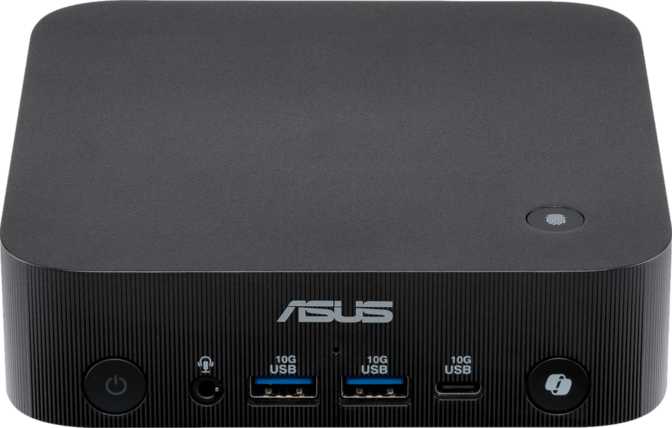
At 130 mm square and just 34 mm tall, the ExpertCenter PN55 is compact in every direction. The footprint is roughly that of a large hardback book, and the total internal volume sits under 575 cubic centimeters — a figure that only makes full sense when you hold the unit and appreciate how much engineering is packed inside.
The chassis is matte-finish plastic with structural rigidity that feels more serious than consumer-grade. There is no flex when you grip it, and the ventilation cutouts are thoughtfully placed to allow airflow without looking industrial. The Micro-ATX designation reflects the PN series’ modular internal architecture rather than a traditional tower footprint.
This machine is designed to be mounted behind a monitor using a VESA bracket — a standard configuration for office and professional deployments where a completely invisible workstation is the goal. On a desk, it sits unobtrusively beside or beneath a monitor. VESA-attached, it disappears entirely. For anyone tired of towers dominating their workspace, this physical profile alone will feel liberating.
Thermal Design Note
At 15 W of processor thermal headroom, the PN55 prioritises silence and compactness over brute-force airflow. There is no liquid cooling option. For sustained all-core compute jobs running continuously for hours, this is a relevant consideration covered in detail in the performance section below.
- Width × Depth 130 × 130 mm
- Height 34 mm
- Total Volume 574.6 cm³
- Form Factor Micro-ATX Mini PC
- Cooling System Active Air (Low-Noise)
- VESA Mount Ready Yes
- Warranty Period 1 Year
Processor Performance: Hybrid Architecture Explained
Multi-threaded muscle and single-core responsiveness, analysed
The PN55 runs on an AMD processor built on a hybrid core design that combines two distinct types of cores — higher-performance cores tuned for demanding single-threaded tasks and efficiency-oriented cores designed to handle lighter background work. This big.LITTLE approach maximises throughput while keeping power consumption controlled, which is critical in a chassis this size.
In total, the processor offers 24 threads across 12 physical cores, with a top turbo frequency that climbs to 5.2 GHz — a figure that would have been flagship territory in full-size desktops not long ago. A 24 MB L3 cache (the fast memory pool the processor draws on before reaching main RAM) sharpens responsiveness in applications that cycle through frequently repeated operations.
For sustained all-core workloads — extended video encoding queues, large compilation jobs, scientific computation — the chip will throttle back after prolonged periods to stay within its 15 W thermal limit. For the typical office, creative, and light development workflows this machine is designed for, that constraint is largely invisible in practice.
The unlocked multiplier is an interesting inclusion for a mini PC. It signals Asus’s intention to cater to technically sophisticated buyers who may want to tune the platform beyond factory settings — an option rarely seen at this form factor.
- Total Threads24
- Turbo Clock Speed5.2 GHz
- L3 Cache24 MB
- L2 Cache12 MB
- Thermal Design Power15 W
- Max Junction Temp100 °C
- ArchitectureHybrid (big.LITTLE)
- Unlocked MultiplierYes
Memory: A Setup That Doesn’t Need Upgrading
DDR5 headroom today, an extraordinary expansion ceiling for tomorrow
Thirty-two gigabytes of DDR5 memory running at 5,600 MHz is a genuinely strong baseline. DDR5 is the current generation of high-performance system memory — faster memory bus, lower voltage, and significantly higher bandwidth than the DDR4 standard that preceded it. The dual-channel configuration means the processor and integrated graphics can access memory across two parallel pathways simultaneously, which matters most for graphics-intensive tasks where memory bandwidth is the limiting factor.
For the vast majority of users — including professionals running large spreadsheets, developers with multiple environments open, and creative workers managing multi-layer projects — 32 GB is comfortable headroom, not a squeeze. Light users will not come close to filling it; power users will find it sufficient rather than limiting.
Memory Expansion Headroom
The 256 GB ceiling is extraordinary for a machine this size — a direct signal that Asus built the PN55 with server-adjacent and data-heavy professional use cases firmly in mind.
- Installed RAM32 GB
- DDR VersionDDR5
- Operating Speed5,600 MHz
- Max Speed (OC)8,533 MHz
- Memory ChannelsDual Channel
- Maximum Capacity256 GB
- ECC SupportNo
ECC Memory Note
The PN55 does not support Error-Correcting Code memory. If data-integrity assurance under sustained computation is a hard requirement — think financial modeling servers or medical imaging workstations — this is a relevant limitation to factor into your decision.
Integrated Graphics: The Radeon 890M Is Not an Afterthought
RDNA 3.5 integrated silicon that genuinely changes the mini PC conversation
Integrated graphics have historically been the weakest link in small desktop machines. The Radeon 890M, based on AMD’s RDNA 3.5 architecture, represents a meaningful departure from that pattern. Built on a 4-nanometer manufacturing process — the same cutting-edge node used in discrete laptop GPUs — it packs 512 shader processors and a GPU clock that can boost to 3,000 MHz under load, delivering just over 3 teraflops of floating-point compute power from fully integrated silicon.
The 890M supports ray tracing, DirectX 12 Ultimate, and OpenCL 2.1 — a feature set that qualifies it for modern game rendering, GPU-accelerated creative applications, and computational workloads that leverage the graphics processor for non-visual tasks. The texture rate and pixel fill rate figures are respectable for integrated silicon and contribute to smooth performance across 4K video playback and light 3D rendering previews.
What the Radeon 890M Means in Practice
- 1080p gaming is achievable on a selection of modern titles at medium settings; older or less demanding games run comfortably
- 4K display output over HDMI 2.1 is fully supported with smooth video playback at native resolution
- GPU-accelerated exports, filters, and AI enhancement tools in creative software benefit meaningfully from the 890M’s compute capability
- Double Precision Floating Point (DPFP) support enables the GPU to assist in scientific and engineering compute tasks alongside the CPU
- Demanding AAA titles at high settings are beyond this machine’s scope — discrete GPU performance it is not
- GPU NameRadeon 890M
- ArchitectureRDNA 3.5
- Process Node4 nm
- Compute Performance3.072 TFLOPS
- GPU Boost Clock3,000 MHz
- Shading Units512
- Texture Units (TMUs)32
- Render Outputs (ROPs)8
- DirectX VersionDirectX 12 Ultimate
- OpenCL Version2.1
- Ray TracingSupported
- DPFP SupportYes
- PCIe InterfacePCIe 4.0
- Max Simultaneous Displays4
Storage: Fast by Default
NVMe performance that sets the right foundation from day one
The included 1 TB NVMe SSD uses the PCIe 4.0 interface, meaning data transfers happen at speeds multiple times faster than the SATA SSDs that once defined “fast” storage. Application launches are near-instant, large file operations complete in seconds rather than minutes, and system boot times are short enough to be unremarkable — which is exactly where boot times should be.
One terabyte is a practical baseline for a system handling documents, projects, applications, and moderate media libraries without strain. Users with large local archives, raw video workflows, or extensive game libraries will want to plan for external storage expansion — the connectivity options covered in the next section make that straightforward.
Genuine NVMe — Not eMMC
This is not the slower embedded flash storage found in budget tablets or entry-level compact systems. The PN55 ships with genuine high-speed NVMe storage as standard — a distinction that matters for day-to-day performance.
- Capacity1,000 GB (1 TB)
- Storage TypeNVMe SSD
- InterfacePCIe 4.0
- External Memory SlotNo
Connectivity: Unusually Well-Equipped for Its Size
A port selection dense enough to serve as a complete desktop hub without a separate dock
Display Output Capability
| Output Type | Count | Max Capability |
|---|---|---|
| HDMI 2.1 | 1 | 4K / 8K support |
| DisplayPort | 2 | 4K high refresh rate |
| USB4 / Thunderbolt (DP Alt) | 1 | 4K / 5K capable |
| Total Simultaneous | 4 | Full multi-monitor ready |
Networking
Dual RJ45 ports are a standout inclusion. Two separate wired Ethernet connections allow the PN55 to serve as a lightweight server, NAS companion, or dual-network node without any additional hardware. For home lab enthusiasts, small business servers, or users who need to bridge two separate network environments simultaneously — a common need in IT, AV, and security contexts — this is a genuinely useful hardware choice.
Wireless connectivity covers the full current spectrum including Wi-Fi 7 — the latest wireless standard offering faster speeds, reduced latency, and better performance in congested environments. Bluetooth 5.4 handles peripherals and audio with current-generation efficiency.
Full Port Summary
- USB4 (40 Gbps) 1 port
- Thunderbolt 4 1 port
- USB 3.2 Gen 2 Type-A (10 Gbps) 3 ports
- USB 2.0 Type-A 1 port
- RJ45 Gigabit LAN 2 ports
- HDMI 2.1 1 port
- DisplayPort 2 ports
- 3.5mm Audio Jack 1 port
- Wi-Fi 7 (802.11be) Latest Gen
- Bluetooth 5.4
Audio Note
There is no S/PDIF optical output. Home theater users routing audio through an AV receiver should use the HDMI 2.1 port’s audio passthrough capability instead.
Who the ExpertCenter PN55 Is Built For
Matching the right buyer to the right machine
- Office professionals and remote workers who want a clean, quiet desk setup with full desktop capability
- Content creators working with video editing, photo processing, or multi-layer design who don’t require discrete GPU rendering
- Home lab enthusiasts and small business IT operators — dual Ethernet, 256 GB memory ceiling, and Thunderbolt 4 enable lightweight server and virtualization roles
- Multi-monitor productivity setups — four simultaneous displays from a machine this size is a rare capability in the category
- AV and digital signage professionals deploying an unobtrusive playback and management node
- Users upgrading from aging tower desktops who want equivalent or better performance without the physical footprint
- Gamers who want to run modern AAA titles at high settings — this requires discrete GPU horsepower the PN55 does not have
- Video professionals encoding large volumes of high-resolution footage continuously for hours — sustained thermal limits will affect throughput over time
- Workloads requiring ECC memory for data-integrity assurance — financial modeling servers and medical imaging workstations, for example
- Users who need internal expansion slots — there are no PCIe card slots for discrete graphics cards, capture cards, or similar internal add-ons
Competitive Positioning
How the PN55 stacks up against logical alternatives a buyer in this segment would consider
| Feature | Asus ExpertCenter PN55 | Intel NUC-Class Mini PC | Budget Mini PC (N-series) |
|---|---|---|---|
| Processor Generation | AMD Ryzen AI 300 (RDNA 3.5) | Intel Core Ultra (Arc graphics) | Intel N100 / N305 |
| System RAM (Base) | 32 GB DDR5 | 16–32 GB DDR4 / DDR5 | 8–16 GB DDR4 |
| Max Expandable RAM | 256 GB | 64–96 GB | 16–32 GB |
| Integrated GPU Tier | Radeon 890M (~3 TFLOPS) | Intel Arc 7 (varies by model) | Intel UHD (minimal) |
| Wi-Fi Generation | Wi-Fi 7 | Wi-Fi 6E / 7 (varies) | Wi-Fi 5 / 6 |
| Wired Network Ports | Dual RJ45 | Single RJ45 (typically) | Single RJ45 |
| USB4 / Thunderbolt 4 | Both present | Thunderbolt 4 (typically) | Absent |
| Max Simultaneous Displays | 4 | 3–4 | 2 |
| PassMark (Multi-Thread) | ~36,000 | ~20,000–28,000 | ~5,000–9,000 |
Competitor specifications represent typical ranges across common configurations in each category. Actual performance varies by specific model and configuration.
Honest Assessment: Strengths and Where It Falls Short
The full picture, without the marketing gloss
What the PN55 Gets Right
The strongest case for the PN55 is the coherence of its specification set. Nothing here feels like a checkbox inclusion — the Wi-Fi 7, the Thunderbolt 4, the dual Ethernet, the 256 GB memory ceiling. These are specifications associated with business workstation-class hardware, delivered in a chassis that weighs under a kilogram. That coherence is rare.
The Radeon 890M’s performance at this form factor makes integrated-graphics compromises feel largely theoretical rather than practical for the target audience. For the vast majority of professional and creative workloads, the 890M’s ~3 teraflops and DirectX 12 Ultimate support cover everything needed.
The connectivity suite deserves specific recognition. USB4 at 40 Gbps, Thunderbolt 4, dual Ethernet, and Wi-Fi 7 in a machine this size is not standard across the category — it is exceptional. The 32 GB DDR5 base configuration also hits the right balance: enough for immediate needs, with enormous room to grow on a current-generation platform.
Where to Temper Expectations
The 15 W thermal design is a deliberate choice, not an oversight, but buyers planning extended compilation jobs, large-scale video encoding queues, or similar sustained all-core workloads should understand that peak performance is a sprinting capability, not a marathon one. In office and professional use, this rarely surfaces. In compute-heavy development or scientific workloads, it is a real conversation to have before committing.
The one-year warranty period is the other friction point. For a machine positioned as a professional business tool, a single year feels short against the competition. Extended coverage plans are available, but they add to the total cost of ownership in a way worth factoring into the purchase decision upfront.
The absence of ECC memory support, while typical for this category, closes the door on specific professional deployments where data integrity under sustained computation is non-negotiable. Buyers with that requirement know who they are.
Common Buyer Questions Answered
The questions real buyers search for before purchasing
Final Verdict
A clear, direct purchase recommendation
The Asus ExpertCenter PN55 makes a convincing argument that small form factor no longer means sacrifice. Its combination of a current-generation hybrid processor, high-speed DDR5 memory with an extraordinary expansion ceiling, capable integrated graphics, and a connectivity suite that rivals full-sized workstations sets a new reference point for what a mini PC can deliver.
The machine is best understood as a professional productivity and light creative workstation that happens to be tiny — rather than a stripped-down PC that trades capability for size. For office professionals, remote workers, multi-monitor power users, and small-scale server deployments, the PN55 covers the brief with confidence.
Sustained compute workloads and high-end gaming are not this machine’s domain, and buyers in those categories should look at machines designed for them. But for the broad, practical middle of the professional computing market — the people who need a fast, reliable, versatile desktop that does not dominate the room — the ExpertCenter PN55 is one of the most complete small-form-factor options available.