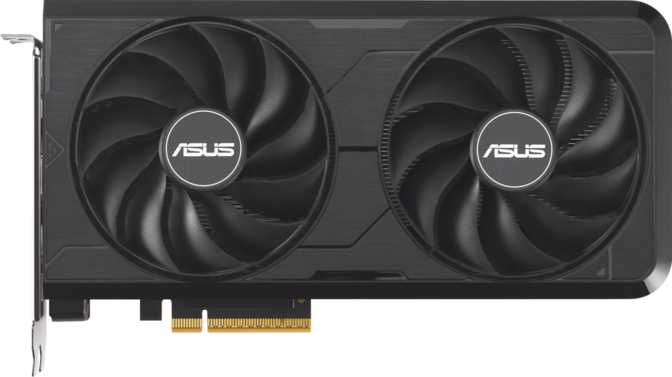
Asus Dual GeForce RTX 5060 Evo OC Edition: An Honest Full Review
Graphics CardsEditor's Rating
Category Assessment
What the RTX 5060 Brings to the Mainstream Market
Context, premise, and what this review delivers
The mid-range GPU segment is where the bulk of PC gaming actually happens — not at the flagship tier where the price tags become uncomfortable, and not at the entry level where the compromises stack up. The Asus Dual GeForce RTX 5060 Evo OC Edition plants itself squarely in this territory with a focused agenda: deliver NVIDIA's current Blackwell architecture and GDDR7 memory technology to buyers who want a next-generation card without a next-generation flagship price.
The premise is reasonable. The execution mostly backs it up. But there are specific decisions baked into this card — about memory capacity, bus width, and connectivity — that deserve an honest examination rather than a marketing gloss. This review provides exactly that.
Design and Build: Compact, Purposeful, Unglamorous
Physical experience, construction, and real-world fit
A Footprint That Actually Fits
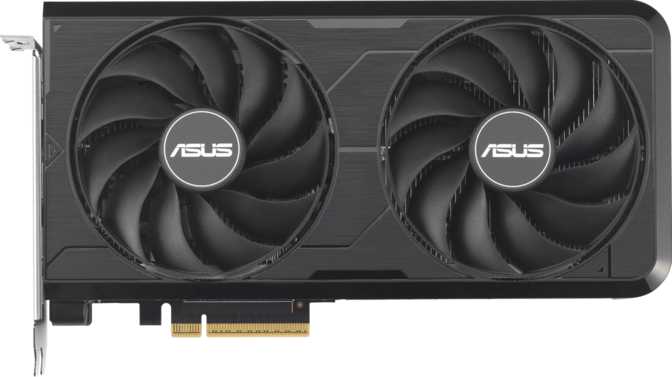
At 225mm long, the Asus Dual RTX 5060 Evo OC Edition is noticeably compact for a current-generation discrete GPU. Mid-range cards from the previous hardware cycle frequently stretched past 270mm, turning case compatibility into a calculation exercise for smaller builds. This card slides into the majority of mid-tower ATX enclosures, a wide selection of micro-ATX cases, and even certain compact form factors without special planning.
The 120mm height keeps the card from encroaching on adjacent expansion slots or blocking nearby M.2 slots — a concern that becomes real with thicker triple-slot designs. This card's proportions are considered.
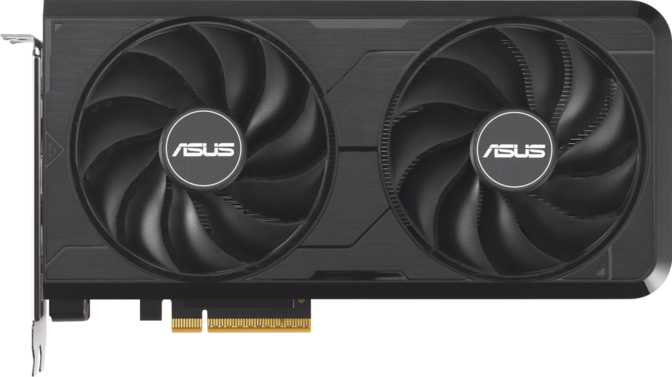
There is no RGB lighting on the Dual Evo series — not a subdued glow, not a single LED strip. The result is a card that suits monochrome and stealth-themed builds well while disappointing buyers who expected illuminated fans. Buyers who want addressable lighting on an RTX 5060 need to look at the Asus TUF Gaming or ROG Strix variants. Cooling is handled by a dual-fan air solution appropriately sized for the card's thermal load.
- Card Length225mm — compact for the current GPU generation
- Card Height120mm — leaves clearance for neighbouring slots
- Cooling SystemDual-fan air cooler — no liquid cooling required
- RGB LightingNone — stealth and monochrome builds only
Core Performance: What Blackwell Delivers Here
Architecture analysis and compute capability
The Factory Overclock Is Real
The "OC Edition" designation refers to a factory-applied overclock that pushes the GPU's sustained operating frequency above what a reference-spec board would achieve. The card boosts to 2,535 MHz under load — running more than 10% above its base clock during active gaming sessions. That headroom is consistent, not a peak that the card briefly touches and retreats from. It is a genuine performance advantage over non-OC versions of the same card.
Compute, Textures, and Pixels — What the Numbers Actually Mean
The RTX 5060 Evo OC Edition operates at just under 19.5 teraflops of floating-point compute performance. A teraflop represents one trillion mathematical operations per second — the foundational compute budget the GPU draws from to render geometry, lighting, particle systems, and shadow calculations. At this compute level, the card handles 1080p gaming at high-to-ultra settings across the large majority of current titles, and manages 1440p in most games, with DLSS providing meaningful additional headroom where raw performance is the constraint.
Efficiency Through Architecture and Manufacturing
Built on a 5-nanometer semiconductor process, the RTX 5060 fits approximately 21.9 billion transistors into its chip. That transistor density is what allows the Blackwell architecture to deliver its compute performance within a 145-watt power limit — a figure moderate for the performance tier it occupies, with downstream implications for PSU sizing, system operating temperatures, and long-term electricity costs that are easy to underestimate.
Memory: The GDDR7 Advantage and the 8GB Conversation
Bandwidth, capacity, and what each means day to day
Why GDDR7 Changes the Equation
The RTX 5060's memory configuration is the most scrutinised aspect of this card, and it merits a complete, accurate treatment. The card carries 8GB of GDDR7 memory on a 128-bit bus. That bus width is narrower than what higher-tier cards offer. On its own, that is a factual limitation. The critical variable is not bus width in isolation — it is how fast data moves through it.
GDDR7 delivers 448 gigabytes of total memory bandwidth per second. GDDR7 is not a marginal improvement over GDDR6 — it is a substantive one. The result is that the effective memory capability of this card's 128-bit bus is meaningfully higher than that number alone would historically imply, closing much of the gap with wider-bus designs from prior generations without their manufacturing cost or power overhead. In practical terms, this higher bandwidth means smoother texture streaming under heavy load and fewer instances where memory pressure manifests as visible stuttering.
| Metric | RTX 5060 (GDDR7) | Typical GDDR6 Equivalent |
|---|---|---|
| Memory Bus Width | 128-bit | 128-bit |
| Effective Memory Speed | 28,000 MHz | ~14,000–18,000 MHz |
| Total Bandwidth | 448 GB/s | ~224–288 GB/s |
| ECC Support | Yes | Typically No |
8GB VRAM: A Clear-Eyed Assessment
Eight gigabytes of video memory is a real ceiling, and the ceiling exists. At 1080p with high or ultra settings, 8GB accommodates virtually every current game without issue. At 1440p, the majority of titles remain within the limit, though the most texture-intensive AAA releases with every quality slider maximised can occasionally push toward that boundary. At 4K, the constraint becomes consistent and meaningful — this card is not designed for 4K gaming.
Features That Change How the Card Performs
DLSS, Ray Tracing, API support, and platform capabilities
DLSS: The Performance Multiplier
DLSS is fully supported on this Blackwell-architecture card. The technology allows the GPU to render frames at a lower internal resolution and reconstruct a visually high-quality output using dedicated AI processing units built into the chip. For a card at this performance tier, DLSS is not a marginal benefit — it fundamentally expands the library of games that can be played at high quality and high framerate. Blackwell's AI hardware represents the current state of NVIDIA's DLSS implementation.
AI-Powered UpscalingFrame GenerationRay Tracing: Capable, with Calibrated Expectations
Ray tracing is supported, and Blackwell's dedicated ray tracing hardware handles it more efficiently than equivalent-tier hardware from previous NVIDIA generations. The realistic calibration for a card at this level is selective use — enabling ray tracing where its visual contribution is most meaningful while maintaining balanced quality settings overall. Maximising every ray tracing parameter in every game will constrain framerates; applying it where it counts delivers worthwhile improvements without sacrificing the framerate experience.
DirectX 12 Ultimate & Full API Support
Full DirectX 12 Ultimate support means the card is compatible with every rendering feature the API currently defines — mesh shaders, hardware-accelerated ray tracing, variable-rate shading, and sampler feedback included. This matters for longevity: as game engines adopt these features, this card will not hit API-level compatibility walls. OpenGL 4.6 and OpenCL 3 support extend the card's reach into GPU-accelerated creative and compute applications.
Resizable BAR Support
Intel Resizable BAR is supported and active on compatible platforms. This feature allows the CPU to access the full graphics card memory simultaneously rather than in sequentially limited chunks — a change that can improve performance in workloads where CPU-to-GPU data exchange is a factor. The benefit varies by application, but it is a free capability available on modern platforms that requires no user configuration overhead.
Display Output and Connectivity
Ports, supported displays, and what is missing
Four Outputs, Three DisplayPorts, One HDMI 2.1b
The card provides four display outputs: three full-size DisplayPort connections and one HDMI 2.1b port. HDMI 2.1b supports very high-refresh-rate 4K output and 8K capability — specifications well beyond what a single RTX 5060 would realistically drive in gaming, but relevant for buyers connecting to modern televisions or ultra-high-specification monitors without needing an adapter. Three DisplayPort outputs give multi-monitor configurations direct flexibility, and all four outputs can drive independent displays simultaneously — useful for extended desktop productivity, trading workstations, or multi-screen creative environments.
- DisplayPort3 × Full-Size — drives up to 3 monitors
- HDMI 2.1b1 × Port — 4K high-refresh and 8K capable
- USB-C VideoNot available — active adapter required if needed
- Simultaneous DisplaysUp to 4 independent outputs at once
- PCIe 5.0 InterfaceFully backward compatible with PCIe 4.0 and 3.0
Power, Thermal Profile, and System Planning
PSU requirements, efficiency, and what this means for your build
The RTX 5060 Evo OC Edition's maximum sustained power draw is 145 watts. For a current-generation card at this performance level, that figure is notably moderate — previous-generation mid-range cards in similar price brackets frequently consumed 200 watts or more, with no corresponding advantage in gaming output.
For PSU planning: a quality 650-watt power supply is a comfortable baseline for most systems combining this card with a mid-range CPU. Builders using high-core-count processors or multiple storage devices should account for those contributions, but the GPU's overhead is not the constraining factor in most sensible configurations. Upgraders replacing an older, high-draw GPU may find their system's total power consumption decreases with this card installed.
The dual-fan air cooler is appropriately scaled to a 145-watt thermal budget. In a case with reasonable airflow, the card maintains controlled operating temperatures without requiring the fans to climb to audible levels during typical gaming loads. The pairing of cooling capacity to power envelope is well-proportioned.
- Recommended PSU650W+
- Cooling TypeDual-Fan Air
- Liquid CoolingNot Required
- PCIe Gen5.0 (backward compat.)
Who Should Buy This Card — and Who Should Not
Matching the card to the right buyer
- 1080p Gamers Targeting High Framerates
The card's primary use case. At 1080p with high or ultra settings, the RTX 5060's performance combined with DLSS delivers high-refresh-rate gaming across the mainstream library without meaningful compromise.
- 1440p Gamers on a Budget
The card handles 1440p capably in most titles. Buyers who accept some quality adjustments in the most demanding games — or lean on DLSS for framerate headroom — will find this a practical, capable choice.
- Compact Build Enthusiasts
The 225mm length removes compatibility concerns that come with longer cards. Micro-ATX builds and space-constrained cases are well served.
- Upgraders from Two or Three Generations Back
Buyers coming from a GTX 1660-class card, an RTX 2060, or a lower-tier RTX 3000-series GPU will see a material jump in both rasterisation performance and AI rendering capability.
- Power-Conscious Builders
The 145W draw enables modest PSU configurations and contributes to lower operating costs over the card's lifespan compared to higher-draw alternatives.
- 4K Gaming
At 4K with demanding settings, the VRAM ceiling and overall compute level create consistent compromises. Buyers targeting 4K resolution need to step up the stack.
- Content Creators with Heavy VRAM Requirements
3D rendering, large-texture design work, and GPU-accelerated AI creative workflows often benefit from 12GB or more. This card's ceiling is a real limitation for certain professional use cases.
- RGB-Centric Builds
This card has no lighting. The Asus TUF Gaming and ROG Strix variants of the RTX 5060 address that need directly.
- Buyers with USB-C Video Requirements
The absent USB-C port requires an adapter for compatible monitors or VR headsets. If that requirement is non-negotiable, a different card or variant is the answer.
Competitive Positioning
How the RTX 5060 Evo OC stacks up against logical alternatives
| Factor | Asus Dual RTX 5060 Evo OC | Prev-Gen NVIDIA Mid-Range | AMD Competing Tier |
|---|---|---|---|
| Architecture Generation | Blackwell (current) | Ampere / Ada Lovelace | RDNA 3 / RDNA 4 |
| VRAM Capacity | 8GB | 8–12GB (model-dependent) | 8–16GB (model-dependent) |
| Memory Technology | GDDR7 | GDDR6 | GDDR6 / GDDR6X |
| Bandwidth Profile | High (GDDR7 / 128-bit) | Moderate | Varies by model |
| AI Upscaling | DLSS (NVIDIA ecosystem) | DLSS (older generation) | FSR (open platform) |
| Maximum Power Draw | 145W | 115–200W (by model) | Varies |
| Physical Length | 225mm (compact) | 260–300mm typical | Varies |
| RGB Lighting | None | Varies by AIB partner | Varies by AIB partner |
Within NVIDIA's own 50-series lineup, moving to the RTX 5070 brings a wider memory bus, additional shader processors, and a meaningful performance step — more appropriate for buyers committed to native 1440p at maximum settings or targeting 4K. Against AMD's competing cards, the central trade-off is the upscaling ecosystem: DLSS offers strong reconstruction quality on NVIDIA hardware with a deep game library, while AMD's FSR operates across hardware from multiple manufacturers and provides more platform flexibility.
Strengths and Weaknesses
The honest balance sheet — neither overstated nor minimised
Where It Excels
- Blackwell Architecture at a Mainstream Price
Current-generation architecture delivers genuine efficiency gains and access to the newest AI rendering capabilities without a flagship price tag.
- GDDR7 Bandwidth Closes the Gap
The 128-bit bus delivers 448 GB/s through GDDR7 — meaningfully more than previous-generation 8GB cards on equivalent buses, with real impact under load.
- Full DLSS Implementation
Fully implemented and providing real, daily-use value across a wide library of supported games — the difference between adequate and genuinely compelling at this tier.
- Compact 225mm Build
A practical asset for a significant portion of buyers — enabling micro-ATX and compact ATX builds without case-compatibility headaches.
- Moderate 145W Power Profile
Previous-generation mid-range cards at comparable performance frequently consumed 200W or more. The Blackwell efficiency dividend is real and financially meaningful over a long ownership period.
Where It Falls Short
- 8GB VRAM Ceiling Is Real
At 4K or in certain professional workflows, the VRAM limit is a present-day constraint — not a future hypothetical. Buyers planning long ownership horizons at 1440p should factor this uncertainty into their decision.
- 128-bit Memory Bus
Narrower than what the RTX 5070 and above offer. GDDR7 offsets this meaningfully, but the gap to wider-bus configurations remains in bandwidth-intensive scenarios.
- No RGB Lighting
A deliberate positioning choice that limits the card to monochrome aesthetics. Buyers who need lighting must choose a different Asus variant — this card will not change for them.
- No USB-C Video Output
A non-trivial gap for buyers with USB-C-only monitors or VR equipment. An active adapter is solvable but is a factor to account for before purchasing rather than after.
Common Questions Before Buying
Answers to what real buyers search for before purchasing
Final Verdict
Our direct purchase recommendation for the Asus Dual RTX 5060 Evo OC Edition
The Asus Dual GeForce RTX 5060 Evo OC Edition is a well-calibrated card for the buyer it is designed to serve. It does not pretend to be a 4K card. It does not disguise its memory capacity. What it delivers — current-generation Blackwell architecture, GDDR7's bandwidth advantages over previous-generation configurations, full DLSS support, a compact build, and a 145-watt power profile — is a meaningful package for buyers whose gaming lives at 1080p or 1440p.
The factory overclock adds real performance above reference spec. The 225mm length solves a problem that longer cards create. The GDDR7 memory technology provides a bandwidth profile that separates this configuration from previous-generation 8GB cards in a way that matters under load. These are not marketing points — they are measurable differences with practical implications.
The 8GB VRAM is the specification that deserves the most careful individual consideration before buying. For 1080p and 1440p gaming at typical-to-high quality settings, it is sufficient for the current game library and should remain so for the near term. For 4K, or for GPU-intensive creative workflows, it is a genuine present-day limitation.
Purchase Verdict
This card earns a clear recommendation for buyers gaming at 1080p or 1440p who want current-generation architecture and DLSS access at a moderate power draw, in a physically compact package.
Step up to the RTX 5070 or examine AMD alternatives with wider buses and higher VRAM capacities if 4K is your target resolution, USB-C video is a requirement, or your workload regularly demands more than 8GB of GPU memory.