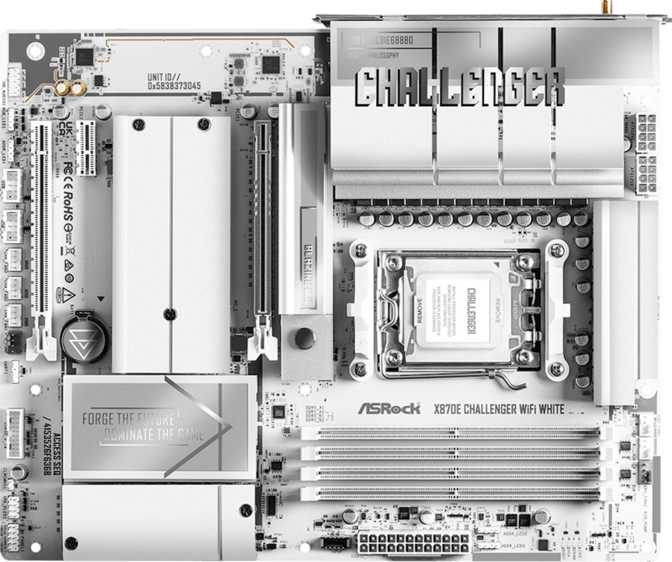
ASRock X870E Challenger Wi-Fi White: An Honest Full Review
MotherboardsWho This Board Is For
The AM5 platform has matured to a point where choosing a motherboard is less about whether it works and more about how much it works for you. The ASRock X870E Challenger Wi-Fi White carries AMD's most capable enthusiast chipset, targets builders who want genuine high-end features, and wraps everything in a clean white aesthetic that has become increasingly rare at this performance tier.
If you are building around a Ryzen 7000 or 9000 series processor and want a board that does not force you to compromise on connectivity, storage, or future-proofing, this board belongs on your shortlist. If you need only a basic daily driver and price is your primary concern, this is more board than you require.
- Socket / ChipsetAM5 / X870E
- Form FactorATX — 305 × 244 mm
- Memory4× DDR5, up to 256 GB
- Memory OC Ceiling8200 MHz
- Primary GPU SlotPCIe 5.0 x16
- NVMe Slots4× M.2
- SATA Ports2× SATA 3
- USB 4 / TB42× 40 Gbps + 2× Thunderbolt 4
- WirelessWi-Fi 7 + Bluetooth 5.4
- Audio130 dB SNR, 7.1 Channel
- Warranty3 Years
Design and Build Quality
A White Finish That Actually Earns Its Place
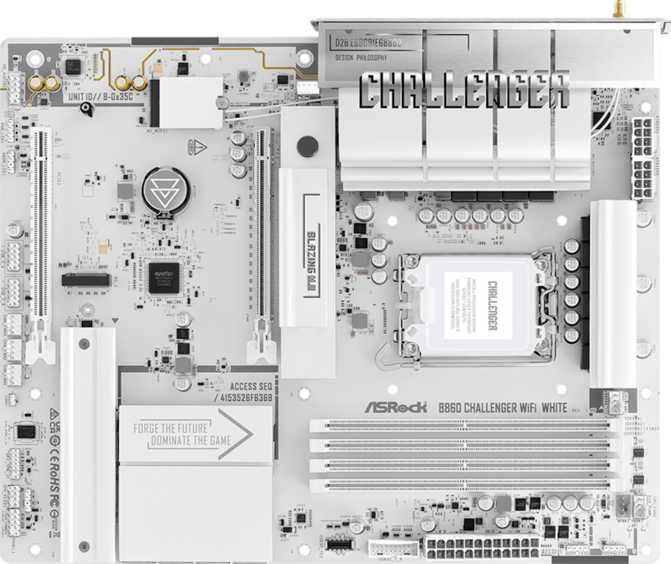
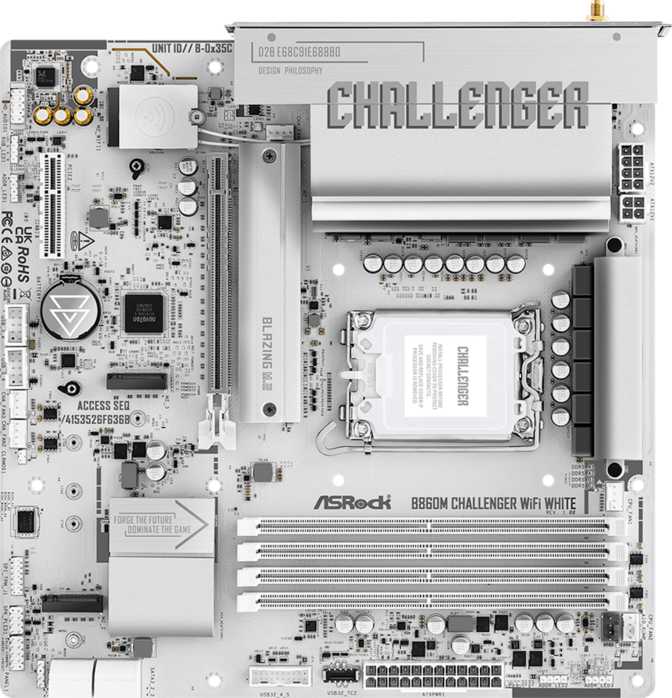
All-white PC builds have a devoted following, and components that genuinely commit to the aesthetic are harder to find than the trend suggests. The ASRock X870E Challenger Wi-Fi White takes the white theme seriously across its shrouds, heatsinks, and PCB accents. For builders constructing a monochromatic or Arctic-themed system, this is one of very few X870E options where the board itself will not become the visual weak point.
ATX Dimensions — Standard and Case-Compatible
At 305 mm wide and 244 mm tall, this board occupies a standard ATX footprint with no unusual cutouts or oversized EATX territory that might not fit your case. RGB lighting is present and integrates with standard ecosystem control software.
For builders who prefer a static look, the lighting is configurable rather than mandatory — useful flexibility for a board positioned as much as an aesthetic statement as a feature platform.
Platform and Chipset: What X870E Actually Means
AMD's current enthusiast lineup includes both X870 and X870E chipsets — and understanding the distinction matters before spending money.
X870E vs X870 — The Real Difference
The "E" in X870E stands for Extreme, denoting AMD's top-tier desktop platform chipset. Compared to standard X870, it provides more PCIe lanes from the chipset itself. In practice this enables all four M.2 slots, USB 4 ports, and expansion slots to run at their rated speeds simultaneously — without the invisible lane-sharing trade-offs that mid-range boards often impose.
AM5 Socket and Cooler Compatibility
The AM5 socket supports AMD's current and announced Ryzen processor generations. It uses an LGA-style socket with pins on the motherboard rather than the CPU, and shares the same cooler mounting standard as AM4. Most recent CPU coolers attach without any adapter — a meaningful cost saving for those upgrading from an existing AM4 system.
Memory: DDR5 Headroom That Reaches Beyond Today's Needs
Four Slots, Dual Channel, and a Serious Overclocking Ceiling
Four DDR5 memory slots in a dual-channel configuration give flexibility to start with two sticks and add two more later without replacing what you already own. The maximum supported capacity reaches 256 GB — effectively unlimited for desktop use, including memory-intensive creative workstations, software development environments, and virtualization setups.
The overclocking ceiling is the more relevant figure for most buyers. Standard out-of-box DDR5 runs around 4800–5600 MHz; enthusiast kits typically target 6000–7200 MHz as the sweet spot for Ryzen performance. This board's ceiling sits comfortably above both ranges, ensuring it will not become the limiting factor as faster memory kits become more common and affordable.
ECC (error-correcting) memory is not supported — expected behavior for a consumer enthusiast platform rather than a workstation or server product.
Storage: Four M.2 Slots and Modern Speed Without Old Compromises
With four M.2 sockets, this board is built for the reality that most new PC builds use NVMe solid-state drives as primary and secondary storage. Given the X870E's lane allocation, these slots do not all share bandwidth from a single narrow pipe — each can operate at full rated speed without the bottlenecking that affects mid-range boards under simultaneous load.
Two SATA 3 ports remain available for existing traditional SSDs, hard drives, or secondary bulk storage. This is a reduced count compared to older-generation boards — the industry-wide direction as M.2 takes over. If your build plan includes four or more SATA drives, this board is not the right match.
RAID Support
- RAID 0 — Combines drives into one faster, larger pool
- RAID 1 — Mirrors two drives for data redundancy
- RAID 10 — Combines mirroring and striping across four drives
- RAID 5 — Not supported (a dedicated NAS feature, not a desktop standard)
Expansion Slots: PCIe 5.0 Ready for Now and Next
The primary PCIe slot runs at PCIe 5.0 x16 — the current cutting edge for desktop GPU connections. Modern graphics cards operate at PCIe 4.0 speeds and see no functional difference today, but the PCIe 5.0 slot ensures forward compatibility as future GPUs begin to use this additional bandwidth.
PCIe 5.0 x16
Primary GPU Slot — Current Standard and Future-Ready
PCIe 3.0 x16
Secondary Slot — Capture Cards, Sound Cards, Add-Ins
PCIe x1
Compact Add-In Card Slot
Connectivity: The Board's Strongest Category
The rear port selection is where the ASRock X870E Challenger Wi-Fi White genuinely separates itself from mid-range options. The combination of USB 4 and Thunderbolt 4 at this price tier is a clear differentiator.
Two USB 4 ports running at 40 Gbps are included on the rear panel — four times faster than the standard USB 3.2 Gen 2 speed of 10 Gbps. This is the connection speed required for the fastest external NVMe enclosures, high-resolution external displays, and professional docking stations.
Most users will not saturate this bandwidth today, but any peripheral you buy in the coming years will work at full speed without a hub compromise.
Two Thunderbolt 4 ports share the USB-C connector and deliver the same 40 Gbps throughput, but add Thunderbolt's protocol layer: daisy-chaining up to six devices, compatibility with Thunderbolt external GPU enclosures, and certified support for professional audio and video interfaces.
For video editors, music producers, and photographers who rely on Thunderbolt peripherals, this inclusion is significant — and absent on many competing boards at this price point.
Rear USB-A Port Count — Ten Ports Total
Internal Headers for Case Expansion
- 4× USB 3.2 Gen 1 headers — standard front-panel USB-A connections
- 4× USB 2.0 headers — additional front-panel ports for keyboards, mice, and peripherals
- 1× USB 3.2 Gen 2x2 header (20 Gbps) — for high-speed front-panel USB-C on supported cases
Wi-Fi 7 and Bluetooth 5.4
The wireless module supports the full generational progression through Wi-Fi 7 (802.11be) — the current leading standard — while remaining backward compatible with Wi-Fi 6E, 6, 5, and 4. It works with whatever router you currently own while being prepared for Wi-Fi 7 routers as they become mainstream.
Wi-Fi 7 offers substantially higher theoretical speeds and better handling of congested wireless environments compared to Wi-Fi 6, particularly in apartments or shared office spaces where many competing networks overlap.
Bluetooth 5.4 is current-generation and compatible with any Bluetooth device available today — peripherals, headsets, and controllers included.
aptX not included: The board does not support the aptX Bluetooth audio codec. If you rely on aptX-certified wireless headphones for audio quality, Bluetooth audio here is limited to standard codec performance.
Audio: What 130 dB SNR Actually Means
The onboard audio delivers a signal-to-noise ratio of 130 dB through a 7.1 channel configuration, with an S/PDIF optical output for connecting external receivers or DACs.
A 130 dB SNR means the background electrical noise from the motherboard contributes virtually nothing to the audio signal. This figure exceeds what most mid-range dedicated sound cards delivered even a few years ago — the hardware behind the spec has genuinely matured.
For music listening, gaming audio, and general multimedia use, the onboard audio will satisfy the vast majority of users without any additional hardware. A dedicated external DAC or sound card only becomes relevant if you own reference-grade headphone amplifiers, or require balanced XLR recording inputs — neither of which any onboard solution provides.
BIOS, Overclocking, and System Management
ASRock's BIOS includes automated overclocking profiles and one-click performance modes that do not require manual tuning expertise. For enthusiasts who want to configure memory timings, CPU frequencies, and voltage curves manually, full controls are available. For those who want gains without the learning curve, automated profiles deliver meaningful results without trial-and-error risk.
A dedicated Clear CMOS mechanism simplifies recovery — if an overclock causes instability, resetting to defaults is straightforward without disassembling the system. This is a quality-of-life feature that experienced overclockers especially appreciate.
An HDMI 2.1 output on the rear panel connects to the Ryzen processor's minimal integrated graphics — useful for system setup or diagnostics without a discrete GPU installed.
Fan Headers and Thermal Management
Seven fan headers across the board provide full coverage for complex cooling configurations — a multi-fan CPU cooler, multiple case fans, and a liquid cooling pump header — all controllable from the BIOS or ASRock's software without requiring a separate fan controller.
Competitive Positioning: How It Compares
The X870E Challenger Wi-Fi White sits between standard X870 mid-range boards and ultra-premium flagship options from ASUS ROG or MSI MEG tier. Here is where it stands on the features that matter most to enthusiast builders.
| Feature | Typical X870 Mid-Range |
ASRock X870E Challenger Wi-Fi White |
Typical X870E Premium Flagship |
|---|---|---|---|
| GPU Slot | PCIe 5.0 x16 | PCIe 5.0 x16 | PCIe 5.0 x16 |
| M.2 Slots | 3–4 | 4 | 4–5 |
| USB 4 (40 Gbps) | 0–1 Ports | 2 Ports | 2–4 Ports |
| Thunderbolt 4 | Rare | 2 Ports | Common |
| Wi-Fi Generation | Wi-Fi 6E or 7 | Wi-Fi 7 | Wi-Fi 7 |
| Dual BIOS | Sometimes | No | Usually |
| White Aesthetic | Uncommon | Yes | Rare |
| Price Tier | Mid | Mid-to-High | High-to-Flagship |
Comparison reflects typical market positioning. Individual board specifications vary — verify current listings before purchasing.
Real-World Usage: Who Benefits and Who Should Look Elsewhere
This Board Is Best For
Creative Professionals
Thunderbolt 4, USB 4 at 40 Gbps, and four M.2 slots are ideal for video editors, photographers, and music producers who depend on fast external storage, Thunderbolt audio interfaces, and multiple high-speed drives for project and scratch storage.
Enthusiast Gamers and Streamers
PCIe 5.0 GPU support, high-speed memory headroom, and generous USB connectivity handle a gaming and streaming workstation without peripheral compromises.
White Build Enthusiasts
The white aesthetic is genuinely well-executed at this tier, filling a real gap in the X870E market where most flagship boards default to black — with no performance sacrifices required.
Future-Proofing Buyers
Wi-Fi 7, USB 4, Thunderbolt 4, PCIe 5.0, and DDR5 with an 8200 MHz ceiling mean this board will not become your system's bottleneck for many hardware generations.
Consider Alternatives If...
You Are Budget-Conscious
The X870E chipset carries a meaningful price premium over X870 or B650E. If you do not need Thunderbolt, USB 4, or Wi-Fi 7, a B650 or standard X870 board delivers strong AM5 performance at lower cost.
You Have Multiple SATA Drives
Two SATA ports will frustrate anyone connecting three or more traditional drives. A board with six or more SATA connectors is the better fit for storage-heavy desktop builds.
Dual BIOS Is Non-Negotiable
If hardware-level BIOS recovery safety is a must — common for builders who push hardware aggressively — competing boards from ASUS and MSI at this tier often include a secondary BIOS chip as standard.
Honest Assessment: Strengths and Weaknesses
Where It Excels
-
Thunderbolt 4 at a Competitive Price
Two Thunderbolt 4 ports at this tier is unusual — boards offering this typically cost significantly more and offer less elsewhere.
-
Dual USB 4 at 40 Gbps
Four times faster than standard USB 3.2 Gen 2, future-proofing external storage and display connectivity for years ahead.
-
Wi-Fi 7 as Standard
Not universal at this price point — a meaningful long-term investment as Wi-Fi 7 infrastructure becomes mainstream.
-
Exceptional Onboard Audio
130 dB SNR outperforms most discrete budget sound cards — the majority of users will need no additional audio hardware purchase.
-
Seven Fan Headers
Complex cooling builds — water loops, multi-fan arrays, pump headers — are fully covered without a separate fan controller.
-
Genuinely Executed White Aesthetic
One of very few X870E boards where the white theme is applied consistently across heatsinks, shrouds, and PCB accents — without any performance compromise.
Where It Falls Short
-
No Dual BIOS
The most significant gap at this tier. A corrupted BIOS firmware scenario requires more involved recovery than on competing boards with a hardware backup chip. The Clear CMOS button cannot address firmware failure — only configuration issues.
-
Only Two SATA Ports
A deliberate trade-off for M.2 expansion, but it will inconvenience builders with existing collections of SATA drives that need connecting simultaneously.
-
No Mid-Speed Rear USB-C
USB-C peripherals not needing 40 Gbps must use the high-speed USB 4 ports or connect through front-panel headers. A surprising oversight for a board at this connectivity tier.
-
No aptX Bluetooth
A minor note for most buyers, but relevant for those using aptX-certified wireless headphones who prioritize Bluetooth audio codec quality.
Questions Buyers Ask Before Purchasing
Final Verdict
ASRock X870E Challenger Wi-Fi White — Our Recommendation
The ASRock X870E Challenger Wi-Fi White is a well-targeted board for builders who want legitimate enthusiast-class connectivity without paying flagship prices for features they will never use. Thunderbolt 4, dual USB 4 at 40 Gbps, Wi-Fi 7, four M.2 slots, and a PCIe 5.0 GPU slot form a connectivity package directly competitive with boards costing substantially more.
The three-year warranty reflects ASRock's confidence in the platform, and the memory overclocking headroom means the board grows with your hardware rather than holding it back. The white aesthetic is among the most complete executions at this feature tier — rare enough that it qualifies as a genuine differentiator rather than a surface-level option.
Buy It If You...
- Need Thunderbolt 4 for professional peripherals
- Want a white build without performance compromise
- Value future-proof connectivity for the next generation
- Prioritize external storage and display bandwidth
Think Carefully If You...
- Require dual BIOS as an absolute safety net
- Plan to connect three or more SATA storage drives
- Could save meaningfully by stepping down to X870
- Have no need for Thunderbolt or USB 4 peripherals
This board earns its place on any serious AM5 shortlist where connectivity quality matters as much as raw chipset tier. It is not a budget compromise dressed up as a flagship — it is a genuine high-performance board sold at a price that undercuts its direct competition on the features that matter most for connected, creative, and forward-thinking builders.