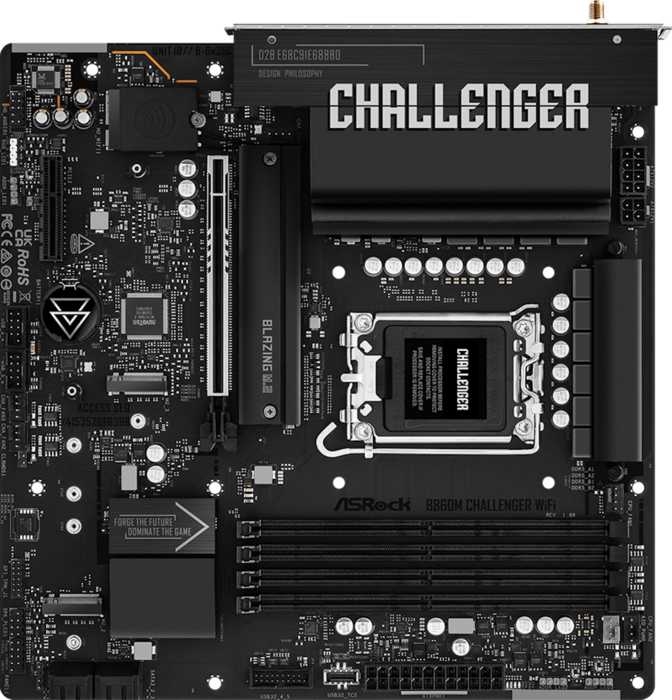
ASRock B860M Challenger Wi-Fi: Full Review and Honest Verdict
MotherboardsIntel's Arrow Lake platform arrived with a new socket, a new memory standard, and a fresh chipset hierarchy — and for most people building a capable, future-aware desktop PC, the sweet spot sits squarely in the middle of that stack. The ASRock B860M Challenger Wi-Fi targets that exact position: a compact Micro-ATX motherboard carrying enough features for a genuinely modern build, without the premium pricing of a full Z890 flagship. Understanding exactly what this board delivers — and where it pulls its punches — is what separates a smart purchase from a regrettable one.
Overall Rating
Key Highlights at a Glance
Design and Build Quality
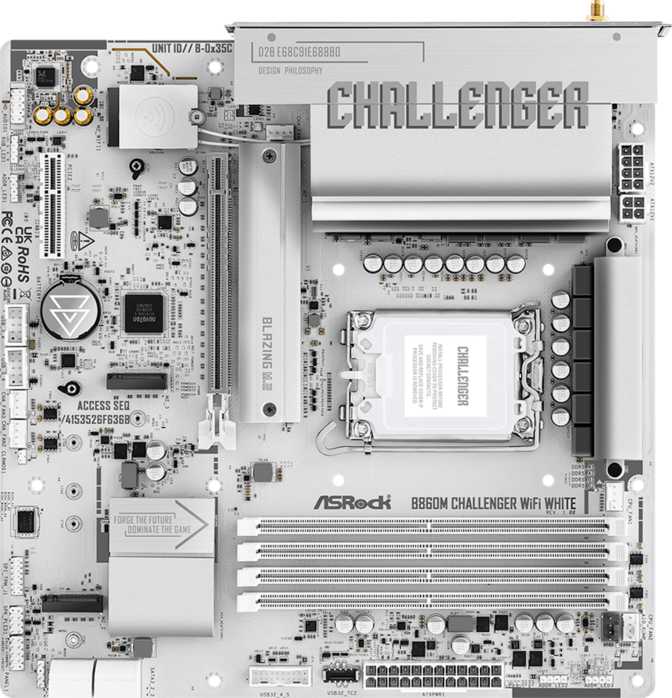
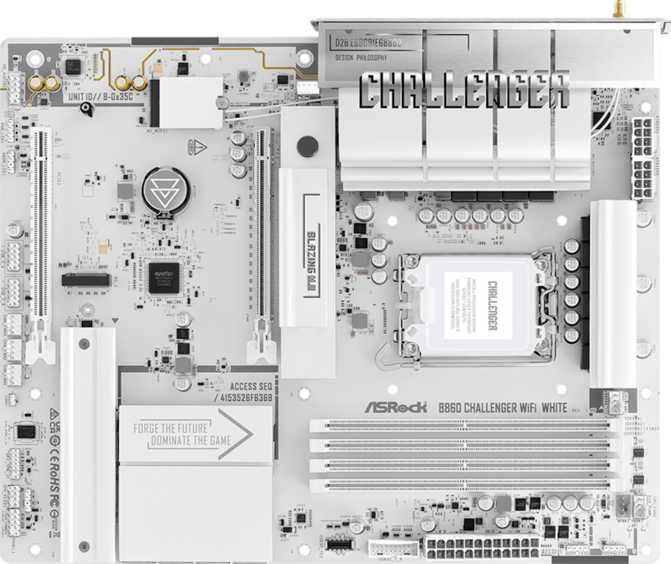
The B860M Challenger Wi-Fi measures 244 mm × 244 mm — the standard Micro-ATX square footprint. This profile fits comfortably inside most compact and mid-tower cases, giving builders a fully featured board without demanding a large chassis. Standard component placement and accessible internal headers keep assembly straightforward, with no cramped areas that create cooler or cable clearance problems in most builds.
ASRock includes RGB lighting, which adds a customizable visual identity for windowed builds. The lighting is purely aesthetic and adds no operational complexity — builders who want it can configure it through the BIOS, and those who prefer a subdued appearance can disable it entirely without affecting any board function.
The three-year warranty stands out at this price tier. Competing boards frequently ship with shorter coverage periods, and for a component that forms the structural and electrical foundation of an entire system, that extra coverage reduces long-term risk meaningfully.
- No CMOS reset button. Recovering from a failed BIOS configuration requires manually shorting the CMOS pins or removing the CMOS battery — a more deliberate process than a single-press reset.
- No dual BIOS. There is no automatic backup firmware if a BIOS flash goes wrong. Verify checksum integrity before every update.
Platform Foundation: LGA 1851 and the B860 Chipset
Intel Core Ultra 200 Series (Arrow Lake) — what the chipset allows and what it restricts
- Memory XMP profile activation — load your RAM's rated speed with a single BIOS toggle, no manual tuning required
- Full PCIe 5.0 bandwidth on the primary GPU slot
- Three simultaneous M.2 NVMe drives
- Full DDR5 memory support including the fastest XMP-rated kits
- Wi-Fi 7, Bluetooth 5.4, and all standard platform connectivity features
- No CPU core frequency overclocking — processor multipliers are locked at Intel-defined values
- Incompatible with manual voltage and frequency tuning on "K" suffix unlocked Intel processors
Memory: DDR5 With Substantial Headroom
DDR5 is the only memory type this board accepts — there is no DDR4 backward compatibility, which is consistent across the entire Arrow Lake platform. This is not a limitation of the board itself but a platform-wide standard that applies to every LGA 1851 motherboard currently available.
Four physical DIMM slots support a dual-channel configuration, meaning two memory controllers operate simultaneously to deliver improved bandwidth over single-channel. Installing RAM in alternating slots (as indicated in the motherboard manual) activates dual-channel mode — effectively doubling the data lanes between your memory and processor. Two sticks or four sticks both achieve this; placement is what matters.
The XMP ceiling reaches into the range of the fastest commercially available DDR5 kits, so high-performance memory will operate at its full advertised speed without the board becoming a limiting factor. The 256 GB total capacity ceiling is functionally unlimited for gaming or productivity and signals a memory subsystem designed without compromise. ECC error-correcting memory — used in servers for real-time data integrity checking — is not supported, which is expected and irrelevant for all but a narrow professional segment.
Memory Specifications
- Memory Standard
- DDR5 Only
- Physical DIMM Slots
- 4
- Channel Configuration
- Dual-Channel
- Maximum Capacity
- 256 GB
- XMP Overclocking
- Supported
- ECC Error Correction
- Not Supported
Storage: Three M.2 Slots and Four SATA Ports
Three M.2 sockets are the storage headline. Each slot accepts a modern NVMe solid-state drive — the direct-to-CPU storage format that delivers dramatically faster read and write performance than older drive interfaces. Running all three simultaneously covers a typical power build: a fast operating system drive, a dedicated applications and games drive, and a third for overflow storage, scratch space, or large media projects.
Four SATA 3 connectors complement the NVMe slots with support for 2.5-inch SSDs and 3.5-inch mechanical hard drives — the large-format storage that remains cost-effective for media libraries, archives, and backup data. The combination reaches a total of seven simultaneous internal drives before any external storage is considered.
Drive Capacity Summary
RAID Support Explained
All four standard RAID configurations are available across the SATA ports. Each serves a distinct purpose that matches a different storage priority:
| RAID Level | How It Works | Best For | Min. Drives |
|---|---|---|---|
| RAID 0 | Stripes data across drives to maximize speed | Performance workloads where redundancy is not a priority | 2 |
| RAID 1 | Mirrors drives identically in real time | Data protection and single-drive failure recovery | 2 |
| RAID 5 | Stripes data with distributed parity information | Balance of speed, capacity efficiency, and protection | 3 |
| RAID 10 | Combines mirroring and striping simultaneously | Maximum protection with improved read performance | 4 |
Connectivity: Wi-Fi 7 Is the Headline Feature
Wi-Fi 7 on a budget-to-mid board is genuinely uncommon. The 6 GHz frequency band and multi-link operation deliver lower wireless latency and substantially better performance in crowded wireless environments — apartments, shared office spaces, or homes with many competing access points and connected devices.
Bluetooth 5.4 handles wireless peripherals — controllers, headsets, and input devices. One caveat: the aptX audio codec is absent, which reduces audio quality specifically when using aptX-certified Bluetooth headphones. Standard Bluetooth audio and all non-audio Bluetooth use are unaffected.
Rear Panel USB Ports
| Port Type | Count | Real-World Speed | Typical Use |
|---|---|---|---|
| USB 3.2 Gen 1 Type-A | 3 | Up to ~625 MB/s | External drives, peripherals |
| USB 3.2 Gen 1 Type-C | 1 | Up to ~625 MB/s | Modern peripherals, USB-C devices |
| USB 2.0 Type-A | 2 | Up to ~60 MB/s | Keyboards, mice, dongles |
Expansion Slots and Thermal Control
PCIe Expansion Slots
| Slot | Generation | Purpose |
|---|---|---|
| Primary x16 | PCIe 5.0 x16 electrical | Dedicated GPU slot — full bandwidth for current and next-generation graphics cards |
| Secondary x4 | PCIe x4 | Expansion cards: capture cards, PCIe SSD carriers, network cards, USB controllers |
Fan and Pump Headers
Six fan and pump headers provide individual BIOS-controlled speed curves for every cooling component in the system — CPU cooler, case fans, and an AIO pump can all be managed independently without a separate fan hub. Both PWM (precision pulse-width speed control) and DC fan types are supported on each header.
Who This Board Is For — and Who Should Look Elsewhere
- Building a mid-range Intel Arrow Lake system without plans to manually overclock the CPU itself
- Working within a compact or mid-tower case where Micro-ATX is preferred or required by the chassis
- Prioritizing wireless connectivity — Wi-Fi 7 at this price point is rare among competing B860 boards
- Planning a multi-drive configuration with three or more NVMe drives or a mix of NVMe and SATA storage
- Interested in RAID for data protection, mirroring, or striped performance across multiple SATA drives
- Using a processor with integrated graphics and needing the HDMI 2.1 rear output for display connectivity
- Planning to push an unlocked K-series processor with manual voltage and multiplier tuning — the B860 chipset locks this out entirely
- Regularly connecting high-speed external NVMe storage where the absence of USB Gen 2 or USB4 on the rear panel creates a daily speed bottleneck
- Using aptX-certified Bluetooth headphones as your primary audio output — the codec is unsupported and audio quality will be affected
- Requiring the safety net of dual BIOS firmware or a physical CMOS reset button, especially during active BIOS experimentation
- Building a workstation or home server with a multi-gigabit wired network requirement — only standard gigabit ethernet is available onboard
How It Stacks Up Against the Alternatives
The B860M Challenger Wi-Fi competes primarily against full-size B860 ATX boards and more expensive Z890 Micro-ATX alternatives. Here is where the key differentiators actually matter:
| Feature | B860M Challenger Wi-Fi | Typical B860 ATX | Typical Z890 mATX |
|---|---|---|---|
| Form Factor | Micro-ATX | Full ATX | Micro-ATX |
| CPU Overclocking | |||
| Memory XMP | |||
| Wi-Fi Generation | Wi-Fi 7 | Wi-Fi 6E (typical) | Wi-Fi 7 |
| M.2 NVMe Slots | 3 | 4–5 (typical) | 3–4 |
| PCIe GPU Slot | PCIe 5.0 | PCIe 5.0 | PCIe 5.0 |
| Rear USB Gen 2 | None | 1–2 ports | 2–4 ports |
| Dual BIOS | Varies | ||
| Relative Price | Budget–Mid | Similar | 30–60% higher |
The Honest Assessment
Where It Gets It Right
The strength of this board is concentrated in deliberate, value-focused choices. Wi-Fi 7 at this price tier is the headline — it typically appears on boards at significantly higher brackets, meaning wireless builders are not penalized for their connectivity situation the way they would be with most competing B860 options.
The triple M.2 configuration is equally well-considered. Storage flexibility is something most buyers think about after purchase when they realize they need a second or third drive, and this board anticipates that requirement upfront without asking for a premium.
PCIe 5.0 on the primary GPU slot ensures the graphics interconnect is not a compromise versus more expensive alternatives. Paired with the three-year warranty, the board makes a confident long-term case at its price point.
Where the Budget Position Shows
The USB ecosystem is the most consequential real-world limitation. No USB 3.2 Gen 2 on the rear panel means anyone transferring large video, photo, or audio project files to external drives regularly will reach the speed ceiling faster than they might expect. For creative professionals, this is a daily friction point that compounds over time.
The absence of CPU overclocking is structural to the B860 chipset and is only relevant to a specific buyer type — but it is worth understanding clearly and unambiguously before purchase, not as a post-purchase discovery.
Missing dual BIOS and a physical CMOS button are abstractions until they are needed. Experienced builders rarely encounter either limitation. First-time BIOS tuners should be aware that configuration recovery is a more deliberate process on this board than on those with dedicated safety mechanisms.
Questions Buyers Ask Before Purchasing
A Focused, Honest Value Proposition
The ASRock B860M Challenger Wi-Fi earns its recommendation through clarity rather than spectacle. It does not attempt to be everything — it is a compact, Wi-Fi 7 equipped, DDR5-native Intel platform board that gets the core decisions right: fast wireless, ample M.2 storage, a fully capable PCIe 5.0 GPU slot, and a competitive three-year warranty backing the whole package.
The compromises are real but predictable. Rear panel USB speed is the most tangible daily limitation for creative workflows. CPU overclocking is locked at the chipset level and affects only a specific buyer type. The missing dual BIOS and physical CMOS reset button are inconveniences rather than dealbreakers for the intended audience — but they are worth knowing before you commit.
You want Arrow Lake in a compact case with Wi-Fi 7, triple M.2 NVMe storage, and PCIe 5.0 at a budget-to-mid price point without paying the Z890 premium.
CPU overclocking is on your roadmap, high-speed external USB storage is a daily requirement, or dual BIOS safety is a non-negotiable for your build workflow.