CPU Socket
LGA 1851
Intel Arrow Lake
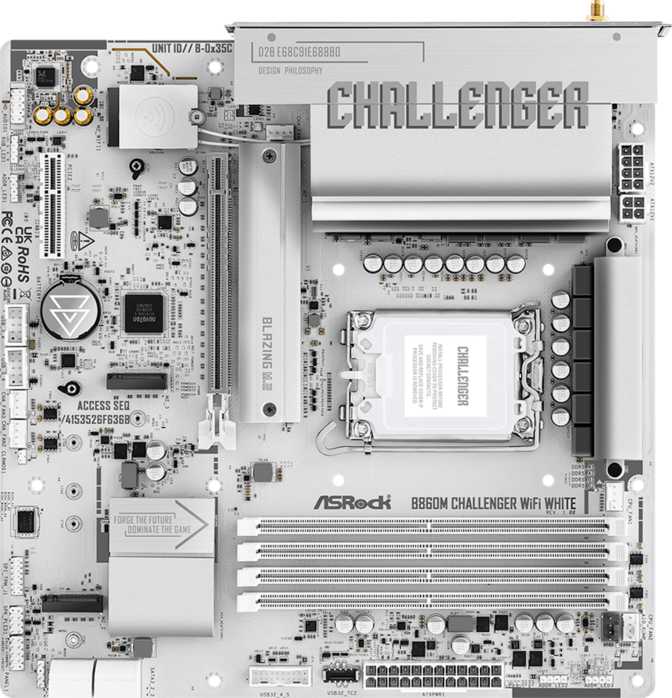
White PC builds have moved from niche aesthetic choice to a legitimate mainstream category, and the motherboard is always the hardest piece to get right. The ASRock B860M Challenger Wi-Fi White lands at a point where the Intel LGA 1851 platform is maturing, meaning buyers now have real price competition to work with.
What makes this board worth a serious look is not just the finish — it is the combination of a capable feature set, a surprisingly modern wireless stack, and the kind of storage flexibility that used to require spending significantly more. Whether you are building a clean-desk aesthetic rig or simply want a capable mid-range foundation without paying premium chipset prices, this board enters the conversation with credible credentials.
Quick take: Wi-Fi 7 connectivity, three M.2 slots, DDR5 support, and a clean white finish on a mid-range B860 chipset. Solid value for most builders; only CPU overclockers need look elsewhere.
Recommended for mid-range Intel builds
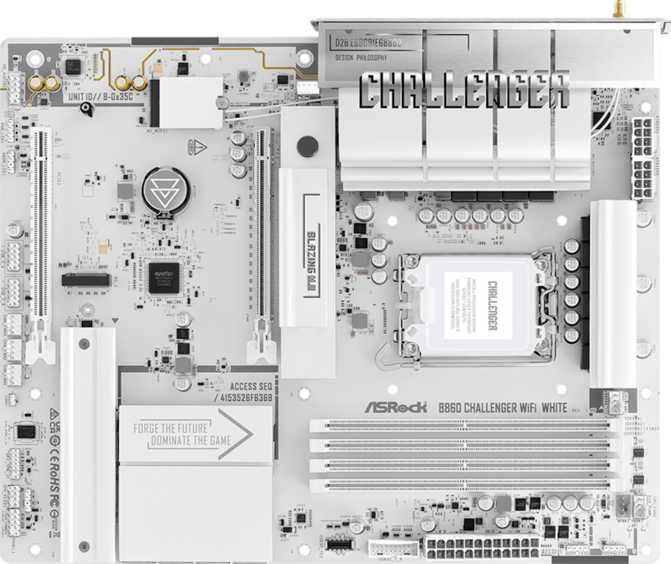
The Challenger Wi-Fi White carries a Micro-ATX footprint — a square 244mm by 244mm. That is meaningfully smaller than a standard ATX board, which opens up a wider range of compatible cases, including compact mid-towers and smaller full-tower designs where reduced PCB real estate means better airflow management around the motherboard tray.
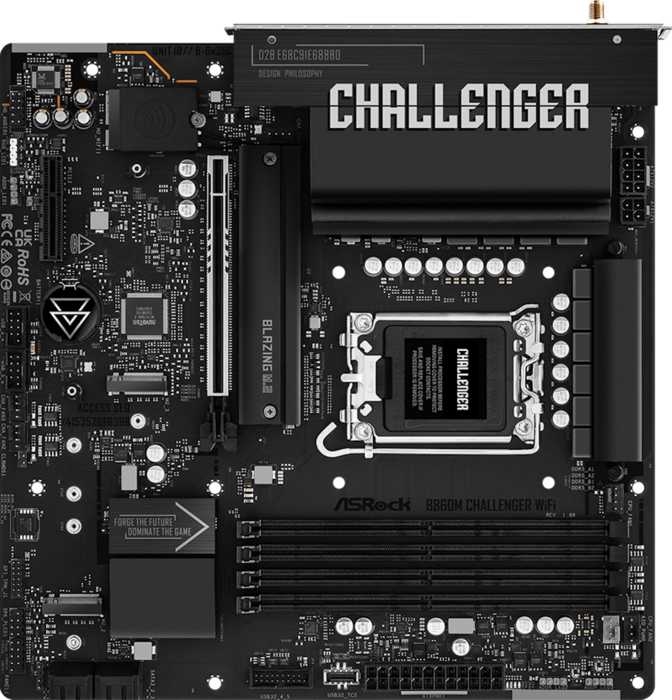
The white colorway here is not just a PCB swap. A white board in a system built around white components — case panels, cooler shrouds, RAM heatspreaders — creates visual cohesion that black boards simply cannot offer in that context. ASRock has paired this with onboard RGB lighting, giving builders the option to add addressable color accents that complement or contrast the white base. Those who prefer a clean, unlit look can disable RGB entirely through the BIOS or software.
Build quality on ASRock's Challenger series sits firmly in the "gets the job done without unnecessary frills" category. The reinforced PCIe slot and metal-shielded M.2 area reflect practical engineering choices rather than cosmetic ones.
This board is built around Intel's B860 chipset and uses the LGA 1851 socket — Intel's current-generation platform designed for Arrow Lake processors. For buyers unfamiliar with Intel's chipset naming: Z890 sits above B860 and unlocks full CPU overclocking. B860 trades that ceiling for a lower price point, while retaining most of what mainstream users actually need.
Critically, B860 still supports memory speed tuning through Intel XMP profiles. The board can push DDR5 memory well beyond baseline speeds — up to frequencies representing the upper tier of consumer DDR5 performance — meaning you are not stuck with slow memory just because you chose the more affordable chipset.
What you give up is the ability to manually push processor core clocks beyond Intel's rated limits. For the majority of users — including serious gamers, content creators, and enthusiasts who are not spending hours tuning voltage curves — this restriction has essentially zero real-world impact. Only a specific type of power user deeply invested in extracting every last percentage point of CPU performance will genuinely feel that absence.
| Feature | B860 | Z890 |
|---|---|---|
| CPU Overclocking | ||
| Memory Tuning (XMP) | ||
| PCIe 5.0 GPU Slot | ||
| DDR5 Support | ||
| Price Tier | Mid | Premium |
The board provides four DDR5 DIMM slots organized in a dual-channel configuration — the standard for consumer platforms. Running memory in dual-channel — two or four sticks populated rather than one or three — has a measurable impact on bandwidth-sensitive workloads, particularly applications that process large sequential data streams.
The maximum supported capacity is 256 GB across four slots. For a mainstream board, this is generous. Most users building gaming or productivity systems will operate at 32 GB or 64 GB, leaving substantial headroom for future upgrades without needing to replace sticks entirely.
With XMP tuning enabled, this board supports frequencies at the aggressive end of what current DDR5 kits offer commercially. For buyers who plan to start with a moderate kit and upgrade later, the board will not be the bottleneck. ECC memory is not supported — expected for a consumer B860 board, but worth noting if data integrity under sustained load is a professional requirement.
Storage flexibility is one of the stronger arguments for this board. Three M.2 sockets provide space for NVMe solid-state drives — the compact form factor that has become the standard for fast storage. For a Micro-ATX board, three M.2 slots is genuinely generous; many competing boards at this size and price stop at two.
Three M.2 sockets for modern NVMe SSDs. The primary slot connects directly to the CPU for maximum bandwidth — ideal for your boot drive and most-used applications.
The remaining two slots route through the chipset, offering strong real-world throughput with a slightly lower theoretical ceiling that most users will never notice in practice.
Four SATA 3 connectors accommodate 2.5-inch SSDs and 3.5-inch mechanical hard drives — essential for users migrating drives from older systems or adding large-capacity cold storage for media libraries.
SATA 3 is backward compatible with older SATA drives, so nothing from a previous build goes to waste.
All four major RAID configurations — 0, 1, 5, and 10 — are supported. RAID 0 stripes for speed, RAID 1 mirrors for redundancy, while RAID 5 and 10 offer more sophisticated combinations of performance and protection.
Home NAS builders and small studio operators who want onboard redundancy without a dedicated controller will find this genuinely useful.
The board carries a single HDMI 2.1 port on the rear panel. HDMI 2.1 supports 4K output at 120Hz and 8K at lower refresh rates — well ahead of what most users currently need, and ready for higher-resolution panels becoming mainstream.
There is no DisplayPort output on this board. For users who need multiple monitors driven purely from rear-panel outputs without a discrete GPU, this is a meaningful limitation. Multi-monitor setups will require a dedicated graphics card with its own display outputs.
Important: This board has no onboard integrated graphics processor of its own. The rear HDMI port is only functional when the installed CPU includes Intel integrated graphics. CPUs with an "F" suffix in their model name omit integrated graphics entirely and leave the HDMI port unusable without a discrete GPU installed.
Wi-Fi 7 (802.11be) is the newest consumer wireless standard, offering substantially higher peak speeds and lower latency than Wi-Fi 6E, which was itself a significant upgrade over Wi-Fi 6. In practical terms, Wi-Fi 7 delivers faster file transfers from a compatible router, reduced lag during network-intensive tasks, and better performance in environments with many competing wireless devices.
The board supports backward compatibility across all recent Wi-Fi generations, so it works correctly with older routers. To benefit from Wi-Fi 7 speeds, a Wi-Fi 7 router is required. This is genuine future-proofing: the board will never be the bottleneck when your networking hardware catches up.
Bluetooth 5.4 is included — the most current Bluetooth revision in wide deployment, bringing improved connection stability and lower power consumption for wireless headphones, controllers, and keyboards.
A single ethernet port provides wired LAN connectivity — sufficient for the vast majority of home and office connections. No 2.5 GbE or 10 GbE is present, which is worth noting for users running high-throughput local network setups.
| Standard | Protocol | Supported |
|---|---|---|
| Wi-Fi 7 | 802.11be | |
| Wi-Fi 6E | 802.11ax (6 GHz) | |
| Wi-Fi 6 | 802.11ax | |
| Wi-Fi 5 | 802.11ac | |
| Wi-Fi 4 | 802.11n |
Future-proof pick: Wi-Fi 7 at this price tier is uncommon. Most competing boards ship with Wi-Fi 6, meaning this board delivers two wireless generations of advancement at no extra cost.
The rear I/O panel provides a practical but not extravagant selection of USB connections. Three USB Type-A ports and one USB Type-C port all operate at 5 Gbps — standard for peripherals like external drives, keyboards, and mice. Two USB 2.0 ports handle lower-bandwidth devices.
The absence of any 10 Gbps ports on the rear panel is the most tangible day-to-day limitation for users who regularly move large files between external storage and their system. Photographers and video editors who transfer multi-gigabyte files to fast external SSDs will notice this ceiling regularly. There are no Thunderbolt or USB4 ports — expected at this chipset level, but relevant for creative professionals who rely on those standards for external storage or display daisy-chaining.
Internal headers expand connectivity further: two USB 3.2 Gen 1 headers and four USB 2.0 headers for front-panel ports. A TPM connector is included for Trusted Platform Module support, covering Windows 11 compliance and enterprise security requirements.
| Port Type | Count | Speed |
|---|---|---|
| USB Type-A (3.2 Gen 1) | 3 | 5 Gbps |
| USB Type-C (3.2 Gen 1) | 1 | 5 Gbps |
| USB 2.0 | 2 | 480 Mbps |
| No USB 3.2 Gen 2 (10 Gbps), Thunderbolt, or USB4 ports | ||
| Header Type | Count |
|---|---|
| USB 3.2 Gen 1 (front panel) | 2 |
| USB 2.0 (front panel) | 4 |
| Fan / Pump Headers | 6 |
| TPM Connector |
Onboard audio supports a 7.1 surround configuration through three physical audio jacks on the rear panel — covering stereo output, microphone input, and the remaining surround channels through software routing. This is a standard implementation for consumer motherboards.
Users with dedicated sound cards or USB DACs will not need the onboard audio at all. For daily listening and communication it is serviceable. The absence of an S/PDIF optical output narrows options for connecting certain home theater receivers digitally.
Six fan headers give builders meaningful flexibility. In a compact Micro-ATX chassis where airflow can be constrained by the smaller case volume, individual control over multiple fans — through PWM or DC headers — allows for a genuinely quiet idle profile without sacrificing cooling headroom under load.
This matters more in a small case than it would in a full-tower. Six headers comfortably cover a CPU cooler, a pump head for liquid cooling, and multiple case fans simultaneously without running out of connections.
The expansion slot configuration is lean, appropriate for a Micro-ATX design. The primary GPU slot uses PCIe 5.0 — the current top generation. Modern graphics cards from major manufacturers do not yet saturate PCIe 4.0 bandwidth in gaming scenarios, so PCIe 5.0 here is genuine headroom rather than a marketing specification. Future GPUs that do leverage higher bandwidth will find a capable interface waiting.
A second slot at PCIe x4 provides room for auxiliary cards — capture cards, add-in NVMe cards, or other PCIe peripherals — without consuming the primary GPU lane. For most single-GPU builds, this covers all the physical expansion space needed.
| Slot | Interface | Primary Use |
|---|---|---|
| Full x16 Slot | PCIe 5.0 | Discrete GPU |
| x4 Slot | PCIe x4 | Capture / add-in cards |
The ASRock B860M Challenger Wi-Fi White sits in a specific competitive gap. Here is how it stacks up against the most likely alternatives a buyer in this space would consider.
| Feature | ASRock B860M Challenger Wi-Fi White This Board | Typical B760 Micro-ATX | Z890 Micro-ATX Board |
|---|---|---|---|
| CPU Overclocking | Not supported | Not supported | Full support |
| Memory Tuning (XMP) | Yes | Yes | Yes + more |
| Wi-Fi Generation | Wi-Fi 7 | Wi-Fi 6 (typical) | Wi-Fi 7 (varies) |
| M.2 Slots | 3 | 2 (common) | 3–4 |
| PCIe GPU Slot Gen | PCIe 5.0 | PCIe 4.0 or 5.0 | PCIe 5.0 |
| White Aesthetic | Available | Usually black | Usually black |
| Price Tier | Mid-range | Budget to mid | Premium |
Competitor specifications represent typical market offerings and may vary by specific model and manufacturer.
Wi-Fi 7 on a mid-range board is not common, and it represents real future value. Most competing boards at this price tier ship with Wi-Fi 6, meaning you are getting two generations of wireless advancement at no extra cost — and that gap will matter more as Wi-Fi 7 routers become affordable and mainstream.
Three M.2 slots in a 244mm square footprint is a practical win that competitive analysis confirms. Many Micro-ATX alternatives stop at two. For a builder who wants a dedicated boot drive, a fast cache SSD, and a large game storage drive — all without touching a single SATA cable — this board delivers.
The white finish is executed cleanly rather than as an afterthought. The DDR5 memory ceiling is high enough that upgrades will not be limited by the board for the foreseeable future. A three-year warranty adds purchase confidence appropriate for a component expected to outlive several upgrade cycles.
Rear-panel USB speeds stopping at 5 Gbps is the most tangible day-to-day limitation. Photographers and video editors who regularly transfer multi-gigabyte files to fast external SSDs will feel this ceiling regularly. There is no path to faster rear-panel USB without an add-in card.
The lack of a Clear CMOS button is a minor ergonomic frustration during setup, particularly for users working through BIOS tuning during an initial build. Combined with the absence of dual-BIOS protection, there is a small risk gap for aggressive firmware experimenters that more expensive boards eliminate.
A single rear HDMI without DisplayPort limits display flexibility for rear-panel multi-monitor setups without a discrete GPU. For professional users who need Thunderbolt or 2.5 GbE, this board is not in the right tier — those needs require a different product category entirely.
ASRock B860M Challenger Wi-Fi White
The ASRock B860M Challenger Wi-Fi White is a well-considered Micro-ATX board for builders who want current-generation Intel platform capabilities, a white aesthetic that holds up at close inspection, and Wi-Fi 7 without paying Z890 prices. It does not try to be everything — CPU overclocking is off the table, rear USB speeds are mid-tier, and DisplayPort is absent — but within those boundaries, it executes cleanly.
For a primary gaming and productivity build where CPU overclocking is not a priority, this board delivers where it matters: fast memory support, ample M.2 storage, solid wireless, and a visual identity that integrates naturally into white-themed builds. The three-year warranty adds enough purchase confidence that the mid-range price feels justified rather than risky. If white aesthetics are not relevant to your build, there are similarly-priced black alternatives worth comparing — but for the builder who has made the deliberate choice to build in white and wants hardware that respects that decision without compromising the foundation, this board earns a confident recommendation.