ASRock Radeon RX 7700 Challenger: An Honest 1440p Gaming Review
Graphics CardsThe Mid-Range Card That Refuses to Compromise on Memory
Most graphics cards at this price point ask you to make a trade. You get solid performance, but you give up VRAM. You get a manageable power draw, but you sacrifice headroom for future titles. The ASRock Radeon RX 7700 Challenger makes a different argument — that a card sitting squarely in the mainstream performance bracket can still ship with the kind of memory capacity typically reserved for workstation-class hardware.
Built on AMD's RDNA 3.0 architecture and manufactured on a 5-nanometer process, the Challenger targets 1440p gamers who want high-quality visuals without the memory pressure that has begun to affect many competing cards. Whether that argument holds up under scrutiny is exactly what this review examines.
Editor's Score
Design and Build Quality
A Workmanlike Card That Earns Its Keep
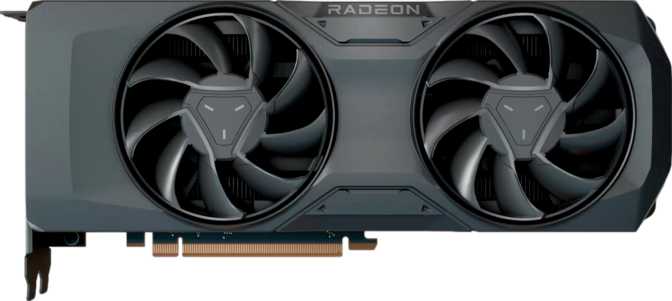
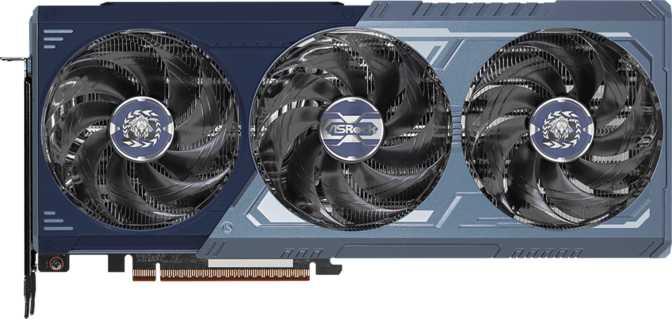
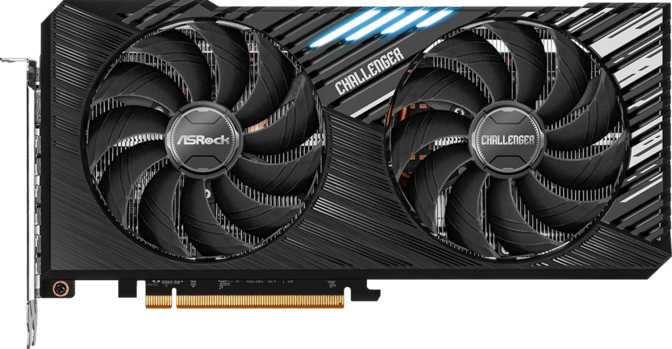
The Challenger earns its name not through aggressive aesthetics but through purposeful, no-nonsense construction. At 267 mm in length and 130 mm in height, this is a card that fits comfortably in the vast majority of mid-tower and full-tower cases without the clearance gymnastics required by some flagship-tier siblings. It is compact enough for most builds without feeling like ASRock cut corners on the cooler to achieve that size.
Card Length
267 mm
Fits most mid-towers
Card Height
130 mm
Standard slot profile
RGB Lighting
Included
Tasteful accent style
Cooling Type
Air-Cooled
Dual-fan configuration
The card includes RGB lighting — tasteful accent illumination rather than the full spectacle treatment, which suits the Challenger's character. It is present for those who want visual cohesion in a lit build, and understated enough not to offend those who would rather it wasn't there.
Cooling is handled entirely through air. For a card with a 200-watt thermal requirement, that means the cooler has real work to do. ASRock's Challenger cooler lineup is historically competent at this load, and the card's dimensions suggest a dual-fan setup with adequate heatsink mass. Expect the fans to spin audibly under sustained gaming load but not dominate your room acoustics.
Core Performance: What the Hardware Actually Delivers
Architecture and Processing Muscle
The RX 7700 Challenger is built on AMD's RDNA 3.0 architecture, manufactured on a 5-nanometer process — the same fabrication generation that powers some of AMD's own flagship desktop CPUs. The chip is dense, power-efficient for its capability tier, and packs 28.1 billion transistors into the die.
Compute Power
25.18
TFLOPS
Boost Clock
2,459
MHz
Pixel Fill Rate
236.1
GPixel/s
Texture Rate
393.4
GTexels/s
Those transistors translate to 2,560 shader processors paired with 160 texture mapping units and 96 render output units — a well-balanced rendering pipeline rather than one bottlenecked at any obvious stage. The practical result is just over 25 TFLOPS of floating-point compute, positioning this card firmly in the bracket that handles 1440p gaming at high-to-maximum settings in most titles, and 4K gaming with settings adjustments in less demanding games.
Clock Speed and Burst Performance
The processor runs at a base frequency around its designed operating point, but the more relevant number is its boosted ceiling of nearly 2,460 MHz. This is where the GPU actually operates during gaming workloads, representing meaningful headroom above the baseline. Higher boost clocks generally translate to smoother frame delivery and better minimum frame rates — which matters more to perceived smoothness than raw averages.
The 16 GB VRAM Advantage — And Why It Actually Matters
Sixteen gigabytes of GDDR6 video memory is uncommon on any mainstream graphics card. Most competitors at this price ship with eight gigabytes — half the capacity.
16 GB
GDDR6 VRAM
256-bit
Memory Bus
622 GB/s
Peak Bandwidth
When a game exhausts available VRAM, performance drops sharply — textures stutter, frame rates crater, and the experience degrades in ways no other specification can compensate for. With modern AAA titles increasingly shipping with texture packs that push well past 8 GB in demanding scenarios, the Challenger's memory capacity is a form of future-proofing that competitors at this price simply cannot match. The wide 256-bit bus and bandwidth exceeding 620 GB/s ensure the GPU can feed its shader processors fast enough to keep them fully productive.
Feature Breakdown: What You're Actually Getting
Ray Tracing — Supported, With Expectations Set Correctly
Hardware-accelerated ray tracing is supported — the rendering technique that simulates realistic light behavior, accurate reflections, and shadows with soft edges. In supported games, enabling it is visually impactful. That said, ray tracing is computationally expensive, and a mainstream card will feel that cost more than a top-tier GPU would. Expect medium settings in the most demanding titles. In lighter, well-optimized games, the visual payoff is real and worthwhile.
AMD SAM Instead of DLSS
This card does not support DLSS — NVIDIA's proprietary AI upscaling technology. If DLSS is a hard requirement, this is not the right card. What AMD offers in its place is AMD SAM (Smart Access Memory): paired with a compatible AMD processor, the CPU can access the full VRAM pool directly, delivering tangible throughput improvements that require no driver tuning to activate. The upscaling ecosystem here is different, not absent.
Display Connectivity
Four simultaneous displays are supported through a practical, modern port selection:
- 1x HDMI 2.1 — supports 4K at 144Hz or 8K at 60Hz
- 3x Full-Size DisplayPort — high-refresh displays covered
- No USB-C display output
DirectX 12 Ultimate Compliance
Full DirectX 12 Ultimate compliance means hardware ray tracing, mesh shaders, variable rate shading, and sampler feedback are all supported. These are features that game developers actively target because they improve both visual fidelity and performance efficiency. OpenGL 4.6 and OpenCL 2.2 support extend the card into professional and compute use cases beyond pure gaming.
ECC Memory Support
Error-Correcting Code memory support means the card can detect and automatically correct certain types of memory errors — a feature relevant to creative professionals running long render jobs or compute workloads where data integrity matters. Gamers won't notice it. Video editors and machine learning hobbyists might genuinely appreciate it. This is uncommon on consumer gaming cards at this price tier.
PCIe 4.0 Interface
The card connects via PCI Express 4.0 — the current mainstream standard. It is backward-compatible with PCIe 3.0 motherboards at a typically low-single-digit performance trade-off, and fully forward-compatible with PCIe 5.0 systems. If you plan to upgrade your motherboard later, the compatibility story is comfortable in both directions.
Power Consumption and Thermal Considerations
200 W
Thermal Design Power
Recommend 650 W PSUA 200-watt TDP is the number your power supply needs to plan around. This is neither unusually thirsty nor impressively frugal for the performance tier — it sits within expectations for what the hardware delivers. Budget at least 550–600 watts of quality PSU headroom for a complete gaming system, giving comfortable margin beyond the CPU and other components.
The 5-nanometer fabrication process delivers meaningful efficiency gains over older manufacturing nodes — the card extracts more performance per watt than predecessors built on larger process nodes. In practical terms: less heat to manage, quieter fans at typical gaming loads, and lower electricity costs over time compared to equivalent-performance cards from older process generations.
Cooling is handled entirely through air — no liquid cooling loop or hybrid solution. For a 200 W card, the cooler has real work to do. ASRock's Challenger coolers are historically competent at this thermal load. Expect fans to spin audibly under sustained gaming load but not dominate your room acoustics.
Real-World Usage: Who This Card Is For
1440p Gamers
The RX 7700 Challenger is built for 1440p gaming at high-to-maximum quality settings. The GPU horsepower aligns with that resolution target, the memory bandwidth handles the higher texture loads that 1440p demands, and the 16 GB VRAM ceiling means you will not hit memory pressure in any current title. If your monitor runs at 1440p and 144Hz or 165Hz, this card was essentially designed for you.
1080p Buyers Planning Ahead
A 1080p gamer buying this card might seem like overkill, but there is a rational case: if your next upgrade is a 1440p monitor, this GPU handles that transition without being replaced. Alternatively, 1080p at maximum settings at 165Hz and above pushes a GPU harder than many assume, and the Challenger handles that target with headroom to spare.
Creative and Compute Users
The 16 GB VRAM, ECC memory support, and OpenCL 2.2 compatibility combine to make this card genuinely capable for light-to-medium creative workloads. Video editing with GPU acceleration, 3D rendering, machine learning inference — these tasks benefit meaningfully from both the VRAM capacity and compute throughput. Not a workstation card, but better than most gaming GPUs at this price for creative work.
Who Should Look Elsewhere
- If your primary concern is maximum ray tracing at high settings in the most demanding titles, a higher-tier card will serve you better — the compute resources here are capable but not unlimited.
- If DLSS is non-negotiable for your gaming workflow or content creation pipeline, this card cannot deliver it.
- If you are gaming exclusively at 1080p on a 60Hz display with no plans to upgrade, much of what you are paying for here goes unused.
Competitive Positioning
The most direct competitive tension is with cards in the same performance tier that ship with half the VRAM on a narrower memory bus. In pure rasterization at 1440p, the gap is modest. What the Challenger offers is memory headroom that becomes increasingly relevant as game texture budgets grow, and bandwidth figures that genuinely differentiate it from 128-bit competition.
| Specification | ASRock RX 7700 Challenger | Typical 8 GB Competitor |
|---|---|---|
| VRAM | 16 GB | 8 GB |
| Memory Bus Width | 256-bit | 128-bit typical |
| Memory Bandwidth | ~622 GB/s | ~280–350 GB/s typical |
| Ray Tracing | ||
| DLSS Support | Yes (NVIDIA only) | |
| AMD SAM | ||
| Max Display Outputs | 4 | 3–4 |
| Thermal Design Power | 200 W | 165–200 W typical |
Competitor values represent category averages for comparable-tier mainstream cards and will vary by specific model.
Honest Assessment: Strengths and Where It Pulls Its Punches
The Challenger's strengths are concentrated and deliberate. Where it asks for patience, it does so at specific, predictable points that most buyers can plan around before purchasing.
Where It Excels
- 16 GB VRAM at this price point is the card's defining characteristic. Competitors have consistently refused to match it, and it provides genuine, lasting value as game asset sizes continue to increase.
- The memory subsystem as a whole — 256-bit bus, 622 GB/s bandwidth, 16 GB capacity — represents the strongest memory configuration available at this price tier by a wide margin.
- RDNA 3.0 brings mature driver support, solid rasterization efficiency, and a ray tracing implementation that has improved meaningfully through AMD's software updates over time.
- The 5 nm process keeps thermals manageable, benefiting acoustics under load and long-term component longevity compared to older-node alternatives at a similar performance tier.
- ECC memory and OpenCL 2.2 give this card genuine prosumer credentials that competitors at the same price typically skip entirely.
Where It Asks for Patience
- Ray tracing performance requires realistic expectations. Competing hardware at similar prices can apply more compute to ray-traced effects, particularly when DLSS upscaling is available to reclaim the performance overhead it costs.
- No DLSS support. AMD's upscaling ecosystem is a capable alternative, but it is a different solution that requires its own evaluation and is not a drop-in substitute for buyers already invested in NVIDIA's workflow.
- No USB-C display output. A minor inconvenience for a small subset of users with monitors that use this connection exclusively. Not a material flaw, but worth confirming before purchase.
Questions Buyers Ask Before Purchasing
Answers to the queries that come up most often when shoppers are choosing between this card and its alternatives.
Final Verdict
ASRock Radeon RX 7700 Challenger
8.4
/10
The ASRock Radeon RX 7700 Challenger is a focused, well-specified card for 1440p gaming that makes one argument loudly and backs it up with hardware: memory matters, and doubling the VRAM of the competition at this price tier is a meaningful, lasting advantage.
It is the right card for 1440p gamers who want high-quality visuals without memory pressure, for 1080p buyers planning a monitor upgrade within the next year or two, and for light-to-medium creative professionals who want gaming performance and compute capability combined in a single card.
It is not the right card if DLSS dependency is part of your workflow, or if maximum ray tracing performance is the single most important metric at this price point.
If you game at 1440p and the thought of hitting memory limits in two years is something you would rather avoid paying for twice — this card makes a compelling, straightforward case for itself.
Best For
1440p Gaming
Target Resolution
1440p / High 1080p
Standout Feature
16 GB VRAM
Architecture
RDNA 3.0 / 5nm