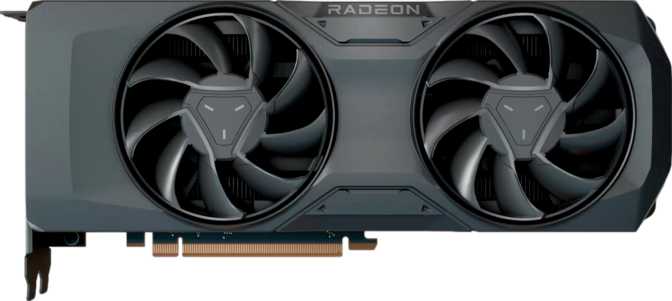
AMD Radeon RX 7700 Review: 16GB VRAM in a Mid-Range Package
Graphics CardsThe mid-range GPU market is where most buyers actually live — and it is also where manufacturers make the most compromises. AMD's Radeon RX 7700 refuses to play it safe. It carries a memory configuration more commonly found in professional-class hardware, pairs it with a genuinely modern architecture, and packages the whole thing at a power envelope that will not force a PSU upgrade. Whether you are building your first serious gaming rig or upgrading from a card two or three generations old, the RX 7700 warrants genuine attention before committing to anything else in its price bracket.
Design, Build, and Physical Footprint
Physical dimensions, cooling, and system compatibility
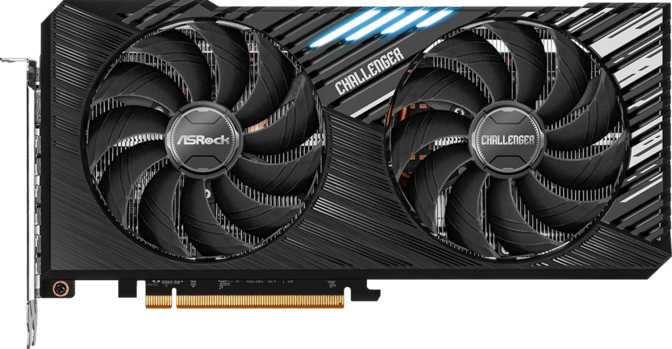
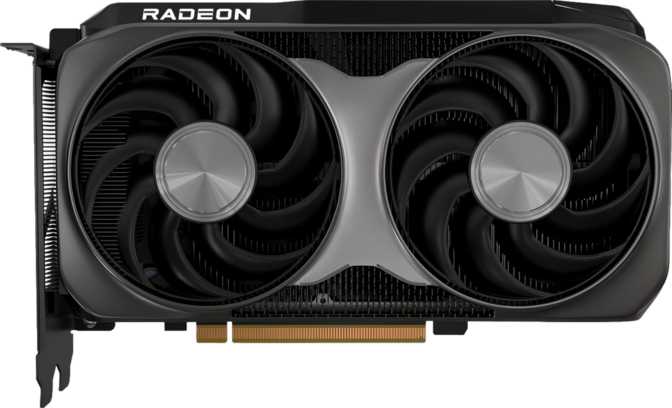
At 267mm in length and 135mm in height, the RX 7700 occupies a comfortable middle ground physically — substantial enough to feel premium but not so imposing that it creates clearance headaches in mid-tower cases. Most standard ATX and mid-ATX builds will accommodate it without any slot juggling. The card connects via PCIe 4.0, the current mainstream standard, ensuring full bandwidth compatibility with any platform released in the last several years while remaining backward compatible with older PCIe 3.0 motherboards at a marginal performance cost.
The air-cooled design means your case ventilation setup matters more than usual under sustained loads. Good airflow — adequate intake and exhaust fans, unobstructed cable routing — will keep the card running efficiently during long gaming or compute sessions. Budget for case airflow when planning your build if you intend to push this card hard.
The reference-adjacent design ships without RGB lighting — a deliberate choice that signals engineering priorities over cosmetics.
Board partner variants from manufacturers such as Sapphire, PowerColor, and XFX offer custom cooler designs that may include lighting if aesthetics matter to your build.
Under the Hood: RDNA 3 Architecture
What the 5nm manufacturing process and 28 billion transistors mean in practice
What RDNA 3 Actually Means for You
AMD's RDNA 3 architecture, built on a 5-nanometer manufacturing process, represents a meaningful generational leap. The 5nm node packs roughly 28 billion transistors onto the die — a figure that reflects how much functional complexity AMD has crammed into a relatively compact chip. More transistors translate to more compute resources, better power efficiency per task, and more sophisticated on-chip logic for handling modern rendering workloads.
For the non-technical reader: a smaller manufacturing node means AMD fits more computing power into the same physical space while consuming less electricity doing it. The practical result is a card that performs above its thermal budget.
Compute and Shader Performance
The RX 7700 operates with 2,560 shader processors — the individual compute units responsible for rendering pixels, handling physics calculations, and running shader programs. These are organized alongside 160 texture units, which handle how surfaces are mapped and detailed in 3D environments, and 96 render output units that control how quickly the card pushes final pixel data to your display.
The card's floating-point throughput reaches territory that, just a couple of generations ago, would have placed it firmly in the enthusiast tier. Combined with turbo clock speeds that climb to a notably high frequency under load, the pixel output rate comfortably drives high-refresh-rate monitors at 1080p and delivers competitive 1440p performance with meaningful headroom.
Memory: The RX 7700's Most Compelling Differentiator
16GB VRAM with a 256-bit bus — rare at this price tier
16GB of VRAM — Why It Matters Right Now
The RX 7700 ships with 16GB of video memory. In a market segment where 8GB remains common and 12GB is considered generous, 16GB is a legitimate outlier — and it has direct, tangible implications for how long this card remains relevant.
Modern games are increasingly memory-hungry. High-resolution texture packs, open-world asset streaming, and games built natively for current-generation consoles all benefit from a larger VRAM pool. A card that runs out of video memory must start swapping assets to system RAM, causing stuttering — not a gradual slowdown, but sudden, jarring frame hitches that no amount of GPU compute power can mask. With 16GB onboard, the RX 7700 sidesteps this problem in virtually every current title and provides substantial runway for games releasing over the next several years.
Memory Speed and Bandwidth
The memory runs on GDDR6 paired with an unusually wide 256-bit memory bus. Most GPUs in this segment use narrower 128-bit or 192-bit buses, limiting how quickly data flows between GPU cores and the memory pool. The result is a memory bandwidth figure that eclipses many cards positioned above the RX 7700 in price — data can flow at a rate that keeps the shader processors fed even in demanding scenes with large textures and complex geometry. The memory also supports Error Correcting Code (ECC) functionality, a feature primarily relevant to compute workloads and content creation, signalling that AMD engineered this silicon with broader use cases in mind.
Key Features: Real-World Meaning Behind the Specs
What each technology actually does for you
DirectX 12 Ultimate
Full DX12 Ultimate compliance means support for every feature Microsoft's current graphics standard defines — mesh shaders, variable-rate shading, and hardware ray tracing. These are capabilities that games tap into automatically; no manual configuration needed.
Hardware Ray Tracing
AMD's ray tracing hardware simulates how light physically behaves — making reflections, shadows, and ambient occlusion dramatically more realistic. At moderate settings in most games the RX 7700 handles it without severe frame rate penalties. For path-traced titles at maximum quality, settings adjustments will be needed.
AMD SAM
When paired with a compatible AMD Ryzen processor, Smart Access Memory allows the CPU to access the full VRAM pool directly rather than working through a smaller addressable window. Performance gains vary by game — from marginal to meaningful — and the feature requires no user action beyond enabling it in BIOS.
Double Precision Compute
DPFP support is largely irrelevant for gaming but valuable for scientific computing, financial modelling, and certain machine learning workloads. Its inclusion signals that AMD engineered this silicon for more than gaming — a meaningful bonus for developers, researchers, or creative professionals.
OpenCL & OpenGL Support
OpenCL 2.2 extends the card's utility into GPU-accelerated computing — useful for video transcoding, physics simulations, and any software that offloads parallel computation to the GPU. OpenGL 4.6 covers compatibility with legacy and creative applications outside the DirectX ecosystem including CAD software and professional creative tools.
ECC Memory Support
Error Correcting Code memory support is a workstation-class feature that detects and corrects data corruption before it causes errors. Irrelevant to everyday gaming, but valuable for professionals running compute workloads where data integrity matters — rendering, simulation, and scientific applications.
Display Support and Connectivity
Port configuration, display standards, and multi-monitor capability
Port Configuration
The RX 7700 offers three active display outputs: one HDMI 2.1 port and two DisplayPort outputs. There is no DVI output, reflecting the reality that DVI is obsolete for any modern display. The card officially supports up to four simultaneous displays, meaning an adapter or hub can extend to a fourth screen if needed — useful for productivity-focused multi-monitor arrangements alongside gaming.
| Output | Quantity | Standard | Max Capability |
|---|---|---|---|
| HDMI | 1 | HDMI 2.1 | 4K@120Hz, 8K@60Hz, VRR |
| DisplayPort | 2 | DisplayPort | High-refresh monitors, max bandwidth |
| DVI | 0 | N/A | Not supported |
| Mini DP | 0 | N/A | Not supported |
What HDMI 2.1 Unlocks
HDMI 2.1 is the current gold standard for display connectivity, supporting 4K at 120Hz and Variable Refresh Rate over HDMI for compatible televisions. If you are gaming on a large-screen TV rather than a dedicated monitor, HDMI 2.1 is the connection you need — and the RX 7700 delivers it. The two DisplayPort outputs serve monitor-focused users who prefer the highest bandwidth available for high-refresh PC displays.
HDMI 2.1 supports Variable Refresh Rate (VRR) on compatible televisions, eliminating screen tearing without requiring a dedicated gaming monitor.
Up to four simultaneous outputs enables productivity multi-monitor configurations. A hub or adapter on the DisplayPort outputs extends beyond the three native ports.
Power, Thermals, and System Requirements
What you need to run the RX 7700 comfortably
The RX 7700 operates within a 200-watt thermal design window. For a system pairing this card with a modern processor, a 650-watt power supply is a comfortable minimum. A 750-watt unit gives additional headroom and is the safer choice for systems with higher-end CPUs or multiple storage drives.
Because this is an air-cooled design, case ventilation quality directly affects sustained performance. A build with poor airflow — cables blocking fan paths, inadequate exhaust — will see the card throttle its performance under extended load to protect itself. Investing in proper case airflow when planning your build is not optional; it is part of getting the performance this card is capable of.
Real-World Usage: Who Should Buy This
Honest scenarios — and equally honest deal-breakers
Buy the RX 7700 If You Are...
-
A 1440p gamer. The RX 7700 is optimally designed for 2560×1440 gaming. It has more than enough compute throughput for high frame rates in fast-paced titles and sufficient memory to handle modern open-world games without stuttering.
-
A 1080p high-refresh enthusiast. At 1920×1080, the card reliably drives 144Hz and 165Hz monitors across most modern titles. If you own a high-refresh monitor and do not want frame rate to be the ceiling, this card handles it comfortably.
-
A future-conscious buyer. The 16GB VRAM is the single strongest argument for choosing this card over a marginally more powerful competitor with less memory. If you plan to use this GPU for three to five years, the memory headroom becomes progressively more valuable.
-
A multi-tasker or content creator. DPFP compute support, OpenCL compatibility, and generous VRAM make this card meaningfully capable beyond gaming — video editing, 3D rendering in tools like Blender, and AI-accelerated creative applications all benefit.
Look Elsewhere If You Are...
-
A dedicated ray tracing maximalist. AMD's ray tracing hardware at this tier handles moderate settings without severe penalties, but it cannot match NVIDIA's RT core density. For path-traced visuals at high frame rates, a competing card will serve you better.
-
Targeting 4K at maximum settings. The display connectivity supports 4K, and the card will run it — but demanding titles at that resolution will require settings compromises to maintain smooth frame rates. The RX 7700 is not an ideal pairing for a high-end 4K panel.
-
A DLSS-dependent buyer. NVIDIA's Deep Learning Super Sampling is not available on AMD hardware. AMD's FSR is an excellent open upscaling solution, but DLSS produces sharper results at equivalent frame rates in supported titles. If DLSS is non-negotiable, this card is not for you.
Competitive Positioning
How the RX 7700 stacks up against its most logical alternatives
| Consideration | RX 7700 | RTX 4060 Ti 8GB | RTX 4060 Ti 16GB |
|---|---|---|---|
| VRAM | 16 GB | 8 GB | 16 GB |
| Memory Bus Width | 256-bit | 128-bit | 128-bit |
| Memory Bandwidth | Exceptional | Moderate | Moderate |
| Ray Tracing | Moderate | High | High |
| DLSS Support | |||
| FSR Support | |||
| Power Draw (TDP) | 200W | 160W | 165W |
Honest Assessment: Strengths and Weaknesses
A balanced evaluation — credibility comes from acknowledging both sides
Where the RX 7700 Shines
The RX 7700's greatest strength is the coherence of its design as a 1440p gaming card. The memory configuration is not a spec sheet checkbox — it is a meaningful engineering decision that results in better real-world performance in texture-heavy games and a longer viable lifespan before the card becomes a bottleneck. The memory bandwidth is exceptional for this tier.
The RDNA 3 architecture delivers efficient, high-frequency performance at a 200W thermal budget that keeps system requirements reasonable — a full-performance build does not demand a premium power supply.
The DPFP compute support and OpenCL compatibility add genuine versatility for users who do more than play games. This is a card you can run a creative workflow on and switch to gaming without any compromise, which is increasingly rare at this price level.
Where the RX 7700 Falls Short
Ray tracing performance is adequate, not impressive. AMD has improved their RT implementation substantially across generations, but NVIDIA retains a meaningful lead at equivalent price points. In titles where ray tracing is the primary rendering path, the gap is visible.
The absence of DLSS is a real omission for some buyers. AMD's FSR works across a wider range of hardware — including NVIDIA cards — but DLSS on a compatible GPU produces sharper results at equivalent frame rates in supported titles. This gap matters more as upscaling becomes a standard tool in game development.
The reference-adjacent design ships without RGB lighting, which matters to builders who have planned their system aesthetics. This is a shopping consideration more than a product flaw — AIB variants solve it — but it warrants flagging before purchase.
Questions Buyers Ask Before Purchasing
Answers to the most common real-world concerns about the RX 7700
Final Verdict
A clear-eyed recommendation for who should — and who should not — buy this card
The AMD Radeon RX 7700 makes a compelling case built on a foundation most competitors in its tier cannot match: a 256-bit wide memory bus and 16GB of GDDR6 at a 200-watt thermal limit. For buyers targeting 1440p gaming — the most practical high-fidelity resolution for the vast majority of monitor users — this card is genuinely well-suited to both present and near-future demands.
The absence of DLSS and the moderate ray tracing performance are real trade-offs, not minor footnotes. Buyers whose primary interest is maximising ray tracing fidelity or who are deeply invested in NVIDIA's upscaling ecosystem will be better served elsewhere.
For the buyer who wants a fast, capable, memory-rich GPU that will not become a bottleneck as game assets grow heavier over the coming years — and who values a platform-flexible, compute-capable card that handles creative work as well as gaming — the RX 7700 is among the most defensible purchases in its competitive tier. The 16GB VRAM at this price point is the clearest differentiator in this segment, and AMD deserves credit for not trimming it to hit a lower cost target.