AMD Radeon Pro W7400 Review: A Workstation GPU Built for Efficiency
Graphics CardsWhat the AMD Radeon Pro W7400 Actually Is
Not every professional graphics card needs to be the biggest, loudest, or most expensive option in the rack. The AMD Radeon Pro W7400 takes a different approach: it slots into the lower-to-mid tier of AMD's workstation lineup and targets a specific, underserved audience — professionals who need certified, capable, workstation-grade graphics in compact or power-constrained environments without paying flagship prices. Understanding that context is the entire key to evaluating this card fairly.
This is not a card for rendering farms or GPU compute clusters. It is a card for the architect running Revit on a small-form-factor workstation, the product designer who needs stable Solidworks performance, or the media professional who wants reliable multi-display output from a machine that fits under a desk. Measured against those real-world goals, the W7400 tells a genuinely interesting story.
Design, Build, and Physical Footprint
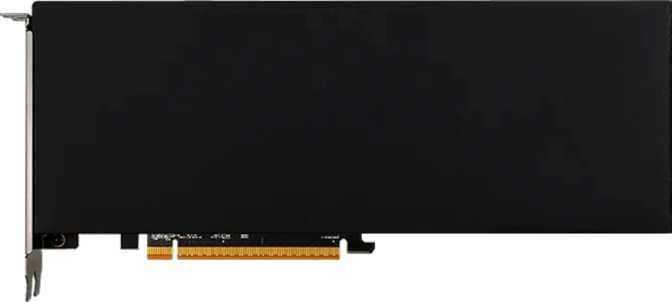
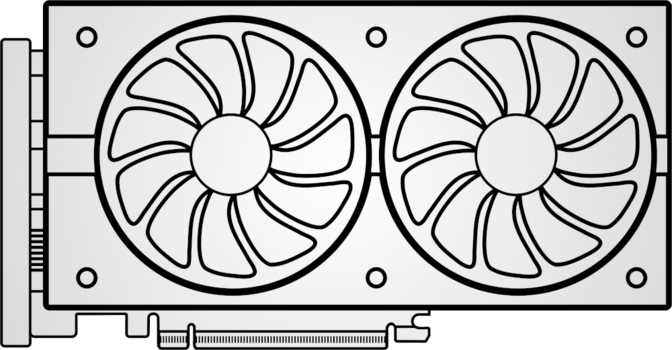
The W7400 is physically small — and deliberately so. At just under 170mm in length and roughly 70mm in height, it qualifies as a low-profile card, meaning it fits inside compact workstation towers and small-form-factor chassis that full-height, dual-slot cards simply cannot enter. That compact profile is one of the primary reasons this card exists.
There is no RGB lighting, no aggressive shroud design, and no unnecessary visual ornamentation. The aesthetic is exactly what you would expect from a card carrying the "Pro" designation: clean, quiet, and professional. This is hardware designed to work inside a machine, not to be admired through a tempered glass panel.
Cooling is handled by an active fan solution sized appropriately to the card's modest power envelope. The absence of a water-cooling option is entirely appropriate here — the thermal demands simply do not require it, and the compact form factor means any complex cooling solution would be counterproductive.
- Length168 mm
- Height69 mm
- Form FactorLow-Profile
- Cooling TypeActive Fan
- RGB LightingNone
- PCIe VersionPCIe 4.0
Architecture and Processing Power
The RDNA 3 Foundation
The W7400 is built on AMD's RDNA 3 architecture, fabricated at 6 nanometers. That process node matters because it directly enables the combination of relatively high computational density and low power consumption that defines this card's character. At 13.3 billion transistors, the die is substantial for a mid-range workstation part — and that transistor budget funds meaningful hardware capability rather than being spent on features the target audience does not need.
The shader configuration — 1,792 active shading units alongside 112 texture mapping units — is sized appropriately for the card's market position. These numbers are more than sufficient for single-user professional workloads: CAD visualization, 3D modeling viewport performance, architectural rendering previews, and professional media workflows.
Compute Performance in Context
At approximately 12 teraFLOPS of single-precision compute, the W7400 offers real working capability for GPU-accelerated tasks. This is comfortably sufficient for real-time 3D viewport work in applications like Blender, Maya, or Cinema 4D at moderate complexity levels, and capable of handling GPU-accelerated effects in professional video editing software without bottlenecking typical broadcast-resolution timelines.
Critically, the card includes hardware support for double-precision floating-point operations. In many consumer and gaming GPUs, double-precision throughput is severely crippled to push buyers toward more expensive compute-oriented hardware. The W7400's inclusion of proper DPFP support is one of the clearest signals that AMD engineered this as genuine professional hardware — not gaming hardware wearing a different driver package.
Performance At A Glance
Memory: Capacity, Speed, and the ECC Question
What 8GB of GDDR6 Delivers
The W7400 carries 8 gigabytes of GDDR6 video memory across a 128-bit memory bus, with an effective memory speed reaching approximately 10,800 MHz. This yields a memory bandwidth of roughly 172 gigabytes per second — meaningfully higher than many cards with a comparable bus width, because GDDR6 at this speed is genuinely fast in its class.
In practice, this translates to fluid 3D viewport navigation with moderately complex scenes, comfortable handling of multi-layer compositions in DaVinci Resolve or Premiere Pro, and no significant bottlenecking during 4K texture-heavy visualization work.
Eight gigabytes is workable for most single-user professional workflows today. Complex VFX scenes, large architectural visualization datasets, or machine learning inference workloads can pressure that ceiling. Buyers who regularly work with these types of assets should carefully assess whether this card meets their specific project requirements before committing.
The ECC Omission
This card does not support Error-Correcting Code (ECC) memory — a feature that detects and corrects memory errors in real time, critical in applications where a single bit-flip could corrupt a financial calculation, a medical imaging dataset, or an engineering simulation result.
For the majority of creative professionals in visualization, design, and media production, the absence of ECC is an acceptable trade-off and not a practical concern. For anyone working in regulated industries, scientific computing, or applications where data integrity is a hard requirement, this omission is a genuine disqualifier. Cards further up AMD's professional lineup — or NVIDIA's workstation range — should be considered instead.
Display Connectivity
The W7400 provides four DisplayPort outputs and nothing else. There is no HDMI port and no USB-C display output. Four DisplayPort connections is a strong multi-monitor specification — it enables simultaneous four-screen setups for trading workstations, reference monitoring environments, expansive creative workspaces, or any workflow that benefits from extended screen real estate.
Power, Thermals, and System Compatibility
A Genuinely Efficient Workstation GPU
The W7400's 55-watt Thermal Design Power figure is one of its most practically significant characteristics. Many mid-range and upper-mid-range professional graphics cards draw two to four times this amount. A 55W TDP means the card typically does not require a dedicated PCIe power connector from the power supply — it draws what it needs directly from the motherboard slot.
Drops into older workstations and small-form-factor systems with limited PSU headroom — no hardware upgrades required in most cases.
In tight chassis with restricted airflow, lower heat output significantly reduces the risk of thermal throttling and overall system stress.
Lower power draw reduces operating costs for continuously running workstations and eliminates the need for dedicated PSU cables in most builds.
This efficiency is not achieved by crippling performance — it results from the combination of the 6nm process node and RDNA 3's architectural improvements, running an efficiently designed chip at a sensible operating point.
PCIe 4.0 Interface
The card connects via PCIe 4.0, the current mainstream standard, and is backward compatible with PCIe 3.0 systems with minimal practical performance impact for professional workloads. The bandwidth overhead of CAD and visualization tasks rarely saturates even older PCIe 3.0 bandwidth ceilings.
Key Features Explained
Ray Tracing Hardware
Hardware-accelerated ray tracing enables real-time photorealistic lighting in modern visualization software, architectural rendering previews, and product design viewport workflows — producing interactive results that previously required full offline render passes.
DirectX 12 Ultimate & OpenGL 4.6
DirectX 12 Ultimate certification covers the full current feature set including variable rate shading and mesh shaders. OpenGL 4.6 compliance is specifically important: many CAD and engineering tools still rely heavily on OpenGL, and full 4.6 support ensures broad application compatibility.
OpenCL 2.1 Compute
OpenCL 2.1 enables GPU-accelerated computation in applications using this framework for image processing, simulation, and data analysis — extending the card's practical utility beyond traditional 3D visualization.
AMD Smart Access Memory
On compatible AMD Ryzen or EPYC platforms, SAM allows the CPU to access the card's full VRAM pool directly, producing measurable performance improvements in GPU-intensive tasks. A meaningful platform-specific advantage for AMD-based workstation owners.
Double-Precision FP Support
Hardware DPFP support — often crippled or disabled in consumer GPUs — enables simulation work, engineering analysis, and scientific applications that demand mathematical precision. This is one of the clearest differentiators between a true professional card and a relabeled gaming part.
No AI Upscaling (DLSS / XeSS)
DLSS is NVIDIA-exclusive hardware; XeSS matrix acceleration is Intel-specific. For professional workloads, this is a non-issue. AMD's FSR upscaling is software-level and does not require dedicated hardware support on any GPU.
Real-World Usage: Who Should Buy This Card
Well-Suited For
-
CAD and Mechanical Design
Solidworks, AutoCAD, Inventor, and similar applications benefit from certified professional drivers, stable OpenGL performance, and reliable multi-display output — all core strengths of the W7400. -
Architectural Visualization
Revit, Rhino, or ArchiCAD with real-time visualization plugins. Hardware ray tracing adds genuine value in modern viewport rendering modes used by architectural design tools. -
Professional Video Editing at 1080p–4K
DaVinci Resolve, Premiere Pro, and similar applications leverage GPU acceleration for effects and rendering. The W7400 handles broadcast-standard timelines comfortably. -
Multi-Monitor Professional Setups
Four simultaneous DisplayPort outputs make this card an efficient choice for multi-screen environments without requiring additional hardware or adapters. -
Compact and Legacy Workstation Upgrades
The low-profile form factor and low power draw make this the right answer for small-form-factor workstations that cannot accommodate full-size or power-hungry cards.
Not the Right Choice For
-
Heavy 3D Rendering or VFX
Complex photorealistic rendering, large scene simulation, or multi-GPU rendering pipelines will outgrow this card. A higher-tier professional GPU is the appropriate tool for these workloads. -
Machine Learning and AI Inference
The VRAM ceiling and compute profile are not well-matched to serious ML workloads. Dedicated compute cards are the correct tool, and the W7400 makes no pretense otherwise. -
Regulated Industries Requiring ECC
Medical imaging, financial simulation, or any scientific workflow where data integrity is a hard requirement. The absence of ECC memory is a genuine, non-negotiable disqualifier here. -
Gaming Use Cases
Professional workstation drivers are optimized for stability and application certification — not game performance. This is not the right purchase if gaming is a primary or secondary goal.
Competitive Positioning
The W7400's most direct competition in the professional mid-range segment comes from NVIDIA's RTX A2000 and from its own predecessor, the Radeon Pro W6400. Here is how the three compare across the specifications that actually matter for professional workloads.
| Feature | AMD Radeon Pro W7400 This Review |
NVIDIA RTX A2000 (12GB) | AMD Radeon Pro W6400 |
|---|---|---|---|
| Architecture | RDNA 3 / 6nm | Ampere / 8nm | RDNA 2 / 6nm |
| Compute (approx.) | ~12 TFLOPS | ~8 TFLOPS | ~6.4 TFLOPS |
| VRAM | 8GB GDDR6 | 12GB GDDR6 | 4GB GDDR6 |
| Memory Bandwidth | ~173 GB/s | ~192 GB/s | ~96 GB/s |
| TDP | 55W | 70W | 50W |
| ECC Support | No | Yes | No |
| Display Outputs | 4x DisplayPort | 4x Mini-DP | 4x Mini-DP |
| Low-Profile Capable | Yes | Yes | Yes |
| Ray Tracing | Yes | Yes | Yes |
The choice between the W7400 and the RTX A2000 often comes down to a single trade-off: VRAM capacity (A2000 advantage at 12GB) versus compute efficiency and lower power draw (W7400 advantage). Against the W6400, the W7400 represents a substantial generational leap in both throughput and memory capacity while maintaining a nearly identical physical and power profile.
Honest Assessment: Strengths and Limitations
What It Gets Right
The W7400's efficiency is exceptional for a professional workstation card. Delivering real compute capability within a 55W envelope is technically impressive and practically valuable for the buyers it targets. The architecture is current, the display output configuration is generous, and the form factor opens doors that higher-end cards simply cannot fit through.
Double-precision floating-point support and proper professional driver certification round out a package that earns its "Pro" designation honestly. The generational leap from RDNA 2 to RDNA 3 — while maintaining a similar physical and power profile — is substantial and meaningful for anyone upgrading from the previous generation.
Where It Falls Short
Eight gigabytes of VRAM, while adequate today, is not a comfortable long-term allocation as professional applications grow more memory-hungry. The lack of ECC is a meaningful constraint in certain industries, and the compute figures — solid for the tier — do not have the headroom to grow with demanding rendering or simulation workloads over a multi-year hardware cycle.
The connectivity profile — four DisplayPorts with no HDMI — is a deliberate professional-market decision, but it creates real friction for anyone whose display infrastructure is not already built around DisplayPort. Active adapters add cost and introduce an additional point of failure into a professional workflow.
Common Questions Before You Buy
Final Verdict
AMD Radeon Pro W7400 — Professional Workstation GPU
The AMD Radeon Pro W7400 is a precisely targeted professional tool that delivers genuine value within clear boundaries. For the architect, product designer, CAD operator, or multi-display professional working in a compact workstation environment, it represents a compelling combination of current-generation architecture, low power consumption, and certified professional performance at a mid-range price point.
The W7400 is not trying to be everything. It knows exactly what it is — and for the right buyer, that clarity is its greatest asset.
- RDNA 3 architecture, 6nm process
- 55W TDP — class-leading efficiency
- 4x DisplayPort outputs
- Low-profile, compact form factor
- Double-precision FP support
- 8GB VRAM — tight long-term ceiling
- No ECC support, no HDMI output