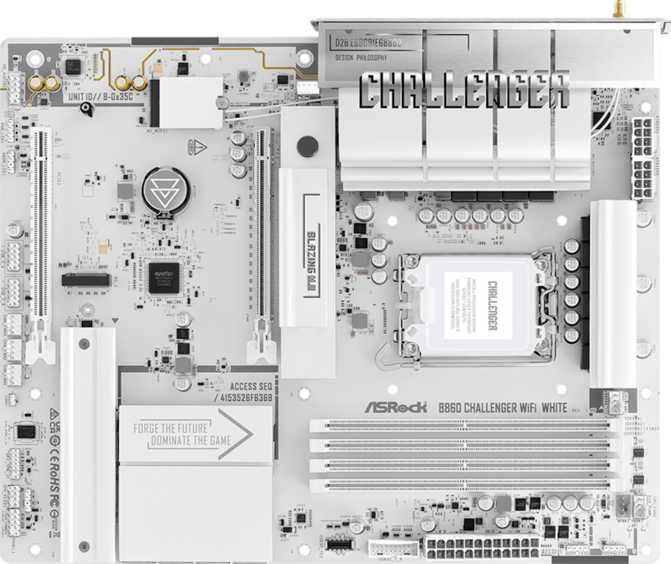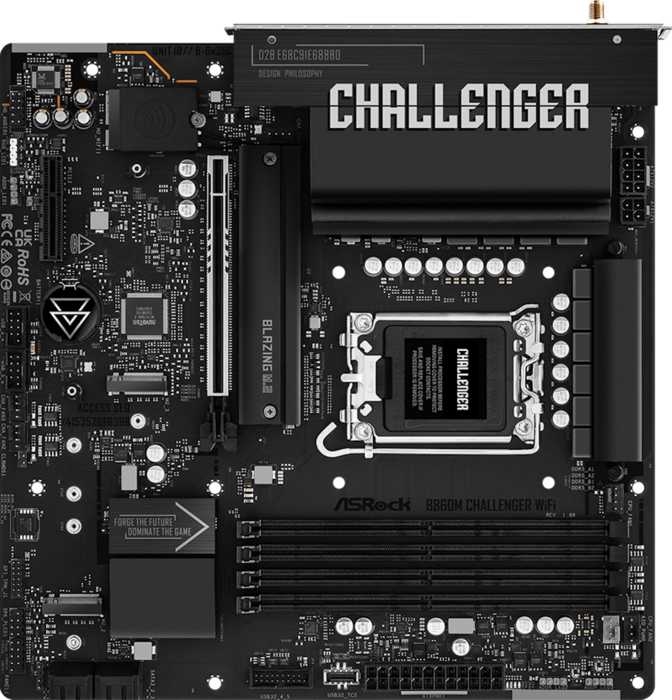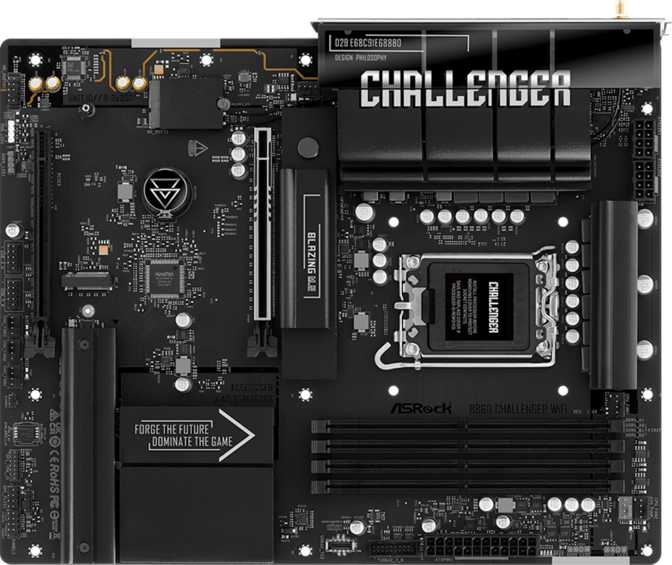
Intel's LGA 1851 platform arrived with a clear message: the mid-range motherboard market was due for a serious upgrade. The B860 chipset sits in a familiar position — below the enthusiast-grade Z890 but well above the budget-tier H810 — and the ASRock B860 Challenger Wi-Fi is one of the more feature-complete boards in that middle ground. It targets builders who want a capable, future-leaning foundation without the premium pricing that comes with full overclocking headroom or flagship-tier VRM configurations. Whether that trade-off works for you depends entirely on what you actually need from a platform, and this review breaks that down in full.
Technical Specifications at a Glance
| Specification | Value |
|---|---|
| Platform | |
| Socket | LGA 1851 |
| Chipset | Intel B860 |
| Form Factor | ATX (305 x 244 mm) |
| CPU Overclocking | Memory OC only (XMP) |
| Memory | |
| Type | DDR5 only |
| Slots | 4 (Dual Channel) |
| Max Capacity | 256 GB |
| Max OC Speed | 8666 MHz |
| Storage | |
| M.2 Sockets | 3 (1x PCIe 5.0 + 2x PCIe 4.0) |
| SATA 3 | 4 connectors |
| RAID | 0 / 1 / 5 / 10 |
| Specification | Value |
|---|---|
| Expansion | |
| PCIe 5.0 x16 | 1 slot (CPU-direct) |
| PCIe 4.0 x16 | 1 slot |
| Rear Connectivity | |
| USB (Type-A) | 6x USB 3.2 Gen 1 + 2x USB 2.0 |
| USB (Type-C) | 1x USB 3.2 Gen 1 |
| Video Output | HDMI 2.1 |
| LAN | 2.5 GbE |
| Wireless & Other | |
| Wi-Fi | Wi-Fi 7 (802.11be) |
| Bluetooth | 5.4 |
| Audio | 7.1 ch, 3 rear jacks |
| Fan Headers | 7 |
| RGB / Warranty | Yes / 3 Years |
Design and Build Quality
Physical Layout and Form Factor
The B860 Challenger Wi-Fi follows the standard ATX footprint — 305mm wide by 244mm tall — which means it fits comfortably in any full-tower or mid-tower case designed for ATX builds. There is nothing proprietary or unusual about the sizing; if your case supports ATX, this board drops in cleanly.
Visually, ASRock leans into the "Challenger" branding with a utilitarian aesthetic that avoids the over-the-top armor plating common on more aggressively styled competitors. RGB lighting is present and controllable, adding accent illumination without dominating the board's appearance. Builders who prefer an understated look can typically dial the RGB down or off entirely through the BIOS or ASRock's Polychrome Sync software — but if you want a light show, the onboard lighting provides a solid foundation to synchronize with compatible components.
There is no dedicated clear CMOS button on the rear I/O panel, which adds minor friction during initial builds or troubleshooting sessions. There is also no dual BIOS — if a firmware update fails, recovery relies on ASRock's Instant Flash utility or manual jumper intervention rather than a failsafe backup chip. Neither is a dealbreaker, but both are absent on a board where some competitors at similar pricing include them.
Platform and Processor Compatibility
LGA 1851 — What That Socket Means for Your Build
The LGA 1851 socket is Intel's current-generation interface, pairing with the Core Ultra 200 series of processors. This is a meaningful detail for longevity: you are not buying into an aging platform. The socket accommodates Intel's latest CPU architecture, which brings meaningful improvements to efficiency, gaming, and AI-assisted workloads depending on the chip tier you pair this board with.
Memory Overclocking: Fully Supported
The B860 chipset fully supports XMP profile activation and manual DDR5 memory tuning. You can push your RAM to its rated high-speed profile without needing a premium Z-series board — just activate the XMP profile in the BIOS and the board handles the rest.
CPU Overclocking: Not Available
The B860 chipset locks CPU clock multiplier adjustment. You cannot push a K-series processor beyond its factory boost frequencies on this board. If CPU overclocking is a specific goal, you need a Z890 board. For most mainstream builders running stock settings, this distinction is irrelevant in practice.
One nuance worth understanding: the HDMI 2.1 port on the rear I/O is present, but integrated graphics display output is not routed through the B860 chipset the way it is on Intel's H-series boards. Plan on a discrete GPU as the primary display output for the vast majority of builds on this platform.
Memory: DDR5 with Serious Headroom
Four Slots, Dual Channel, and a High Ceiling
The B860 Challenger Wi-Fi uses DDR5 exclusively — there is no DDR4 compatibility, which is standard across the LGA 1851 platform. Four physical slots support a dual-channel configuration, and the maximum supported capacity reaches 256GB across all four slots. That ceiling is far beyond what any gaming or general productivity build would ever approach, but it matters for workstation use cases involving large datasets, multiple virtual machines, or memory-intensive creative applications.
The memory speed ceiling when running overclocked profiles is particularly noteworthy: validated configurations up to 8666 MHz represent the top of what current consumer DDR5 platforms support. For context, standard JEDEC DDR5 speeds begin around 4800–5600 MHz. Everyday builders running a 6000–6400 MHz kit will find the board handles XMP activation without drama. Enthusiasts chasing maximum memory bandwidth for heavily threaded or latency-sensitive workloads have a genuine runway here that most competing B-series boards don't match.
ECC memory is not supported, which is expected for a consumer B-series chipset. This will only matter to builders running continuous-operation workstations where data integrity under sustained load is a professional requirement — home and gaming users can disregard it entirely.
Storage Capabilities
M.2, SATA, and RAID — More Than Expected at This Price
Storage flexibility is where the B860 Challenger Wi-Fi earns real respect. Three M.2 sockets handle modern NVMe drives, with the primary slot running through the PCIe 5.0 lanes connected directly to the processor. This means it can take advantage of the fastest consumer NVMe drives currently available — those capable of sequential reads exceeding 12,000 MB/s. The two remaining M.2 slots run through PCIe 4.0, which is still fast enough that no real-world bottleneck exists for general use cases.
NVMe and SATA at a Glance
-
Primary M.2 — PCIe 5.0Supports the fastest consumer NVMe drives available. Sequential read speeds exceeding 12,000 MB/s are achievable with compatible drives.
-
Secondary M.2 x2 — PCIe 4.0Still high-performance by any measure — ideal for game libraries, applications, or secondary system drives without any real bottleneck.
-
4x SATA 3 ConnectorsTraditional SSDs and hard drives connect here — mix a fast NVMe boot drive with high-capacity SATA storage for media libraries or backups.
RAID Support — Unusual at This Tier
| RAID Level | What It Does | Supported |
|---|---|---|
| RAID 0 | Striping for maximum speed | |
| RAID 1 | Mirroring for data redundancy | |
| RAID 5 | Balanced capacity + fault tolerance | |
| RAID 10 | Speed + redundancy combined | |
| RAID 0+1 | Combined array |
Full RAID support across four levels is genuinely unusual at B-series pricing. Whether you use it depends on your workflow, but having the option without a Z-series price premium is a real advantage for home server builders and small creative studios.
Expansion Slots and GPU Compatibility
PCIe 5.0 for the GPU, PCIe 4.0 for Everything Else
The primary PCIe slot runs at PCIe 5.0 x16, wired directly to the processor — not routed through the chipset. This future-proofs the board for any discrete GPU currently on the market and any GPU likely to arrive in the near future. Current high-end graphics cards still operate comfortably within PCIe 4.0 bandwidth, so a PCIe 5.0 slot provides complete headroom with room to spare for several years of GPU generations ahead.
A second slot operates at PCIe 4.0 x16 physically, with actual electrical bandwidth allocated through chipset lanes. This slot handles capture cards, RAID expansion controllers, or other add-in cards with no compatibility concerns.
There are no PCIe x1 slots on this board — an increasingly common design choice as USB front-panel headers and M.2 sockets absorb the roles that x1 cards once filled. Builders with specific legacy or niche expansion card requirements should verify compatibility before purchasing.
Slot Summary
| Slot | Interface | Count |
|---|---|---|
| Primary GPU | PCIe 5.0 x16 | 1 |
| Secondary | PCIe 4.0 x16 | 1 |
| PCIe x1 | — | 0 |
PCIe Backwards Compatibility
PCIe 5.0 x16 is fully backwards compatible. Any PCIe 4.0 or 3.0 discrete GPU operates at its native bandwidth — there is no real-world performance penalty for current graphics cards from any manufacturer.
Connectivity: Rear I/O and Internal Headers
A Broad Port Selection with One Meaningful Gap
Rear I/O Panel
-
USB Ports (6x Type-A + 1x Type-C + 2x USB 2.0)
Six USB 3.2 Gen 1 Type-A ports at 5 Gbps cover keyboards, mice, hubs, and most peripherals. One USB 3.2 Gen 1 Type-C adds modern connector support at the same speed tier. Two USB 2.0 ports handle remaining low-bandwidth devices.
-
HDMI 2.1 Output
Supports up to 4K at 144Hz or 8K at lower refresh rates. Requires a processor with iGPU display output in most build configurations — a discrete GPU handles display output for the majority of LGA 1851 builds.
-
2.5 GbE Wired Networking
A step up from the 1GbE that was standard on prior-generation mid-range boards. Meaningful for local file transfers to NAS devices, high-bandwidth streaming setups, and any environment where network throughput actually matters.
-
3x Analog Audio Jacks
Supports 7.1 surround through the standard 3.5mm multi-jack arrangement. No S/PDIF optical output — optical connections to AV receivers or external DACs require an add-in solution.
Key Limitation: USB Speed
The fastest rear-panel USB port tops out at 5 Gbps. There is no USB 3.2 Gen 2 (10 Gbps), no Gen 2x2 (20 Gbps), and no USB 4 anywhere on the rear I/O. Users who regularly dock fast external NVMe enclosures or professional storage accessories will feel this constraint. Several competing B860 boards address this with at least one 10 Gbps port.
Internal Headers
-
7 Fan and Pump HeadersAdequate for a 360mm AIO cooler plus multiple case fans. Each header supports PWM and DC control with individual speed curves via BIOS or ASRock's fan utility.
-
Front Panel USB Expansion2x USB 3.2 Gen 1 headers, 4x USB 2.0 headers, and 1x USB-C 3.2 Gen 1 front-panel header broaden connectivity for case front panels.
-
TPM HeaderSupports discrete TPM modules for hardware-based security — relevant for enterprise deployments or security-conscious home users who prefer physical TPM over firmware TPM.
Wireless Connectivity
Wi-Fi 7 at a Mid-Range Price Point
The wireless module included on this board supports Wi-Fi 7 (802.11be) — the current top tier of consumer wireless standards. Wi-Fi 7 is backwards compatible with Wi-Fi 6E, Wi-Fi 6, Wi-Fi 5, and older standards, so it works with any router you already own. To experience Wi-Fi 7's peak throughput improvements — particularly multi-link operation, which allows simultaneous use of multiple frequency bands — you need a Wi-Fi 7 router on your network.
For most home builders, Wi-Fi 7 on a current-generation board is a forward-looking investment. It means this board will not become a wireless bottleneck as Wi-Fi 7 infrastructure becomes standard over the coming years — an upgrade path that requires no hardware swap on the motherboard side.
Bluetooth 5.4 is included alongside the wireless module, covering wireless peripherals, audio devices, and any Bluetooth-based accessories with current-generation range and connection stability.
- Standard
- Wi-Fi 7 (802.11be)
- Backwards Compat.
- 6E / 6 / 5 / 4
- Bluetooth
- Version 5.4
- aptX Audio
- Not supported
Audio
Onboard 7.1 — Functional, Not Flagship
The B860 Challenger Wi-Fi includes a 7.1-channel onboard audio implementation accessed through three rear audio jacks. This setup supports stereo headphones, 2.1 speaker setups, and full 7.1 surround configurations when combined with compatible equipment and software. For gaming with a quality headset or casual desktop audio, the onboard solution is entirely adequate.
There is no S/PDIF optical output on this board. Audiophiles or home theater builders who run optical connections to an AV receiver or a high-quality external DAC will need to add a dedicated sound card or an optical-capable USB audio device. This is a niche concern for most users, but worth knowing before you build.
Who This Motherboard Is For
-
Mainstream Gaming BuildsA PCIe 5.0 GPU slot, DDR5 memory support, and 2.5GbE networking cover everything a gaming build needs at this tier. Three M.2 sockets mean fast storage without compromise.
-
Content Creation WorkstationsRAID support, a 256GB memory ceiling, and three M.2 slots serve video editors, photographers, and developers managing large file libraries or running multiple virtual machines simultaneously.
-
Intel Platform UpgradersLGA 1851 represents a meaningful generational leap from older Intel platforms, and the B860 Challenger Wi-Fi offers that upgrade path without demanding a top-tier board price.
-
Network-Forward and Home Server BuildsWi-Fi 7 combined with 2.5GbE wired networking makes this a strong choice for home server use, NAS configurations, or workspaces where local network throughput matters.
-
CPU OverclockersThe B860 chipset does not allow CPU multiplier overclocking. If you purchased a K-series Intel processor specifically to push clock speeds, you need a Z890 board.
-
High-Speed USB Power UsersNo USB 3.2 Gen 2 or USB 4 on the rear I/O is a real daily-use limitation for those regularly transferring large files through fast external enclosures or docking stations.
-
Budget-Focused BuildersIf Wi-Fi 7, PCIe 5.0 storage, or RAID don't factor into your specific build, a simpler board may serve you better at lower cost — you'd be paying for capabilities you won't use.
-
Dual BIOS / Easy-Recovery BuildersNo clear CMOS button and no dual BIOS means firmware updates carry a small but non-zero risk. Builders who flash BIOSes frequently or push memory aggressively will miss these safety nets.
Competitive Positioning
| Feature | ASRock B860 Challenger Wi-Fi | Typical B860 Competitor | Z890 Entry-Level |
|---|---|---|---|
| CPU Overclocking | |||
| PCIe 5.0 GPU Slot | |||
| PCIe 5.0 M.2 | Yes (1 slot) | Varies | Yes |
| Wi-Fi Generation | Wi-Fi 7 | Wi-Fi 6E (common) | Wi-Fi 7 |
| Rear USB Max Speed | 5 Gbps | 10 Gbps (some models) | 10–40 Gbps |
| M.2 Slots | 3 | 2–3 | 3–5 |
| RAID Support | 0 / 1 / 5 / 10 | Limited | Full |
| Dual BIOS | Varies | Common | |
| Price Tier | Mid-range | Mid-range | Premium |
Within the B860 segment, the Challenger Wi-Fi stands out for full RAID support and Wi-Fi 7 inclusion — features not universal among competing boards at this price. Where it trails some rivals is rear I/O USB speed. Z890 boards offer CPU overclocking and faster USB but command a premium that only makes sense if you actively need those capabilities.
Honest Assessment
Three M.2 slots — with the primary running PCIe 5.0 — alongside four SATA ports and full RAID support gives this board a storage configuration that punches above its class. Wi-Fi 7 at this price tier is a genuine value inclusion, not a marketing afterthought, and it carries real forward-compatibility value as Wi-Fi 7 infrastructure expands.
Seven fan and pump headers indicate that ASRock thought seriously about thermal management flexibility during the design process. For a mid-tower build with a 360mm AIO cooler and multiple case fans, seven headers is more than adequate — and each one supports both PWM and DC control.
The memory subsystem deserves specific praise: a 256GB capacity ceiling and validated support for DDR5 speeds reaching the very top of what consumer platforms support provide headroom that most comparable boards simply don't match. Builders planning memory-intensive workloads or who enjoy tuning XMP profiles will find real room to work here.
No rear-panel USB faster than 5 Gbps is the most tangible day-to-day limitation. Anyone who regularly docks a fast external SSD through USB will feel it every time a transfer starts. This is the single most significant practical weakness of an otherwise strong mid-range board, and it is not a minor spec omission — it affects a real daily workflow.
The absence of a dedicated clear CMOS button adds friction during troubleshooting. The lack of dual BIOS introduces a small but real risk during firmware updates that competing boards with backup firmware simply don't carry — something to weigh seriously if you flash BIOSes frequently or push memory limits aggressively.
No S/PDIF optical output and no PCIe x1 slots are niche concerns for most builders today, but they are real omissions for anyone who specifically needs them — worth verifying against your own requirements before purchasing.
Common Buyer Questions
Final Verdict
The ASRock B860 Challenger Wi-Fi is a well-considered mid-range motherboard for builders who want a current-generation Intel platform without the cost of Z890 overclocking capabilities. Its strengths — Wi-Fi 7, full RAID support, strong storage connectivity, and a generous DDR5 memory ceiling — are meaningful and not universally matched by competing boards at the same price point.
The board is the right choice for mainstream gaming builds, content creation workstations, and home server use where storage flexibility and network speed matter more than CPU overclocking. It is not the right choice for builders who need fast external USB connectivity at the rear I/O or who specifically purchased an unlocked K-series processor to push clock frequencies. Know its limitations going in, and it will not disappoint.