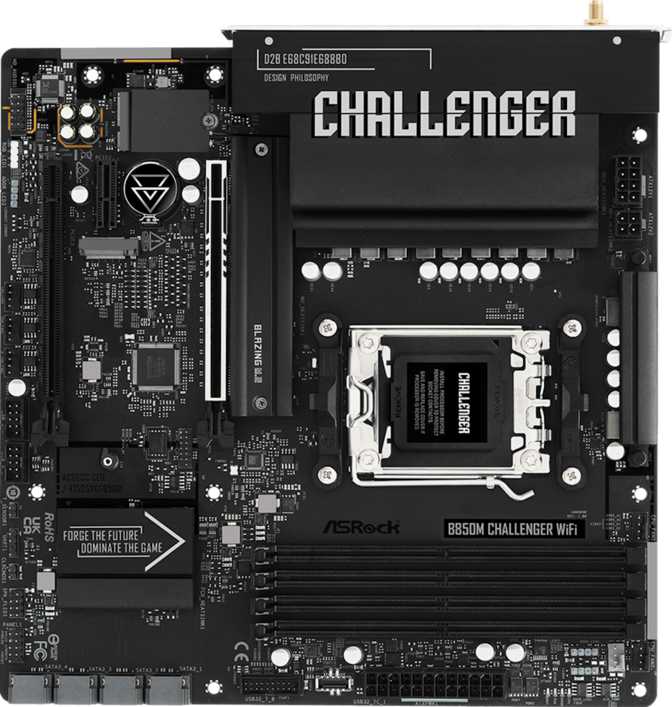
ASRock B850M Challenger Review: Value AM5 Board With Real Trade-Offs
MotherboardsAt a Glance
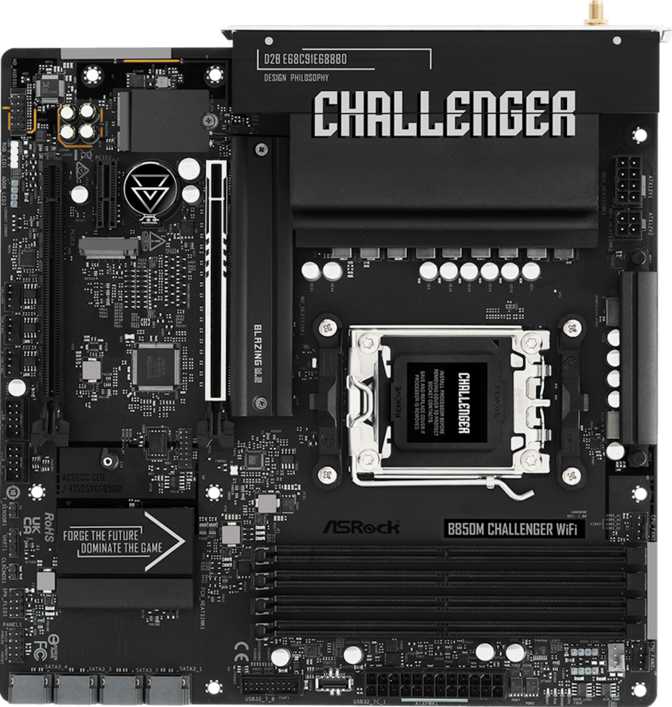
The ASRock B850M Challenger is a Micro-ATX motherboard on AMD's current AM5 platform. It brings genuine PCIe 5.0 graphics support and high-ceiling DDR5 memory tuning to budget-aware builds — provided you can work around the absent Wi-Fi and rear USB-C ports.
Design and Build Quality: Compact Without Cutting Corners
At 244mm × 244mm, the B850M Challenger occupies the Micro-ATX sweet spot — larger than Mini-ITX, smaller than a full ATX board — opening the door to a wide range of mid-tower cases while still accommodating four memory slots and a full expansion slot lineup.
Aesthetics and RGB Lighting
The board includes RGB lighting — a practical addition for builders who want their system to look deliberate rather than utilitarian. ASRock's Polychrome Sync ecosystem enables lighting coordination across compatible components, with exact zone count and brightness depending on configuration choices in the BIOS and companion software.
Warranty and Longevity
ASRock backs this board with a three-year warranty — standard for the segment and appropriate for a component that typically outlasts the rest of a build. Motherboards rarely fail when treated reasonably well, and three years of coverage addresses the critical early ownership window where manufacturing defects are most likely to surface.
Builder Note: No Rear CMOS Reset and No Dual BIOS
There is no dedicated CMOS reset button on the rear I/O panel. Recovering from a failed overclock or a bad BIOS flash requires opening the case and using the onboard header or removing the CMOS battery. The board also ships without a dual BIOS, meaning there is no automatic fallback ROM if a firmware update fails mid-process. These are minor inconveniences for most users but a real friction point for builders who frequently push BIOS settings aggressively.
Platform Foundation: Why AM5 and B850 Matter
The AM5 Advantage
AM5 is AMD's current CPU socket platform, purpose-built for modern Ryzen processors running DDR5 memory and PCIe 5.0 interconnects. Choosing AM5 today means investing in a platform AMD has committed to supporting across multiple processor generations — a future CPU upgrade without replacing the motherboard is a realistic path, not a marketing promise.
The B850 chipset occupies a deliberate mid-range position. It enables full CPU and memory overclocking — a capability withheld from entry-level A620 boards entirely — while stopping short of the premium X870 feature set. For the majority of builders, B850 hits the right balance between capability and cost, offering a meaningful platform upgrade over B650 without the X870 price premium.
Integrated Graphics and the HDMI Port
The rear panel includes an HDMI 2.1 output, but this port is only active with Ryzen processors that carry built-in Radeon graphics — AMD's APU lineup. Builders running a discrete GPU have no practical use for it, and for the majority of buyers pairing this board with a dedicated graphics card, the HDMI port simply does not exist in daily use.
For APU-based builds, HDMI 2.1 is genuinely capable output: it handles 4K at 120Hz and high-refresh-rate displays without any additional hardware. For anyone who wants to skip a discrete GPU while still driving a demanding display, the APU route on this board is technically supported and well-served by the output specification.
Memory: DDR5 With Real Headroom
The B850M Challenger runs DDR5 exclusively — there is no DDR4 compatibility, a platform-level decision by AMD. DDR5 pricing has converged substantially with DDR4 since its early launch premium, and quality DDR5 kits are now available at prices competitive with equivalent DDR4 configurations, making the all-DDR5 AM5 platform far more accessible than it once was.
What the OC Ceiling Actually Means
DDR5 at stock speeds begins around 4800MHz. The kits most commonly paired with Ryzen builds run between 6000MHz and 6400MHz — the range AMD specifically recommends for the best blend of stability and real-world performance. The board's 8000MHz ceiling means it can keep pace with even the fastest consumer DDR5 kits currently available, giving enthusiast buyers genuine headroom rather than an artificial cutoff.
Reaching the top of that range requires a quality matched memory kit, careful BIOS tuning, and a favourable CPU memory controller sample. For most users, a well-configured 6000MHz CL30 dual-channel kit extracts maximum practical performance from the AM5 platform. The ceiling is there when needed — it does not need to be chased to get full value from the board.
Upgrade Path and Practical Capacity
Four slots allow a sensible build progression. Begin with two 16GB modules in the recommended paired slots, run dual-channel from day one, and add a second matching pair later if the workload demands it. Starting with two sticks instead of four preserves upgrade flexibility without sacrificing immediate performance.
ECC memory — the error-correcting type used in workstations and servers where data integrity is non-negotiable — is not supported. For gaming, content creation, and everyday computing, non-ECC DDR5 is exactly what you want, and the absence of ECC support here is completely appropriate for the intended audience.
Storage: Solid Options for a Modern Build
Two M.2 sockets accept NVMe SSDs — the thin, gum-stick-shaped drives that connect directly to the motherboard and operate dramatically faster than any SATA drive. In daily use, an NVMe drive makes Windows load in under 15 seconds, applications launch almost instantly, and large file operations that once took minutes now complete in seconds.
The primary M.2 slot benefits from PCIe 5.0 bandwidth through the CPU — the fastest consumer-grade storage interface currently available, ready for the latest generation of high-performance NVMe drives. The secondary M.2 slot operates at PCIe 4.0 speeds, still exceptionally fast by any practical measure and well-suited to mainstream NVMe drives.
Four SATA 3 ports accommodate traditional 2.5-inch or 3.5-inch drives, useful for secondary storage, large media libraries, or additional capacity beyond the NVMe primary drives. Supported RAID modes across SATA storage:
- RAID 0 — Combines multiple drives into a single faster volume
- RAID 1 — Mirrors data across two drives for automatic redundancy
- RAID 10 — Combines mirroring and striping across four drives
- RAID 5 — Not supported; parity-based redundancy requires a different platform
Connectivity: Capable at the Core, Limited at the Edges
Rear Panel Port Breakdown
| Port Type | Count | Speed | Best Used For |
|---|---|---|---|
| USB 3.2 Gen 1 Type-A | 6 | Up to 5 Gbps | External drives, peripherals, hubs |
| USB 2.0 Type-A | 2 | 480 Mbps | Keyboards, mice, low-speed dongles |
| USB Type-C (any speed) | 0 | Not present | — |
| RJ45 Ethernet | 1 | 1GbE / 2.5GbE | Wired networking |
| HDMI 2.1 | 1 | APU output only | Ryzen APU display output |
No Wi-Fi and No Bluetooth — Plan Accordingly
The B850M Challenger includes neither built-in wireless networking nor Bluetooth. For desktop builds connected via ethernet cable, this is invisible in practice. For builds where a cable run is not feasible, you will need to add connectivity via a PCIe Wi-Fi card (occupying one expansion slot) or a USB adapter. Neither solution is expensive, but both require a deliberate purchasing decision before your build is functional as a wireless machine.
Internal Headers and Front-Panel Connectivity
USB 3.2 Gen 1 Headers × 2
Connects front-panel USB-A ports via case headers, adding up to 4 additional USB-A ports
USB 2.0 Headers × 4
Supports additional low-speed front-panel ports and internal USB devices
No USB-C Front Panel Header
Cases with a front-panel USB-C port cannot connect it natively to this board
Fan and Thermal Headers
Six fan and pump headers give this board strong thermal flexibility for its size tier. Builds combining a CPU air cooler, an AIO liquid cooler pump and radiator fans, and multiple case fans can all be connected and controlled natively through the BIOS without needing a separate fan controller. For a Micro-ATX board, six headers is a genuinely generous count.
Expansion Slots: GPU and Beyond
The primary GPU slot runs PCIe 5.0 x16 — the fastest consumer-grade graphics interface currently available. Current and upcoming graphics cards install here without the slot itself becoming a performance bottleneck. PCIe 4.0 GPUs, which represent the majority of today's graphics card market, run without any penalty in this configuration.
| Slot | Interface | Typical Use |
|---|---|---|
| PCIe x16 — Slot 1 | PCIe 5.0 x16 | Primary GPU |
| PCIe x16 — Slot 2 | PCIe 4.0 (x4 electrical) | Capture card, secondary device |
| PCIe x1 Slot | PCIe x1 | Wi-Fi card, USB expansion, sound card |
The PCIe x1 slot has a particularly practical role in a build like this one: it cleanly accepts a PCIe Wi-Fi card, solving the board's absent wireless connectivity without consuming the secondary x16 physical slot. It is a straightforward fix for the board's most significant omission.
Audio: Functional, Not Audiophile
Onboard audio supports a 7.1 surround sound configuration through three analog jacks on the rear panel, covering stereo headphone and speaker output, microphone input, and line-level connections. For gaming headsets, desktop speakers, and everyday music listening, the onboard solution is entirely adequate.
No S/PDIF optical output. Users who connect to external DACs or AV receivers via optical cable will need to add a USB DAC or a dedicated sound card to replicate that output.
The 7.1-channel configuration is most relevant for multi-speaker home theater setups. Most gaming headset users work with stereo or software-based virtual surround, where the onboard audio handles everything they need without compromise.
Overclocking Support: Capable With Caveats
The B850M Challenger supports CPU overclocking — a capability that separates the B850 chipset from the locked-down entry-level A620 tier below it. In practice, how much benefit CPU overclocking delivers depends heavily on which processor you pair with the board. AMD's X3D gaming processors deliver their performance advantage through a different architectural mechanism and do not benefit from traditional voltage-frequency tuning.
Where this board's overclocking support delivers clearest real-world value is memory tuning. Pushing DDR5 from stock speeds to AMD's recommended 6000–6400MHz sweet spot, or further toward 7000–8000MHz for enthusiasts, is well within the board's operational range. For most AM5 Ryzen users, memory configuration is where the most tangible performance improvement is found — and this board removes no barriers to pursuing it.
One practical note: without a rear CMOS reset button, recovering from a setting that prevents the system from posting means opening the case. If you plan to push DDR5 configurations aggressively, familiarize yourself with ASRock's BIOS recovery procedure before you begin experimenting.
- CPU overclocking enabled
- XMP and EXPO memory profiles
- Manual DDR5 tuning up to 8000MHz
- No rear-panel CMOS reset button
- No dual BIOS failsafe ROM
Who Should Buy This Board — and Who Should Not
- You are building a Ryzen desktop with a discrete GPU and wired ethernet, and want to protect as much budget as possible for the CPU and GPU
- You need Micro-ATX for a compact mid-tower build without the component and case constraints of Mini-ITX
- PCIe 5.0 GPU support and genuine DDR5 OC headroom are priorities, but X870 pricing is out of budget range
- You want to stay on AM5 long-term and upgrade to a future Ryzen processor without replacing the entire platform
- You are comfortable adding a PCIe Wi-Fi card later, or will use wired networking exclusively
- Wireless connectivity is non-negotiable and you do not want to add a separate card or adapter to get it
- You regularly use USB-C devices and expect at least one rear-panel USB-C port for daily convenience
- Your audio setup requires an S/PDIF optical output to connect to an AV receiver or external DAC
- You frequently stress-test aggressive overclocking settings and need a rear CMOS reset button for quick recovery
- Your workflow requires Thunderbolt, USB4, or high-speed USB 3.2 Gen 2 (10Gbps) ports on the rear panel
How It Compares to the Alternatives
The B850M Challenger does not exist in isolation. Understanding where it sits relative to its nearest alternatives clarifies which buyers it actually serves best — and where it genuinely falls short.
| Feature | ASRock B850M Challenger | Typical B650M Board | X870M Alternative |
|---|---|---|---|
| Chipset Generation | B850 — Current Gen | B650 — Previous Gen | X870 — Enthusiast |
| PCIe 5.0 GPU Slot | Yes | Some models only | Yes |
| DDR5 OC Ceiling | ~8000 MHz | ~6400–7600 MHz | ~8000 MHz+ |
| Built-in Wi-Fi | No | Often included | Usually included |
| USB-C Rear Panel | No | Often 1 port | Usually 1–2 ports |
| USB4 / Thunderbolt | No | No | Some models |
| Price Tier | Value | Value | Premium |
B650M boards from the previous AM5 generation remain widely available and frequently include Wi-Fi and a USB-C rear port at comparable price points. If wireless and USB-C are genuinely important to your workflow, a B650M board with those features may deliver more practical day-to-day value than the B850M Challenger. Stepping up to X870M adds USB4, a more robust VRM configuration for sustained heavy CPU loads, and broader premium connectivity — at a noticeably higher price that the B850M Challenger deliberately avoids.
Honest Assessment: Strengths and Weaknesses
Where It Gets Things Right
The B850M Challenger gets the fundamentals right. The AM5 platform with B850 represents genuine future capability — the PCIe 5.0 GPU slot and high-ceiling DDR5 support are not paper specs; they are features that extend the practical lifespan of this board as GPU generations advance and faster memory becomes standard. Running a 6000MHz DDR5 kit today and knowing the board can push further when needed is a quiet but meaningful advantage over constrained entry-level alternatives.
Four memory slots in a Micro-ATX layout is practically generous, enabling a straightforward capacity upgrade path from 32GB to 64GB or beyond without discarding existing sticks. Six fan headers support a properly cooled build without any additional fan controller hardware. The three-year warranty reflects appropriate manufacturer confidence in a component that buyers typically keep for the full lifespan of their build.
Where the Trade-Offs Land
The rear I/O tells a clear story about where ASRock applied cost pressure. No USB-C port of any kind on the rear panel is a frustrating omission for a modern motherboard. USB-C is the charging and data standard for virtually every current smartphone, most new external drives, and a growing range of peripherals — its absence creates a genuine friction point every time you reach for a port that is not there.
The lack of a CMOS reset button and the absence of a dual BIOS are less critical for everyday users but remove conveniences that experienced builders rely on. Missing wireless support requires additional hardware to resolve. These are deliberate cost decisions, not oversights. The critical question for each buyer is whether those savings align with their specific workflow — or whether they will produce daily annoyances that a slightly different board choice would have avoided entirely.