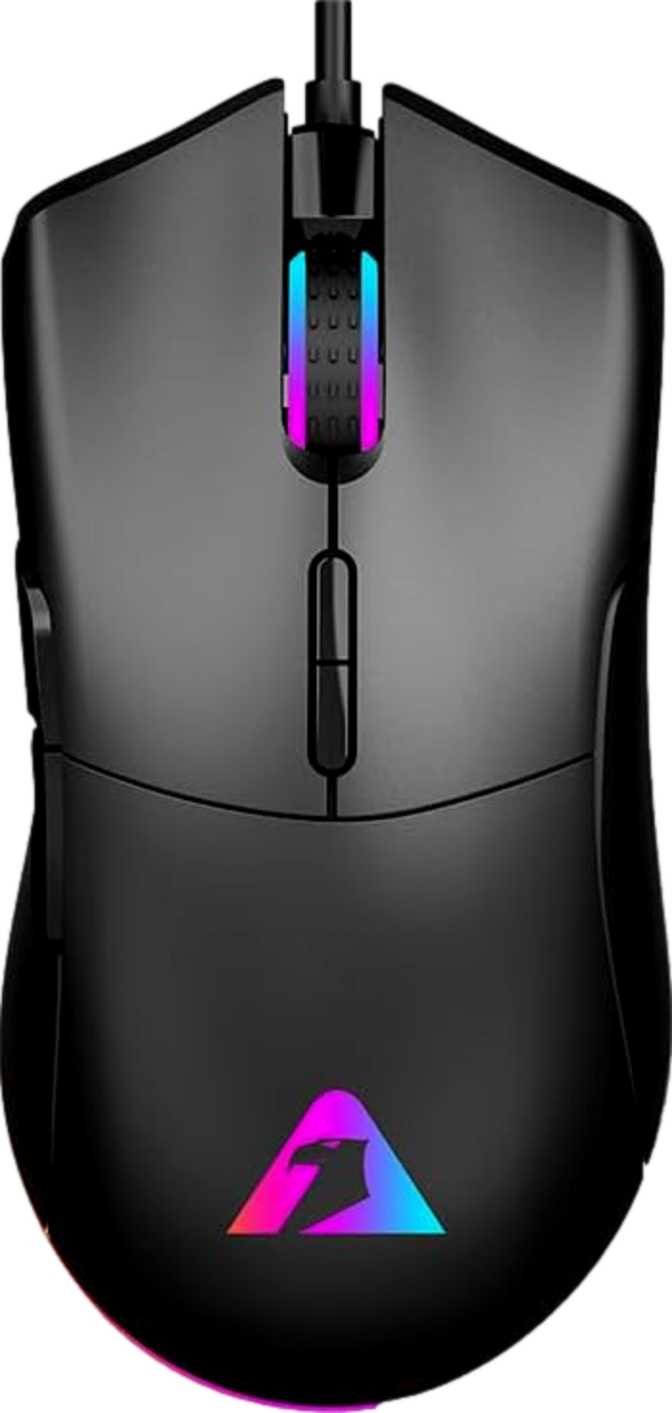
Armaggeddon Falcon V Stealth Review — Ultralight Done Right?
MiceAt a Glance
The numbers that define the Armaggeddon Falcon V Stealth experience
The Case for Going Ultralight
Gaming mice have split into two distinct camps: feature-loaded heavyweights with onboard controls for everything, and precision-trimmed lightweights designed to disappear under your hand. The Armaggeddon Falcon V Stealth commits to the second camp without apology.
At 55 grams, it sits firmly within the weight range that competitive FPS players actively seek — light enough to reduce wrist fatigue during extended sessions, and light enough that fast repositioning movements feel quicker because, physically, they are. But weight alone does not justify a place on your desk. The question is whether the Falcon V Stealth pairs that featherweight chassis with reliable tracking, sensible ergonomics, and enough practical features to earn consistent daily use. That is what this review answers.
Design and Build Quality
Shape, Dimensions, and Ergonomics
The Falcon V Stealth is built for right-handed users only. The profile follows a classic right-hand ergonomic curve: a gentle hump toward the rear provides a natural resting point for palm grip, while the forward taper creates enough clearance for claw-grip users to feel at home.
At 124.5mm front to back and 64mm across, the footprint falls solidly into medium-mouse territory — fitting for most adult hands without feeling stretched or cramped. The 41mm height makes this a relatively flat mouse. Players with larger hands who prefer a high, full-palm contact point may find the low profile sits slightly short under the palm.
The Weight Advantage in Practice
Fifty-five grams is genuinely light. Most mainstream gaming mice weigh between 90 and 120 grams, and mice specifically advertised as lightweight frequently land in the 65–80 gram range. The Falcon V Stealth sits well below all of those — and achieves this through material discipline rather than a skeletal perforated shell that accumulates debris over time.
During high-intensity play, the reduced mass means your arm muscles work against less resistance during large, fast sweeps. Over a multi-hour session, that difference in fatigue accumulation is tangible for competitive players.
Weight in Context
Cable
The 1.8-meter braided cable is generous enough to reach any reasonable desktop-to-tower distance without strain. The braided sleeve resists tangling and adds durability over plain rubber. It does not replicate the ultra-pliable paracord-style cables found on some premium lightweight mice, meaning there is a small but perceptible amount of cable drag on a mousepad — a non-issue for most players, a minor consideration for those extremely sensitive to cable feedback.
The PixArt PMW3327 Sensor Explained
The optical sensor inside the Falcon V Stealth is a PixArt PMW3327 — a mid-tier offering from the manufacturer that supplies the vast majority of sensors found in gaming mice across the entire price spectrum. The PMW3327 tracks accurately and consistently without the processing irregularities common in lower-end alternatives.
The sensor photographs the surface beneath the mouse at extreme frequency and calculates movement by comparing successive images. Crucially, it does this without applying artificial smoothing or hardware acceleration. Cursor movement is a direct, unaltered translation of your hand movement — no hidden processing layer predicting or correcting your motion.
Direct Input Tracking
No drift compensation or positional prediction — what your hand does, the cursor does. Essential for consistent muscle-memory development over time.
No Hardware Acceleration
Fast and slow movements track at the same resolution. Cursor distance per inch of hand movement stays constant regardless of movement speed.
Reliable Tier Placement
One generation behind PixArt's current ceiling — but the day-to-day competitive performance gap is far narrower than spec sheets suggest.
Performance Breakdown
Polling Rate: 1000 Hz
The Falcon V Stealth communicates with your computer 1,000 times per second. An office mouse typically updates its position between 125 and 250 times per second. At 1,000 Hz, position updates happen faster than the human eye can perceive individual frames, eliminating any detectable input lag between your hand and the cursor on screen.
This is the ceiling for serious gaming mice, and the Falcon V Stealth operates at it fully — with no paid upgrade or driver workaround required.
Speed and Acceleration Headroom
The sensor is rated to maintain accurate tracking at movement speeds far exceeding what the human wrist can physically generate. In real-world competitive play, even the most aggressive flick motions fall comfortably within the sensor's operational envelope.
The acceleration tolerance is similarly rated well above realistic use — relevant because sensor spin-out, where tracking fails during fast movements, occurs when a sensor is pushed past its limits. The Falcon V Stealth's specification headroom makes this a non-concern in practice.
DPI Range: Where It Helps and Where It Stops
DPI — dots per inch — determines how far your cursor travels relative to how far your hand moves. The right setting depends on your screen resolution, monitor size, game type, and personal movement style. The Falcon V Stealth offers DPI adjustment from 800 up to 12,000, switchable via the dedicated button on the mouse body.
The 12,000 DPI ceiling is more than sufficient for any realistic use case. Most competitive players — including professionals — operate between 400 and 3,200 DPI. Settings above roughly 6,000 DPI introduce cursor instability on standard monitors and serve no practical in-game purpose.
Hard Limit: 800 DPI Minimum — Know Before You Buy
The Falcon V Stealth cannot go below 800 DPI. This is a hardware-level restriction built into the sensor and firmware — not a software setting that any update can change. A meaningful portion of the FPS community trains at 400, 450, or 500 DPI. If your established sensitivity falls below 800 DPI, this mouse physically cannot accommodate you. There is no workaround.
If you use 800 DPI or above — or if you are new to PC gaming and have not yet established a sensitivity preference — this limitation is entirely invisible to you in daily use.
Wired and Always Ready
As a USB wired mouse, the Falcon V Stealth draws power continuously from your PC. It will never lose charge mid-session, never need to rest on a charging dock, and never introduce the signal dropouts that some wireless mice experience at the edges of their range.
For players who have migrated to wireless and value the untethered experience, the wired-only design is simply the nature of this product — there is no wireless variant. For everyone else, wired operation means the connection is always active, always consistent, and demands zero management beyond plugging in the cable.
Who Should Buy the Armaggeddon Falcon V Stealth?
The Falcon V Stealth makes deliberate trade-offs. Understanding them tells you immediately whether this mouse fits your situation.
- FPS and fast-paced competitive playersLow weight is your primary criterion and you make constant large mouse movements during gameplay.
- Single-PC dedicated setupsThe mouse stays on one desk permanently. The lack of onboard memory becomes a non-issue.
- Right-handed, medium-hand playersPalm or claw grip users with medium-sized hands will find the flat-to-medium profile sits naturally.
- Entry-level upgradersSignificant weight reduction and a genuine mid-tier sensor over a generic entry-level mouse without a large price jump.
- Players using 800 DPI or higherThe full 800–12,000 DPI range is available and the hardware limitation never factors in.
- Low-sensitivity players (below 800 DPI)The 800 DPI hardware minimum is absolute. No software or in-game workaround can change this floor.
- Left-handed usersThe ergonomic shape is purpose-built for the right hand only. No mirrored variant is available.
- Multi-machine or LAN usersNo onboard memory means your configuration does not travel with the mouse to other computers.
- Fans of heavier miceNo weight system is included and the base weight cannot be increased.
- Per-game profile switchersWithout onboard storage, per-game button profiles are not a supported feature.
How It Compares to the Competition
The Falcon V Stealth competes in the segment above budget mice but below the premium tier. Its primary differentiator is weight — a figure that significantly more expensive mice work hard to match.
| Feature | Armaggeddon Falcon V Stealth | Typical Mid-Range Competitor | Budget Entry-Level Mouse |
|---|---|---|---|
| Sensor | PixArt PMW3327 | Higher-tier PixArt variants | Generic optical |
| Weight | 55g (ultralight) | 70–95g | 90–130g |
| Onboard Memory | None | 1–5 profiles typical | Rarely included |
| Minimum DPI | 800 | 100–400 typical | 400–800 |
| Polling Rate | 1000 Hz | 1000 Hz | 125–500 Hz |
| Programmable Buttons | 7 | 5–11 | 4–6 |
| Warranty | 1 year | 1–2 years | 1 year or less |
Full Specifications
| Specification | Value |
|---|---|
| Mouse Type | Gaming (Right-handed) |
| Connection | USB Wired |
| Sensor | PixArt PMW3327 |
| Polling Rate | 1000 Hz |
| DPI Range | 800 – 12,000 DPI (adjustable) |
| Max Tracking Speed | 220 IPS |
| Max Acceleration | 30G |
| Total Buttons | 7 |
| Programmable Buttons | 7 (all buttons remappable) |
| Side Buttons | 2 (thumb-accessible) |
| DPI Switching Button | Yes |
| Onboard Memory Profiles | None |
| RGB Lighting | Yes |
| Weight | 55g |
| Length | 124.5mm |
| Width | 64mm |
| Height | 41mm |
| Cable Length | 1.8 meters (braided) |
| Hand Orientation | Right-handed only |
| Warranty | 1 year |
Honest Assessment: Where It Delivers and Where It Does Not
Where It Delivers
The Falcon V Stealth gets the most important fundamentals right. Its weight is the defining characteristic, and it is genuine — this is not a mouse that arrives feeling slightly flimsy in exchange for a low gram count. The solid, non-perforated shell is a deliberate material choice that contributes to long-term durability.
The PixArt PMW3327 delivers accurate, direct tracking with no artificial processing working against your inputs. Seven fully programmable buttons and a generous braided cable complete a package that checks every core gaming mouse requirement.
The 1,000 Hz polling rate means zero perceptible input delay — the same ceiling other mice at significantly higher price points achieve, telling you the Falcon V Stealth is not cutting corners on the fundamentals that actually matter in play.
Where It Falls Short
The 800 DPI floor is a hard technical limitation — low-sensitivity players cannot adapt to it or work around it with in-game settings without losing the precision they have trained for. This is a specification incompatibility, not a complaint about value.
The lack of onboard memory is a genuine disadvantage for portable use. All configuration lives in software on one machine; the mouse is not self-contained in the way that competing mid-range options often are, even at modest price premiums.
A one-year warranty is standard but uninspiring — some competitors extend two-year coverage at comparable pricing. The "Stealth" branding creates a minor internal contradiction with the presence of RGB lighting, though this is purely cosmetic with zero effect on performance.
Questions Buyers Ask Before Purchasing
Answers to the most common searches before making a purchase decision.
Final Verdict
Armaggeddon Falcon V Stealth
The Armaggeddon Falcon V Stealth is a mouse that knows its audience and delivers on its primary promise without unnecessary compromise. At 55 grams, it achieves genuine ultralight status. The PixArt PMW3327 sensor provides accurate, consistent tracking with no hidden processing quirks to fight against. Seven fully programmable buttons, a 1.8-meter braided cable, and a full 1,000 Hz polling rate mean the fundamentals are solid across the board.
The limitations are equally clear: the 800 DPI minimum is a firm exclusion for low-sensitivity players, the absence of onboard memory makes it a single-desk mouse rather than a portable one, and the right-handed design simply does not serve left-handed users.
Buy It If
You are a right-handed gamer who plays at 800 DPI or above, works from a single dedicated PC, and wants a genuinely lightweight mouse with a reliable mid-tier sensor. The weight advantage is real, measurable, and immediately noticeable coming from a heavier mouse.
Skip It If
You train below 800 DPI, use your left hand, travel between machines regularly, or prefer a heavier feel. Those limitations are hardware-level and permanent — not addressable by software updates or workarounds.