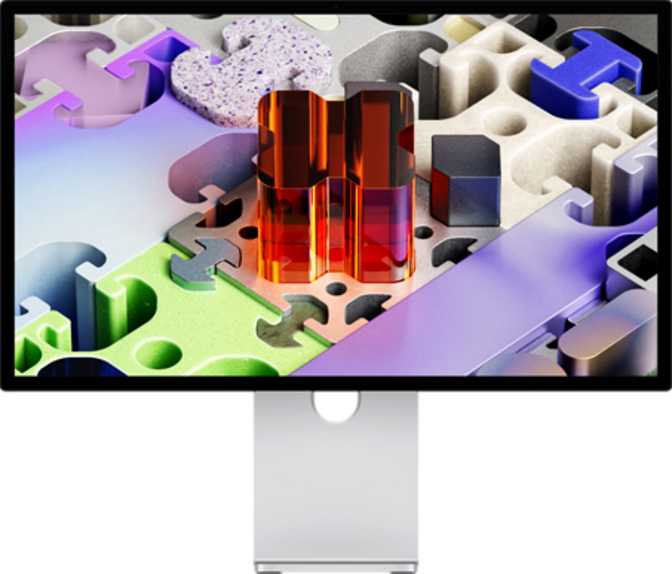
Apple Studio Display (2026) 27″ Review: A Mac-First 5K Monitor That Means Business
MonitorsThe Apple Studio Display occupies a peculiar but deliberate position in the monitor market. It is not trying to win over everyone. It is built for a specific type of creative professional — one who works within Apple's ecosystem, demands extraordinary image fidelity, and refuses to compromise on the quality of what they look at for eight or more hours a day.
If that describes you, very little else at this size and resolution comes close. If it does not, this display will frustrate you before the first week is out.
At a Glance
- 5K Retina panel — 218 ppi, reference-grade sharpness
- 600 nits brightness with hardware color calibration
- Single Thunderbolt cable — video + power + USB hub
- 12MP Center Stage camera built in
- 60Hz only — no high refresh rate option
- Mac-only — no HDMI, no DisplayPort
Design and Build Quality
Physical experience, materials, and ergonomics
The Studio Display is a striking object. At just 31mm deep, it presents an almost impossibly slim profile for a 27-inch panel — the kind of thinness that reads as premium before you have even turned it on. The aluminum enclosure continues Apple's long-standing commitment to materials that feel cold, dense, and genuinely durable rather than plasticky or hollow.
That said, the weight tells a more complete story. At 5.4 kilograms, this is a substantial monitor. It is not something you reposition casually or carry between rooms. The mass is partly the aluminum construction, partly the internal engineering required to pack genuine acoustic hardware and optics into a frame this slender. It sits planted on a desk with an authority that lighter, cheaper displays simply do not project.
The stand offers tilt, swivel, and height adjustment. Portrait orientation is also supported — genuinely useful for developers reviewing long code files or editors working with vertical document layouts. For those who want to use an existing arm or wall mount, VESA compatibility is included, letting you integrate this display into a complex workstation setup without being locked to Apple's base design.
Physical dimensions come in at 362mm tall and 623mm wide — a monitor that fills your field of view at a normal working distance without overwhelming a medium-sized desk.
Physical Specs
- Screen Size
- 27 inches
- Depth
- 31 mm — remarkably slim
- Weight
- 5.4 kg (planted, premium)
- Height × Width
- 362 mm × 623 mm
- Ergonomics
- Tilt, Swivel, Height, Portrait
- VESA Mount
- Supported
The Panel: Where the Studio Display Earns Its Price
5K resolution, brightness, color accuracy, and refresh rate — analyzed honestly
At normal viewing distance, individual pixels are not resolvable by the human eye. Text renders with print-like sharpness.
Comfortably above the threshold for a brightly lit studio environment. Not HDR-peak, but appropriate for color-accurate creative work.
Retina workflow on macOS renders UI at 2× scale, delivering the effective clarity of 2560 × 1440 at double the density.
What 5K Actually Means at 27 Inches
The display outputs 5,120 pixels horizontally by 2,880 pixels vertically — a total pixel count meaningfully beyond what most people ever use. At 27 inches, this works out to 218 pixels per inch. At a normal working distance of roughly 60–70 centimeters, the human eye cannot resolve individual pixels on this screen. Text appears with the sharpness of high-quality print. Fine lines in illustrations, the grain of a high-resolution photograph, and the hairlines in a typeface all render with clarity that lower-density displays simply cannot replicate.
For anyone retouching images, grading footage, or preparing files for print, this is not a vanity specification — it is the entire point.
Brightness and Color Accuracy
The panel reaches a calibrated 600 nits under typical conditions. More important than the raw brightness figure is built-in hardware color calibration support. For photographers working in Adobe RGB or DCI-P3 color spaces, or video editors preparing deliverables to specific standards, this calibration means the colors you see on screen correspond accurately to your output. Anyone who has printed a photograph only to find the colors shifted significantly from what they saw on screen will understand exactly what this buys.
The Studio Display is a color-accurate working display, not a home theater screen. Its brightness and calibration are tuned for creative output precision, not HDR specular highlights during movie playback.
Refresh Rate: A Real-World Trade-Off
The Studio Display refreshes at 60 frames per second. For static work — photo editing, design layout, document writing — the difference between this and a 120Hz screen is invisible. For video playback, interface navigation, or anyone who has lived with a ProMotion MacBook screen, 60Hz is simply less smooth. This is a deliberate trade-off Apple has maintained. If high refresh rate is a priority for you — whether for gaming, motion-heavy creative work, or general interface comfort — the Studio Display does not address that need. Name it plainly before buying.
Connectivity: Powerful Within Its Lane
What you can plug in — and what you cannot
What Is Here
-
Thunderbolt — Single-Cable Hub
One cable carries the full 5K signal, returns power to a connected MacBook, and activates the built-in USB hub simultaneously. Plug in once, be fully operational.
-
2× USB-C Downstream Ports
Rear-mounted hub ports for drives, audio interfaces, or accessories — no need to route cables to the laptop directly.
What Is Not Here
-
No HDMI or DisplayPort
Windows PCs, gaming consoles, Blu-ray players — none connect to this display without workarounds that still cannot deliver full 5K.
-
No 3.5mm Headphone Jack
Audio passthrough runs via the connected Mac. Most users are unaffected, but worth knowing before committing.
-
No Ethernet, Wi-Fi, or Wireless Display
All connectivity is wired, Thunderbolt-only. No AirPlay, no wireless projection from any source.
Built-In Camera and Audio
The features most monitors don't even attempt
12MP Front Camera
The built-in 12-megapixel wide-angle camera sits at the top center of the display. Paired with Apple's Center Stage technology — a macOS-level feature enabled by the hardware — the camera intelligently tracks the subject during video calls, keeping a person or small group centered even as they move.
For a professional whose video calls are a regular part of their workday, this removes the need for a separate webcam cluttering the desk. Image quality exceeds most standalone webcams below twice the price, and placement at the top of a 27-inch display means eye contact during calls feels natural — a genuine improvement over glancing downward into a laptop camera.
Stereo Speaker System
The Studio Display houses a stereo speaker system within its slim enclosure. The acoustic output is notably capable for a monitor of this type — sufficient to serve as the primary audio source in a private office or home studio during casual listening or video playback.
It will not replace a dedicated speaker system for critical audio work, but it handles music, reference viewing, and meeting audio without sounding thin or distorted at moderate volumes.
Who This Display Is For — and Who Should Look Elsewhere
The clearest way to know if this is your monitor
Buy This If You Are...
-
A photographer editing high-resolution images and preparing files for print or publication, where pixel-level accuracy and color fidelity affect your output
-
A graphic designer or illustrator working in Figma, Affinity, or Adobe applications where the crispness of fine lines and typography matters at scale
-
A video editor working with 4K or 6K footage who wants a reference-grade display that plays back color accurately without a separate calibration device
-
A writer or developer on a Mac who wants the most legible, comfortable screen available — 218 ppi reduces eye strain in ways that become noticeable over weeks of use
-
A MacBook user who wants a desk display connected with a single cable that also charges the laptop
Look Elsewhere If You Are...
-
A Windows or cross-platform user — this display is functionally a Mac-only monitor and should not be purchased with other intentions
-
A gamer or motion-sensitive user — 60Hz is a genuine limitation, and anyone who has lived with a higher-refresh display will feel the difference
-
A multi-source user who needs to connect a console, secondary PC, or streaming device to the same screen
-
A budget-conscious buyer — the value proposition only materializes if display accuracy has measurable impact on your professional output
-
Anyone needing a 3.5mm jack on the monitor itself — audio passthrough runs through the Mac, not the display
How It Compares to the Alternatives
Apple Studio Display vs. the most logical competitors at this resolution tier
| Feature | Apple Studio Display 27″ | LG UltraFine 5K 27″ | Dell UltraSharp 27 4K (U2725D) | Samsung ViewFinity S9 27″ |
|---|---|---|---|---|
| Resolution | 5120 × 2880 (5K) | 5120 × 2880 (5K) | 3840 × 2160 (4K) | 5120 × 2880 (5K) |
| Pixel Density | 218 ppi | 218 ppi | ~163 ppi | 218 ppi |
| Refresh Rate | 60 Hz | 60 Hz | 60 Hz | 60 Hz |
| Brightness | 600 nits | 500 nits | 400 nits | 600 nits |
| Built-in Camera | 12MP Center Stage | None | None | 4K |
| HDMI Input | No | No | Yes | Yes |
| Thunderbolt | Yes | Yes | No | Yes |
| Color Calibration | Yes | Limited | Yes | Yes |
| Portrait Mode | Yes | No | Yes | Yes |
| VESA Mount | Yes | No | Yes | Yes |
| Speaker System | Stereo built-in | Stereo built-in | None | Stereo built-in |
The Studio Display's clearest advantage over every competitor is its integration with macOS — Center Stage, True Tone ambient color temperature adjustment, and single-cable simplicity are only accessible on this hardware paired with a Mac. The Dell UltraSharp trades pixel density for broader input compatibility at a lower price, making it the right call for cross-platform users. The Samsung ViewFinity S9 is the closest all-round competitor, matching resolution and brightness while adding HDMI — though it typically commands a similar price bracket.
Honest Strengths and Weaknesses
What this display does well, and where it genuinely falls short
The Studio Display does several things with genuine excellence. The image it produces at 218 pixels per inch is among the finest available at this screen size — not simply good for a monitor, but approaching what you would expect from high-end photographic print. The color accuracy out of the box, combined with hardware calibration support, means creative professionals can trust what they see on screen. The built-in camera outperforms the vast majority of standalone webcams at twice the price. The speaker system is a meaningful bonus rather than an afterthought. And the single-cable desk setup it enables for MacBook users is practical convenience that accumulates into real quality-of-life improvement across a year of use.
The weaknesses are just as real, and dismissing them would be dishonest. The 60Hz refresh rate is a limitation that competitors have begun to move past — it is noticeable for anyone who has lived with a higher-refresh display. The complete absence of HDMI and DisplayPort is not a minor omission; it is a platform lock-in decision that makes this display unusable for large portions of the market. The lack of a headphone jack on the display itself is a small but occasionally irritating gap. And the price-to-flexibility ratio is unfavorable for anyone whose workflow does not specifically benefit from color-accurate, high-density 5K output.
Clear Strengths
- Reference-grade 218 ppi image quality — closest to print of anything at this size
- Factory color calibration with ongoing hardware calibration support
- 600 nits brightness handles well-lit studio environments
- 12MP Center Stage camera eliminates the need for a separate webcam
- Single-cable Thunderbolt setup is genuinely elegant for MacBook users
- Full ergonomic range including portrait rotation and VESA compatibility
- Premium aluminum build with exceptional desk presence and durability
Real Weaknesses
- 60Hz only — noticeably less smooth than ProMotion displays during navigation
- No HDMI or DisplayPort — platform locked to Mac, full stop
- No 3.5mm headphone jack directly on the monitor
- No multi-source switching — one device only
- Heavy at 5.4kg — not repositioned easily, no casual portability
- Premium price that only pays off for specific professional workflows
Questions Buyers Are Actually Asking
Straightforward answers to the searches that led you here
A Remarkable Monitor for Exactly the Right Buyer
The Apple Studio Display is one of the best 27-inch monitors available for Mac-native creative work. The image quality at 218 pixels per inch is reference-class. The color fidelity is production-ready out of the box. The built-in camera makes video calls as effortless as a monitor can. And the integration with macOS is tight enough that, if you are already invested in Apple's ecosystem, this display removes friction rather than adding it.
But it earns that recommendation only for a specific buyer. If you work exclusively on a Mac, your work involves color-sensitive creative output, and you can absorb the asking price without requiring multi-device flexibility — this is the display to buy. The long-term value in image accuracy, daily comfort, and reduced peripheral clutter is real. If any one of those conditions does not apply to you, there are better-matched alternatives. This display does not compromise its focus to accommodate broader use cases, and it should not be purchased with the expectation that it will.
For Mac-first creative professionals