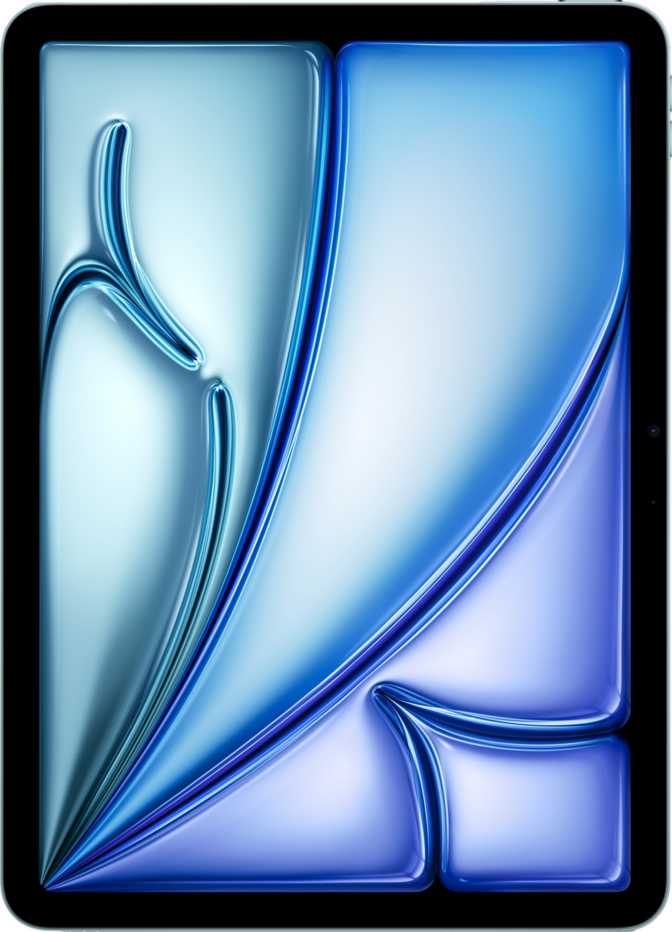
Apple iPad Air 13 (2026) Wi-Fi + Cellular: An Honest Review
TabletsiPad Air 13 (2026) — At a Glance
The six specifications that define this iPad and what they mean for how you actually work.
Design and Build: Thin to the Point of Feeling Engineered
At 6.1 mm thick, this iPad Air sits in a category of devices where thinness has crossed from marketing talking point into something that tangibly changes the experience. Holding it feels different from older-generation tablets — the profile disappears into your hand in a way that makes extended use noticeably less fatiguing.
The 617-gram weight is the more important figure for most buyers. That is the equivalent of two moderate-sized smartphones held in one hand. For a 13-inch device, that mass distribution over a larger surface area means it sits comfortably during long reading sessions, drawing sessions, or video calls in ways that a smaller but heavier device simply would not.
The dimensions — roughly 280 mm wide and 215 mm tall — give it the footprint of a large legal notepad. It fits across your lap naturally, and in a bag it occupies space efficiently given its output size.
Physical Highlights
- Apple Pencil supported with tilt sensitivity — pressure-angle dynamics respected during drawing and precision annotation
- USB-C connector handles both high-speed data transfer and external display output simultaneously
- Fingerprint authentication integrated into the power button — works reliably in portrait and landscape orientations
- No water or dust resistance rating — exercise caution in kitchens, outdoors, or other moisture-prone environments
The M4 Chip: What It Actually Means for Day-to-Day Use
The M4 chip inside this iPad Air is built on a 3-nanometer manufacturing process — the same generation of silicon architecture found in Apple's highest-performing devices. That manufacturing scale allows the chip to pack 28 billion transistors into a design that draws very little power relative to the performance it delivers.
8-Core CPU
Four high-performance cores handle demanding tasks like video rendering and complex document work. Four efficiency cores manage lighter tasks — email, browsing, streaming — at a fraction of the energy. This split-core design is what allows the iPad to perform at a high ceiling while preserving battery life across a full day of mixed use.
12GB Unified Memory
Peak memory bandwidth moves data at a rate comparable to many desktop workstations. That capacity keeps multiple large applications resident in memory simultaneously — a practical benefit when bouncing between a digital audio workstation, a PDF editor, and a communication tool without the system reloading any of them from scratch on return.
Up to 1TB Storage
Enough to hold thousands of hours of audio projects, hundreds of full-resolution video clips, an extensive app library, and years of offline content — simultaneously. With no external memory card slot, storage planning matters at purchase time. Choose honestly rather than defaulting to the base tier and hoping for the best later.
Display: A Large Canvas with One Honest Trade-Off
What the Screen Gets Right
The 13-inch IPS LCD panel delivers a resolution that translates simply: text is sharp to the point where individual letter edges are indistinguishable from print at any normal viewing distance. At 264 pixels per inch, you can press your nose to the glass during normal use and still not resolve individual pixels.
The anti-reflection coating is a practical feature that earns its mention. Working near windows or under overhead lighting — scenarios that plague glossy screens — is markedly more comfortable here. The 600-nit brightness keeps the image readable in moderate outdoor light, though direct sunlight remains a challenge. HDR content playback is supported, and color accuracy reflects Apple's careful display calibration.
Display Specifications
- Panel Type
- IPS LCD
- Screen Size
- 13 inches
- Resolution
- 2048 × 2732 px
- Pixel Density
- 264 ppi
- Refresh Rate
- 60Hz
- Peak Brightness
- 600 nits
- Anti-Reflection
- Yes
- HDR Support
- Yes
The 60Hz Caveat — Who Actually Notices
The refresh rate is 60Hz. For reading, document work, web browsing, drawing, video consumption, and most creative applications, 60Hz is not a handicap. The vast majority of iPad Air buyers never miss the 120Hz ProMotion display found in the Pro line because their work simply does not expose the difference.
Where the gap becomes perceptible: fast-scrolling through long documents, gaming with high-motion visuals, and Apple Pencil latency during rapid strokes. If you have owned a ProMotion device and are considering a step toward the Air, spend time with both before deciding. For everyone else — especially those upgrading from an older iPad or a laptop — 60Hz will feel perfectly fluid.
Camera System: More Capable Than Its Positioning Suggests
The iPad Air is not a primary camera device for most people, but its camera system delivers genuinely useful output — particularly for educators, content creators, and professionals who capture demonstrations, tutorials, or presentations directly on-device.
Rear Camera
The 12-megapixel rear sensor with a wide f/1.8 aperture captures enough light to produce usable images and video in varied conditions. The back-illuminated sensor design improves low-light performance by gathering more photons per pixel — resulting in cleaner, less noisy images when ambient light is limited.
4K video recording at 60 frames per second represents broadcast-grade quality by most practical standards. Slow-motion video, time-lapse, burst shooting, and panoramas round out a feature set covering the overwhelming majority of tablet capture scenarios. Manual controls for exposure, shutter speed, and focus give more experienced users the ability to work beyond automatic modes.
Front Camera
The 12-megapixel front camera matches the rear sensor's resolution — an increasingly important parity as video calls and front-facing content creation have become central to how tablets get used. The f/2.4 aperture collects adequate light for indoor video calling in typical room lighting.
No front-facing flash is present, so low-light video calls in dark environments rely entirely on the sensor's inherent capability. For most home and office scenarios, this is inconsequential.
Available Manual Controls
- Manual exposure control
- Manual shutter speed
- Manual focus
- HDR mode and touch autofocus
Battery Life and Charging: All-Day, Every Day
Real-World Duration
The battery capacity in this iPad Air allows full, unbroken workday use without concern. Ten hours of active use across mixed workloads — browser, email, video, and productivity tools combined — aligns with what the hardware sustains. Heavier use, particularly sustained GPU-intensive tasks or streaming over cellular, will shorten that window; lighter reading and note-taking will extend it.
For most buyers, this translates to a device they charge overnight and use all day without anxiety. Users who work across long travel days or extended outdoor sessions — field researchers, travelers, educators — will find the endurance profile reliably sufficient.
Charging Constraints
Fast charging via USB-C meaningfully reduces the time needed to recover from a low battery. The device does not support wireless charging, so a cable connection is always required for power. For users whose current ecosystem has made wireless charging habitual, this is the one inconvenience the Air lineup has not yet addressed — worth knowing clearly before committing to a purchase.
Connectivity: Future-Ready on Every Front
The wireless stack in this iPad Air represents the current leading edge of consumer connectivity — with Wi-Fi 7 and 5G both present, this device is prepared for network infrastructure that many households and enterprises are only beginning to deploy at scale.
Wi-Fi 7 and Wireless
Wi-Fi 7 support means the device is prepared for the next generation of home and enterprise networks, delivering theoretical throughput and reduced latency that prior Wi-Fi versions cannot match. On a Wi-Fi 6E or Wi-Fi 7 router, large file transfers, 4K streaming, and cloud-based professional tools behave with noticeably less friction. Backward compatibility with Wi-Fi 4, 5, and 6 ensures seamless operation on existing networks.
Bluetooth 6 — the newest generation — offers more reliable connections with lower power overhead compared to prior versions, benefiting audio accessories, keyboards, and peripherals alike.
5G, SIM, and GPS
The 5G cellular module, paired with both a physical SIM slot and eSIM support, makes this a genuinely flexible mobile device. Switching carriers or plans without a physical swap is a practical convenience for travelers or users managing business and personal accounts separately.
Cellular iPads carry GPS hardware — a meaningful advantage over the Wi-Fi-only version for navigation-dependent users. USB-C with USB 3.1 throughput handles data and display output; the chip supports two simultaneous external displays, making a dual-screen desktop setup practical for power users.
Connectivity at a Glance
Software, Privacy, and Platform Ecosystem
iPadOS delivers the full complement of Apple's productivity and privacy architecture. Split-screen multitasking, Picture-in-Picture video, Stage Manager for window management, and full widget support cover the core productivity needs. Direct OS updates from Apple ensure this device receives iPadOS updates without carrier or manufacturer delays — a long-term value proposition that budget tablets typically cannot match.
On-device machine learning enables AI-powered features — transcription, image recognition, smart suggestions — without sending data to a server. Given the M4 chip's neural engine capability, these processes happen locally and quickly. Offline voice recognition extends this to voice-based interaction without network dependency. Live Text, which extracts and interacts with text found in images and documents, rounds out a capable intelligent layer built directly into the operating system.
System-Level Privacy Features
- Mail Privacy Protection
- Camera & microphone access indicators
- App tracking restrictions
- Cross-site tracking blocked by default
- Granular location privacy controls
- On-device machine learning (no server upload)
- Offline voice recognition
- Direct OS updates from Apple
Who This iPad Is For — and Who Should Look Elsewhere
The Right Buyer
- Students and academicsLarge screen for reading papers, annotating PDFs, attending lectures, and handwritten notes with Apple Pencil
- Creative professionalsIllustration, graphic design, music production, and video review — the M4 handles professional creative apps without strain
- Business travelersCellular-connected large-format device that replaces a laptop for most road-warrior workloads
- Educators and presentersRear camera for live demonstrations and a 13-inch screen for collaborative annotation and presentation
- Home and hybrid workersLargest comfortable iPad form factor without the cost and added weight of the Pro lineup
Look Elsewhere If
- ProMotion is non-negotiableIf you have used 120Hz extensively and cannot unsee the difference during fast scrolling or Pencil use, the Air's 60Hz panel will frustrate you
- Water resistance mattersEnvironments with regular moisture exposure benefit from the IP rating protection found only on the Pro line
- Heavy professional video productionThe Air handles serious editing, but large pipeline production benefits from the Pro's storage ceiling and port flexibility
- Wireless charging is a daily habitIt is simply not available here — a cable is always required for power, with no exceptions
How It Compares to Logical Alternatives
Three tablets share the same price conversation. Here is where the iPad Air 13 (2026) sits relative to its most relevant alternatives in Apple's current lineup.
| Feature | iPad Air 13 (2026) | iPad Pro 13 (M4) | iPad 11" (Standard) |
|---|---|---|---|
| Chip | M4 | M4 | A-series (lower tier) |
| Display Type | 60Hz IPS LCD | 120Hz OLED / ProMotion | 60Hz LCD |
| Screen Size | 13" | 13" | 11" |
| Water Resistance | None | Yes — IP rated | None |
| Wireless Charging | |||
| 5G Option | Limited configs | ||
| Max Storage | 1 TB | 2 TB | 256 GB |
| Price Tier | Mid | Premium | Entry |
Strengths and Honest Weaknesses
Where It Excels
The M4 chip's presence at this price tier is the defining story of this iPad Air. Historically, Apple's mid-tier tablets received last-generation silicon. Sharing the same processor as the current Pro lineup eliminates the performance hierarchy that used to make the Pro an obvious choice for demanding users. The chip combined with the 13-inch canvas and the large battery creates a daily driver that handles virtually everything the average professional or creative user will attempt.
The 6.1mm chassis at 617 grams represents a physical achievement that shapes how the device actually feels in use — not a specification that becomes irrelevant after unboxing, but one that affects every hour spent with it in your hands. Wi-Fi 7 and 5G connectivity, paired with Bluetooth 6, ensure this tablet will not become a wireless bottleneck as network infrastructure continues to advance.
The 1 TB storage ceiling, the all-day battery endurance, and Apple's long-term OS update commitment collectively make this a device designed to remain relevant for years, not months.
Where to Calibrate Expectations
The display holds one area where expectations should be set honestly. At 60Hz, the screen is accurate, bright enough for indoor and moderate outdoor use, and sharp enough to satisfy any reader or creative. But it is not the best display in Apple's iPad lineup, and users who have become accustomed to ProMotion on any device will feel the difference. The absence of OLED also means the HDR experience — while present — does not achieve the same peak contrast as the Pro.
The lack of any water resistance rating, the absence of NFC, and the inability to expand storage externally are each trade-offs rather than failures — they define the product's position rather than undermining its value. Being clear-eyed about them before purchase means no surprises after it.
Wireless charging remains absent, and the Apple Pencil plus keyboard accessories require additional spend on top of the device price. For buyers already invested in those accessories from a prior iPad, this matters less — for new entrants, it is real cost to factor in.
Common Buyer Questions Answered
These are the questions real buyers search before purchasing — answered directly.
A Clear Recommendation — With Honest Conditions
The Apple iPad Air 13 (2026) with Wi-Fi and Cellular is a confident recommendation for a broad audience — and an unusually strong value proposition in Apple's tablet lineup.
The M4 chip's presence at this tier removes the most compelling reason to spend more on an iPad Pro for the majority of buyers. The 13-inch display delivers on its promise as a productive canvas. The all-day battery, the thin and light chassis, Wi-Fi 7, and 5G connectivity form a package that handles the demands of modern mobile work without visible compromise in any of those areas.
The 60Hz display and absence of water resistance are the two specifications where buyers who need more must step up to the Pro. Everyone else — students, creatives, remote workers, travelers, and power users who do not require ProMotion — will find that this iPad Air does not feel like a compromise at all. It feels like exactly the right amount of iPad.