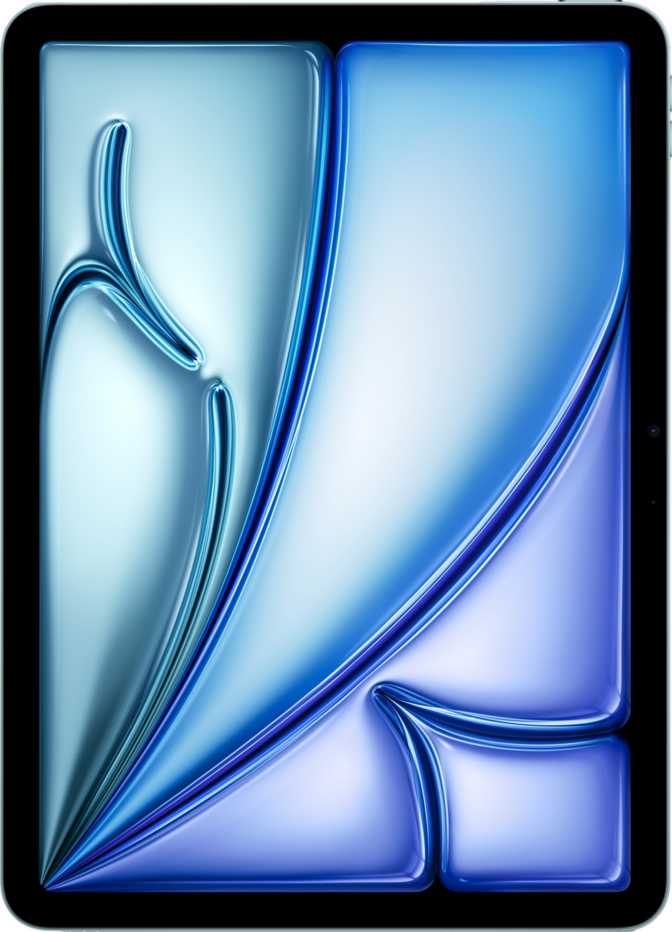
Apple iPad Pro 11 (2025) Wi-Fi + Cellular – Full Expert Review
TabletsExpert Score
Apple iPad Pro 11 (2025)
Quick Verdict
The most technically accomplished 11-inch tablet ever made. Its M5 chip and tandem OLED display are without peer in the category — but the premium price only makes sense for creative professionals and power users with workflows to match.
At a Glance
-
Apple M5
3nm · 10-core · 38B transistors
-
11" Tandem OLED
120Hz · 264 ppi · 2M:1 contrast
-
16GB Unified RAM
153 GB/s bandwidth · up to 2TB
-
Wi-Fi 7 + 5G
USB 4 · Bluetooth 6 · GPS
-
~10 Hours Battery
Fast charging · 5.3mm · 444g
Design and Build Quality
Thinness With Real-World Consequences
At 5.3mm, this iPad Pro is thinner than most flagship smartphones — a measurement that sounds like marketing until you actually hold it. The sensation is disorienting: your brain expects something this large to carry more mass. At 444 grams, it is lighter than a hardcover novel and comfortable to hold one-handed for extended reading or browsing sessions.
The flat-edged aluminium chassis — 249.7mm wide by 177.5mm tall — hits a practical sweet spot between compact and workable. It slips into a slim shoulder bag without the psychological overhead of "bringing a laptop," yet provides enough screen real estate for split-screen work and detailed illustration. There are no creaks, no flex points, no sense of compromise anywhere in the enclosure. The matte aluminium finish resists fingerprints and looks deliberately architectural.
Ultra-thin construction means Apple's own keyboard folio and protective accessories become practically essential rather than optional — neither is included in the box. The Apple Pencil Pro, also sold separately, connects magnetically and takes full advantage of the device's native tilt sensitivity.
No Water or Dust Resistance
The iPad Pro 11 (2025) carries no IP rating whatsoever. Competing tablets at considerably lower price points carry formal ingress certifications. For a device at this price, treat it with corresponding care.
Physical Specifications
- Thickness
- 5.3 mm
- Weight
- 444 g
- Width
- 249.7 mm
- Height
- 177.5 mm
- Temp Range
- 0 – 40 °C
- Water Resistance
- None
- Stylus Included
- No
- Keyboard Included
- No
Display: The OLED Advantage
OLED
Display Tech
120Hz
ProMotion
264
Pixels per Inch
2M:1
Contrast Ratio
1,000
Typical Nits
HDR10 +
Dolby Vision
HDR Standards
True Black, True Contrast
Previous iPad Pro models used mini-LED backlighting — excellent technology, but still LCD at heart, producing subtle blooming around bright content on dark backgrounds. This iPad Pro uses tandem OLED: two stacked display panels working together to reach brightness levels no single-layer OLED can sustain. The result is a two-million-to-one contrast ratio. Most premium LCD panels achieve approximately a thousand to one. In practice, dark scenes in films are genuinely dark — shadows look like shadows, not a dimmed bright panel. This is a qualitative change in the viewing experience, not a specification footnote.
ProMotion: Why 120Hz Changes Things
The display adapts its refresh rate dynamically up to 120 times per second based on content. Scrolling through documents and webpages feels frictionless in a way that is difficult to describe to anyone who has not experienced it directly. Apple Pencil strokes appear with near-zero latency. After extended use, returning to a conventional 60Hz screen is an immediate, jarring downgrade.
Outdoor Performance
Sustained brightness at 1,000 nits makes outdoor use workable, though direct sunlight is still a challenge. The anti-reflection coating does real work reducing the mirror effect that makes many tablets unusable on terraces or in vehicles — it is a coating that genuinely matters more than its placement in marketing materials suggests.
Professional Colour Standards
Support for both HDR10 and Dolby Vision means streaming platforms including Netflix, Apple TV+, and Disney+ serve their highest-quality streams to this screen. For video editors, the colour and dynamic range visible during editing matches what viewers with modern HDR televisions will see — an important assurance for professional deliverables where output consistency matters.
Performance: The Apple M5 Decoded
Architecture in Plain Language
The M5 is a 3-nanometre chip — a fabrication process so precise that transistor gates are measured in atoms. It packs 38 billion transistors with ten CPU cores split between four high-performance cores running at 4.6GHz and six efficiency cores running at 3.2GHz. The chip constantly routes work to the appropriate core type: intensive tasks go to the performance cores, background processes use the efficiency cores without burning unnecessary power.
This architecture is why the iPad Pro handles demanding creative workloads while still delivering all-day battery life. There is no fan, no thermal throttling spiral, no noise. The chip runs at exactly the speed the current task requires, and no faster.
Memory and Bandwidth
16GB of unified memory means the CPU and GPU share a single high-speed pool rather than separate allocations. Memory bandwidth reaches 153 gigabytes per second — a figure that exceeds many desktop graphics cards. Video editors handling ProRes footage, 3D artists working with reference-heavy scenes, and developers running multiple build processes simultaneously all benefit from eliminated data-transfer bottlenecks between processor and graphics memory.
16GB also means switching between a large illustration canvas, multiple browser sessions, and a video editing project no longer forces aggressive app suspension. Multiple demanding applications remain in a ready state simultaneously — a practical difference you notice within a week of use.
Geekbench 6 Scores
Governs everyday responsiveness — app launches, UI rendering, web browsing
Outperforms most premium thin-and-light laptops — relevant for video export and 3D rendering
Chip Specifications
- Process: 3nm · 38 billion transistors
- CPU: 4 × 4.6 GHz + 6 × 3.2 GHz
- RAM: 16GB unified DDR5 · 6400 MHz
- Bandwidth: 153 GB/s memory
- GPU: M5 integrated · drives 2 displays
- Storage: Up to 2TB · no expansion slot
Camera System
More capable than you expect from a tablet — and positioned correctly for how tablets actually get used.
Rear Camera
The 12-megapixel rear camera with its f/1.8 aperture and back-illuminated sensor captures meaningful light in lower-illumination conditions. BSI sensor design improves light capture at the pixel level, reducing noise where smaller sensors typically struggle. Phase-detection autofocus — the same technology used in flagship smartphones — locks onto subjects fast and accurately, including during motion.
Two-times optical zoom is achieved through the sensor itself. For document scanning, whiteboard capture, and content creation, results are genuinely useful and often sufficient as a primary capture device for YouTube-quality video or tutorial recordings.
- 12MP · f/1.8 · BSI sensor · 2x optical zoom
- 4K video at 60 fps · HDR10 recording
- Phase-detection AF · continuous video AF
- Slow-motion · time-lapse · panorama
- Manual ISO · exposure · white balance · focus
Front Camera & Audio
The 12-megapixel front camera sits along the device's longer edge in landscape orientation — a deliberate placement that positions the lens directly facing you during typical desk use with a keyboard folio. This eliminates the awkward chin-level or off-angle framing that plagued earlier iPad designs in video calls.
Five microphones support the front camera, providing directional audio pickup and background noise reduction that makes conference calls noticeably cleaner than those from most laptop microphones. The four-speaker stereo system delivers balanced, wide-stage audio for media consumption and playback monitoring.
- 12MP · f/2.0 · landscape orientation
- Five-microphone array with directional pickup
- Touch AF · HDR · burst mode
- Four-speaker stereo system
- No 3.5mm headphone jack · no front flash
Connectivity: Future-Proof by Design
Wi-Fi 7
802.11be
5G + eSIM
Cellular + nano SIM
USB 4
40 Gbps · DisplayPort
Bluetooth 6
Latest generation
GPS + Galileo
Multi-system GNSS
Face ID
3D infrared scan
The Cellular Advantage
The Wi-Fi + Cellular model adds a physical SIM slot alongside eSIM support, paired with 5G. On a capable network, download speeds reach multi-gigabit levels — making this iPad viable as a standalone connected device without a phone hotspot. For professionals working from client sites, co-working spaces, or in transit, always-on cellular removes a dependency on external connectivity you may not even realise you have until it disappears.
eSIM support means activating an international data plan mid-trip requires no physical SIM swap. The cellular radio can remain entirely inactive when on Wi-Fi, so a plan costs money only when you choose to use one.
USB 4 and Wired Capability
The single USB-C port runs USB 4 — fast enough to handle ProRes video editing directly from an external SSD without buffering. It simultaneously outputs to an external monitor via DisplayPort and charges the device. A hub is necessary for multiple connections at once, but the underlying capability of that single port exceeds what most professional laptops offer. The M5 GPU can drive two external displays, making expanded desktop setups entirely practical.
Privacy Features
- Mail Privacy Protection
- System-wide app tracking block
- Cross-site tracking prevention
- Per-app camera & microphone controls
- Clipboard access warnings
- Granular location privacy options
- On-device ML — no cloud processing
Battery Life and Charging
10 hrs
Apple's rated usage
8,160
mAh capacity
Fast charging supported
Real-World Expectations
Apple's ten-hour rating reflects moderate mixed use — some video, some browsing, some document work. For a typical professional workday of document editing, video calls, and web research, a single charge covers the day with capacity to spare. Tasks that push the M5 performance cores harder — extended video export, sustained 4K recording — will shorten this window noticeably.
The M5's efficiency cores handle lighter workloads with dramatically reduced power draw compared to the performance cores. This architecture — not raw battery capacity — is what enables all-day use despite a demanding OLED panel that would drain a less intelligent chip far faster.
One Meaningful Omission
Fast charging is supported, so recovering from a depleted battery is not a long wait. The device does not support wireless charging — a deliberate product decision, not an oversight. USB-C is the only charging path.
For intensive professional workflows — extended ProRes editing sessions or long-form video recording — keeping a cable accessible is sensible. For typical all-day use patterns, battery anxiety should not be a daily concern with this device.
iPadOS: Software Capabilities
Current iPadOS on M5 hardware brings the iPad Pro closer to laptop-class productivity than any previous generation — while retaining the platform trade-offs that have always defined this category.
Stage Manager
Overlapping resizable windows
Split View & Slide Over
Classic two-app multitasking
Face ID (3D)
Infrared · works in total darkness
Live Text
Interact with text in photos
Apple Intelligence
On-device AI processing
Focus Modes
Granular notification control
Picture in Picture
Float video while working
Direct OS Updates
Straight from Apple, years ahead
Multitasking on M5 Silicon
Stage Manager allows overlapping, independently resizable windows with a persistent dock and a stage of recent apps. Connected to an external monitor via USB-C, the experience extends into a full desktop-style layout. Split View and Slide Over remain available for simpler two-app layouts. For users who have historically found iPadOS limiting, the current state represents genuine progress.
iPadOS still does not run macOS applications. Professional software for law, accounting, engineering, and medicine often lacks a credible App Store equivalent. Verify your specific application dependencies before purchasing this as a laptop replacement.
On-Device Intelligence
Apple Intelligence processes writing assistance, image analysis, and semantic search on the M5 chip directly — no cloud round-trip required. Tasks that would involve network latency on other platforms complete instantly. Live Text, which lets you copy, translate, and search text found inside photographs, is a practically useful daily feature for anyone who routinely photographs documents, menus, or signage.
Direct OS updates mean Apple pushes security patches and new features to this device without carrier or manufacturer intervention. The M5's architecture ensures software support for many years ahead — a meaningful consideration for professionals who factor device lifecycle costs into purchasing decisions.
Who Should Buy This iPad
- You are a creative professional — illustrator, video editor, photographer, or 3D artist — who needs a portable workstation with uncompromised display quality and sustained processing power for demanding workflows.
- You travel frequently or work across multiple locations and need reliable always-on connectivity with enough performance to leave your laptop behind entirely.
- You are already deep in the Apple ecosystem — Mac, iPhone, AirPods — and want every Handoff, AirDrop, AirPlay, and Continuity Camera feature working without friction.
- You are a student in design, architecture, film, or music production and need a portable creative tool that can keep pace with professional-grade applications from day one.
- Your primary use is streaming video, browsing social media, and reading. The iPad Air 11 delivers a significantly better price-to-utility ratio for these patterns — the Pro's capabilities will sit entirely unused.
- You live primarily in an Android or Windows ecosystem. This device's value is inseparable from iPadOS and Apple's services — cross-platform workflows are possible but involve trade-offs that erode the premium.
- Your workflow depends on specific professional software — legal, financial, engineering, or medical tools — that lacks a credible iPadOS equivalent. Check your applications before buying.
- You have not budgeted for the Apple Pencil Pro and a keyboard folio. Neither is included. Both are essential to unlocking this device's full productivity identity and should be factored in from the start.
How It Compares to Logical Alternatives
The iPad Pro 11 (2025) sits at the premium end of the 11-inch tablet market. Here is how it compares to the two most logical purchase alternatives.
| Feature | iPad Pro 11 (2025) | iPad Air 11 (M2) | Samsung Galaxy Tab S10+ |
|---|---|---|---|
| Display Type | Tandem OLED · 120Hz | LCD · 60Hz | Dynamic AMOLED · 120Hz |
| Chip Generation | M5 (3nm) | M2 (5nm) | Snapdragon 8 Gen 3 |
| RAM | 16GB unified | 8GB | 12GB |
| Max Storage | 2TB | 1TB | 512GB + microSD |
| 5G Support | Yes | Yes | Yes |
| Wi-Fi Generation | Wi-Fi 7 | Wi-Fi 6E | Wi-Fi 7 |
| USB Standard | USB 4 (40 Gbps) | USB 3 | USB 3.2 |
| Bluetooth | Version 6 | Version 5.3 | Version 5.3 |
| Headphone Jack | No | No | No |
| Expandable Storage | No | No | Yes (microSD) |
iPad Pro vs. iPad Air 11
The iPad Air on M2 handles general productivity, media consumption, and casual creative work without obvious strain. The Pro justifies its premium specifically through the tandem OLED display, the M5 chip's headroom for sustained intensive workloads, 16GB versus 8GB of unified memory, and USB 4 bandwidth. If your work regularly saturates 8GB of RAM — common in video editing and large illustration files — the upgrade is functional, not aspirational. For everyone else, the Air is the more rational choice.
iPad Pro vs. Samsung Galaxy Tab S10+
The Tab S10+ offers the most credible Android competition with a comparable AMOLED display and strong performance. Its expandable microSD storage is a genuine practical advantage the iPad Pro cannot match at any price tier. Where the Tab S10+ falls short is in sustained workload performance, long-term software support assurance, and the depth of professional creative application availability. Samsung's DeX desktop mode is impressive but still lags Stage Manager's integration depth for productivity-focused users.
Honest Assessment: Strengths and Weaknesses
What It Gets Undeniably Right
-
The best portable display at any price
The tandem OLED and two-million-to-one contrast ratio are in a category of their own at this size. If your work involves colour-accurate visual evaluation, this display alone makes the purchase case.
-
Sustained performance without thermal compromise
The M5 processes intensive creative workloads at sustained speeds with no fan noise, no heat buildup that forces throttling, no degradation over a long editing session. The performance is real and consistent.
-
A connectivity stack that will not date quickly
Wi-Fi 7, 5G, USB 4, and Bluetooth 6 in a single 5.3mm device means the networking hardware is ahead of most current infrastructure — not behind it.
-
16GB keeps demanding apps live simultaneously
The difference between 8GB and 16GB is not theoretical in a creative workflow. Multiple demanding apps remain in a ready state, and the system stops managing memory in ways you notice.
What Requires Honest Acknowledgment
-
No expandable storage at any price tier
At the top storage configuration, no microSD slot is a real limitation. External SSDs via USB-C work well, but they are an additional cost and eliminate the clean, cable-free form factor this device promises.
-
iPadOS multitasking still has real limits
Stage Manager is improved, but precise window management, full file system access, and professional desktop application availability all remain more constrained than macOS. Users with specific software dependencies will hit these walls.
-
No wireless charging at a premium price point
For users who have built wireless charging into their daily routine, the USB-C-only requirement is a genuine adjustment. This omission stands out more given the device's price positioning.
-
No water or dust resistance rating
At this price, the absence of any IP certification is a notable gap. Everyday accidents — a spilled drink at a desk, unexpected rain during transit — carry real risk for an unrated device this expensive.
Frequently Asked Questions
Final Verdict
The Apple iPad Pro 11 (2025) is the most technically accomplished 11-inch tablet ever made. The tandem OLED display has no equal in its size class. The M5 chip outperforms the competition by a margin that matters for real creative workflows. The connectivity stack — Wi-Fi 7, 5G, USB 4, Bluetooth 6 — is future-proofed in ways that most competing devices are not.
Buy it if you need it
Creative professionals with video, illustration, photography, or music workflows will use every capability this device offers.
Pause if you don't
General media consumption and productivity tasks are served better by the iPad Air. The technology here is extraordinary; the price is commensurate.
Budget for the Apple Pencil Pro and keyboard folio from the start, accept that you are committing to the Apple ecosystem, and this device will reward you for years. For everyone else, the question is whether the task demands the tool — or whether the tool is simply impressive.