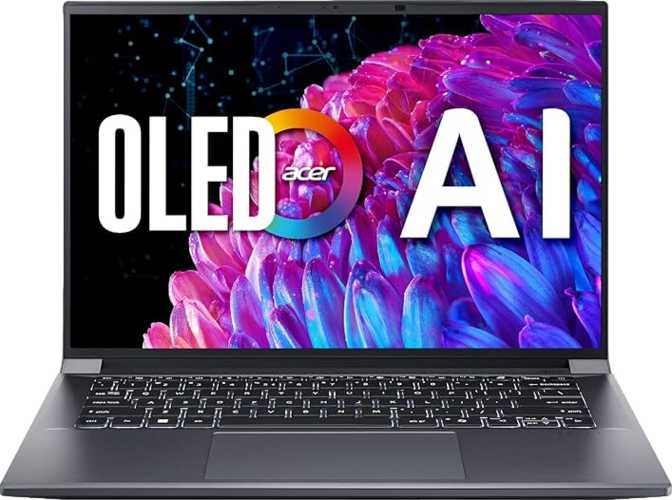
Acer Swift X 14 AI SFX14 Review: OLED Power in a Portable Frame
LaptopsThe Swift X line has always occupied an interesting middle ground — laptops that carry genuine creative horsepower inside a chassis thin enough to slip into a backpack without a second thought. This 14.5-inch model takes that premise further by pairing a hybrid-core processor, a discrete GPU built on NVIDIA's latest Blackwell architecture, and a 2.8K OLED panel, all wrapped in a body that weighs under 1.6 kilograms. On paper, that combination sounds almost too ambitious for a machine this slim. In practice, the specs tell a story worth unpacking carefully — the trade-offs are real and the target audience is narrower than Acer's marketing might suggest.
Review Scores at a Glance
Design and Build: Slim, Light, and Purposefully Compact
The Swift X 14 AI measures 322mm wide, 227mm deep, and just 18mm thick — roughly the footprint of a large hardcover book, but considerably flatter. At 1,570 grams (approximately 3.46 lbs), it sits comfortably in the lightweight tier for a laptop carrying a discrete GPU and a large-format display. Most comparable machines with dedicated graphics weigh well above 1.8 kilograms, making the weight advantage here genuine, not marginal.
The machine uses an active cooling system rather than a fanless design, which is the correct engineering call given the 45W processor thermal envelope and the demands of a discrete GPU. A fanless design at this performance level would result in sustained throttling — the fans are a necessary trade-off, not a design oversight. The chassis is neither weather-sealed nor ruggedized, built for desk-to-bag-to-desk commuters rather than fieldwork or harsh environments.
Physical Dimensions
- Width
- 322 mm
- Depth
- 227 mm
- Thickness
- 18 mm
- Weight
- 1,570 g (3.46 lbs)
- Cooling
- Active fan-cooled
- Weather Sealed
- No
- Rugged Build
- No
Build Highlights
- Backlit keyboard supports work in variable or low-light environments
- Active thermal system is appropriately matched to the 45W TDP processor
- Front-facing camera included for video calls
- No fingerprint reader — biometric login relies on 2D camera only
- No 3D facial recognition — may not meet enterprise security policies
Display: The OLED Argument Made Real
The 14.5-inch OLED panel running at 2880 × 1800 pixels achieves a pixel density of 234 PPI. At that density, individual pixels are invisible at any normal viewing distance — text appears with print-like sharpness, fine photo and video detail renders without stair-stepping, and UI elements stay crisp even when scaling is reduced. This resolution sits in a purposeful sweet spot between standard 2K and 4K, delivering sharp visuals without the GPU overhead that full 4K imposes during productivity workloads.
OLED means each pixel generates its own light and switches completely off for black content. The practical results are absolute blacks, contrast that LCD panels cannot replicate at any price, and color accuracy that benefits photography, video, and graphic design work. HDR content genuinely benefits from this technology in a way that most laptop displays — even expensive IPS panels — cannot match.
Display Specifications
- Panel Type
- OLED / AMOLED
- Screen Size
- 14.5"
- Resolution
- 2880 × 1800 px
- Pixel Density
- 234 PPI
- Refresh Rate
- 120 Hz
- Touch Input
- No
- Anti-Reflection
- No
- Supported Displays
- Up to 4 total
What This Display Means Day-to-Day
- Absolute blacks — each pixel powers off individually, producing contrast no LCD achieves regardless of backlight technology
- HDR content — genuinely transforms streaming and creative review work, not a marketing checkbox
- 120Hz smoothness — fluid scrolling and video playback, clearly improved over standard 60Hz panels
- Multi-display flexibility — four total simultaneous displays supported, enabling complex external monitor setups
- No anti-reflection coating — in bright offices or near windows, the glossy OLED surface reflects ambient light and reduces perceived image quality
Performance: Hybrid CPU, Blackwell GPU, and What the Numbers Mean
The processor uses a hybrid core design — eight cores split across two performance clusters, with a peak turbo frequency of 5GHz. Sixteen threads mean demanding multi-threaded workloads run across the full available capacity simultaneously. The 5-nanometer manufacturing process keeps power draw controlled relative to performance output, directly benefiting both battery endurance and sustained responsiveness.
Processor Specifications
- Architecture
- Hybrid (big.LITTLE)
- Total Cores
- 8 (4+4 clusters)
- Threads
- 16
- Peak Turbo
- 5 GHz
- Process Node
- 5 nm
- Thermal Design Power
- 45 W
- L3 Cache
- 16 MB
- L2 Cache
- 8 MB
Discrete GPU Specifications
- Architecture
- Blackwell (NVIDIA)
- Video Memory
- 8GB GDDR7
- Compute Throughput
- 9.68 TFLOPS
- Memory Bandwidth
- 448 GB/s
- Memory Bus
- 128-bit
- Shading Units
- 3,328
- DLSS Support
- Yes
- Ray Tracing
- Yes
Memory and Storage
- System RAM
- 32GB DDR5
- RAM Speed
- Up to 8,000 MHz
- Memory Channels
- Dual-channel
- Max Supported RAM
- 256 GB
- Storage Capacity
- 2TB NVMe SSD
- Storage Interface
- PCIe 4.0
Benchmark Results
Scores shown relative to competitive-tier range. Higher bars indicate stronger relative performance.
Connectivity: Ports That Reward Planning
The Swift X 14 AI's port selection reflects deliberate trade-offs between capability and chassis volume. The headline connections are genuinely current-generation — but a few notable absences require planning before committing to the purchase.
What Is Included
- 2× USB 4 at 40 Gbps (USB-C form factor) — supports fast external SSDs, daisy-chained displays, and high-bandwidth docks; also carries DisplayPort signal for external monitors
- 2× USB 3.2 Gen 2 (USB-A, 10 Gbps) — handles drives, audio interfaces, and peripherals at full speed without any adapters
- HDMI output — direct connection to monitors, projectors, and TVs
- Memory card reader — convenient direct import for photographers and videographers
- 3.5mm audio jack — headphones and headsets connect without a dongle
- Wi-Fi 6 (802.11ax) — current mainstream standard with full backward compatibility to older routers
- Bluetooth 5.4 — current-generation wireless for peripherals, audio, and accessories; sleep-and-charge USB ports keep devices powered with the lid closed
What Is Missing
- No RJ45 Ethernet port — wired network connections require a USB-C or USB-A adapter, adding persistent friction in office or data-center environments
- No Thunderbolt 4 — USB 4 covers most use cases at identical bandwidth, but specific TB4 docks or external GPU enclosures may require compatibility verification
- No dedicated DisplayPort output — external display connections route entirely through USB-C or HDMI
- No VGA connector — older projectors or legacy A/V equipment require an adapter; unlikely to affect the target audience but worth noting
Battery Life: The 11-Hour Claim in Context
The 76Wh battery is appropriately sized for a machine of this weight class. The dual-GPU architecture — seamlessly switching between the low-power integrated graphics and the discrete GPU based on workload demand — is what makes the 11-hour figure credible. During productivity-focused sessions handled primarily through the integrated GPU, the claim holds up. Under sustained discrete GPU workloads, runtime drops considerably, as it does on every laptop with a dedicated graphics processor.
Realistic Runtime by Scenario
- Productivity workday (documents, email, video calls, browsing) — 9 to 11 hours is genuinely achievable; the integrated GPU handles these tasks efficiently
- Mixed creative and productivity use (light editing, browsing, video) — expect 6 to 8 hours as a practical, realistic average
- Sustained GPU-intensive workloads (gaming, video export, 3D rendering) — plan for 3 to 5 hours under continuous load; keep the charger accessible
Battery Specifications
- Battery Capacity
- 76 Wh
- Rated Battery Life
- 11 hours
- Sleep-and-Charge
- Yes
- MagSafe Adapter
- No
For travel and commuting days dominated by communication, writing, and browsing, the battery genuinely supports a full working session without requiring the charger until evening.
Who This Laptop Is For — and Who Should Look Elsewhere
The Swift X 14 AI has a well-defined target audience. Buying it for the right reasons leads to one of the most satisfying portable machines currently available. Buying it for the wrong reasons leads to daily frustration with trade-offs that cannot be worked around.
This Machine Suits
- Creative professionals — photo editing, video work, and motion graphics benefit directly from the OLED panel and the Blackwell GPU's compute capacity and memory bandwidth
- Software developers and engineers — intensive build pipelines, containerized environments, and local AI model inference run with confidence on the CPU benchmark scores and 32GB of fast DDR5 RAM
- Design and media students — a single machine that handles studio-level software and carries across campus without weighing down a bag
- Part-time gamers — modern titles at genuine OLED image quality with DLSS bridging the performance gap, without owning a dedicated gaming machine
This Machine Does Not Suit
- Competitive gamers — the 120Hz display optimized for image quality is the wrong tool for players who require 165Hz or higher with minimal pixel response for fast-paced titles
- Wired-network-dependent users — the absent RJ45 port creates consistent daily friction in office environments where stable Ethernet connectivity is preferred or required
- Enterprise security-sensitive deployments — without a fingerprint reader or IR camera, Windows Hello biometrics rely on a 2D camera, which may not satisfy stricter IT security policies
- Field workers and physically demanding environments — no splash protection, no rugged construction; this is a precision-built consumer ultrabook built for controlled settings
Competitive Positioning: How It Stacks Up
The Swift X 14 AI's core differentiation is the convergence of OLED display quality, current-generation discrete GPU capability, and a sub-1.6kg frame — a combination that no single competing category fully replicates at this weight.
| Factor | Acer Swift X 14 AI SFX14 | Creator Ultrabook (No Discrete GPU) | Gaming-First (Same GPU Tier) |
|---|---|---|---|
| Weight | 1.57 kg | 1.3 – 1.5 kg | 2.0 – 2.5 kg |
| Display | 2.8K OLED, 120Hz | 2K IPS / OLED, varies | 1080p – 1440p, 144 – 165Hz |
| Discrete GPU | Blackwell, 8GB GDDR7 | Integrated only | Discrete, varies |
| Battery (Light Use) | 76Wh, ~11hr | 60 – 80Wh, 12 – 15hr | 80 – 99Wh, 5 – 8hr |
| Port Selection | Moderate — no RJ45 | Moderate to high | High, often includes RJ45 |
| Sustained Thermal Headroom | Constrained (18mm chassis) | Less constrained | More headroom |
| DLSS / Ray Tracing | Yes | No | Yes |
Strengths and Honest Weaknesses
Where It Excels
The display is the Swift X 14 AI's clearest competitive advantage. A 2.8K OLED at 120Hz on a laptop in this weight class is genuinely uncommon. For anyone whose work involves color accuracy, high contrast, or simply spending eight-plus hours a day looking at a screen, the visual difference compared to a standard IPS panel is immediately apparent — and sustained over time rather than merely impressive in a showroom.
The Blackwell discrete GPU represents real current-generation capability rather than a rebadged previous-generation chip. GDDR7 memory with 448 GB/s bandwidth and close to 10 TFLOPS of compute throughput puts this machine in performance territory that portable laptops historically could not access. AI-accelerated creative applications are increasingly designed to exploit exactly this hardware profile, and the DLSS and ray tracing support extends that capability to gaming workloads.
The 32GB DDR5 and 2TB NVMe configuration removes the compromises that entry configurations impose. Most machines at this portability level ship with 16GB and 512GB — the Swift X 14 AI ships ready for serious work without immediate upgrade pressure.
Where It Compromises
The 18mm chassis constrains sustained peak performance. Under extended heavy loads — long gaming sessions, hours of rendering, or intensive compute pipelines — the thermal system operates at its ceiling and clock frequencies moderate themselves accordingly. This is not a defect; it is physics. Any buyer expecting consistent desktop-replacement performance over hours-long intensive workloads should either accept this nuance or consider a thicker machine engineered specifically for sustained output.
The absence of an anti-reflection coating on the OLED panel is a meaningful daily limitation for anyone who works near windows or in brightly lit environments. The display's image quality is excellent in controlled lighting; in poor ambient conditions, reflections on the glossy surface partially offset the very quality that makes OLED compelling.
The missing wired Ethernet and fingerprint reader are deliberate weight and thickness trade-offs, not oversights. They matter unevenly across buyers. Honestly assessing whether either affects your daily workflow before purchasing is essential — for some users they are invisible omissions; for others, persistent daily friction points.
Questions Real Buyers Ask Before Purchasing
Final Verdict
Acer Swift X 14 AI SFX14 — 14.5"
The Acer Swift X 14 AI SFX14 makes a coherent and compelling argument for itself within a specific buyer profile: someone who needs genuine GPU capability in a machine light enough to carry daily, viewed through one of the better portable displays available at any weight class.
It is not a gaming laptop optimized for peak frame rates, a ruggedized workhorse, or an enterprise security fixture. It is a precision-built ultrabook with ambitions beyond what ultrabooks traditionally offer — and it largely delivers on those ambitions.
If you work in creative fields, development, or AI-adjacent workflows and want a single machine that handles that work without anchoring you to a desk, the Swift X 14 AI SFX14 earns a firm recommendation. Understand its thermal limits under sustained loads, its reflective display in bright rooms, and its port omissions. Within those parameters, this is an exceptionally capable machine in a package that few direct competitors can match.