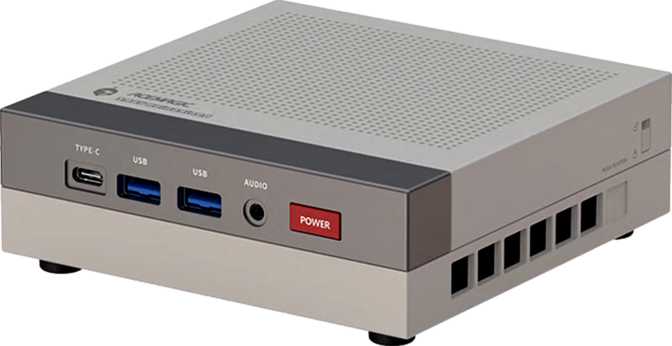
Acemagic Retro X3 Review: The Mini PC That Refuses to Compromise
Mini PCsThe mini PC market has spent years chasing one idea: shrink everything down until the compromises outweigh the savings. The Acemagic Retro X3 takes a different approach. It arrives in a compact chassis that would barely qualify as a paperweight on a corporate desk, yet the hardware packed inside belongs in a conversation about serious productivity machines — not shelf ornaments. If you have ever dismissed a mini PC because you needed real memory, real storage, or actual graphics capability, the Retro X3 deserves your attention before you walk away.
Design and Build: Small Footprint, Deliberate Character
Physical experience and build quality
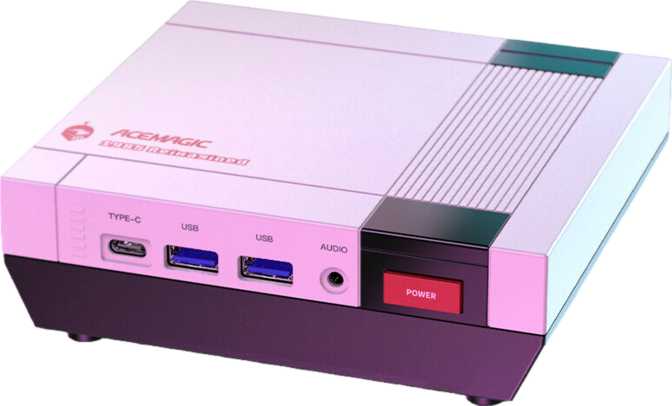
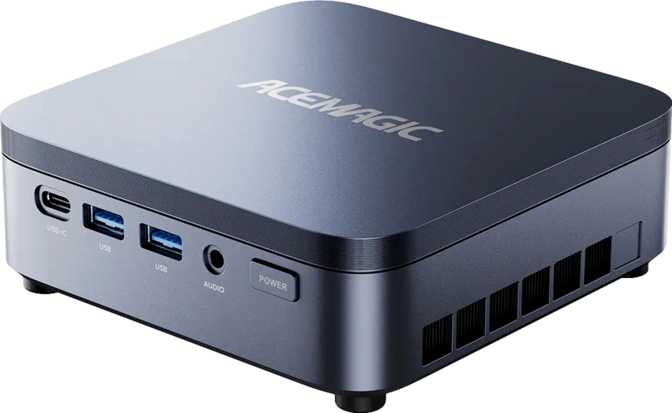
At roughly 128 millimeters square and just 44 millimeters tall, the Acemagic Retro X3 occupies less desk space than a standard hardcover book. The "Retro" name carries visual personality that distinguishes it from the sea of anonymous black rectangles dominating the mini PC category. This is a machine you are likely to leave visible on your desk rather than hide behind a monitor.
The chassis dimensions result in a total volume of just over 720 cubic centimeters. Many full mini-tower desktops clock in at ten to fifteen times that volume, yet the Retro X3 manages to house a high-capacity NVMe drive and a chip capable of driving four simultaneous displays without compromise.
Port placement follows practical logic — outputs and frequently used connections are positioned for easy access without requiring the machine to be repositioned. For a device often mounted behind a monitor or placed on a shelf, that accessibility matters considerably in day-to-day use.
Physical Dimensions
- Width
- 128.2 mm
- Depth
- 128.2 mm
- Height
- 44 mm
- Volume
- ~723 cm³
- Form Factor
- Micro-ATX
CPU Performance: Laptop Efficiency Meets Desktop Ambition
Eight cores, sixteen threads, and meaningful cache depth
The Retro X3 runs a processor configured with eight physical cores and sixteen processing threads — the kind of threading depth that was, until recently, reserved for workstation-class hardware. The base operating frequency sits at 3.8 GHz across all cores, with individual cores capable of climbing to 4.9 GHz under demand.
The chip carries a 45-watt thermal ceiling. In the context of a machine this size, that is well-matched: it allows Acemagic to manage heat without fan noise becoming a constant companion, while still delivering meaningful performance headroom. Housed in a compact desktop chassis rather than a thin notebook, this chip typically sustains its boost frequencies more consistently.
Cache allocation is generous — 16MB of L3 and 8MB of L2 cache split at 1MB per core — which helps the processor handle multi-threaded workloads like video encoding, spreadsheet modeling, and code compilation without the latency penalties that come from constantly reaching out to slower system memory.
Multiplier Is Locked
Manual overclocking is not available on the Retro X3. The chip manages its own boost behavior, reaching 4.9 GHz automatically through its own thermal management rather than user intervention. Enthusiasts who want to push past factory limits will need to look elsewhere.
PassMark Benchmark Results
Competitive with mid-range desktop builds
Strong per-core speed for everyday responsiveness
Reflects maximum sustained boost behavior
Scores compared against a 50,000-point reference ceiling representing current high-end desktop builds. Single-core compared against a 5,000-point reference.
Integrated Graphics: The Radeon 780M Changes the Conversation
AMD RDNA 3 at 4nm — the most capable integrated GPU at this form factor
The Radeon 780M — built on AMD's RDNA 3 architecture and fabricated at a 4-nanometer process node — is the most capable integrated GPU currently available in a machine at this size class. At 4nm, transistor density allows AMD to pack 25.39 billion transistors into the GPU portion of the chip while keeping heat and power draw within the thermal budget. That engineering discipline is what makes the Retro X3's performance-per-volume ratio possible at all.
8.2+ TFLOPS
Floating-point compute throughput that roughly doubles what the PlayStation 4 Pro delivered. For integrated graphics, this is a genuinely significant number — not a marketing rounding exercise.
768 Shaders
768 shading units handle everything from 3D geometry to display scaling and hardware video decoding — across all four connected screens simultaneously without software-side penalties.
Up to 2,600 MHz
The GPU ramps aggressively from 800 MHz at idle to 2,600 MHz under load. That range is the primary reason the 780M punches above integrated GPU expectations in gaming and creative tasks.
Ray Tracing Support
Real-time ray tracing is present — a feature absent from most integrated graphics at any price. Performance scales with title and settings, but the hardware capability exists natively without workarounds.
4 Simultaneous Outputs
Drive up to four monitors at once through HDMI 2.1 and DisplayPort. A four-screen workspace is achievable without a discrete GPU, a dock add-on, or any additional hardware investment.
Full API Support
DirectX 12, OpenGL 4.6, and OpenCL 2.1 cover every modern rendering pipeline — creative software, simulation tools, GPU-accelerated workflows, and current game engines all run without compatibility issues.
No DLSS — AMD FSR Applies Instead
DLSS is an NVIDIA-exclusive upscaling technology and is not available on the Radeon 780M. AMD's FSR (FidelityFX Super Resolution) is supported by many titles at the driver and game level, delivering comparable upscaling benefits. Games that advertise DLSS as a specific feature will not use it on this hardware, though FSR support in the same title is common.
Memory: 128GB of DDR5 Is Not a Typo
Workstation-class RAM in a machine the size of a hardcover book
The Retro X3 ships with 128 gigabytes of DDR5 running at 5,600 MHz — the maximum the system supports in its current configuration, though the memory controller handles up to 7,500 MHz, leaving headroom that could be activated via future platform updates. 128GB of system memory is a specification that normally belongs in professional workstations. Its presence here, in a form factor measured in centimeters, is the Retro X3's single most defining specification.
Virtualization
Running three or four virtual machines simultaneously without memory pressure is entirely realistic. Complex stacks and nested environments stay responsive.
Data Analysis
In-memory databases and large model datasets load fully into RAM, eliminating paging delays and the slowdowns they cause during active computation sessions.
Content Creation
Video editing proxies, 3D scene caches, and project assets load once and stay resident — no waiting for memory to swap during active editing sessions.
GPU Bandwidth
The Radeon 780M shares system memory bandwidth. Faster RAM directly improves GPU performance — giving the 780M more bandwidth than the same chip receives in most laptops.
ECC Memory Is Not Supported
The Retro X3 does not support error-correcting code memory, which means it is unsuitable for mission-critical server deployments where memory integrity is a hard requirement. This is a client workstation, not infrastructure hardware — buyers evaluating it for production server roles should look at ECC-capable platforms instead.
Storage: 4TB NVMe Ready From Day One
Four terabytes of fast NVMe storage — no add-ons or immediate upgrades required
The 4TB NVMe SSD is one of the most practically significant specifications in this machine. Most compact desktops ship with 512GB or 1TB as a baseline — enough to get started, but not enough to avoid managing storage within months. Four terabytes means your operating system, applications, project files, media libraries, and game installations can coexist without constant housekeeping.
NVMe means the drive connects directly to the CPU via PCIe rather than through the slower SATA interface. The PCIe 4 connection standard used here delivers sequential read speeds that make large file transfers — pulling a 50GB video project, installing a large application suite, moving archives — feel quick rather than coffee-break slow.
There is no external memory card slot, which means storage expansion requires either USB-attached drives or internal modification if the chassis allows it. Given the generous starting capacity, most users will not face this constraint for years of normal use.
Storage Capacity Context
All drives are NVMe; exact interface standard and speeds vary by manufacturer and model tier.
Connectivity: A Port Layout That Respects Your Peripherals
Wired and wireless connections for a fully equipped desk setup
Wired Connections
- 6 × USB-A at 10 Gbps each
All six ports run at USB 3.2 Gen 2 speeds — enough for keyboard, mouse, USB hub, external drives, and headset without reaching for adapters.
- USB4 at 40 Gbps
The top-tier USB standard. Supports fast external NVMe enclosures, high-bandwidth docks, and peripherals that saturate slower connections.
- Thunderbolt 4
Opens the full Thunderbolt ecosystem: certified docks, eGPU enclosures, high-speed displays, and daisy-chaining. A single TB4 cable to a quality dock can replace most of this port list entirely.
- HDMI 2.1 and DisplayPort
HDMI 2.1 supports 4K at 120Hz or 8K at lower refresh rates. DisplayPort provides a second dedicated monitor output for dual-screen setups without a dock.
- Gigabit Ethernet (RJ45)
Wired networking for stable, low-latency connections — essential for professionals who cannot afford the variability of wireless under load.
- 3.5mm Audio Jack
Headphones, headsets, and desktop speakers connect directly without an adapter or external DAC requirement.
Wireless
- Wi-Fi 6 (802.11ax)
The current mainstream wireless standard. Delivers better performance in congested environments — apartments and open-plan offices — compared to Wi-Fi 5, with improved multi-device handling.
- Bluetooth 5.2
Supports modern wireless peripherals, audio devices, and accessories with improved range and connection stability over older Bluetooth versions.
Display Outputs at a Glance
| Port | Max Resolution | Notes |
|---|---|---|
| HDMI 2.1 | 4K @ 120Hz | High refresh rate support |
| DisplayPort | Up to 4K | Standard monitor output |
| USB4 / TB4 | Up to 4K | Via dock or adapter |
| Total Simultaneous Displays | Up to 4 | |
Thermal Management and Noise: What to Expect
Cooling behavior and acoustic profile in real daily use
The 45W processor in a chassis this compact means thermal design is a genuine engineering challenge. The Retro X3 uses an air cooling configuration — there is no liquid cooling loop, which keeps the system simpler and eliminates the maintenance considerations that come with it.
Under light loads — browsing, documents, light media playback — the system should remain nearly inaudible, with the fan running at low RPM or near-idle. Under sustained workloads such as rendering, extended compilations, or gaming sessions, expect the fan to become audible as it manages rising processor temperatures.
The chip is rated to handle temperatures up to 100°C before thermal throttling occurs. This is a normal operating parameter for this chip architecture and is not a cause for concern — it reflects how modern mobile-derived chips balance sustained performance within tight power envelopes. Users in noise-sensitive environments should weigh this characteristic carefully before purchasing.
Noise Profile
Real-World Use Cases: Who This Machine Is Built For
An honest look at the right buyers — and the wrong ones
A Great Fit For
- Remote Workers and Home Office Professionals
Full desktop experience without a tower. Handles multiple applications, browser-heavy workflows, and video calls simultaneously without memory pressure.
- Developers and Engineers
128GB handles Docker containers, local dev environments, and multiple virtual machines running complex stacks without a memory ceiling in sight.
- Data Analysts and Researchers
Large datasets load into memory and stay there. In-memory database work and model training on large tabular data become practical rather than theoretical.
- Content Creators (Light-to-Medium)
1080p video editing is comfortable. 4K with proxies is manageable. Storage and RAM mean the application never waits on the hardware during active sessions.
- Multi-Monitor Power Users
Four display outputs without a discrete GPU or additional hardware. A three or four screen workspace is possible straight out of the box.
- Esports and Budget Gamers
The Radeon 780M handles competitive titles and older games at 1080p with frame rates that are genuinely playable — not just technically functional.
Not the Right Fit For
- 3D Rendering Professionals
GPU compute measured in tens of TFLOPS is required for serious rendering work. A discrete GPU workstation is the correct tool — the 780M is not a render farm.
- Hardcore Gamers
High frame rates in demanding titles at 1440p or 4K are beyond the 780M's reach. Modern AAA games at ultra settings will expose integrated graphics limits quickly.
- Server or Infrastructure Deployments
No ECC memory support makes this unsuitable for mission-critical workloads where memory error correction is a hard requirement.
- Overclocking Enthusiasts
The locked CPU multiplier makes manual tuning unavailable. The chip boosts automatically and cannot be pushed further by the user under any configuration.
Competitive Positioning: How It Compares
The Retro X3 versus typical AMD RDNA 3 mini PC alternatives
The Retro X3 competes in the segment defined by AMD's RDNA 3 integrated graphics chips. Several manufacturers use the same or closely related silicon. What distinguishes the Retro X3 is primarily its memory and storage configuration — 128GB of DDR5 is not standard at this size class, and most competitors ship 16GB or 32GB while positioning higher configurations as premium upgrades at additional cost.
| Feature | Acemagic Retro X3 | Typical Competitor (Same GPU Tier) |
|---|---|---|
| RAM | 128GB DDR5 | 16–64GB DDR5 |
| Storage | 4TB NVMe PCIe 4 | 512GB–2TB NVMe |
| USB-A Ports | 6 × 10 Gbps | 2–4, mixed speeds |
| USB4 / Thunderbolt 4 | Both present | Often one or neither |
| Wireless Standard | Wi-Fi 6 (802.11ax) | Wi-Fi 6 (common at this tier) |
| GPU Architecture | RDNA 3 — Radeon 780M | RDNA 3 (same or similar) |
| Warranty | 1 Year | 1–2 Years (varies by brand) |
Honest Assessment: What Works, What Doesn't
A balanced evaluation without the marketing gloss
Where the Retro X3 Excels
The memory configuration alone — 128GB of fast DDR5 — is a genuine differentiator that makes this machine useful for workflows most mini PCs cannot handle without upgrades. Pairing that with a 4TB NVMe drive means the machine arrives ready for serious use with no immediate add-on investment required.
The Radeon 780M performs beyond what the word "integrated" suggests to most buyers. It exceeds expectations for the workloads realistically attempted on a machine this size — and the advantage is amplified by the 128GB of DDR5, which provides the GPU more memory bandwidth than it receives in typical laptop deployments.
The port layout is genuinely complete. Six high-speed USB-A ports plus Thunderbolt 4 means this machine can serve as the hub for a complex desk setup without a separate dock purchase — though a Thunderbolt dock remains a clean single-cable solution for users who prefer it.
Where It Falls Short
The locked CPU multiplier eliminates enthusiast tuning. Users who want to extract every percentage of performance from their hardware must accept that the chip manages itself — there is no manual headroom to explore and no unlock path available.
The one-year warranty window is shorter than what competing compact desktops often provide. For a machine in this configuration and price tier, a two-year manufacturer warranty would be more appropriate. Extended coverage may be purchasable separately, but it should not need to be to feel adequately protected.
Noise under heavy load is a real characteristic. The thermal system is doing serious work inside a small enclosure, and the fan reflects that under sustained workloads. Users in genuinely quiet environments should know this before buying.
Ray tracing is present, but the performance gap between integrated ray tracing and a dedicated GPU with hardware acceleration units is significant. Buyers expecting high-fidelity ray-traced visuals should calibrate expectations against the 780M's actual throughput.
Answers to Common Pre-Purchase Questions
What real buyers search for before committing to a mini PC purchase
Final Verdict: Punching Well Above Its Weight Class
The Acemagic Retro X3 makes a compelling case for itself by doing something unusual: it specifies the machine as if it were built for someone who actually uses computers for demanding work. 128GB of DDR5, 4TB of NVMe storage, and the Radeon 780M make this a legitimate workstation-class compact desktop for developers, analysts, and multi-tasking power users. The port selection is complete enough that most users will never feel short-changed, and the form factor is small enough to fit where a tower cannot.