Acemagic Retro X5 Review: A Compact Desktop That Defies Expectations
Mini PCsMini PCs have spent years being politely dismissed as underpowered novelties — good for media centers, maybe light office work, but little else. The Acemagic Retro X5 has no interest in that reputation. Equipped with a high-efficiency mobile-class processor, an integrated GPU that punches well above its station, and a memory configuration that embarrasses many full-sized desktop builds, this compact machine makes a genuine case for itself as a primary workstation. The question is whether the hardware underneath the nostalgic exterior holds up when you actually push it.
Design and Build: Retro Aesthetic, Modern Internals
Form Factor: Micro-ATX
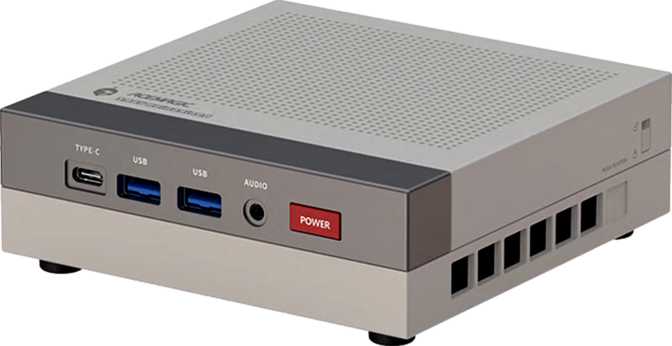
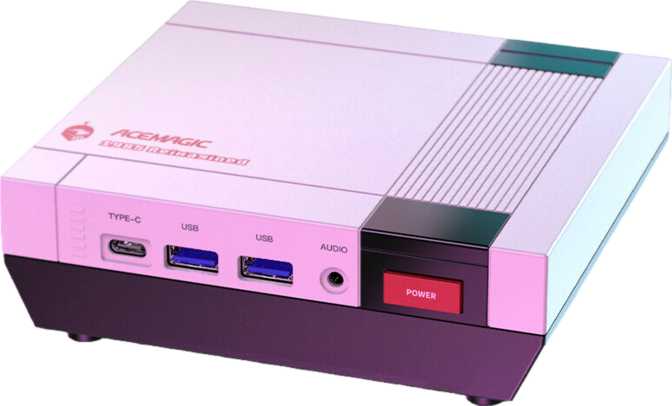
The "Retro" in the name is not incidental. Acemagic has leaned into a throwback visual identity here, which will either be the first thing you love about this machine or something you appreciate and move past once you understand what's inside. The Micro-ATX chassis keeps the footprint manageable without shrinking to the point where thermal compromises become unavoidable — a balance that many ultra-compact PCs get wrong.
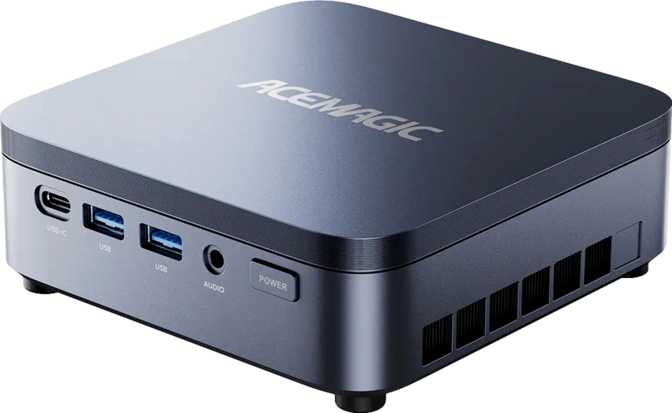
The physical layout reflects deliberate engineering choices. The port selection is distributed across the chassis in a way that gives you meaningful front- and rear-access options without crowding any single panel. For a machine intended to sit permanently on or under a desk, this matters more than most buyers initially realize — nothing is worse than having to reach behind a computer every time you plug in a peripheral.
Build quality on Acemagic's recent releases has trended toward solid plastics with metal accents rather than all-aluminum unibody construction. Buyers expecting the heft of a Mac Mini or an Intel NUC-style premium chassis should calibrate expectations accordingly. The Retro X5 feels purposeful rather than luxurious — which is appropriate at this market position.
CPU Performance: Efficiency Without Compromise
12 Cores · 24 Threads · 28W TDP · 5.1 GHz Turbo · 36 MB Combined Cache
The Processor Architecture
The processor inside the Retro X5 is a twelve-core, twenty-four-thread chip designed around a 28-watt thermal envelope. In a laptop, that budget is shared with battery life. In the Retro X5's desktop chassis with active cooling and no battery constraint, the chip runs at or near its thermal ceiling continuously — which changes the real-world performance picture considerably.
Base clock speeds sit at 2 GHz across all cores, but the single-core turbo ceiling of 5.1 GHz is where most real work happens. Browsers, productivity suites, video calls, and background syncs all demand short bursts of fast single-core performance. The processor scales individual cores to over five gigahertz in milliseconds, then steps back when demand drops — exactly how efficiency-focused architectures are designed to behave.
Cache and Threading Depth
Thirty-six megabytes of combined L2 and L3 cache is substantial for a chip in this class. Cache acts as ultra-fast local memory for the processor — the more data held close to the cores without reaching out to system RAM, the faster complex tasks complete. Software compilation, data analysis, and large-file manipulation all benefit disproportionately from generous cache allocations.
The twenty-four thread count means the system handles twenty-four simultaneous computational tasks without the operating system having to queue or delay any of them. For developers running parallel build processes, creative professionals managing layered audio or video projects, and analysts running concurrent data pipelines, this threading depth is directly productive.
Benchmark Results in Context
PassMark
Geekbench 6
Integrated Graphics: The Radeon 890M Explained
1,024 Shaders · 2,900 MHz Boost · 4 nm · DirectX 12 · OpenGL 4.6 · 4 Displays
Integrated graphics on mini PCs have historically been an afterthought — something that pushed pixels to a monitor and not much else. The Radeon 890M built into the Retro X5 is a different species entirely. Built on a 4-nanometer manufacturing process, it brings 1,024 shading units, 64 texture mapping units, and 32 render output units to the table. Its clock speed boosts to nearly 2,900 MHz under load — higher than many recent mid-range discrete GPUs manage — producing iGPU performance that would have been classified as discrete GPU territory just a few years ago.
DirectX 12 and OpenGL 4.6 support means the 890M is compatible with every current game and application that doesn't require a dedicated GPU by design. OpenCL 2.1 support extends usefulness into GPU-accelerated workloads like video transcoding, AI inference at modest scales, and scientific computing tasks.
- Shading Units
- 1,024
- Texture Units
- 64
- Render Outputs
- 32
- Boost Clock
- 2,900 MHz
- Process Node
- 4 nm
- DirectX
- 12
- OpenGL
- 4.6
- PCIe Version
- 4
- Esports titles and older AAA games at 1080p medium settings
- Indie games without reservation
- GPU-accelerated video export and transcoding
- AI inference at modest scales via OpenCL 2.1
- All current productivity and creative applications
- 4K and high-refresh-rate gaming at maximum settings
- Professional 3D rendering at production scale
- Machine learning model training workloads
- Replacing a discrete GPU for demanding AAA titles
Memory and Storage: Where the Retro X5 Stands Apart
128 GB DDR5 · 7,500 MHz Dual-Channel · 4 TB NVMe · PCIe Gen 4
128 gigabytes of RAM is the maximum this platform supports — and the Retro X5 ships there. Most mini PC competitors deliver 16 to 32 GB as standard, with 64 GB as an expensive premium option. 128 GB shifts the machine's use case profile entirely.
The RAM runs on DDR5 in dual-channel configuration at up to 7,500 MHz — delivering roughly twice the bandwidth of DDR4 at equivalent speeds. That bandwidth feeds both the CPU and the Radeon 890M, which uses system RAM as its video memory, without significant bottlenecking under typical workloads.
Users Who Genuinely Benefit
- Developers running multiple simultaneous virtual machines
- Analysts loading large datasets into memory for in-memory processing
- Home lab and self-hosting operators
- Power users who never close applications
Four terabytes of NVMe solid-state storage means fast load times and enough space that most users will never need to think about storage management. NVMe drives connect directly to the processor rather than through a shared bus, keeping read and write speeds consistently high even during heavy parallel access — critical for users running virtual machines stored on the same drive as the primary OS.
PCIe Gen 4 connectivity doubles the theoretical interface bandwidth of PCIe 3, ensuring the SSD operates at its rated performance ceiling rather than being throttled by the interface itself.
Connectivity: Genuinely Future-Ready
Wi-Fi 7 · Bluetooth 5.4 · USB4 40 Gbps · Thunderbolt 4 · Dual RJ45 Ethernet
Wireless
Wi-Fi 7 (802.11be) is the newest Wi-Fi standard available, delivering higher theoretical throughput and meaningfully lower latency on compatible routers compared to Wi-Fi 6E. Backward compatibility with Wi-Fi 6E, 6, 5, and 4 networks means existing home or office hardware works without modification. Bluetooth 5.4 handles audio peripherals, mice, keyboards, and accessories with current-generation reliability and range.
Dual Wired Ethernet
Two RJ45 ethernet ports are a genuinely uncommon inclusion at this chassis size. Two simultaneous wired connections benefit network engineers testing equipment, home lab operators separating traffic across interfaces, and anyone wanting a primary wired connection plus an always-ready backup without physical re-cabling. This specification alone signals a machine built for serious users.
Port Breakdown
| Port Type | Qty | Real-World Capability |
|---|---|---|
| USB 3.2 Gen 2 — Type-A | ×2 | Up to 10 Gbps per port — fast external SSDs and hubs |
| USB 3.2 Gen 1 — Type-A | ×2 | Up to 5 Gbps per port — standard peripherals |
| USB 3.2 Gen 2 — Type-C | ×1 | Up to 10 Gbps — fast devices or power delivery |
| USB4 40 Gbps — Type-C | ×1 | Up to 40 Gbps — maximum-speed data transfer |
| Thunderbolt 4 | ×1 | 40 Gbps · eGPU enclosures · daisy-chaining · certified docks |
| HDMI 2.1 | ×1 | Up to 4K @ 120 Hz or 8K @ 60 Hz video output |
| DisplayPort | ×1 | Additional video output for multi-monitor setups |
| RJ45 Ethernet | ×2 | Dual simultaneous wired network connections |
| 3.5mm Audio Jack | ×1 | Headset and speaker connectivity |
Who This Machine Is Built For
Developers and Software Engineers
Multiple development environments, local containers, virtual machines, and fast iteration across projects. The 128 GB RAM and 24-thread CPU directly serve this workflow.
Home Lab and Self-Hosting Enthusiasts
File servers, media servers, local network tools, and private cloud infrastructure — without the power draw or desk footprint of a tower.
Multi-Monitor Productivity Users
Four simultaneous displays from integrated graphics, for work in productivity, data, or creative applications that don't require 3D-intensive GPU output.
Light-to-Moderate Gamers
Esports titles, classic PC games, and indie games run well. Demanding AAA titles at high settings require a different hardware category entirely.
Data and Analytics Professionals
Loading large datasets into memory, running local model inference, and processing files too large for RAM-constrained machines.
Serious High-Refresh Gamers
1440p and 4K gaming at high frame rates demands a dedicated GPU. The Radeon 890M is capable integrated graphics — it is not a gaming card, and no settings adjustment changes that ceiling.
3D Rendering Professionals
Commercial-scale CPU/GPU render queues are beyond what this platform was designed to handle. The 890M covers previews and light output, not production workloads.
Mission-Critical ECC Users
ECC memory is not supported. Applications where data integrity under sustained load is non-negotiable require a different platform entirely.
Hardware Enthusiasts Seeking Expandability
The memory maximum is fixed at what the machine ships with. There is no external memory slot. Buyers who need to grow the hardware after purchase are already at the ceiling on day one.
Competitive Positioning
The Retro X5 occupies a specific gap: substantially more capable than entry-level mini PCs that ship with 16–32 GB RAM and minimal storage, and significantly cheaper to operate than full-tower workstations reaching similar performance through discrete GPU hardware and far higher power consumption.
| Feature | Retro X5 | Entry Mini PC | Mid-Range Competitor |
|---|---|---|---|
| RAM | 128 GB DDR5 | 16–32 GB DDR4/5 | 32–64 GB DDR5 |
| Storage | 4 TB NVMe | 512 GB–1 TB | 1–2 TB |
| GPU | Radeon 890M | Intel UHD / Radeon 780M | Radeon 780M / 890M |
| Wi-Fi | Wi-Fi 7 | Wi-Fi 6 | Wi-Fi 6E |
| Thunderbolt 4 | Occasionally | ||
| Max Displays | 4 | 2–3 | 2–3 |
| Dual Ethernet | |||
| USB4 40 Gbps | Rarely |
Honest Strengths and Weaknesses
What It Gets Right
The Retro X5's strongest case is its coherence as a package. The 128 GB RAM and 4 TB storage are not marketing numbers tacked onto a mediocre chassis — they make the machine genuinely suitable for workloads that would otherwise require a significantly more expensive desktop build. The connectivity stack, anchored by Thunderbolt 4, USB4 40 Gbps, and Wi-Fi 7, ensures the machine does not become a liability as peripherals and networks evolve.
The Radeon 890M's real-world integrated GPU capability continues to surprise users who last evaluated integrated graphics several years ago. Combined with a desktop chassis that gives the 28W chip sustained thermal headroom a laptop cannot maintain, performance in everyday and moderately demanding tasks stays consistently high — without the fan aggression or thermal throttling that plagues similarly specced ultrabooks.
Where It Falls Short
The processor's efficiency-first design is a double-edged characteristic. Under sustained all-core loads — continuous video encoding, large build jobs running for hours — the 28W ceiling becomes visible. This is not a flaw unique to the Retro X5; it is intrinsic to the chip category. But buyers coming from full-power desktop processors should calibrate their sustained workload expectations accordingly.
The locked multiplier removes any option to push beyond factory configuration — what you see is what you get, forever. The absence of ECC memory support is a hard limitation for specific professional use cases. The plastic-primary chassis will not satisfy buyers accustomed to premium-material construction. And the retro aesthetic, while distinctive, will divide opinion in workplaces and setups where understated design is preferred.
Questions Real Buyers Ask Before Purchasing
Final Verdict
The Acemagic Retro X5 is a rare machine in the compact desktop category: one where the full specification package tells a coherent story rather than a list of inflated numbers designed to win shelf comparisons. The processor performs at a level that handles professional-grade multitasking, the 128 GB DDR5 RAM enables use cases most mini PCs simply cannot attempt, and the connectivity options reflect genuine forward-thinking rather than minimum viable port selection.
It is not a gaming desktop, and buyers who measure value primarily in frame rates should look elsewhere. It is not the machine for users who need ECC memory or the ability to push hardware beyond factory settings.
Purchase Verdict — Recommended
For developers, home lab operators, multi-monitor productivity users, and data-intensive professionals who want a capable and quiet workstation without a full tower footprint, the Retro X5 earns a confident recommendation. The retro aesthetic is a polarizing bonus — the hardware underneath it is the real argument for buying one.