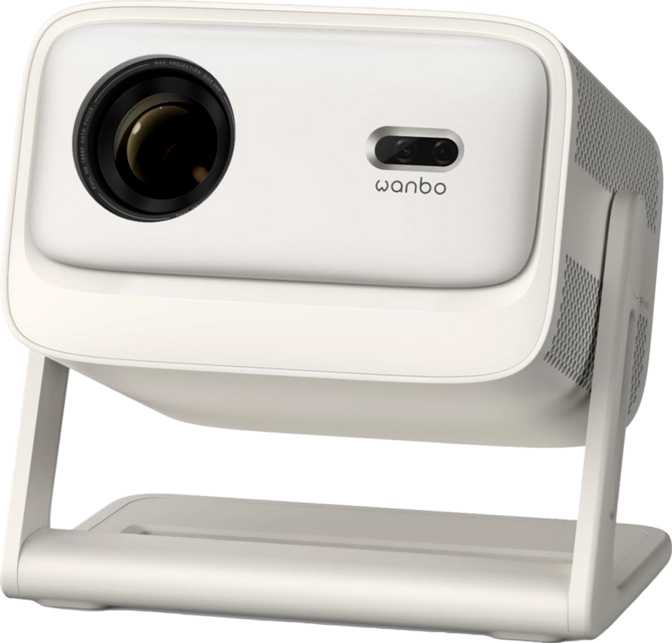
Wanbo Vali 1 Pro Review: Full HD Smart Projector Tested
ProjectorsEditor's Score
RecommendedPerformance at a Glance
The home projector market has fractured into two camps: cheap pico projectors that disappoint anyone who expects real picture quality, and full-sized home theater units that demand a dedicated room and a serious budget. The Wanbo Vali 1 Pro aims squarely at the space between those extremes — a compact, smart-enabled 1080p projector that promises cinema-scale images without the installation headaches. Whether it actually delivers depends heavily on what you are bringing to the equation.
Six Reasons This Projector Gets Noticed
Design and Build: Small Footprint, Considered Proportions
Physical experience, materials, and form factor
The Vali 1 Pro sits in a form factor closer to a large lunchbox than a traditional projector. At roughly 19 cm wide and just under 23 cm deep, it fits on a standard bookshelf or coffee table without rearranging the room. The chassis is well-balanced — nothing feels disproportionate or rushed. This is a projector designed to live in living spaces, not AV racks.
At 2.8 kg, it is light enough to carry between rooms or pack into a bag for backyard screenings, yet substantial enough that it does not feel fragile or toy-like when you pick it up. Moving it from room to room for different uses is genuinely practical, not just theoretically possible.
One critical distinction to establish upfront: this is an LED-based projector, not a laser unit. That matters for understanding its brightness ceiling, its long-term ownership economics, and the type of viewing environment where it performs best — all of which are covered in the sections below.
Physical Specs
- Width
- 188.8 mm
- Depth
- 254 mm
- Height
- 227.6 mm
- Weight
- 2.8 kg
- Power Draw
- 130 W
- Fan Noise (Eco)
- 28 dB
- Warranty
- 1 Year
Picture Quality: Full HD With Real HDR Credentials
Resolution, dynamic range, screen size, and refresh rate
Resolution and Sharpness
Native 1080p output means every pixel in a Full HD source lands exactly where it should — no upscaling artifacts, no softness from pixel interpolation. At typical living room distances, the image is crisp enough for detailed sports broadcasts, sharp text in presentations, and fine texture in film grain.
For 4K content, you will be watching a downscaled version — this is worth stating plainly. If 4K HDR fidelity is your primary requirement, this projector is not the right tool. For the overwhelming majority of streaming content, which is still delivered predominantly in 1080p or 1080p-equivalent HDR, the Vali 1 Pro is fully equipped.
HDR: Real Support, Not a Badge
HDR support on budget projectors is often cosmetic. The Vali 1 Pro supports both HDR10 and HLG, covering the two formats you will actually encounter on streaming platforms and broadcast content. HLG is the standard for live HDR broadcasts, so sports and live events in HDR are handled correctly.
HDR10+ — used by Amazon Prime Video and a subset of Blu-ray titles — is not supported. For most users, this will never matter. The content library requiring HDR10+ is narrow, and the difference on a projector screen is minimal compared to a high-brightness TV panel.
Screen Size and Refresh Rate
The image ceiling is 130 inches diagonal — over 3 meters wide, enough to fill an entire wall. Realistically, most users will land between 80 and 110 inches, which remains spectacular compared to even the largest flat-panel TV. The minimum throw distance of 1.2 meters makes it practical in smaller apartments where you cannot push the projector far from the wall.
The 60 Hz refresh rate handles everything from cinematic 24fps film to 60fps gaming and sports. What it does not support is the 120 Hz high-frame-rate output from newer gaming consoles. If you are connecting a PlayStation 5 or Xbox Series X expecting 120fps gameplay, you will be capped at 60fps.
Throw Distance and Placement Flexibility
What you need to know before choosing where to put it
The Vali 1 Pro has no lens shift — neither vertical nor horizontal. Correct physical positioning is essential. Any offset correction must come from digital keystone adjustment, which works but reduces effective resolution and can introduce minor edge softness.
Without lens shift, the projector needs to be placed at a specific height relative to the screen center. This is not unusual at this price point — lens shift is a feature more commonly found on higher-end installation projectors — but it is something to plan around before mounting or positioning permanently.
The practical advice: invest time placing the projector correctly before relying on digital correction. A flat surface at the right height pointed straight at the wall will always produce a sharper, more accurate image than a tilted projector digitally compensated afterward. Once you find the right spot, the Vali 1 Pro stays there without fuss.
Built-In Smart TV and Wireless Casting
A complete streaming platform — no external hardware required
The Vali 1 Pro ships with a full smart TV operating system integrated, functioning as a self-contained streaming device from the moment it is powered on. But where it separates itself from competitors is the wireless casting suite — all three major protocols are supported simultaneously, meaning virtually no phone or laptop is incompatible.
Voice commands and a dedicated smartphone app round out the control options. You can adjust settings, switch sources, and control playback by voice or from your phone — the remote control is there when you want it, but it is not the only option.
Audio: A Built-In Sound System That Surprises
Stereo speakers, Dolby Atmos decoding, and wireless audio options
Budget projectors almost universally treat audio as an afterthought. The Vali 1 Pro takes a different approach: a stereo speaker configuration totaling 12 watts across two drivers — enough to fill a medium-sized room with clear, directional sound. That alone puts it ahead of most competitors in this price range.
More significantly, Dolby Atmos decoding is included. Atmos is the spatial audio format embedded in most premium streaming content, and having a projector that decodes it properly — rather than ignoring it or falling back to a compressed track — is uncommon at this price tier.
A practical note on Atmos: two speakers can decode the Atmos mix but cannot physically reproduce three-dimensional spatial audio. What you get is the benefit of the Atmos track processed correctly for stereo playback, which is noticeably better than a projector that bypasses it entirely.
Audio Connection Options
-
3.5mm Headphone / Line Out
Connect any passive speaker or headphone amplifier via the analog output -
Bluetooth Audio Out
Pair wireless headphones or a Bluetooth speaker — ideal for late-night viewing at low projector volume -
No S/PDIF or HDMI ARC
Traditional AV receivers requiring optical or ARC connection are not directly supported
LED Lamp Life and Long-Term Economics
Why you will almost certainly replace the device before the light source fails
At two hours of use per evening, that translates to roughly 5,500 evenings of viewing — or over fifteen years of nightly movie nights before any brightness degradation becomes noticeable.
Switching to eco mode extends the rated lifespan to a figure that, at typical household usage, exceeds 40 years. It also drops the audible fan noise to 28 decibels — the sound level of a quiet library — which is below the threshold most people consciously notice once audio is playing.
This is one of the most compelling practical arguments for an LED-based projector over a traditional lamp model: no expensive bulb replacements, no darkening picture after a couple of years, no sudden lamp failure mid-film. The light source is, for all practical purposes, a non-issue for the lifetime of the device.
Physical Connectivity: What Is There and What Is Not
Full port inventory so you can plan your setup before buying
Physical Ports
| Port | Status |
|---|---|
| HDMI | 1 Port |
| USB | 1 Port |
| 3.5mm Audio Out | |
| Ethernet (RJ45) | |
| VGA | |
| DVI | |
| S/PDIF Optical | |
| External Memory Slot |
Wireless Connectivity
| Protocol | Supported |
|---|---|
| Wi-Fi | |
| Bluetooth | |
| AirPlay | |
| Chromecast Built-In | |
| Miracast |
Real-World Scenarios: Who Should Buy This Projector?
Matching the Wanbo Vali 1 Pro to the right buyer — and flagging who should look elsewhere
Ideal For
-
The apartment dweller who wants a big screen without buying a big TV.Compact footprint, Wi-Fi-only operation, and wireless casting mean setup takes under ten minutes. Push it to 100 inches on a white wall and you are watching.
-
The occasional outdoor or travel user.At 2.8 kg with built-in streaming, it needs no laptop or media player to accompany it. A portable battery pack and a white sheet make a complete outdoor cinema setup.
-
The mixed-device family living room.AirPlay for the iPhone, Chromecast for the Android, Miracast for the Windows laptop — every family member's device works without negotiation or dongles.
-
The moderate gamer.60fps at 1080p covers casual, narrative, and sports titles without issue. The big-screen experience transforms living room gaming in a way no same-budget TV can match in scale.
Not the Right Fit For
-
Dedicated home theater purists.If you are building a light-controlled dedicated room and want reference-quality 4K HDR with peak laser brightness, a different category of projector is the correct tool.
-
Competitive and high-frame-rate gamers.60 Hz is the hard ceiling. Sub-20ms input lag setups and 120fps gameplay on current consoles require a gaming-specific projector from a different product family.
-
Users in very bright rooms.No projector at this form factor and price point overcomes a sunlit living room. The Vali 1 Pro performs best in dim or fully darkened environments.
-
Users who need a wired network connection.No Ethernet port is a real constraint in environments with inconsistent Wi-Fi where a wired fallback is essential for reliable streaming.
How the Wanbo Vali 1 Pro Compares to Alternatives
Positioned against a typical budget LED competitor and a mid-range smart laser projector
| Feature | Wanbo Vali 1 Pro | Typical Budget 1080p LED | Mid-Range Smart Laser |
|---|---|---|---|
| Resolution | 1080p Native | 1080p Native | 1080p or 4K |
| Light Source Lifespan | Very Long (LED) | Very Long (LED) | Very Long (Laser) |
| HDR Support | HDR10 + HLG | Often HDR10 only | HDR10+ possible |
| Smart TV Built-In | Varies | ||
| AirPlay + Chromecast + Miracast | All Three | Rarely all three | Common |
| Dolby Atmos | Sometimes | ||
| Lens Shift | Rarely included | Often included | |
| Ethernet Port | Sometimes | ||
| Fan Noise (Eco) | 28 dB | 28 – 35 dB | Typically quieter |
| Price Tier | Mid-Budget | Budget | Mid to Upper |
Highlighted column indicates the Wanbo Vali 1 Pro. Competitor entries reflect category-typical specifications, not a single named model.
Honest Assessment: Where It Excels and Where It Compromises
A balanced look at what this projector actually gets right and where it pulls punches
What It Gets Right
The wireless casting situation is the standout. Supporting AirPlay, Chromecast, and Miracast simultaneously — without requiring any external hardware — is something that even more expensive projectors frequently skip. In a multi-device household, this is a daily-use feature that earns its place every single time someone wants to throw content from their phone to the wall.
The audio package elevates the experience well above what the physical size suggests. Twelve watts of stereo sound with proper Dolby Atmos decoding is not a marketing claim — it is audibly better than the single-driver mono speakers that budget projectors typically include. For casual viewing without external speakers, it is genuinely usable.
The LED light source removes the traditional projector ownership anxiety. No budgeting for replacement lamps, no gradual brightness loss after the first year, no unplanned expense. Over the lifetime of the device, this represents real money saved compared to conventional lamp-based alternatives.
Where It Pulls Punches
The absence of lens shift is a real placement constraint. It is a feature cut that keeps costs down — understandable — but it means the projector must be positioned precisely before digital keystone correction is used. For buyers who want to mount it permanently at an offset angle, this will require more planning than expected.
No Ethernet port is a practical inconvenience for a specific type of user. In apartments with concrete walls, dense urban buildings, or any space where Wi-Fi is unpredictable, a wired fallback is the difference between reliable streaming and a frustrating evening. The Vali 1 Pro provides no route to that reliability.
The one-year warranty is shorter than the competition norm for a device expected to run for years. This is the one area where checking the retailer's return policy and any available extended coverage before purchasing is genuinely worth the effort — not because the projector seems unreliable, but because the warranty coverage is thin relative to the product's intended lifespan.
Questions Buyers Are Actually Searching For
Answers to the eight questions that come up most before purchasing
Final Verdict
The Wanbo Vali 1 Pro is a well-considered product for a specific, clearly defined buyer: someone who wants a large, cinema-quality image in a home living space without the complexity or cost of a dedicated home theater setup.
Its wireless casting versatility, legitimate HDR support, and Dolby Atmos audio set it apart from similarly priced competitors that cut corners on the features that actually affect daily use. The LED light source removes the ongoing maintenance cost that has historically made projector ownership frustrating.
The placement limitations and connectivity constraints require that you match the product to your specific room and use case before purchasing. Go in with accurate expectations about what 1080p and 60 Hz mean for your content habits, and the Vali 1 Pro delivers a living room experience that comfortably outperforms anything a same-budget television can offer in terms of scale.
For renters, apartment dwellers, families who stream from mixed devices, and anyone who wants big-screen movie nights without building a dedicated room — this projector makes a compelling, practical case for itself.