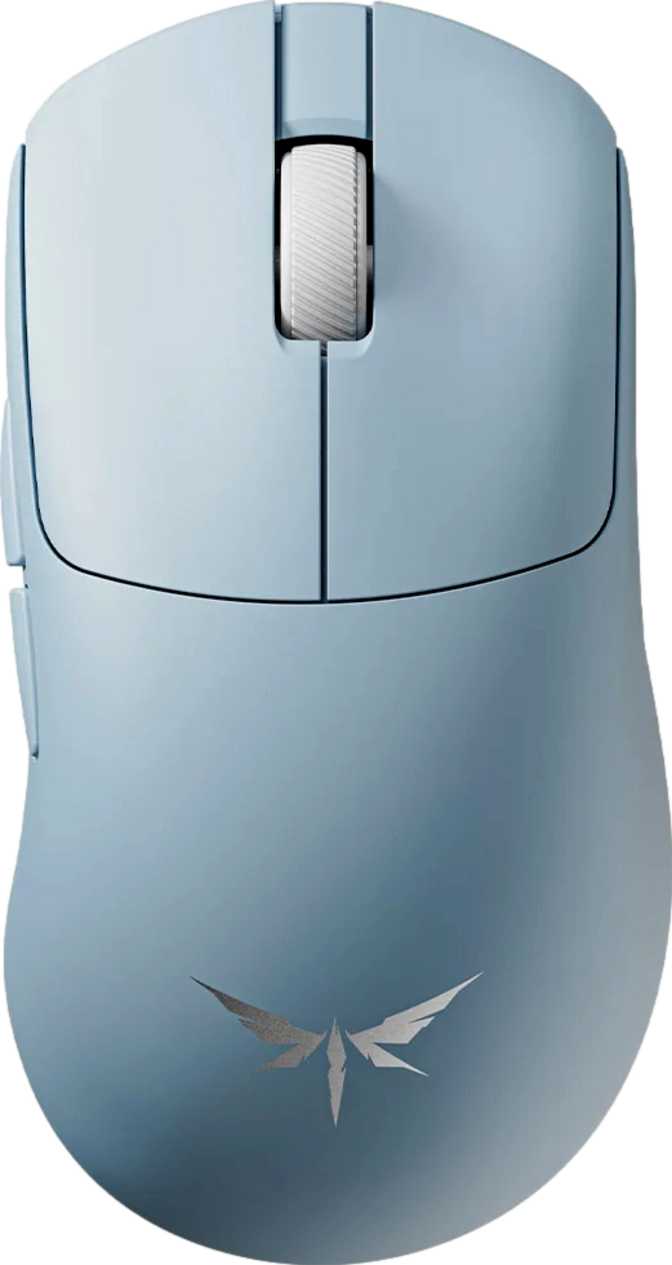
VGN Dragonfly Y2 Master Review: Flagship Specs, Featherweight Build
MiceA Featherweight Contender Built for Competitive Play
Most wireless gaming mice ask you to make a trade. You can have top-tier sensor accuracy, but expect a heftier chassis. You can have a featherweight build, but accept a shorter battery or a simpler sensor. You can have flagship polling rates, but prepare to pay a significant premium. The VGN Dragonfly Y2 Master is built on the premise that none of those compromises are actually necessary — and looking at its specifications, it makes a compelling case.
This is a right-handed wireless gaming mouse that weighs less than a standard deck of playing cards, tracks movement with one of the most capable sensors currently available in consumer peripherals, and offers a battery life so extraordinary it practically rewrites expectations for what wireless gaming mice should deliver. Whether VGN's value-focused approach can provide all of that without the hidden compromises that typically accompany budget-tier peripherals is exactly what this review examines.
Design, Build, and Physical Experience
A Weight That Changes How You Think About Precision
At 53 grams, the Dragonfly Y2 Master sits firmly in the elite tier of ultra-lightweight gaming mice. To give that figure meaningful context: a standard office mouse typically weighs between 85 and 110 grams. The gaming mouse market's previous benchmark for "lightweight" hovered around 70 to 80 grams. Anything under 60 grams is considered genuinely exceptional, and at 53 grams, this mouse is pushing toward the lower practical boundary of what's achievable without sacrificing structural integrity.
The practical effect of this weight isn't simply comfort over long sessions. Reduced mass means less inertia — your hand can initiate, stop, and redirect the mouse faster and with greater precision. For FPS players where a fraction of a second of overshot aim is the difference between a hit and a miss, that physical reality translates directly into performance.
Size, Shape, and Grip Style Compatibility
The Dragonfly Y2 Master measures 119mm in length, 63.3mm across, and stands at 39.4mm tall. These are compact-to-medium dimensions with a notably low-profile height — a deliberate shape that serves specific grip styles well and others less so.
Claw Grip
The low profile and relatively narrow width are well-matched for claw users who arch their fingers and use the rear of the palm for lateral guidance.
Fingertip Grip
The compact footprint suits fingertip users who prefer a smaller contact area and maximum wrist mobility in their movements.
Palm Grip
Users with medium-sized hands may find the fit comfortable. Those with larger hands should note that the low height and length may not provide sufficient palm coverage for extended sessions.
Designed exclusively for right-handed use. The ergonomic form factor does not accommodate left-handed operation.
No RGB — and Why That's a Feature Here
The Dragonfly Y2 Master ships without any RGB lighting. For buyers who consider lighting a part of their desktop aesthetic, that absence is a limitation. For competitive players and anyone who has grown weary of managing additional software for illumination they don't use in-game, it's a clean advantage. The absence of RGB hardware contributes directly to two areas where this mouse leads its category: weight reduction and battery life. This isn't a cost-cutting omission — it's an engineering priority with compounding benefits throughout the product.
Sensor Performance: The PAW3395 Extreme
What This Sensor Actually Represents
The PixArt PAW3395 has become a reference-tier sensor across the gaming peripheral industry — consistently regarded for its accuracy, absence of cursor smoothing or angle snapping in its default configuration, and reliable tracking across a wide variety of surfaces and textures. VGN has equipped the Dragonfly Y2 Master with the PAW3395 Extreme variant, which represents an enhanced tier above an already elite foundation.
In practical terms, this sensor tracks precisely through rapid directional changes rather than interpolating or predicting where the cursor "should" go — a distinction that separates genuinely excellent tracking hardware from merely capable hardware. Surface versatility is strong; the sensor does not require a specific high-end mousepad to perform at its ceiling.
Tracking Range in Context
The sensor handles movement up to 650 inches per second without losing positional accuracy. That threshold is, in honest terms, unreachable in actual gameplay — even the most aggressive competitive players don't approach that speed during real sessions. The significance of the number is reliability: no matter how fast a flick shot or panic-redirect might be, the sensor won't lose tracking or introduce positional error at the moment it matters most.
The same principle applies to the 50G acceleration tolerance. These specifications exist as a performance ceiling that real-world use will never touch, which means the sensor operates well within its optimal range at all times during play.
Sensitivity Range: More Nuance Than the Max Figure Suggests
The adjustable sensitivity range spans from an extremely low floor — useful for precision-critical work such as graphic design or architectural drafting — all the way to a maximum that far exceeds what any human hand can meaningfully control. Most competitive players use settings between 400 and 1600 DPI; most productivity users don't exceed 3200. The maximum figure is not a practical operating point — it's a measure of sensor headroom. The more meaningful aspect of this range is how finely you can tune the incremental steps between your preferred sensitivity levels, and whether the adjustable range gives you the exact setting your grip style and play pattern require. On both counts, the Dragonfly Y2 Master delivers.
The 8000 Hz Polling Rate: Why It Matters — and When It Doesn't
Polling rate is how often the mouse reports its position to your computer. A standard mouse updates 125 times per second. Gaming mice have traditionally operated at 1000 times per second, which was considered sufficient for any human perception threshold. The Dragonfly Y2 Master operates at 8000 reports per second.
At 1000 Hz, each position report takes 1 millisecond. At 8000 Hz, that interval drops to 0.125 milliseconds — position data transmitted so frequently that it effectively appears continuous rather than sampled in discrete steps.
For the majority of users across general and even mid-level competitive play, 1000 Hz is sufficient and the perceptual difference at 8000 Hz will be minimal. Where higher polling becomes genuinely meaningful is in fast, precise competitive play — particularly FPS titles where micro-corrections during high-velocity mouse sweeps determine accuracy. The practical benefit appears most clearly during rapid flick-and-track motions: the cursor path more precisely represents your actual hand movement, reducing the staircase stepping that can emerge at lower polling rates during fast diagonal motion.
Three Ways to Connect: 2.4GHz, Bluetooth, and Wired
Built for Gaming
For competitive play, the 2.4GHz wireless connection is the recommended mode. This radio frequency offers very low and highly consistent latency — perceptually indistinguishable from a wired connection under real-world conditions. It provides full wireless freedom without any meaningful performance trade-off.
Flexibility Beyond the Gaming Desk
Bluetooth 5 meaningfully expands the Dragonfly Y2 Master's daily utility. Pair it to a laptop, tablet, or secondary device without needing a USB dongle. Bluetooth 5 provides improved connection stability and range over older generations — a reliable option for multi-device workflows that is genuinely uncommon at this weight class.
The Tournament Fallback
The included 1.8-meter cable provides a full wired connection — useful for events where wireless is restricted, or as a convenient charging method during active sessions. The ability to use the mouse while plugged in means a low battery situation never forces you offline. Plug in, keep playing, disconnect when ready.
Battery Life That Reframes Wireless Expectations
Seven hundred hours of battery life on a single charge is not a specification commonly encountered — or frankly expected — at this sensor and polling rate tier.
To make that figure tangible: a dedicated gamer running 8-hour daily sessions would use this mouse for close to three months before needing to recharge. At a more typical 3 to 4 hours of daily use, a single charge sustains around 6 to 7 months of continuous operation. Even accounting for the overhead of 2.4GHz wireless transmission at 8000 Hz, the charging interval on the Dragonfly Y2 Master operates in a different category from virtually every competitor in this segment.
The battery is built in and non-removable, which is standard for this form factor and carries no practical disadvantage given how rarely you'll need to charge it. The use-while-charging capability via the USB cable means that in the rare circumstances where the battery does run down, there is no interruption to your session.
This endurance is directly and causally linked to the absence of RGB lighting. That single design decision compounds through weight, battery duration, and thermal management — three areas where the Dragonfly Y2 Master outperforms more feature-laden alternatives.
Who This Mouse Is Built For — and Who It Isn't
The Ideal User
- Competitive FPS players and reflex-intensive gamers who want the lightest credible wireless option without compromising sensor quality or polling rate.
- Right-handed users simply tired of managing battery anxiety. The charging interval is long enough that battery life effectively stops being a daily consideration.
- Multi-device users who move between a gaming setup and a laptop or secondary workstation — the Bluetooth 5 fallback adds genuine full-day versatility.
- Value-focused buyers who want to evaluate hardware on its merits rather than its brand label, and who understand what the PAW3395 Extreme and 8000 Hz actually deliver.
Where It Falls Short for Some Buyers
- Left-handed users have no path forward with this mouse. The right-handed form factor is not adaptable.
- MMO and strategy players who rely on extended button layouts for ability activation will find two side buttons insufficient.
- LAN and tournament players who depend on onboard memory to carry their settings between machines should weigh this gap seriously.
- RGB enthusiasts who want their peripherals to contribute to a lit desktop aesthetic will need to look elsewhere — there is no lighting of any kind.
How It Positions in the Ultra-Light Wireless Mouse Market
The Dragonfly Y2 Master's headline specifications have historically been features associated with premium pricing from established Western brands. The table below shows where it lands against the broader competitive category.
| Specification Area | VGN Dragonfly Y2 Master | Comparable Premium Tier |
|---|---|---|
| Weight | 53g | Typically 55–75g at equivalent spec level |
| Sensor Tier | PAW3395 Extreme (flagship) | PAW3395 or proprietary equivalents |
| Polling Rate | 8000 Hz standard | Often 1000 Hz standard; 8000 Hz as optional or paid upgrade |
| Connectivity | 2.4GHz + Bluetooth 5 + Wired | Usually 2.4GHz + Wired only; Bluetooth rare in this segment |
| Battery Endurance | 700 hours | Typically 40–200 hours |
| RGB Lighting | None | Commonly included |
| Onboard Memory | None | Typically 1–5 configurable profiles |
| Warranty | 1 year | Increasingly 2 years at premium tier |
An Honest Assessment
The Dragonfly Y2 Master's strengths are concentrated and genuinely meaningful. Fifty-three grams at this build quality puts it among the lightest fully capable wireless gaming mice available. The PAW3395 Extreme sensor is not a budget-tier substitution — it is a legitimate flagship component that performs without the caveats that often accompany value-positioned hardware. The 700-hour battery is, in plain terms, extraordinary. Where competing wireless mice require weekly charging at best, the Dragonfly Y2 Master operates on an interval measured in months. The triple connectivity — 2.4GHz for gaming, Bluetooth 5 for everything else, wired for emergencies — adds genuine versatility that few mice at this weight offer.
The limitations are specific and consistent rather than broadly distributed. The absent onboard memory is a real functional gap, not a minor footnote, and affects any buyer who uses their mouse across multiple systems. VGN is a younger brand without the established software ecosystem and long-term support infrastructure of the dominant names in gaming peripherals — which means the companion software experience, firmware update cadence, and spare parts availability may not match what buyers are accustomed to from larger companies. The one-year warranty reflects that brand positioning; it is standard, but the competition has largely moved beyond it at the flagship performance level.
The compact, low-profile chassis genuinely favors claw and fingertip grip users. Palm grip users, particularly those with larger hands, should hold the mouse before committing.
Questions Buyers Ask Before Purchasing
VGN Dragonfly Y2 Master
The VGN Dragonfly Y2 Master is a technically serious gaming mouse from a brand that doesn't yet carry the market presence of the category leaders. That gap between brand recognition and specification quality is precisely where this mouse operates — and for buyers willing to evaluate hardware on its merits rather than its label, it represents a genuinely strong proposition.
The 53g chassis, PAW3395 Extreme sensor, and 8000 Hz polling form a technical foundation that directly competes with flagship-tier products from more established manufacturers. The 700-hour battery life makes virtually every other wireless gaming mouse look like an early draft. The inclusion of both Bluetooth 5 and 2.4GHz wireless — alongside wired operation — gives this mouse a connectivity flexibility rare at its weight class.
The trade-offs are real and should not be minimized. The absent onboard memory is a genuine limitation for multi-machine users and LAN competitors. The one-year warranty and less mature software ecosystem require some tolerance for a brand still building its long-term support track record.
Buy This If
- You are a right-handed competitive player — particularly in FPS titles — who wants the lightest credible wireless gaming mouse available.
- You game from a fixed setup with no need to carry onboard profiles between machines.
- You want to permanently remove battery anxiety from the equation.
Look Elsewhere If
- You are left-handed, require more than two side buttons, or depend on onboard memory for LAN use.
- You consider RGB a non-negotiable part of your setup aesthetic.
- You require the long-term ecosystem, warranty, or software support of an established major brand.