T-Mobile T Tablet 2 Full Review: The Connected Budget Tablet
TabletsBuilt for Everyday Connected Use
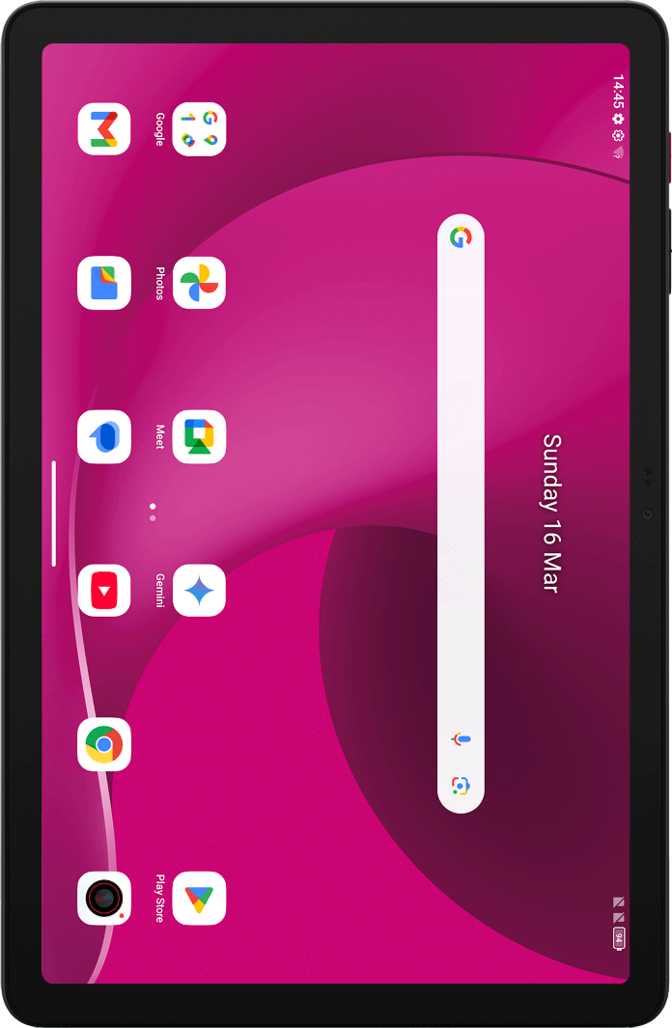
When most people look at a T-Mobile-branded tablet, they're asking one underlying question: is this a capable daily device, or just a subsidized accessory dressed up as a deal? The T-Mobile T Tablet 2 answers that question more honestly than you might expect. With a large, sharp screen, generous storage, a substantial battery, built-in cellular connectivity, and the latest version of Android, this tablet targets the everyday user who wants to stream, browse, video-call, and stay productive — without the premium price tag of flagship competition.
That said, it comes with real trade-offs that matter depending on who's buying it. This review covers everything you need to know before committing.
Design and Build
Size, Weight and In-Hand Feel
At roughly 490 grams, the T Tablet 2 sits in the "substantial but manageable" zone for a 10.1-inch device. It's not the kind of tablet you'll hold comfortably with one hand for extended periods — expect fatigue during long reading sessions. Laid flat in a bag, propped on a desk, or resting on a table surface, however, the weight stops drawing attention to itself.
The 8.5mm profile keeps the tablet from feeling thick and dated. It sits comfortably between ultraslim flagship territory and the blunt chunky feel of budget slabs from a few years ago. The physical footprint — wider than tall in landscape — makes it a natural match for video consumption and split-screen work.
What You Won't Find in the Box
There is no water or dust resistance of any kind. This isn't unusual in this price category, but the practical implication is real: keep this tablet away from poolside use, steamy kitchens, and open containers. The screen does benefit from a branded damage-resistant glass coating that provides meaningful scratch and incidental-contact protection.
- No water or dust resistance
- No stylus included or supported
- No keyboard accessory attachment
- Damage-resistant glass coating
Display Quality
What You Actually See
The 10.1-inch IPS LCD panel delivers approximately 231 pixels per inch — a density where text and images appear genuinely crisp at normal viewing distances, without the pixelation that plagued entry-level tablets of earlier generations. For web browsing, Netflix, YouTube, and reading apps, this screen looks clean and comfortable.
The IPS panel technology matters here. Unlike cheaper TN panels, IPS delivers consistent color accuracy and wide viewing angles. Hand the tablet to someone sitting beside you and colors won't wash out. Tilt the screen and the image holds.
Where It Stops Short
This is not an AMOLED display. Dark scenes in movies will render as deep charcoal rather than true black — a perceptible difference if you're sensitive to contrast quality, largely invisible if you're not. Color vibrancy won't match what flagship AMOLED panels deliver.
HDR content is off the table. Streaming services won't unlock HDR-tier picture quality on this screen, even if the content you're playing supports it. Outdoor use in direct sunlight will also be challenging — IPS panels at this price tier are not typically built for brightness levels that fight ambient glare effectively.
Performance
Processing and Memory
The T Tablet 2 runs on an octa-core processor with all eight cores clocked at the same frequency — a configuration that prioritizes consistent throughput over the big-core/little-core hierarchy found in more complex chips. Paired with 6GB of DDR4 RAM, this setup handles everyday tablet workloads confidently: multitasking between browser tabs, streaming apps, social media, video calls, and productivity tools all fall comfortably within its capability.
DDR4 memory offers substantially stronger bandwidth efficiency than the DDR3 configurations commonly found in competing budget tablets. The practical result is snappier app transitions and smoother multitasking behavior when switching between active applications.
Storage
The 128GB of built-in storage is a genuine differentiator here. Most competing devices at similar price points ship with half that capacity. The tablet also accepts external microSD cards, so media libraries and downloaded content can be expanded without cloud workarounds.
Connectivity: The T-Mobile DNA
This is where the T Tablet 2 leans hardest into its carrier identity. The tablet includes both a physical SIM slot and eSIM support simultaneously — meaning you can activate service the traditional way or digitally. It connects to LTE cellular networks, covering video streaming, navigation, remote work, and general browsing reliably.
On 5G Absence
The absence of 5G will be the first point of conversation among connectivity-minded buyers — particularly given the carrier selling it. In practical terms, LTE is genuinely fast enough for everything this tablet is designed to do. If you're in Wi-Fi-rich environments most of the time, the cellular tier is a backup, not a daily driver. If you need this as a dedicated mobile workstation where 5G is pervasive, consider whether the price trade-off justifies the upgrade.
What's Missing
- No NFC
No tap-to-pay, no Google Pay contactless — no workaround exists - No 5G
LTE only — ceiling on future-facing network usefulness - USB 2.0 Only
Large file transfers are noticeably slower than USB 3.x devices - No Wi-Fi 6
Won't leverage efficiency gains from next-gen router networks
Battery Life: A Genuine Standout
Cameras: Good Enough for Video Calls
Both the rear and front cameras are 8-megapixel shooters — a symmetrical pairing that makes a clear statement about intended use. This is a video-calling device first, a casual documentation tool second, and a photography device essentially never.
Front Camera — The Priority
The front-facing 8MP camera is the priority here, delivering what video conferencing apps need: a clean, adequately detailed image for Zoom, Google Meet, Microsoft Teams, or similar platforms. In well-lit environments, video calls look natural and sharp.
- 8 MP resolution
- Touch autofocus
- Continuous autofocus during recording
- No front-facing flash
Rear Camera — The Limitations
The rear camera records at Full HD at 30 fps. Touch-to-focus is responsive and a generous set of manual controls is available — ISO, white balance, focus, and exposure can all be adjusted independently. HDR capture is available for high-contrast daylight scenes.
- Manual ISO, white balance, exposure
- HDR capture mode
- No optical image stabilization
- No flash, poor low-light performance
- No slow-motion video
Audio
The T Tablet 2 includes stereo speakers — both channels present across the left and right edges — giving audio spatial separation that single-speaker tablets completely lack. For movies, music, and video calls in a quiet room, the experience is meaningfully better than a mono setup.
The 3.5mm headphone jack is present — worth flagging since many newer tablets have dropped this port entirely. For users with wired headphones or headsets — students, remote workers, gamers — the physical jack is a practical convenience that shouldn't be taken for granted.
Bluetooth audio is functional but lacks the high-resolution wireless codecs (such as aptX HD or LDAC) used by premium wireless headphones. Standard Bluetooth audio at typical quality levels works without issue; audiophiles pairing this with flagship wireless headphones won't unlock those headphones' full quality ceiling.
Software: Android 15 with a Privacy Focus
Running Android 15 is a meaningful advantage at this price point. It's a mature, current-generation experience with split-screen multitasking, Picture-in-Picture mode, widget support, dark mode, dynamic theming, customizable notifications, and full multi-user support for families or shared devices.
Privacy Tools Worth Knowing
- App tracking can be selectively restricted per-app
- Camera and microphone access toggled centrally
- Location data limited per-app
- System alerts when apps read your clipboard
- Offline voice recognition — processes locally, not remotely
- Child lock and parental controls built in
Software Trade-offs
-
Indirect OS Updates
Updates route through T-Mobile's pipeline, not directly from Google — expect delays in patches and major Android versions. -
No Focus Mode
No distraction-limiting feature — notable for students or users who rely on focused work sessions. -
No Biometric Security
No fingerprint scanner, no secure 3D face recognition. PIN and pattern are the reliable options — functional but not frictionless.
Who This Tablet Is For
Strong Fit For
-
Students
LTE connectivity for coursework, video lectures, and light productivity — no Wi-Fi dependency -
Families
Multi-user profiles, child controls, streaming, and a battery that doesn't need daily charging -
Remote Workers
Secondary screen for video calls, document review, and note-taking alongside a laptop -
Travelers
Connected access without hunting for Wi-Fi — eSIM flexibility for digital activation -
Budget Upgraders
Current Android on generous hardware without flagship pricing
Poor Fit For
-
Creative Professionals
No pressure-sensitive stylus support for drawing, illustration, or precise handwritten notes -
5G Power Users
LTE only — no access to next-gen network speeds or efficiency -
Mobile Gamers
No gyroscope for motion-controlled gameplay; demanding 3D titles will strain the hardware -
Photography Enthusiasts
Camera quality is insufficient for events, portraits, or low-light conditions -
Security-First Users
No fingerprint scanner, no secure biometric authentication — PIN/pattern only
How It Stacks Up
The T Tablet 2's strongest competitive argument is the combination of built-in LTE with eSIM, a large battery, 128GB storage, and current Android — bundled at a price point where competitors compromise on at least one of these.
| Feature | T-Mobile T Tablet 2 | Typical Budget Android | Entry-Level iPad |
|---|---|---|---|
| Cellular Connectivity | LTE + eSIM | Often Wi-Fi only at base price | Cellular at added cost |
| OS Version | Android 15 (current) | Varies; often 1–2 versions behind | iPadOS (current) |
| Base Storage | 128 GB | Commonly 64 GB | 64–128 GB depending on model |
| Expandable Storage | Varies | ||
| Headphone Jack | Increasingly absent | ||
| Stylus Support | Varies by model | Apple Pencil (extra cost) | |
| 5G | Rare at this price | LTE only at entry level | |
| NFC / Tap-to-Pay | Varies | ||
| Fingerprint Scanner | Varies |
Honest Assessment
The case for the T Tablet 2 rests on a coherent, honest value proposition. For users who need reliable cellular connectivity, strong battery endurance, sufficient storage, and current software, it delivers on all four core priorities without asking for premium pricing.
What It Does Well
A 6,000 mAh cell in a sub-11-inch tablet is genuinely generous. Combined with fast charging, it removes one of the most common daily frustrations of tablet ownership: the anxiety of running out mid-session.
Competing devices at comparable price points routinely ship with 64GB and charge extra for the upgrade. Here, it's the baseline. That quiet advantage accumulates over months of use.
The software experience is genuinely current, and the privacy toolkit reflects modern expectations — clipboard monitoring, app tracking controls, and camera/microphone toggles are all present.
Many competing tablets at this price point are Wi-Fi only at base. The dual SIM setup — physical and eSIM together — offers real flexibility for travel or digital carrier switching.
Where It Falls Short
The absence of NFC eliminates contactless payments entirely. Competing devices and even entry-level smartphones have made this standard. There's no software workaround for a missing hardware component.
The USB-C port charges fine but transfers large files noticeably slowly. Backing up a media library or loading an offline video collection becomes a patience exercise.
T-Mobile is one of the most 5G-forward carriers in the US. Selling an LTE-only tablet under their own brand places a ceiling on this device's forward-looking usefulness in a network environment they're actively promoting.
No fingerprint scanner, no secure 3D facial recognition. Entering a PIN every time feels outdated on a modern device. For anyone who values frictionless, secure daily access, this is a tangible ongoing friction point.
Questions Buyers Ask Before Purchasing
The Honest Bottom Line
The T-Mobile T Tablet 2 is a competent, well-calibrated everyday tablet that earns its place by doing the things its target audience actually needs — and doing them without meaningful compromise in those specific areas.
For the student, the remote worker, the parent managing a shared household device, or the traveler who wants connected access without hunting for Wi-Fi, this tablet covers the brief: reliable LTE connectivity, a battery that lasts, sufficient storage, current Android software, and a clean display for media consumption.
It is not trying to compete with the iPad or the Samsung Galaxy Tab S-series. It's trying to be the most sensible value-for-money connected Android tablet for people with real but modest requirements — and in that narrower contest, it makes a genuinely persuasive argument.
Recommended For
- Everyday users and families
- Students and remote workers
- Travelers needing LTE fallback
- Budget upgraders from older tablets
- Anyone prioritizing battery and storage
Not Recommended For
- Creative professionals using a stylus
- Power users needing 5G
- Mobile gamers with motion controls
- Photography enthusiasts
- Security-first users needing biometrics
A practical win for the connected, budget-conscious user. The gaps are real but priced into the decision — for the right buyer, this tablet earns its keep.