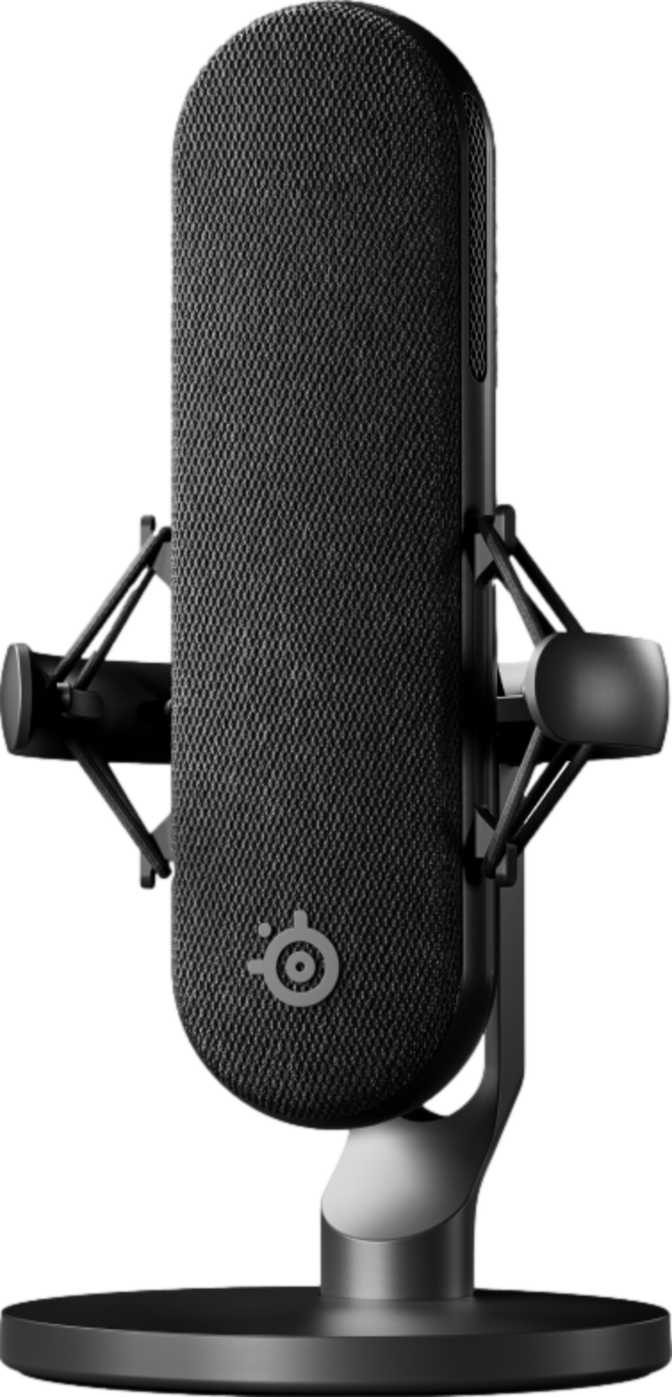
Under 170g
Featherweight body
50Hz–20kHz
Full vocal range
24-bit / 48kHz
Studio-grade clarity
XLR + USB
Hybrid connectivity
First Impressions: Design and Build Quality
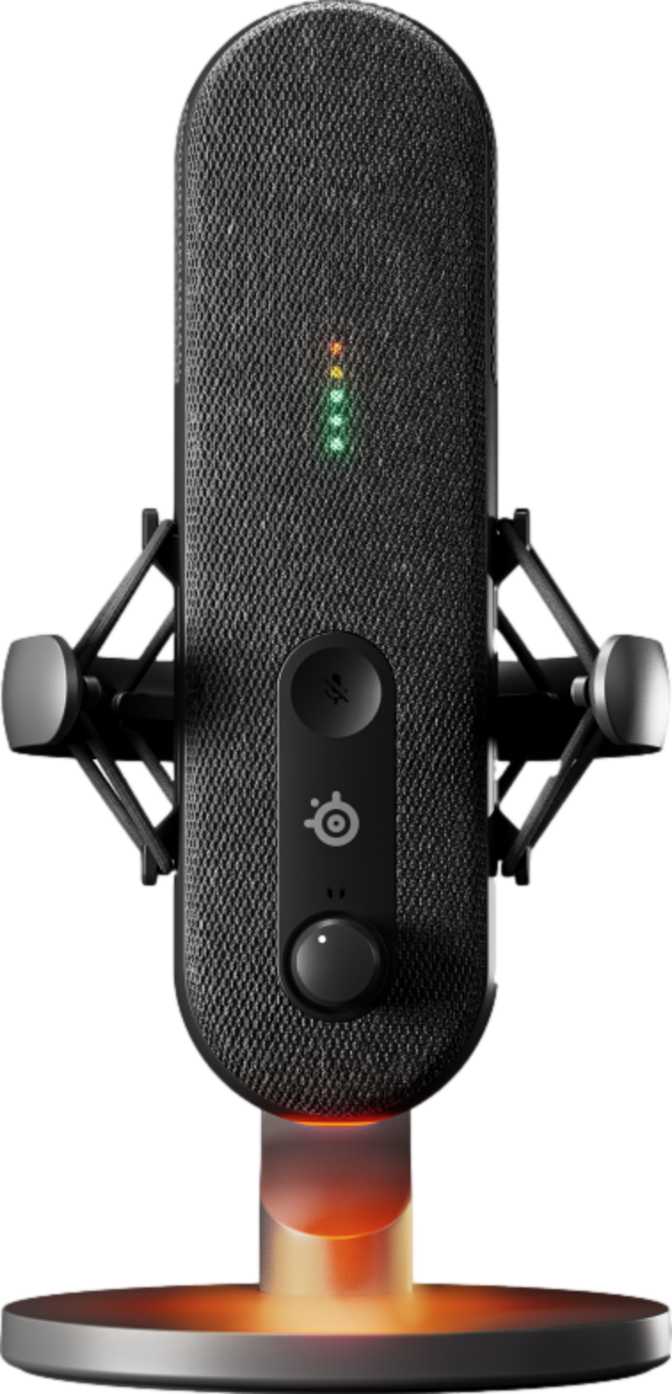
Most people upgrading their streaming or podcasting setup get the camera and lighting right long before they fix their audio, then wonder why viewers drop off after a few minutes. Sound is the part listeners forgive least and notice most, and it's exactly where the SteelSeries Alias Pro is aimed. Before getting into how it performs, it's worth understanding what you're actually holding.
At well under 170 grams, the Alias Pro is noticeably lighter than most microphones in its class. That matters more than it sounds. A heavy condenser mic sitting on a cheap boom arm tends to sag, drift downward over a session, or fight against the spring tension every time you reposition it. A lighter capsule means less mechanical stress on your arm, easier repositioning mid-stream, and a setup that stays where you put it instead of slowly drooping toward your desk.
The body itself puts its controls where your hands actually are, rather than locking everything behind a desktop app. The control panel lives directly on the microphone, so adjusting gain or hitting mute doesn't mean alt-tabbing out of a game or pausing a recording to dig through software menus. Paired with that is an LED sound level indicator, a small but genuinely useful touch that gives you a visual read on your input level in real time, so you're not guessing whether you're about to clip a recording or speaking too quietly to be heard clearly.
Physical Controls, Not Touch
There's no touch-sensitive control surface anywhere on this mic. Capacitive touch panels look sleek, but they're prone to accidental triggers, brush past one while reaching for your keyboard and you might unknowingly unmute yourself mid-rant. A physical button gives you tactile confirmation and a far lower chance of an embarrassing hot-mic moment.
RGB Lighting
The RGB lighting is purely cosmetic but not purely pointless if you care about how your setup looks on camera. It won't change your audio quality, but it will change how your stream looks in a webcam corner or a desk-setup photo.
Sound Quality: What XLR and USB Connectivity Actually Means for You
The single most important spec on this microphone isn't a frequency number, it's the fact that it offers both XLR and USB connections. This is the feature that decides who this microphone is really for.
USB Mode
A true plug-and-play experience. There's a digital converter built into the microphone itself, so you plug it into your computer and start talking, no mixer, no audio interface, no separate gear to buy. This is how almost everyone will use it on day one.
XLR Mode
The professional path. XLR is the connector standard used in studios, broadcast booths, and live sound, meaning you route the mic through an external audio interface or mixer instead of relying on the microphone's internal converter. You can run it through dedicated outboard preamps or a more elaborate studio chain as your needs grow.
Bit Depth and Sample Rate: The Numbers Behind the Clarity
When you're using the Alias Pro in USB mode, its internal converter processes your voice at 24-bit depth and a 48kHz sample rate. Bit depth determines how much fine detail and dynamic range the recording captures, the difference between quiet whispers and loud reactions being represented accurately rather than getting flattened or noisy, and the sample rate determines how precisely your voice is captured. This combination is the standard used across professional broadcast and game-streaming workflows, sitting comfortably above consumer-grade "CD quality" audio.
Frequency Response and Headroom
The Alias Pro is rated to pick up frequencies from 50Hz up through 20,000Hz, essentially the entire range most people can hear. The low end captures the natural warmth and body of a speaking or singing voice, while the high end preserves crispness and detail in sibilance and consonants, so your voice doesn't come across thin, muffled, or artificially bright.
Just as important is how loud a sound the microphone can handle before distorting, rated at 120dB of sound pressure level, in the territory of a chainsaw at close range or a loud rock concert. You don't need to be running power tools for this to matter, it means you have generous headroom for raised voices, laughter, excited reactions, or gaming sessions where volume spikes unpredictably, without the audio cracking the moment you get loud.
Polar Pattern: Why Cardioid-Only Is a Deliberate Choice
The Alias Pro ships with a single, fixed polar pattern: cardioid. A polar pattern describes the direction a microphone "listens" from. Cardioid means the mic is most sensitive to sound coming from directly in front of it, and progressively rejects sound coming from the sides and rear.
For a solo streamer, podcaster, or gamer talking directly into the mic, this is close to ideal, it naturally suppresses keyboard clatter, fan noise, and room echo without you needing to do anything. It's also why this microphone skips switchable omnidirectional or bidirectional modes found on some multi-pattern studio condensers, capabilities built for ambient room recording or face-to-face interviews, in favor of doing one job extremely well.
Right tool if:
Your use case is a single voice talking into a mic.
Limiting if:
You regularly record round-table conversations or in-person two-person interviews around the same microphone.
Everyday Features That Matter More Than the Spec Sheet
A few details that don't show up as headline numbers end up mattering the most once you're actually using the microphone daily.
-
Built-in mute function
A dedicated, physical mute control means you can silence yourself instantly without diving into software, which matters most in the exact moments you need it: an unexpected interruption, a sudden coughing fit, a phone call mid-stream.
-
Shock mount included
Vibrations traveling up through your desk or stand, a dropped object, a slammed keyboard, even footsteps on a hollow floor, get absorbed by the shock mount instead of being picked up as a dull thump in your recording.
-
Pop filter included
Plosive sounds like hard "P" and "B" consonants create little bursts of air that can blow out a recording with an unpleasant thump. The included pop filter screens that out before it reaches the capsule.
-
Direct headphone monitoring
A 3.5mm headphone jack on the microphone itself lets you listen to your own voice in real time with effectively no perceptible delay, essential for catching audio problems before they end up baked into your recording. It's the smaller, consumer-standard 3.5mm connector rather than the larger 6.35mm jack found on some studio gear, so most standard headphones plug straight in, while professional studio headphones built for the larger connector will need an adapter.
Together these accessories solve a problem most people don't realize they have until they've already paid to fix it themselves, shock mounts and pop filters are commonly sold separately for $20–$50, and having both included out of the box is a real, practical saving.
Power, Reliability, and Cross-Platform Compatibility
No Batteries, No Downtime
Because the Alias Pro runs on a wired XLR or USB connection rather than a battery, there's no charging cycle to manage and no risk of it dying mid-recording. Whether you're three minutes or three hours into a session, the microphone performs identically, a real advantage over wireless microphones that quietly lose performance, or shut off entirely, as their battery drains.
Works Across Desktop and Mobile
The Alias Pro is built to work across Windows, Mac, Android, and iOS. Desktop streamers and podcasters get a microphone that works identically on a Windows rig or a Mac-based editing setup, while mobile creators can use the same microphone for on-the-go recording, voiceover work, or mobile streaming.
Who Should Buy the SteelSeries Alias Pro
A Strong Fit If You Are
- A solo streamer or YouTuber who talks directly into a microphone and wants broadcast-quality audio without studio engineering
- A podcaster recording solo episodes or one-on-one interviews
- Someone starting simple with USB who may upgrade to a mixer later without buying a second mic
- A creator who values having shock mount and pop filter handled out of the box
- Someone recording across both a desktop setup and a phone or tablet
Probably Not the Right Choice If You Are
- Someone who regularly records multi-person round-tables where a switchable pattern would serve better
- A console-first streamer needing confirmed console plug-and-play support
- Someone who specifically wants touch-sensitive controls rather than physical buttons
- A user with an existing 6.35mm-only professional headphone setup who doesn't want an adapter
How It Stacks Up Against the Competition
Rather than compare against any single named product, it's more useful to see where the Alias Pro sits against the broader categories of microphones people typically cross-shop in this space.
| Category | Connectivity | Pattern Flexibility | Included Accessories | Best For |
|---|---|---|---|---|
| SteelSeries Alias Pro | XLR + USB hybrid | Fixed cardioid only | Shock mount + pop filter included | Solo streamers/podcasters wanting an upgrade path |
| Typical USB-only RGB streaming mic | USB only | Usually fixed cardioid | Varies, often sold separately | Beginners who don't plan to use XLR or mixers |
| Typical multi-pattern USB condenser | USB only | Multiple switchable patterns | Varies, often minimal | Multi-person recording, interviews, ambient capture |
| Typical XLR-only studio mic | XLR only | Often fixed pattern | Rarely included | Users who already own an interface or mixer |
The Alias Pro's real differentiator sits in the middle of that table: it doesn't force a choice between USB simplicity and XLR growth potential, and it doesn't make you buy your own shock mount and pop filter on top of the purchase price. What it gives up, by design, is the pattern flexibility of a dedicated multi-pattern condenser, a fair trade for most solo creators, a real limitation for multi-person podcast hosts.
The Honest Verdict: Strengths and Weaknesses
What Works
The Alias Pro's biggest strength is flexibility without complexity. Most beginner-friendly microphones lock you into USB forever, and most XLR microphones assume you already own a mixer. This one lets you start exactly where you are and grow into more advanced gear later without replacing the microphone itself. The included shock mount and pop filter reinforce that beginner-friendly philosophy, you're not expected to know you need them or to buy them separately.
The physical control layout is another genuine strength rather than just a nice-to-have. Being able to mute, monitor your level visually through the LED indicator, and adjust settings without opening software removes friction from the parts of streaming where friction is most costly: live, on-air, in the moment.
Where It Falls Short
The honest weakness is the fixed cardioid-only pattern. SteelSeries clearly built this as a tool optimized for one voice at a time, and that focus is also its ceiling. If your content evolves toward co-hosted shows or in-person guest interviews, you'll feel that limitation directly, no software update adds a polar pattern that isn't physically there.
The compatibility list doesn't include consoles, and the headphone monitoring jack is the smaller 3.5mm size rather than the professional 6.35mm standard, meaning some users will need an adapter for existing studio headphones. Neither is a dealbreaker, but both are worth knowing before you order.
Frequently Asked Questions
Final Verdict: Should You Buy It?
The SteelSeries Alias Pro earns its place as a serious recommendation for a specific, common type of buyer: the solo streamer, podcaster, or content creator who wants broadcast-credible audio now, without ruling out a more advanced studio setup later. The dual XLR/USB connectivity solves the upgrade-path problem that traps so many beginners into replacing their first microphone entirely, and the included shock mount and pop filter remove two purchases most people don't know they need until their first recording sounds worse than expected.
Where it asks for a clear-eyed decision is the fixed cardioid pattern and the absence of confirmed console support, if either is central to how you plan to use it, weigh that honestly before buying. But for the single largest group of buyers shopping in this category, one voice, one microphone, room to grow, this is a well-considered, genuinely practical pick rather than a flashy one.
Best For: Solo Creators
Real Upgrade Path
Accessories Included