SteelSeries Alias Review: A Complete USB Mic for Solo Creators
MicrophonesThe SteelSeries Alias at a Glance
Most USB microphones ask you to make a compromise. Either you get clean audio with no accessories, or you get a bloated kit that overwhelms the desk. The SteelSeries Alias tries to close that gap — arriving with a shock mount, a pop filter, on-device controls, and an LED signal meter built right in, all in a package light enough to forget is sitting there. Whether that combination justifies a place in your setup depends entirely on how you work. This review breaks down every specification, every included feature, and every limitation so you can make that call without second-guessing.
Design and Build: Purposeful, Not Flashy
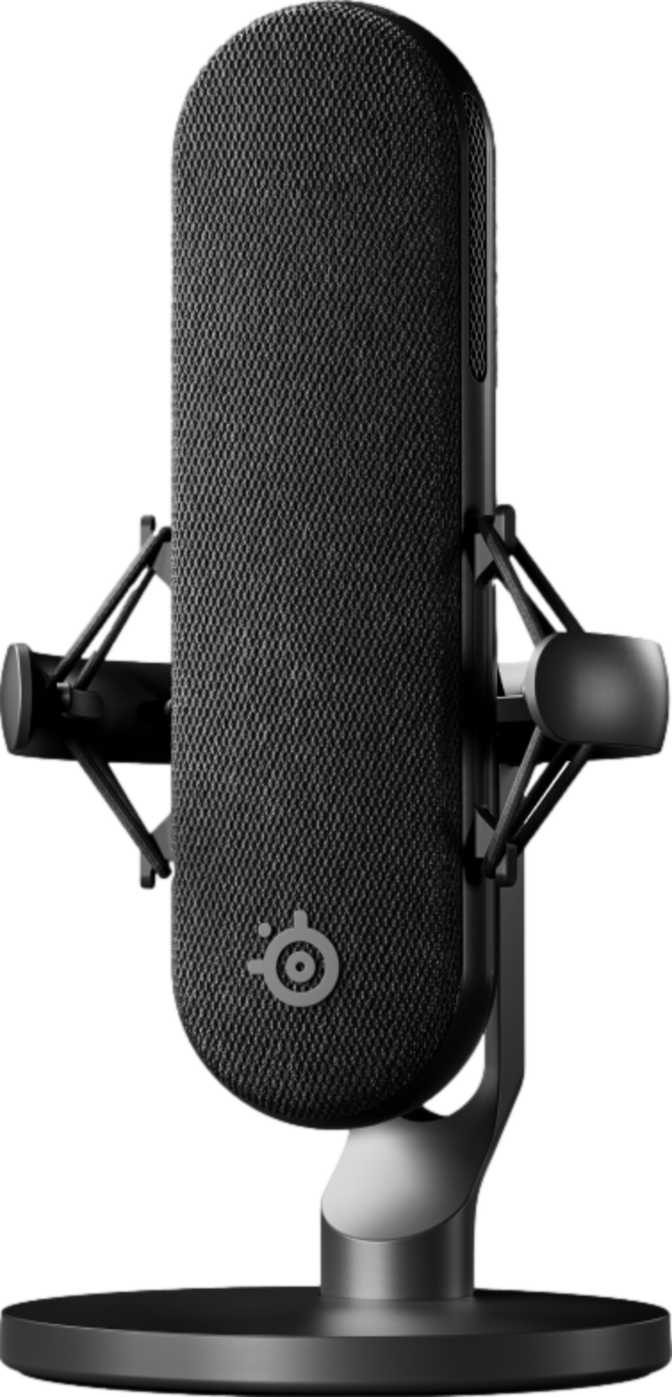
At 205 grams, the SteelSeries Alias is noticeably lighter than most condenser microphones in its class. Many comparable USB condensers run significantly heavier, which matters more than people expect once you're adjusting a boom arm mid-stream. The reduced mass means less counterweight tension on your arm, smoother repositioning, and less risk of the arm drifting over long sessions.
RGB Lighting
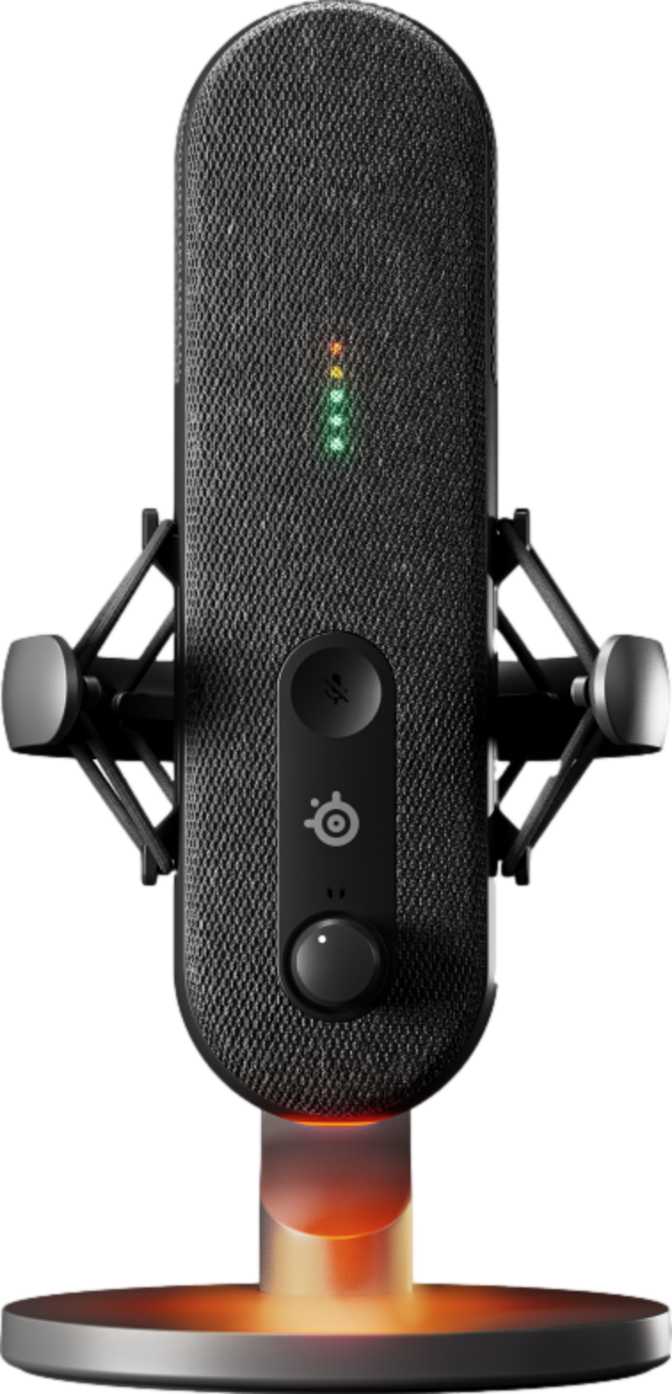
The physical design carries RGB lighting — a deliberate nod to the gaming and streaming audience this microphone targets. Whether that's a draw or a distraction depends on your workspace aesthetic, but it functions as more than decoration. The glow provides passive visual confirmation that the microphone is powered and active from across a dimly lit room.
On-Body Controls
The control panel is integrated directly onto the microphone body, not on a separate desktop unit or inside a companion app. Adjustments happen without breaking focus — no alt-tabbing, no hunting through software menus during a live session. The hardware mute function gives you an instant, tactile cut exactly when you need it.
Heavier microphones create more torque on boom arm joints, causing slow drift over long sessions. The Alias stays where you put it — a subtle but meaningful advantage across hours of streaming.
Audio Specifications: What the Numbers Actually Mean
Raw numbers on a spec sheet tell you almost nothing. Here is what the Alias's audio specifications mean for your actual recordings.
Bit Depth & Sampling Rate
The Alias records at a resolution that far exceeds what any streaming platform or podcast host can reproduce. That excess headroom gives you clean separation between the quietest whisper and the loudest peak. When you compress or normalize audio in post, high-resolution recordings survive that processing with far less degradation than lower-resolution captures.
The sampling rate matches the industry standard for video-synchronized audio and streaming content, integrating natively with broadcast software and video editors without conversion artifacts.
Frequency Response
The Alias responds to sound from roughly the floor of cinematic low-end up to the ceiling of human hearing. That lower boundary captures the natural resonance and warmth of a speaking voice — full-bodied, present, and natural — rather than the thin quality that over-filtered microphones produce.
Extending to the full limit of human perception ensures sibilance, consonants, and the natural air of a recording are all preserved. For voiceover, podcasting, and streaming commentary, this range is everything you need.
Maximum Loudness Tolerance
The Alias can accept extremely high signal levels before its internal circuitry introduces any audible distortion — a ceiling that exceeds what a typical loud concert measures from the front row. A sudden excited shout during gameplay, a passionate podcast debate, or peak-volume streaming commentary will not clip this microphone.
You get the transient, unclipped, every time. This headroom protects against the most frustrating recording mistake: unexpected peaks that ruin an otherwise perfect take.
Cardioid Pattern: Strength or Limitation?
The Alias is a cardioid microphone — it picks up sound from the front while rejecting sound from the sides and rear. It does not offer switchable patterns: no omni, no bidirectional, no hyper-cardioid modes. For some buyers, that triggers a reflex to keep shopping. Resist that reflex, at least until you understand what you are actually trading away.
Multi-pattern microphones are invaluable in specific scenarios: recording two people face-to-face, capturing room ambience, or miking acoustic instruments from multiple angles. But for the solo streamer, solo podcaster, or single-person home office setup, multi-pattern capability is a feature you pay for and never use. What you lose with that extra circuitry is simplicity — fewer modes means no risk of accidentally broadcasting in the wrong pattern.
The cardioid pattern also helps dramatically in untreated rooms. Because it actively rejects off-axis sound, air conditioning hum from across the room, keyboard clicks from behind, and ambient household noise all register significantly quieter in your recording than what your ears are actually hearing. This is the most practical acoustic treatment available without hanging a single piece of foam.
Cardioid Pattern: Quick Reference
Works Best For
- Solo streaming and solo podcasting
- Untreated home recording spaces
- Rejecting keyboard and ambient room noise
- Remote guest interviews over separate connections
Single Pattern Falls Short
- Two people speaking into one mic in the same room
- Capturing room ambience or instrument recordings
What's Already in the Box: Accessories That Actually Matter
The SteelSeries Alias ships with two accessories that are often sold separately — and that omission can silently inflate the cost of competing options.
Shock Mount
A shock mount isolates the microphone capsule from mechanical vibration traveling through your desk and boom arm. Every time you type, bump your desk, or adjust your setup, that vibration travels through solid surfaces into an unmounted mic capsule as a low-frequency thud. The included shock mount intercepts that vibration path. For anyone using a keyboard while recording — essentially every gaming creator — this is not optional equipment. It is necessary, and having it included removes a cost and a shopping step.
Pop Filter
Plosive sounds — the burst of air from letters like P, B, and T — hit a microphone capsule and register as a low-frequency thump that no amount of post-processing cleanly removes. A pop filter sits between your mouth and the capsule and diffuses that air burst before it becomes a problem. This is the kind of accessory you typically discover you need after your first few recordings, then have to purchase separately. Having it included from day one is a meaningful quality-of-life advantage.
On-Mic Controls and Visual Feedback
The Alias places its control interface directly on the device body, giving you a physical mute button and an LED sound level indicator without reaching for a mouse or opening software.
Built-In Level Meter
Setting gain typically requires watching a software level meter — which means your streaming software or OS audio settings have to be open in front of you. The Alias's built-in LED indicator lets you set your position and verify your level with a glance at the mic itself. For streamers running multiple screens, or podcasters who prefer to keep screens clear during recording, this is a workflow advantage that doesn't show up in spec comparisons but matters every session.
Hardware Mute
A software mute — toggling a slider or pressing a hotkey — has perceptible delay and depends on your computer responding. A hardware mute on the microphone itself cuts audio at the source, instantly, with no latency and no risk of an OS-level hiccup letting a sound through. When you need to cough, sneeze, or take an unplanned call mid-stream, hardware mute is the reliable choice every single time.
Hearing Yourself Without the Delay
The Alias includes a 3.5-millimeter headphone output on the microphone body. This connects standard consumer and studio headphones directly to the mic for real-time audio monitoring — allowing you to hear your own voice exactly as the microphone captures it.
This feature is more significant than it appears. Monitoring through your computer forces audio through the operating system's processing chain, introducing a slight delay between when you speak and when you hear yourself. Even small delays are disorienting and can affect how naturally you speak. Monitoring through the mic's own output bypasses that chain entirely, delivering what broadcast engineers call zero-latency monitoring — you hear yourself in real time.
The output accommodates virtually every set of headphones, earbuds, and gaming headsets. Users with professional studio headphones using a larger connector will need a simple, widely available adapter.
Monitoring at a Glance
- Output Type
- 3.5mm standard headphone jack
- Latency
- Zero-latency direct monitoring — bypasses OS processing
- Compatibility
- Works with all standard consumer headphones and earbuds
- Adapter Needed?
- Only for professional studio headphones with larger connectors
Platform Flexibility You Might Not Expect
The Alias connects via USB and works across Windows, macOS, iOS, and Android. That last pair is worth dwelling on.
Windows
Driver-free class-compliant audio device. Plug in and record immediately with any Windows application.
macOS
Native macOS recognition — no third-party software required. Works with Logic, GarageBand, and any DAW immediately.
iOS
Connect to an iPhone or iPad for mobile podcast recording and content creation on the go.
Android
Expands your recording setup to Android phones and tablets — useful as a backup system or mobile production tool.
Who This Microphone Is Built For — and Who It Isn't
A Strong Match For...
-
Solo streamers and gaming content creators Who need reliable, clean audio and want a mic that looks at home in a gaming setup.
-
Podcasters recording alone or with remote guests Who value clean cardioid capture and on-device workflow controls.
-
Home office communicators Who spend significant time on video calls and want to sound distinctly better without managing complex software.
-
Mobile content creators Who need a USB microphone that works across their desktop and their phone or tablet.
-
Setup-first buyers Who want a complete solution out of the box without sourcing a shock mount and pop filter separately.
Look Elsewhere If You Are...
-
Running a multi-person in-room podcast If both people speak into one microphone, the cardioid pattern cannot adapt to that scenario. A mic with a bidirectional pattern is the appropriate tool.
-
Music production and instrument recording The single cardioid pattern doesn't provide the flexibility that recording musicians often need to capture different sources or room characteristics.
-
Building an audio interface setup The Alias is USB-only. If you're planning to scale toward a professional audio interface for advanced signal processing and routing, you'll need an XLR microphone.
Competitive Positioning: Where the Alias Sits in the Market
The USB condenser microphone market has a broad middle tier occupied by products targeting gamers and streamers. Most offer USB connectivity, a single cardioid pattern, and on-device controls. Here is how the Alias differentiates itself against that category.
| Factor | SteelSeries Alias | Typical Competitor A | Typical Competitor B |
|---|---|---|---|
| Bit Depth | 24-bit | Often 16-bit | 24-bit (varies) |
| Included Shock Mount | Varies | ||
| Included Pop Filter | Varies | ||
| Zero-Latency Monitoring | Not always included | Often included | |
| Multiple Polar Patterns | Some offer 4 patterns | Often cardioid only | |
| Mobile Compatibility | Varies | ||
| Hardware Mute Button | Usually included | Usually included | |
| On-Device Level Meter | Not always included | Varies |
Comparison based on general category norms among popular USB gaming and streaming microphones.
Honest Assessment: Where It Excels and Where It Falls Short
The Alias earns its strongest marks for audio resolution and the quality of its included accessories. At 24-bit capture with a shock mount and pop filter out of the box, you can record audio that holds up to professional scrutiny in streaming, podcasting, and video content contexts — with no additional purchases and no software configuration. That is not universally true of competing products; many look comparable on paper and require accessories and configuration to reach the same result.
The on-device controls are a genuine quality-of-life feature. The combination of a hardware mute, physical gain feedback via the LED indicator, and headphone monitoring output on the device itself makes the Alias one of the more workflow-conscious options in its class. These are not headline marketing features, but they are the features that matter across hundreds of hours of actual use.
At 205 grams, the weight is also worth acknowledging. Heavier microphones create more torque on a boom arm's joints, leading to drift over time. The Alias stays where you put it more reliably — a subtle but meaningful advantage.
The honest limitation is the single polar pattern. Not because cardioid is a poor choice — it is the right choice for most solo users — but because the absence of alternatives permanently caps what you can do with this specific microphone. If your setup evolves, you will need a second mic rather than a setting change. The USB-only interface carries the same implication: if you later invest in an audio interface for superior preamp quality and routing, the Alias cannot make that transition with you.
Where It Excels
- 24-bit resolution superior to many category rivals
- Shock mount and pop filter included — a true complete kit
- Hardware mute and on-device level meter for fast session control
- Zero-latency headphone monitoring on the mic itself
- Lightweight build reduces boom arm drift
- iOS and Android support expands mobile use cases
Where It Falls Short
- Single polar pattern permanently limits recording scenarios
- USB-only — cannot transition to an audio interface setup
- Unsuitable for multi-person in-room recording from one mic
Questions Real Buyers Ask Before Purchasing
Final Verdict
The SteelSeries Alias is a strong, specific microphone. It captures audio at a resolution that exceeds what most delivery platforms require, handles unexpectedly loud sources without breaking a sweat, and ships ready to use with the shock mount and pop filter that competing products often leave you to source separately.
The hardware mute, on-device signal meter, and zero-latency headphone monitoring are exactly the kinds of features that stop feeling like bonuses and start feeling like necessities once you've used them for hundreds of hours.
Its limitations are real but narrow. The single cardioid pattern serves solo creators exceptionally well but cannot adapt if your needs expand to in-room multi-person recording. The USB-only interface means that if you eventually scale toward a professional audio interface setup, the Alias cannot make that transition with you.
Solo streamers, podcasters, and home office creators who want a complete, ready-to-use kit
You plan to grow into multi-pattern recording, in-room podcasting, or a professional audio interface chain
A competent, accessory-complete, resolution-capable USB condenser for the creator who works alone and wants to sound like they don't
For the streaming creator, the solo podcaster, the home office professional, and the mobile content creator — the Alias is a considered, complete purchase at any point in its product life.