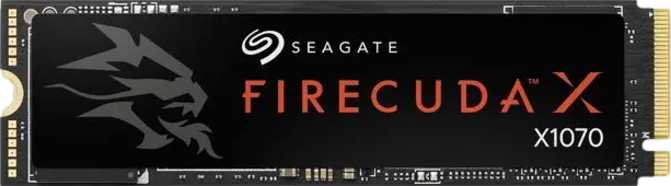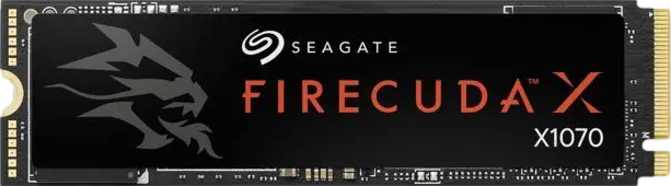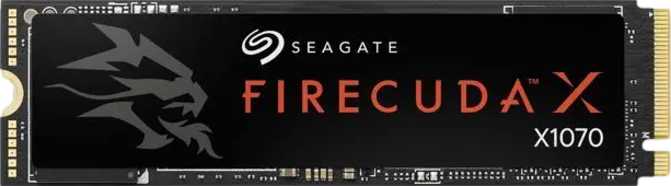
Four terabytes of NVMe storage used to mean either a compromise on speed or a significant hit to your wallet. The Seagate Firecuda X1070 4TB challenges that assumption by pairing a high-capacity QLC design with sequential performance that sits firmly at the top of the PCIe Gen 4 category. That combination makes it genuinely interesting — but it also raises real questions that any informed buyer should work through before committing.
This is not a simple drive to evaluate. The Firecuda X1070 4TB does several things exceptionally well and cuts corners in places that will matter to some users and be completely invisible to others. What follows is an honest breakdown of exactly where it lands.
Key Specifications at a Glance
| Specification | Value |
|---|---|
| Form Factor | M.2 2280 |
| Interface | PCIe Gen 4 x4 (Gen 3 backward compatible) |
| NVMe Version | 1.4 |
| Controller | TenaFE TC2201 |
| Controller Channels | 4 |
| NAND Type | QLC |
| Cache Architecture | HMB (Host Memory Buffer) |
| Capacity | 4,000 GB (4 TB) |
| Sequential Read | 7,200 MB/s |
| Sequential Write | 6,500 MB/s |
| Random Read | 900,000 IOPS |
| Random Write | 900,000 IOPS |
| TBW Endurance | 2,400 TB |
| MTBF | 1.8 million hours |
| Integrated Heatsink | No |
| RGB Lighting | No |
| Warranty | 5 Years |
Design and Physical Characteristics
The Firecuda X1070 4TB follows the standard M.2 2280 form factor — that long, narrow stick shape that fits into the dedicated NVMe slot found on virtually every modern motherboard, laptop, and desktop platform. If your system was built or purchased in the last several years, this drive will physically fit without adapters or modifications.
There is no integrated heatsink on this drive. That keeps it universally compatible — some motherboard-mounted heatsink solutions or laptop chassis have clearance restrictions — but it means thermal management is entirely on you. In a desktop build with a motherboard heatsink cover or a dedicated M.2 cooler, this is a non-issue. In a compact PC or a poorly ventilated enclosure, sustained heavy workloads may cause the controller to throttle speeds to protect itself. For typical day-to-day use this rarely becomes a problem, but users planning extended sequential write sessions should add an inexpensive aftermarket M.2 heatsink.
There is no RGB lighting. That means no proprietary software requirement, no LED controller overhead, and no dependency on ecosystem-specific lighting sync. For most users, this is simply irrelevant. For those who specifically want RGB storage, this is not that drive.
Physical Summary
- Form FactorM.2 2280 — standard NVMe slot compatibility
- InterfacePCIe Gen 4 x4, backward compatible with Gen 3
- HeatsinkNot included — recommended for compact or hot builds
- RGB LightingNone — no proprietary software dependency
Performance Analysis
What the numbers actually mean for your day-to-day experience
Sequential Speed — The Headline Figure
The Firecuda X1070 4TB reaches read speeds approaching the practical ceiling of what the PCIe Gen 4 interface allows, and its write performance is similarly positioned near the top of the Gen 4 class. Transferring a 50GB 4K video project takes only a matter of seconds. Loading an 80GB open-world game happens in a fraction of the time it would on a SATA SSD, let alone a mechanical hard drive.
Where sequential speed becomes most tangible:
- Moving large media libraries or backup archives between drives
- Loading large creative project files in video editing or 3D software
- Game installation, patching, and initial load screens in AAA titles
- OS reinstallation and disk imaging workflows
Random I/O — The Speed That Affects Daily Feel
Sequential speed is the figure manufacturers advertise most prominently because it looks impressive. Random read and write performance is what actually determines how snappy your system feels during normal use — opening programs, multitasking, running background tasks, or any workload involving many small scattered file operations rather than large continuous transfers.
The Firecuda X1070 4TB delivers 900,000 IOPS on both random read and write. That is an exceptionally high figure for a consumer drive — most mid-range Gen 4 NVMe drives land in the 600,000–800,000 IOPS range for reads. The X1070 meaningfully exceeds that, which translates to a genuinely snappier system feel in everyday use and positions this drive well even in light professional and workstation scenarios.
The Architecture Behind the Performance
HMB Cache Architecture
The drive uses HMB — Host Memory Buffer — rather than a dedicated on-drive DRAM chip. A traditional high-end NVMe drive includes its own RAM chip soldered directly onto the PCB, acting as a fast lookup table (called an FTL map) that helps the controller find data. The Firecuda X1070, by contrast, borrows a small slice of your system's RAM through the PCIe interface to serve the same purpose.
In practice, for most consumer workloads — gaming, general productivity, web browsing, media consumption — HMB performs indistinguishably from DRAM-backed designs. The NVMe 1.4 protocol handles HMB efficiently, and your system RAM is fast enough that the absence of dedicated on-drive DRAM is not a bottleneck you will notice.
QLC NAND Technology Explained
QLC stands for Quad-Level Cell — a NAND flash technology that stores four bits per cell, compared to three bits in TLC. This higher density is precisely how Seagate can offer 4TB at a price point lower than a comparable TLC product would command. The capacity-per-dollar advantage at 4TB is substantial.
- Higher storage density enabling larger capacities
- Read performance comparable to TLC in most real-world scenarios
- Sequential reads effectively identical to TLC at Gen 4 speeds
- Sustained write speeds outside SLC cache can be lower
- Per-cell endurance lower than TLC (offset by TBW rating)
- Slightly higher thermal output under heavy sustained writes
Interface, Compatibility, and Platform Requirements
The drive connects via PCIe Gen 4 — the current mainstream standard — which is backward compatible with PCIe Gen 3 slots. If your motherboard only supports Gen 3, the drive will work, but speeds will be roughly halved. That is still faster than a SATA SSD, but well below the Gen 4 ceiling. To get full performance you need a platform with a PCIe Gen 4 M.2 slot: AMD Ryzen 5000 or newer, Intel 12th Generation (Alder Lake) or newer, or equivalent laptop platforms.
The drive communicates using NVMe version 1.4, a mature and widely supported protocol revision that brings improved power management, better multi-queue handling, and enhanced error reporting compared to older NVMe versions. Every modern operating system — Windows, macOS, Linux — handles NVMe 1.4 natively without additional drivers.
The TenaFE TC2201 controller manages four channels of NAND flash. A four-channel controller is standard for consumer NVMe drives and is well-matched to this capacity tier. It handles SLC write caching, HMB integration, and error correction without being a bottleneck in typical workloads.
Platform Compatibility
- AMD Ryzen 5000 series and newer
- Intel 12th Gen (Alder Lake) and newer
- PCIe Gen 4 laptop platforms
- Windows, macOS, Linux — no extra drivers
- PCIe Gen 3 slots: functional but at ~50% speed
Endurance and Long-Term Reliability
TBW ratings, MTBF, and what the warranty actually means in practice
A user writing 200GB per day — an extremely heavy workload — would reach this limit in approximately 33 years. For a typical home user writing 20–30GB daily, this figure is effectively unlimited within any realistic ownership window.
MTBF is a statistical reliability measure across a large population of drives — not a runtime guarantee per unit. Consumer drives commonly land in the 1–1.5 million hour range; 1.8 million hours signals enterprise-adjacent manufacturing confidence.
Five years is the gold standard for NVMe SSDs and matches the best drives in the category. It represents a genuine manufacturer commitment — and gives buyers real recourse within a realistic ownership window.
The 2,400 TBW rating works out to 600 TBW per terabyte of capacity — competitive within the QLC category and meaningfully better than the low-endurance QLC drives that first appeared in the market. Seagate has clearly provisioned appropriately for a high-capacity QLC product, and this number should remove lingering doubt about the drive's suitability for long-term consumer use.
Who Should Buy This Drive
Real-world use cases — and honest situations where a different drive makes more sense
The Firecuda X1070 4TB Is Right For
- PC Gamers With Large Libraries
Modern games routinely exceed 100GB. At 4TB, this drive holds 30–40 large titles simultaneously with room to spare, while Gen 4 speeds make load times as short as the platform allows.
- Creative Professionals
Video editors, 3D artists, and photographers working with large project files benefit from both the capacity and sequential throughput. A 4TB NVMe working project disk is a practical and well-matched use case for creative workflows.
- Content Creators and Streamers
Recording high-bitrate footage locally while simultaneously streaming demands both write speed and sustained capacity. The X1070 handles both comfortably without requiring separate recording and storage volumes.
- HDD and SSD Consolidators
If your current setup pairs a small fast SSD with a slow spinning hard drive, a single 4TB NVMe drive replaces both, eliminates the mechanical disk entirely, and simplifies cable management and storage management alike.
- Desktop Builders Upgrading to Gen 4
The performance leap from Gen 3 NVMe or SATA storage — particularly in large file transfer scenarios — is immediately and tangibly noticeable on any Gen 4 capable platform.
Consider an Alternative If You Are
- A Laptop User in a Thermally Constrained Chassis
Without a heatsink and with QLC thermal characteristics under sustained load, users in ultrabooks or compact gaming laptops should verify their M.2 slot thermal situation carefully before purchasing.
- A Workstation User With Heavy Random Writes
Database administrators, developers doing continuous build and compile cycles, or anyone whose storage is under heavy random write pressure throughout the workday. A TLC drive with dedicated DRAM cache serves these workloads more reliably.
- Running a PCIe Gen 3 Platform Only
The drive will work, but at roughly half its rated speed. A Gen 3 optimized drive may represent better value without paying a Gen 4 premium for speeds your platform cannot fully deliver.
- A Budget Buyer Needing 1TB or 2TB
The X1070's value proposition scales with capacity. At lower capacities, TLC-based alternatives may offer better endurance per dollar and dedicated DRAM cache at comparable or lower prices.
Competitive Positioning
How the Firecuda X1070 4TB compares to logical alternatives at the 4TB capacity tier
| Drive | Interface | NAND | Cache | Seq. Read | Seq. Write | TBW | Warranty |
|---|---|---|---|---|---|---|---|
| Seagate Firecuda X1070 4TB | PCIe Gen 4 | QLC | HMB | 7,200 MB/s | 6,500 MB/s | 2,400 TB | 5 Years |
| Typical Gen 4 TLC / DRAM Drive (4TB) | PCIe Gen 4 | TLC | DRAM | ~7,300 MB/s | ~6,800 MB/s | 3,000+ TB | 5 Years |
| Typical Gen 4 TLC / HMB Drive (4TB) | PCIe Gen 4 | TLC | HMB | ~7,000 MB/s | ~6,000 MB/s | 2,000–2,400 TB | 3–5 Years |
| Typical Gen 3 TLC / DRAM Drive (4TB) | PCIe Gen 3 | TLC | DRAM | ~3,500 MB/s | ~3,300 MB/s | 2,400–3,000 TB | 5 Years |
Against TLC alternatives with DRAM cache, the X1070 trades a modest amount of sustained write performance and absolute endurance for a lower price point — a deal that works in its favor for the majority of consumer use cases. Against Gen 3 drives, it is a clear step up in sequential performance for any Gen 4 capable platform. The most direct competition comes from other Gen 4 QLC HMB drives, where the X1070 differentiates itself through IOPS figures and TBW rating that sit at or near the top of this sub-category.
Honest Assessment: Strengths and Weaknesses
Genuine Strengths
The Firecuda X1070 4TB earns its place in the market through a combination of genuine performance credentials and a capacity that remains unusual for consumer NVMe storage. The sequential throughput is not a marketing figure padded by ideal conditions — it reflects a controller and NAND pairing that is well-tuned for burst read and write performance. For users who need to move large files fast, those speeds are real and consistently accessible in normal system conditions.
The IOPS figures are particularly impressive and represent one of the stronger arguments for this drive over comparably priced QLC alternatives. Random performance at 900,000 IOPS on both read and write means the drive does not feel sluggish during the everyday workloads that sequential specs do not capture — the quick launches, multitasking, and background activity that define moment-to-moment system responsiveness.
The five-year warranty and 2,400 TBW rating are genuine strengths. Seagate has not shortchanged the endurance specification to hit a price point, which is meaningfully reassuring for a QLC product at this capacity.
Where to Temper Expectations
This is a QLC HMB drive, and those two facts carry implications. The absence of dedicated DRAM is not a flaw — it is an architecture choice that works well in the context this drive is designed for — but it is a meaningful difference from a DRAM-backed TLC alternative. Buyers who understand this and whose workloads fit the HMB plus QLC profile will be entirely satisfied.
Buyers who assume all Gen 4 drives perform identically in all scenarios may encounter surprises under sustained sequential write loads that push past the SLC cache boundary. The limitations are specific and real, and they will never surface for most home users — but they are worth understanding before you buy.
The lack of a heatsink places thermal management responsibility squarely on the buyer. In a well-ventilated desktop this is a non-issue. In compact builds or laptop chassis, it requires attention. Adding an inexpensive aftermarket M.2 heatsink is the easy fix — but it should not be overlooked.
Common Buyer Questions Answered
The questions real buyers search for before purchasing
Final Verdict
The Seagate Firecuda X1070 4TB is a well-executed high-capacity NVMe drive that makes a clear and sensible case for itself in a specific part of the market.
If you need 4TB of fast NVMe storage and your primary workloads are gaming, media consumption, content creation, or general computing, this drive delivers on its headline performance claims without meaningful compromise in those scenarios. The QLC and HMB architecture require honest acknowledgment, not alarm — they are engineering decisions that make 4TB of Gen 4 NVMe storage achievable at a consumer price point.
The 2,400 TBW endurance rating and five-year warranty add real-world confidence to what might otherwise seem like a capacity-over-quality proposition. At its price point and capacity tier, the Firecuda X1070 4TB is among the most compelling options available in the high-capacity Gen 4 NVMe category.
- PC gamers with large game libraries
- Creative professionals working with large files
- Content creators and streamers
- Users consolidating HDD and SSD setups
- Heavy sustained random write workloads
- PCIe Gen 3 platform only
- Dedicated DRAM cache required for consistency
- Thermally constrained laptop chassis