Razer Seiren V2 X Review: The Hyper-Cardioid USB Mic for Streamers
MicrophonesNot every streaming microphone fights the same battle. Most USB condenser mics at this price point rely on a standard cardioid pickup pattern — a good all-purpose solution that captures audio from the front while offering moderate rejection from the sides. The Razer Seiren V2 X makes a different choice. Its hyper-cardioid capsule draws a tighter boundary around your voice, making it one of the more directionally focused desktop microphones in the USB category — and that single decision shapes everything this microphone excels at, and where it runs into limits.
Key Features at a Glance
Design and Build: Clean, Compact, and Camera-Ready
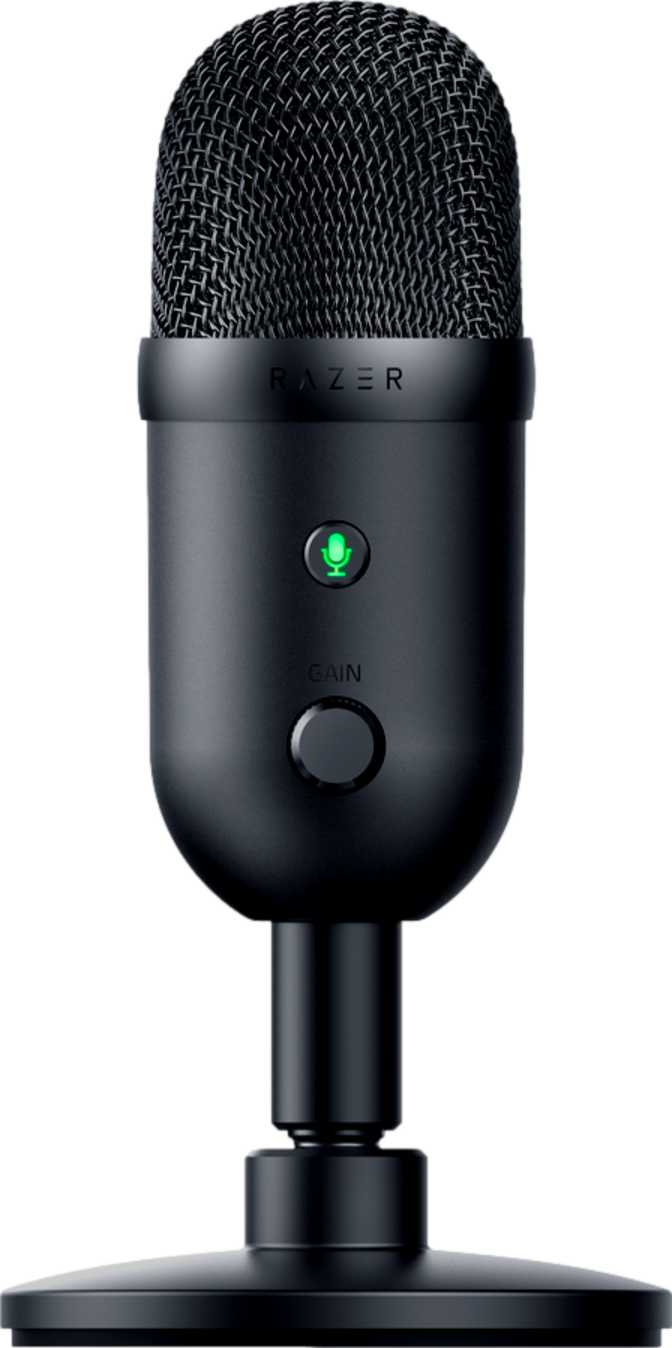
The physical experience of the Seiren V2 X leans professional over flashy. The housing is compact — tall enough to clear your desk accessories without looming over them, with a narrow footprint that sits comfortably in front of a keyboard without crowding your workspace. Light enough to reposition without ceremony, it won't strain a standard desk stand or tip under its own weight.
What you won't find on this mic is RGB lighting — a deliberate departure from Razer's usual design language. For streamers who appear on camera and want their setup to look more like a broadcast booth than a gaming rig, this restraint is an advantage. The mic reads as a serious audio tool, not a peripheral.
In place of RGB, there's a functional LED sound level indicator at the front of the body. It gives you immediate, at-a-glance feedback about your input signal — useful for catching level issues mid-session without pausing to open a software mixer window.
On-Device Controls You Can Actually Reach
The control panel lives on the microphone itself. There's no companion software required for day-to-day operation — you can activate the one-touch mute directly from the device body. When you're mid-stream and need to silence yourself instantly, a physical button on the mic is faster and more reliable than navigating software panels on a second monitor.
The 3.5mm headphone output enables zero-latency monitoring — you hear your voice exactly as the mic captures it, in real time, with no perceptible delay. This is the most accurate way to catch mic placement problems or environmental interference during a live session without interrupting your broadcast to check waveforms.
Isolates the capsule from vibrations traveling through your desk — keyboard impacts, accidental knocks, and low-frequency thuds that otherwise inject unwanted noise into an otherwise clean recording.
Softens the burst of air produced by hard consonants — without it, plosives like "P" and "B" create a distracting thud that audio processing often can't fully fix after the fact.
The front-facing LED monitors your input level continuously. Visual feedback lets you spot clipping and peak levels mid-session without switching to a software mixer — a small but practical addition for live broadcasting.
The Hyper-Cardioid Pattern: What It Actually Means
This is the feature that defines the Seiren V2 X — and the one that demands the most careful explanation before you decide whether this mic belongs on your desk.
Captures sound from a generously wide arc in front of the capsule. Good for flexibility and forgiving of slightly off-axis positioning, but less effective at rejecting side noise like keyboard clicks, fans, and ambient room sounds.
Captures a tighter, narrower cone in front of the capsule. Significantly better at rejecting audio arriving from the sides — keyboard noise, fans, off-axis voices. What you say directly into the mic is what gets recorded.
The practical result: audio arriving from the sides is rejected far more aggressively. Your mechanical keyboard sitting beside the mic? Largely ignored. A fan running to your left? Significantly reduced. Someone speaking off to your side during a call? Mostly filtered out. This directional discipline is exactly what a solo streamer or podcast host needs in a room that isn't acoustically treated.
Because the pattern tightens at the front, a secondary sensitivity window exists directly behind the microphone. For most desk setups this is irrelevant — what sits directly behind a mic is usually a wall or open space. But if your monitor speakers are positioned behind the mic, that rear lobe may pick up some of that audio. Position your setup so the things you least want captured are to the sides, not directly behind.
There is no cardioid, omni, or bidirectional mode available. The Seiren V2 X operates exclusively in hyper-cardioid. If your recording scenarios require capturing multiple speakers from a single mic, or if you need to record a room's ambient character, this design is not built for those needs.
Audio Performance: What the Specifications Tell You
The Seiren V2 X covers the complete range of human hearing — from the lowest bass tones a healthy ear can detect through to the upper limit where most people's perception ends. In practical terms, the microphone isn't artificially shaping its output: the bass isn't rolled off (which would make voices sound hollow and thin), and the high end isn't trimmed (which would lose the detail and air that makes a recording feel present rather than muffled).
The signal-to-noise ratio is the specification audio engineers pay closest attention to when evaluating mic quality: it measures how loud your voice signal is relative to the microphone's own internal electronic noise floor. The Seiren V2 X sits comfortably above average for USB condenser microphones in this category — not at the ceiling premium studio condensers occupy, but well clear of the floor where cheaper mics leave audible hiss in your recording. Under typical streaming and podcasting conditions, the noise floor is not something you'll notice or need to fight.
What's absent is worth naming clearly: there is no switchable processing mode on this mic. The onboard signal chain is fixed. For streamers who want to plug in and sound good immediately, this is perfectly fine. For audio engineers who want to capture a completely unprocessed signal to shape in a DAW, the absence of a flat bypass mode means the Seiren V2 X isn't built for that workflow.
-
Full RangeFrequency CoverageAcross human hearing range
-
Above AverageSignal-to-Noise Ratiovs USB streaming mic category
-
FixedSignal ProcessingOnboard DSP mode
-
3.5mm IncludedHeadphone OutputReal-time monitoring jack
-
Voice & StreamPrimary Use CaseBest suited for
Who This Microphone Is For — and Who Should Look Elsewhere
The Seiren V2 X was built for a specific user. Confirm you're in this group — or that you're not — before purchasing.
- Solo streamers and podcasters recording at a desktop in a space that isn't acoustically treated
- Anyone frustrated by a standard cardioid picking up keyboard noise, fan sounds, or ambient room reflections
- Creators who want a professional-looking desk setup without RGB lighting aesthetics
- Users who want to be recording within minutes of unboxing — no driver installs, no accessory shopping
- You need to record more than one person speaking into a single microphone
- You create content on iOS or Android mobile devices — there is no mobile support
- You need XLR connectivity to work with a dedicated hardware audio interface
- You want to record acoustic instruments or room ambience — the tight pattern rejects exactly what you'd be trying to capture
- You need the noise floor headroom required for professional studio music production
How It Compares Against the Alternatives
Placing the Seiren V2 X alongside what the broader USB microphone category typically offers reveals consistent patterns in both its strengths and its tradeoffs.
| Feature | Razer Seiren V2 X | Typical USB Alternatives |
|---|---|---|
| Polar Pattern | Hyper-Cardioid Only | Multiple Patterns Available |
| Side Noise Rejection | Excellent | Moderate |
| Included Accessories | Shock Mount + Pop Filter | Often Sold Separately |
| Mobile Support | Desktop Only (Win & Mac) | Varies by Model |
| RGB Lighting | None — Professional Look | Common in Category |
| Headphone Monitoring | Yes — 3.5mm Jack | Common, Not Universal |
| On-Device Controls | Yes — Mute & Level | Varies by Model |
| Setup Process | Plug-and-Play | Plug-and-Play to Moderate |
Where the Seiren V2 X wins, it wins consistently — directional rejection, accessory completeness, professional aesthetics. Where it cedes ground, it does so predictably: pattern flexibility, mobile support, and RGB ecosystem integration.
Honest Strengths and Weaknesses
The Seiren V2 X's greatest quality is coherence. Every design decision points in the same direction: make this microphone as easy as possible to use well, for one specific type of person, in one specific scenario. The hyper-cardioid capsule, the included accessories, the on-device controls, the clean aesthetics — they all serve the solo desktop streamer who wants good audio without friction.
The absence of RGB is worth singling out because it cuts against Razer's brand identity and will initially feel counterintuitive to buyers shopping within the Razer ecosystem. For any creator who appears on camera and wants a professional-looking desk, this is a feature, not an omission.
Having both a shock mount and a pop filter in the box isn't a minor convenience — it means the microphone ships ready to use at a quality level that competing mics at similar prices don't always achieve straight out of the box.
The weaknesses are real but predictable — and they're all tied to the same focused design philosophy that makes the mic effective. A single polar pattern excludes any scenario involving more than one speaker or any kind of spatial recording. The lack of mobile support is a genuine restriction in a market where mobile content creation continues to grow.
The audio performance is solid for its intended use cases, but the noise floor doesn't carry the headroom that premium studio condensers offer. This rarely matters for streaming, but becomes relevant if your recording ambitions expand over time.
The rear pickup lobe — inherent to any hyper-cardioid design — is manageable with thoughtful placement, but it does require slightly more deliberate mic positioning than a standard cardioid would. It's not a dealbreaker, but it's a discipline that takes a session or two to develop naturally.
Questions Real Buyers Ask Before Purchasing
The questions that appear most often in search results before buying a streaming microphone — answered directly.
A Focused Tool for a Defined Creator
The Razer Seiren V2 X is not trying to compete across the entire USB microphone market. It's trying to be the cleanest, simplest, most desk-ready option for the solo creator who needs their mic to isolate their voice from everything else in the room — and at that specific mission, it delivers.
- You stream or podcast solo at a desk and want your mic to reject background noise without acoustic treatment
- You're frustrated by a standard cardioid picking up your keyboard, fan noise, or room reflections
- You want a clean, professional-looking desk setup that doesn't shout "gaming peripheral"
- You want to be recording within minutes of unboxing, with everything needed already in the box
- You need multi-person recording or pattern flexibility from a single microphone
- You create content primarily on mobile devices — iOS and Android are not supported
- You're building a production setup where a lower noise floor is a meaningful recording requirement
- You need XLR output to connect to a dedicated hardware audio interface
For its intended audience — the focused, solo desktop creator who wants clean voice audio with minimal setup — the Razer Seiren V2 X earns its place on the desk.